1. Pengenalan
The D-Link DIR-808L Wireless AC600 Dual-Band Cloud Router provides high-speed Wi-Fi connectivity with dual-band technology and Fast Ethernet ports. This device is designed to deliver a reliable networking experience for home use, supporting activities such as HD media streaming, online gaming, and web browsing. It includes security features and mydlink Cloud Services for remote network management.
The DIR-808L is backward compatible with existing Wi-Fi devices (802.11a/b/g/n) for seamless integration into your current network setup.
2. Kandungan Pakej
Sahkan bahawa pakej anda mengandungi item berikut:
- Wireless AC600 Dual Band Cloud Router (DIR-808L)
- Penyesuai Kuasa
- Kabel Ethernet
- Panduan Pemasangan Pantas
Jika mana-mana barang di atas hilang atau rosak, sila hubungi penjual semula D-Link tempatan anda.
3. Keperluan Sistem Minimum
To set up and use the D-Link DIR-808L router, ensure your computer meets the following minimum requirements:
- Sistem pengendalian: Windows® 8, Windows® 7, Windows Vista®, Windows® XP SP3, or Mac OS® X (v10.4 or higher)
- Web pelayar: Internet Explorer® v6, Mozilla® Firefox®, Google Chrome, or Safari 4 or higher
- Perkakasan: Kad Antara Muka Rangkaian (NIC)
For Internet access, you will also need:
- Modem Kabel atau DSL
- Langganan dengan Pembekal Perkhidmatan Internet (ISP)
4. Perkakasan Terlaluview
Familiarize yourself with the physical components and ports of your DIR-808L router.

Rajah 4.1: Depan view of the DIR-808L router with power and internet status indicators.

Rajah 4.2: Rear panel of the DIR-808L router, detailing port layout.
Penerangan Panel Belakang:
- Port LAN (1-4): Four Fast Ethernet ports for connecting wired devices such as computers, gaming consoles, or network storage.
- Pelabuhan Internet: Menyambung ke modem anda untuk akses internet.
- Butang Tetapkan Semula: Press and hold for 10 seconds to restore the router to factory default settings.
- Input Kuasa: Sambungkan penyesuai kuasa yang disertakan di sini.
- Butang WPS: Use for easy, secure wireless connection to WPS-compatible devices.
5. Persediaan dan Pemasangan
Follow these steps to set up your D-Link DIR-808L router.
5.1 Sambungan Fizikal
- Matikan: Putuskan sambungan kuasa dari modem dan penghala anda (jika berkenaan).
- Sambungkan Modem: Connect an Ethernet cable from your modem's Ethernet port to the Internet port on the back of your DIR-808L router.
- Sambungkan Komputer (Pilihan): For initial setup, connect an Ethernet cable from your computer's Ethernet port to any of the LAN ports (1-4) on the back of your DIR-808L router. You can also connect wirelessly using the default Wi-Fi name and password found on the device label.
- Modem Hidupkan Kuasa: Connect the power adapter to your modem and power it on. Wait for the modem's indicator lights to stabilize, indicating an active internet connection.
- Hidupkan Penghala: Sambungkan penyesuai kuasa yang disertakan ke Input Kuasa on the back of your DIR-808L router and plug it into a power outlet. The power LED on the front of the router should illuminate.
5.2 Konfigurasi Awal (Web pelayar)
After physical connections are made, configure your router using a web pelayar.
- Buka a web pelayar (cth., Chrome, Firefox, Edge) pada komputer yang disambungkan ke penghala.
- Dalam bar alamat, taip
http://dlinkrouter.localor192.168.0.1dan tekan Enter. - The D-Link Setup Wizard should appear. Follow the on-screen instructions to configure your Internet connection, wireless network name (SSID), and password.
- Create a unique password for your router's administration interface for security.
5.3 Quick Router Setup Mobile App
Alternatively, you can use the D-Link Quick Router Setup mobile app for convenient setup from your smartphone or tablet.
- Download the "D-Link QRS Mobile" app from the Apple App Store or Google Play Store.
- Sambungkan peranti mudah alih anda ke rangkaian Wi-Fi lalai penghala (SSID dan kata laluan terdapat pada label penghala).
- Launch the QRS Mobile app and follow the instructions to complete the setup.
6. Operasi
This section covers the basic operation of your DIR-808L router.
6.1 Dual-Band Wireless Performance
The DIR-808L operates on two frequency bands: 2.4 GHz and 5 GHz.
- Jalur 2.4 GHz: Memberikan liputan yang lebih luas dan penembusan yang lebih baik melalui dinding, sesuai untuk kegunaan internet umum dan peranti lama.
- Jalur 5 GHz: Offers faster speeds and less interference, ideal for high-bandwidth activities like HD video streaming and online gaming, but with a shorter range.
You can configure separate SSIDs (network names) for each band or use a single SSID for both, allowing the router to intelligently assign devices to the optimal band.
6.2 Kesambungan Berwayar
The four Fast Ethernet LAN ports allow you to connect up to four wired devices directly to the router for stable and fast connections.
6.3 mydlink Cloud Management
mydlink Cloud Services enable you to monitor and manage your network remotely from anywhere using the mydlink Lite app or the mydlink web portal.
- Akses Jauh: View connected devices, block unwanted users, and receive notifications.
- Kawalan Ibu Bapa: Manage internet access schedules and block specific webtapak.
To use mydlink services, you will need to register your router with a mydlink account during or after the initial setup process.
6.4 Keselamatan Tanpa Wayar
The DIR-808L supports WPA/WPA2 encryption to secure your wireless network. It is recommended to use WPA2-PSK (AES) for the strongest security.
- WPS (Persediaan Dilindungi Wi-Fi): Provides a simple way to connect WPS-compatible devices to your wireless network by pressing the WPS button on the router and the device.
7. Penyelenggaraan
Penyelenggaraan yang betul memastikan prestasi optimum dan jangka hayat penghala anda.
- Kemas kini Firmware: Periksa sokongan D-Link secara berkala website for firmware updates. Updating firmware can improve performance, add new features, and fix security vulnerabilities. Instructions for updating firmware are typically provided with the update package.
- Pembersihan: Keep the router in a clean, dust-free environment. Use a soft, dry cloth to clean the exterior. Do not use liquid cleaners or aerosols.
- penempatan: Place the router in a central location, away from obstructions and devices that may cause interference (e.g., cordless phones, microwaves).
8. Penyelesaian masalah
This section addresses common issues you might encounter with your DIR-808L router.
8.1 Tiada Sambungan Internet
- Semak Kabel: Pastikan semua kabel Ethernet disambungkan dengan selamat ke port yang betul pada penghala dan modem.
- Kitaran Kuasa: Power off your modem, then your router. Wait 30 seconds, then power on your modem first. Once the modem is fully online (indicator lights stable), power on your router.
- Status Modem: Verify that your modem has an active internet connection. Check its indicator lights or consult your modem's manual.
- Tetapan ISP: Confirm your Internet Service Provider (ISP) settings are correctly entered in the router's web antara muka.
8.2 Slow Wireless Speed or Poor Range
- Peletakan Penghala: Position the router in a central location, elevated, and away from large metal objects, concrete walls, and other electronic devices that may cause interference.
- Gangguan: Other wireless devices (cordless phones, microwaves, Bluetooth devices) can interfere with Wi-Fi signals. Try changing the wireless channel in the router's settings.
- Penggunaan Dwi-Jalur: Connect devices that require high bandwidth (e.g., streaming devices) to the 5 GHz band, and other devices to the 2.4 GHz band.
- Perisian tegar: Pastikan perisian tegar penghala anda dikemas kini.
8.3 Tidak Boleh Mengakses Penghala Web Antara muka
- Alamat IP: Pastikan komputer anda ditetapkan untuk mendapatkan alamat IP secara automatik (DHCP).
- Alamat yang Betul: Periksa semula sama ada anda menaip alamat yang betul:
http://dlinkrouter.localor192.168.0.1. - Temporary Disable Firewall/Antivirus: Lumpuhkan sementara mana-mana perisian firewall atau antivirus pada komputer anda yang mungkin menyekat akses.
- Tetapkan Semula Penghala: If all else fails, perform a factory reset by pressing and holding the Reset button on the back of the router for 10 seconds. Nota: Ini akan memadamkan semua tetapan tersuai anda.
9. Spesifikasi Teknikal
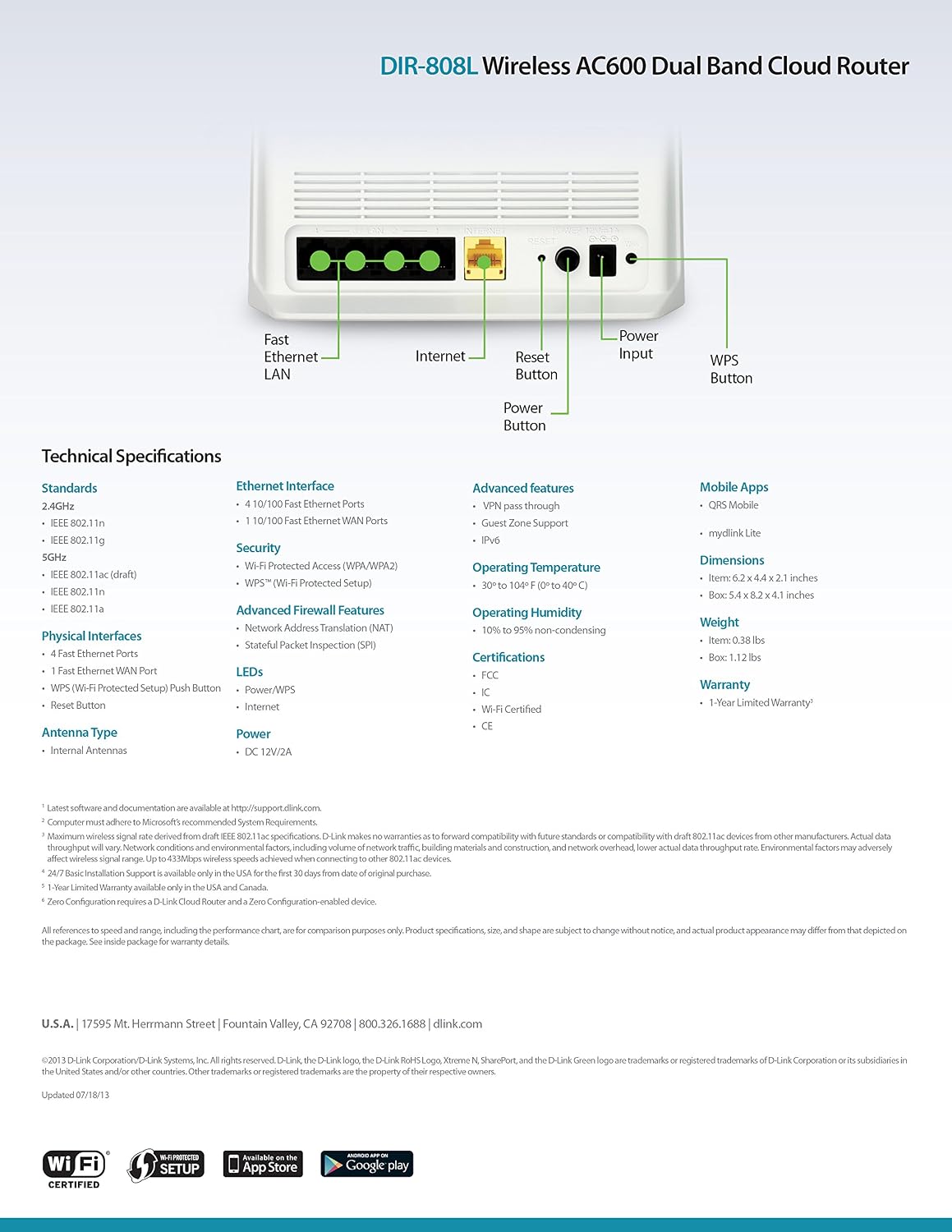
Rajah 9.1: Technical specifications and rear panel diagram of the DIR-808L router.
| Ciri | Penerangan |
|---|---|
| Nama Model | DIR-808L |
| Jenis Wayarles | 802.11ac (AC600), 802.11a/b/g/n |
| Kelas Band Kekerapan | Dwi-Jalur (2.4 GHz & 5 GHz) |
| Kesambungan Berwayar | 4 x Fast Ethernet LAN Ports, 1 x Fast Ethernet WAN Port |
| Keselamatan | WPA/WPA2, WPS (Wi-Fi Protected Setup) |
| Keserasian Sistem Pengendalian | Windows, Mac, Android |
| Dimensi (LxWxH) | 2.1 x 6.1 x 4.4 inci |
| Berat Barang | 7.2 auns (0.45 paun) |
| Input Kuasa | 12V DC, 1A |
| Suhu Operasi | 0 hingga 40°C (32 hingga 104°F) |
| Kelembapan Operasi | 10% hingga 95% tidak terkondensasi |
| Pensijilan | FCC, Wi-Fi Certified, CE |
10. Maklumat Waranti
The D-Link DIR-808L Wireless AC600 Dual-Band Cloud Router comes with a Waranti Terhad 1 Tahun dari tarikh pembelian. Waranti ini melindungi kecacatan pada bahan dan mutu kerja di bawah penggunaan biasa.
For full warranty terms and conditions, please refer to the warranty card included with your product or visit the official D-Link webtapak.
Legal Disclaimer: D-Link is not responsible for honoring warranty claims from unauthorized resellers. Please contact the manufacturer directly for official warranty service.
11. Sokongan Teknikal
If you encounter problems that are not addressed in this manual, or require further assistance, please contact D-Link Technical Support.
- Sokongan D-Link Webtapak: melawat menyokong.dlink.com for FAQs, documentation, and firmware downloads.
- Phone Support (U.S.): You may contact D-Link customer support at 1-877-453-5465. Please have your product model number (DIR-808L) and serial number ready when calling.


