pengenalan
The Casio SA-76 44-Key Mini Personal Keyboard is designed for beginners, offering an intuitive and engaging musical experience. Its compact size and user-friendly interface make it suitable for young musicians and those new to keyboard playing. This manual provides essential information for setting up, operating, and maintaining your SA-76 keyboard.
The keyboard features an easy-to-read LCD display that shows important data such as tone, rhythm, song number, metronome, tempo, and the note being played. With dedicated buttons for Piano and Organ sounds, switching between instrument voices is quick and simple. The 44 mini keys and 5 percussion pads are designed for comfortable play, especially for smaller hands, making it an excellent introduction to the world of keyboard music.
Ciri-ciri Utama
- 44 mini-sized keys for comfortable play.
- 5 percussion pads for rhythmic exploration.
- 100 built-in tones to explore various instrument sounds.
- 50 rhythm patterns to accompany your playing.
- Simple tone selection with dedicated PIANO and ORGAN buttons.
- Melody on/off lesson function for practice.
- Easy-to-read LCD display for clear information.
- Built-in speakers with 1.6 Watts output.
- Headphones jack (3.5mm) for private practice.
- Portable design, can be powered by batteries (6 AA, not included) or an optional AC adapter.
Persediaan
1. Menghidupkan Unit
The Casio SA-76 can be powered by either an optional AC adapter or batteries.
- AC Adapter (Optional): Connect a compatible 9V DC AC adapter (not included) to the DC 9V jack on the rear panel of the keyboard. Plug the adapter into a standard wall outlet.
- Bateri: The keyboard requires 6 AA-size batteries (not included).
2. Pemasangan Bateri
- Ensure the keyboard is turned off.
- Locate the battery compartment cover on the bottom of the keyboard.
- Slide the cover to open it.
- Insert 6 AA-size batteries, ensuring correct polarity (+/-) as indicated inside the compartment.
- Gantikan penutup petak bateri dengan selamat.
3. Attaching the Music Stand
The included music stand can be inserted into the slots on the top panel of the keyboard to hold sheet music or a tablet.
Arahan Operasi
1. Hidupkan/Mati Kuasa
- To turn on the keyboard, press and hold the KUASA butang sehingga paparan LCD menyala.
- To turn off the keyboard, press and hold the KUASA butang sekali lagi sehingga paparan dimatikan.
2. Melaraskan Kelantangan
Gunakan JILID + dan JILID - buttons located next to the power button to increase or decrease the overall sound volume.
3. Memilih Nada
The SA-76 offers 100 different tones. You can select them using the dedicated buttons or the rotary dial.
- Tekan ke PIANO or ORGAN button for quick access to these common sounds.
- To select other tones, rotate the TONA dial to browse through the available options displayed on the LCD.
4. Playing Rhythms
The keyboard includes 50 rhythm patterns.
- Putar RITMA dial to select a desired rhythm pattern.
- Tekan ke MULA/BERHENTI button to begin or end the rhythm playback.
- Laraskan tempo menggunakan TEMPO + dan TEMPO - butang.
5. Playing Built-in Songs
The SA-76 features 10 built-in songs for listening or practicing with the melody on/off function.
- Putar BANK LAGU dial to select a song.
- Tekan ke MAIN/JEDA button to start or pause the song.
- Gunakan MELODY ON/OFF button to mute or unmute the melody part of the song, allowing you to play along.
6. Sustain Function
Aktifkan KEUSAHAWANAN function to make notes linger longer after the key is released, similar to a piano's sustain pedal.
- Tekan ke KEUSAHAWANAN button to toggle the effect on or off.
7. Percussion Pads
The 5 percussion pads allow you to add drum sounds to your performance. Simply press a pad to trigger a percussion sound.
8. Menggunakan Fon Kepala
For private practice, connect 3.5mm stereo headphones to the PHONES / OUTPUT jack on the rear panel. This will mute the built-in speakers.
Produk Selesaiview
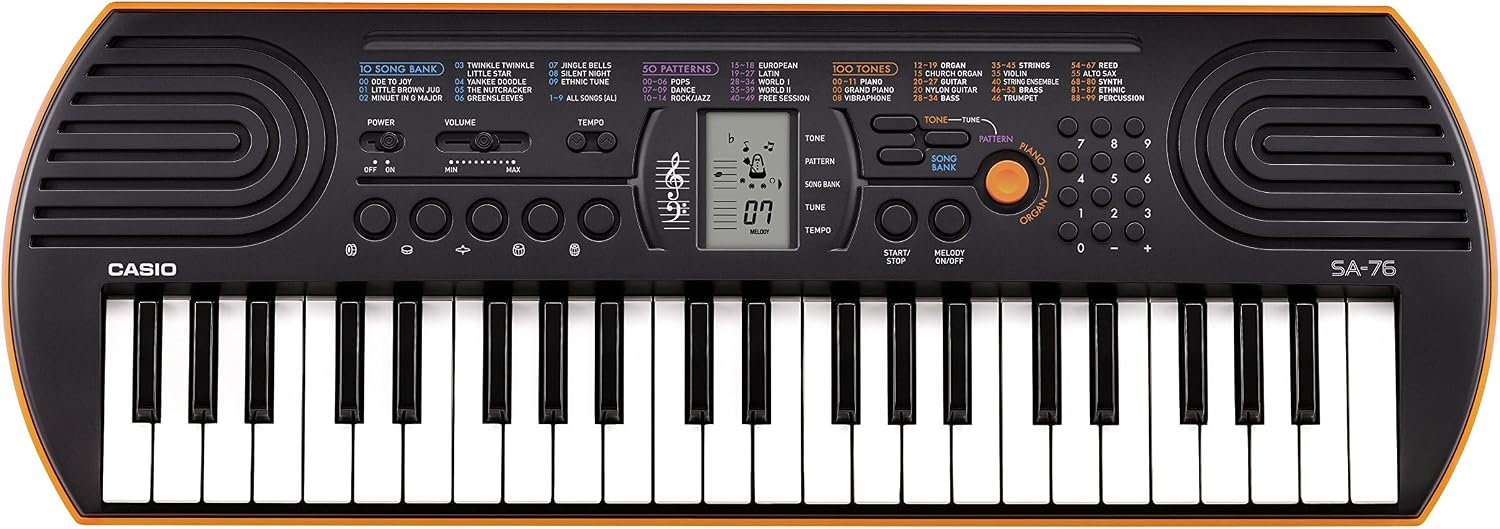
Figure 1: Casio SA-76 44-Key Mini Personal Keyboard. This image shows the overall design of the orange Casio SA-76 keyboard with its 44 mini keys and control panel.

Figure 2: Close-up of the control panel. This image provides a detailed view of the LCD display, tone/rhythm/song dials, volume buttons, and other function buttons on the Casio SA-76.

Figure 3: Diagram highlighting key features. This image illustrates various components of the Casio SA-76, including the 44 mini keys, drum pads, built-in speakers, and easy-to-use controls.

Figure 4: Casio SA-76 product dimensions. This image shows the physical measurements of the keyboard: 23.8 inches (W) x 8.3 inches (D) x 2.24 inches (H).
Penyelenggaraan
- Pembersihan: Wipe the keyboard with a soft, dry cloth. Avoid using abrasive cleaners, waxes, or solvents, as these can damage the finish.
- Storan: Store the keyboard in a cool, dry place away from direct sunlight, extreme temperatures, and high humidity. If storing for an extended period, remove the batteries to prevent leakage.
- Pengendalian: Elakkan daripada menjatuhkan papan kekunci atau terkena impak yang kuat. Jangan letakkan objek berat di atasnya.
Menyelesaikan masalah
| Masalah | Kemungkinan Punca | Penyelesaian |
|---|---|---|
| Tiada kuasa | Batteries are dead or incorrectly installed; AC adapter not connected or faulty. | Replace batteries or check polarity. Ensure AC adapter is securely connected and functional. |
| Tiada bunyi | Volume is too low; headphones are connected; speakers are muted. | Increase volume. Disconnect headphones. Check if any mute function is active. |
| Kunci tidak bertindak balas | Keyboard may be in a specific mode (e.g., lesson mode with melody off) or requires a reset. | Check current mode settings. Turn the keyboard off and on again to reset. |
Spesifikasi
| Ciri | Perincian |
|---|---|
| Bilangan Kunci | 44 mini-sized keys |
| Nada | 100 |
| Irama | 50 |
| Lagu | 10 |
| Pad Perkusi | 5 |
| Penceramah | 2 x 1.2 W (Amp Output: 1.6 Watts) |
| Bicu Fon Kepala | Bicu mini stereo 3.5mm |
| Sumber Kuasa | 6 AA batteries or optional AC adapter (DC 9V) |
| Dimensi (W x D x H) | 23.8" x 8.3" x 2.24" (60.45 cm x 21.08 cm x 5.69 cm) |
| Berat Barang | 3.08 paun (1.4 kg) |
Waranti dan Sokongan
For warranty information or technical support, please refer to the documentation included with your product or visit the official Casio webtapak. Simpan resit pembelian anda sebagai bukti pembelian untuk sebarang tuntutan waranti.


