1. Pengenalan dan Lebihview
This manual provides essential information for setting up, operating, and maintaining your Xbox 360 Limited Edition Halo 4 Bundle. This special edition console and accessories are designed to immerse you in the Halo Reclaimer saga with unique features and content.
The Xbox 360 console offers a comprehensive entertainment experience, including gaming, streaming media, and online multiplayer capabilities through Xbox LIVE. This bundle includes a custom-designed console, two customized controllers, the Halo 4 Standard Edition game, and exclusive downloadable content.
2. Apa yang ada di dalam Kotak
Your Xbox 360 Limited Edition Halo 4 Bundle includes the following components:
- Custom Designed Console: A unique Xbox 360 console featuring a Halo 4 theme, exclusive on-off and eject sound effects.
- Two Custom Halo 4 Wireless Controllers: High-performance wireless controllers with blue LED lights and a rotating D-pad, offering a range of up to 30 feet.
- 320GB Hard Drive: Menyediakan ample storage for games, add-ons, downloadable content, and other entertainment.
- Halo 4 Standard Edition Game: The full game to begin the Halo Reclaimer saga immediately.
- LIVE Token for Exclusive Halo 4 Downloadable Content: Includes a unique armor skin, unique weapon skin, unique emblem, matching avatar armor, and unique avatar prop.
- Fon Kepala Berwayar: For in-game communication and chat on Xbox LIVE.
- Penyesuai Kuasa: To power the console.
- Penyambung RCA: For audio and video output.
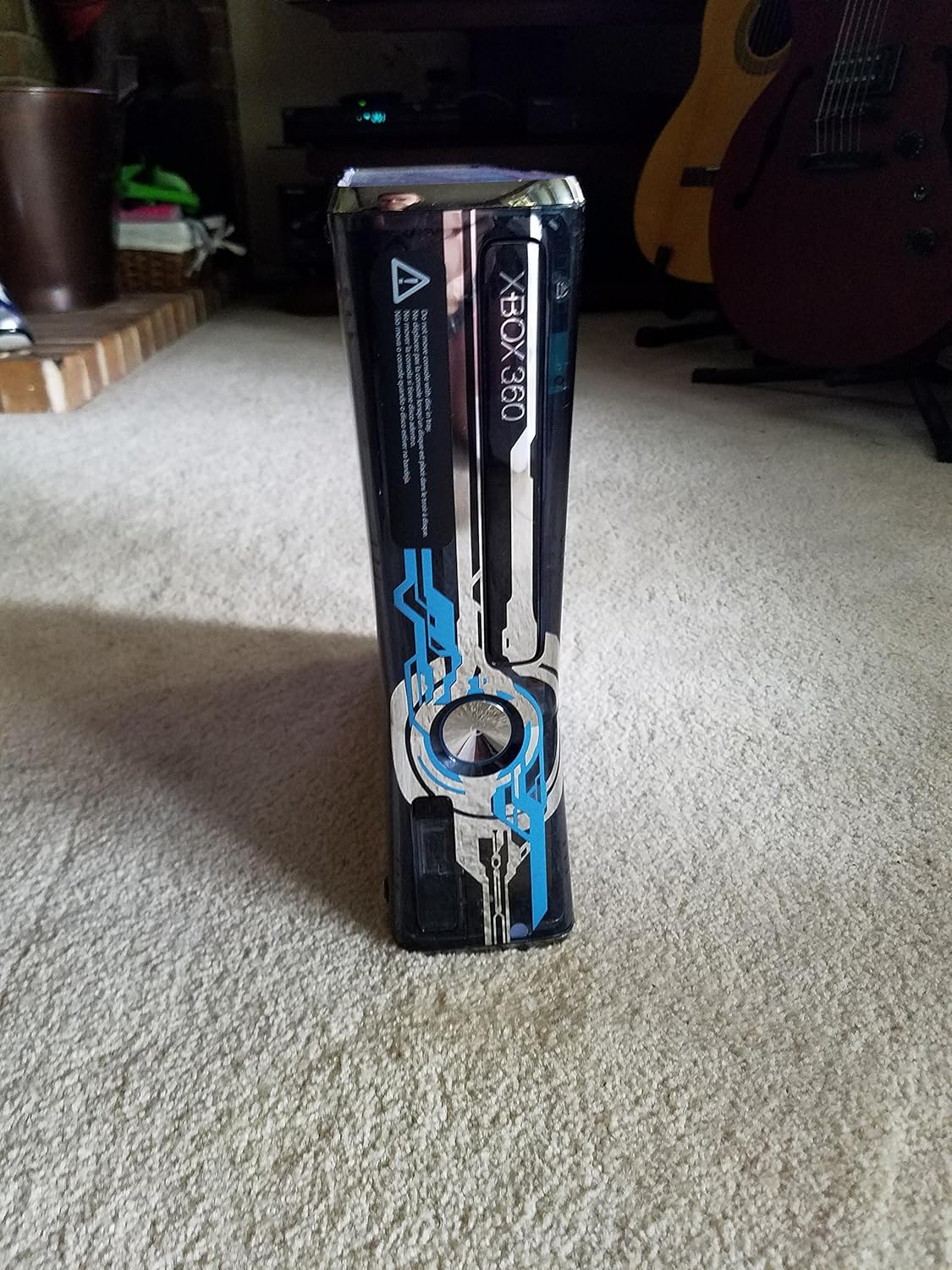
Imej 1: Depan view of the Xbox 360 Limited Edition Halo 4 console, showcasing its custom design.

Imej 2: Belakang view of the Xbox 360 console, displaying various input/output ports for connectivity.

Image 3: Two custom Halo 4 wireless controllers, along with AA batteries, included in the bundle.

Image 4: The RCA audio/video cables and power adapter for connecting the Xbox 360 console.
3. Persediaan
Follow these steps to set up your Xbox 360 console:
- Sambungkan Kuasa: Plug the power adapter into the console and then into a wall outlet.
- Sambung ke TV: Use the provided RCA cables to connect your console to your television. For high-definition video (1080p), an HDMI cable (sold separately) is recommended.
- Sambungkan Pengawal: Insert the included AA batteries into the wireless controllers. Press the Xbox Guide button on the controller to turn it on and connect to the console.
- Sambungkan Fon Kepala: Plug the wired headset into the controller for communication.
- Sambungan Internet: The Xbox 360 features built-in 802.11n Wi-Fi for easy connection to Xbox LIVE. Navigate to network settings on the console to configure your wireless connection.
4. Arahan Operasi
Your Xbox 360 Limited Edition Halo 4 Bundle offers a rich gaming and entertainment experience. Here are some key operational aspects:
4.1. Halo 4 Game Features
- The Reclaimer Saga Begins: Experience an epic new Halo saga with Halo 4. Play the intense storyline solo or with up to three friends via split-screen or Xbox LIVE.
- Infinity Multiplayer: Features Spartan Ops and War Games, offering a vast suite of multiplayer modes, weapons, vehicles, armor abilities, and a new loadout and Spartan-IV player progression system.
- Spartan Ops: Extend your campaign experience with weekly cinematic episodes and new gameplay missions, playable solo or cooperatively.
- War Games: Battle opponents in fresh, immersive new game modes and strategies.
- Enhanced Graphics and Sound: Immerse yourself in Halo 4's detailed graphics, sound, and epic gameplay, including a mysterious new class of enemies.
4.2. Xbox LIVE
Xbox LIVE provides a world of entertainment. Stream HD movies and TV, download game add-ons, and engage in online multiplayer with friends globally. Note that an Xbox LIVE Gold membership and additional fees may apply for some features.
4.3. Kinect Ready
The console includes a dedicated port for seamless connection with the Kinect sensor (sold separately).
4.4. Video Produk Rasmi
Video 1: Halo 4 - E3 Trailer Part 2. This video provides an extended look at the game's cinematic elements and gameplay, offering insights into the narrative and action sequences.
Video 2: Halo 4 - Composing Worlds. This video delves into the musical score and audio design of Halo 4, highlighting the creative process behind the game's immersive soundscape.
Video 3: Halo 4 - E3 Accolades Trailer. This video showcases critical acclaim and features of Halo 4, providing a quick overview of its highlights and positive reception.
Video 4: Halo 4 - Release Date: Remembering. This video humorously reminds viewers of the Halo 4 release date, adding a lighthearted touch to the game's promotion.
Video 5: Halo 4 - Release Date: Sick Day. Another humorous video promoting the Halo 4 release date, playing on the excitement for the game's launch.
Video 6: Halo 4 - Awakening Trailer. This video provides a compelling trailer for Halo 4, setting the tone and introducing key elements of the game's story and atmosphere.
Video 7: Halo 4 - E3 Trailer Part 1. The first part of the E3 trailer for Halo 4, offering an initial glimpse into the game's world and action.
Video 8: Halo 4 - Showcase Trailer. This video provides a comprehensive showcase of Halo 4, detailing various features, gameplay mechanics, and visual enhancements.
5. Penyelenggaraan
To ensure the longevity and optimal performance of your Xbox 360 console, follow these maintenance guidelines:
- Jaga kebersihan: Regularly wipe the console and controllers with a soft, dry cloth to remove dust and fingerprints. Avoid using harsh chemicals or abrasive materials.
- Pastikan Pengudaraan: Place the console in a well-ventilated area, away from direct sunlight or heat sources. Do not block the ventilation openings.
- Handle Discs Carefully: Always hold game discs by their edges and store them in their cases when not in use to prevent scratches.
- Matikan dengan betul: Always turn off the console using the power button or the Xbox Guide button on your controller, allowing it to shut down completely.
6. Penyelesaian masalah
If you encounter issues with your Xbox 360 console, consider the following basic troubleshooting steps:
- Tiada Kuasa: Ensure all power cables are securely connected to the console, power adapter, and wall outlet. Try a different outlet.
- Tiada Video/Audio: Check that the video and audio cables are firmly connected to both the console and your television. Ensure your TV is set to the correct input source.
- Pengawal Tidak Menjawab: Verify that the controller batteries are charged and correctly inserted. Try re-syncing the controller with the console by pressing the sync buttons on both devices.
- Ralat Bacaan Cakera: Ensure the game disc is clean and free of scratches. Try another game disc to determine if the issue is with the console or the disc.
- Isu Sambungan Internet: Check your network settings on the console. Restart your router and modem.
For more detailed troubleshooting or persistent issues, please refer to the official Xbox support website or contact Microsoft customer support.
7. Spesifikasi
| Ciri | Perincian |
|---|---|
| ASIN | B003O6JIFA |
| Tarikh Tayangan | 6 November 2012 |
| Pelanggan Reviews | 4.3 daripada 5 bintang (455 penilaian) |
| Dimensi Produk | 16.54 x 13.15 x 8.94 inci |
| Jenis Barang | Konsol |
| Bahasa | Inggeris |
| Nombor Model Item | Standard |
| Berat Barang | 10.36 paun |
| Pengeluar | Microsoft |
| Tarikh Mula-mula Tersedia | 26 Mei 2010 |
8. Waranti dan Sokongan
Your Microsoft Xbox 360 Limited Edition Halo 4 Bundle is covered by a limited warranty provided by Microsoft. For specific warranty terms, conditions, and duration, please refer to the warranty documentation included with your product or visit the official Microsoft Xbox support webtapak.
For technical assistance, product registration, or to find answers to frequently asked questions, please visit the official Xbox Support webtapak or contact Microsoft customer service directly.