1. Pengenalan
This manual provides essential information for the safe and effective use of your Kodak Easyshare M530 Digital Camera. Please read it thoroughly before operating the device and retain it for future reference. The Kodak Easyshare M530 is a compact digital camera featuring a 12-megapixel sensor, 3x optical zoom, and a 2.7-inch LCD screen, designed for capturing high-quality photos and videos with ease.
2. Apa yang ada di dalam Kotak
- Kamera Digital Kodak Easyshare M530
- Kabel USB
- Bateri Litium-Ion Boleh Dicas semula
- Tali Pergelangan Tangan
- Manual Arahan (dokumen ini)
3. Kamera Lebihview
Familiarize yourself with the main components of your camera.

Rajah 1: Depan view of the Kodak Easyshare M530 Digital Camera, showing the lens, flash, and brand logo.

Rajah 2: belakang view of the Kodak Easyshare M530 Digital Camera, displaying the 2.7-inch LCD screen and control buttons.

Rajah 3: Atas view of the Kodak Easyshare M530 Digital Camera, highlighting the power button and shutter release.

Rajah 4: sebelah view of the Kodak Easyshare M530 Digital Camera, illustrating the USB port for connectivity.
4. Persediaan
4.1. Memasang Bateri
- Buka penutup petak bateri yang terletak di bahagian bawah kamera.
- Insert the rechargeable Lithium-Ion battery with the contacts facing the correct direction, as indicated inside the compartment.
- Tutup penutup petak bateri dengan selamat sehingga ia berbunyi klik pada tempatnya.
4.2. Memasang Kad Memori
The camera supports SD/SDHC memory cards (not included).
- Buka penutup slot kad memori, biasanya terletak berhampiran petak bateri.
- Masukkan kad SD/SDHC dengan label menghadap bahagian hadapan kamera sehingga ia berbunyi klik pada tempatnya.
- Tutup penutup slot kad memori.
4.3. Mengecas Bateri
- Ensure the battery is correctly installed in the camera.
- Connect the supplied USB cable to the camera's USB port.
- Sambungkan hujung kabel USB yang satu lagi ke penyesuai kuasa USB yang serasi atau port USB komputer.
- The charging indicator light will illuminate. Charging is complete when the light turns off or changes color (refer to camera display for exact status).
5. Mengendalikan Kamera
5.1. Hidupkan/Mati Kuasa
- Untuk menghidupkan: Tekan butang kuasa butang yang terletak di bahagian atas kamera.
- Untuk mematikan kuasa: Tekan dan tahan butang kuasa button until the camera shuts down.
5.2. Mengambil Foto
- Hidupkan kamera.
- Bingkaikan gambar anda menggunakan skrin LCD 2.7 inci.
- Tekan ke Pengatup button halfway down to focus. The focus frame will turn green when focus is achieved.
- Tekan ke Pengatup button all the way down to capture the photo.
5.3. Merakam Video
- Switch the camera to video mode (refer to your camera's specific mode dial or menu for this option).
- Tekan ke Pengatup button to start recording. A red indicator will typically appear on the screen.
- Tekan ke Pengatup butang sekali lagi untuk menghentikan rakaman.
5.4. Fungsi Zum
Use the zoom lever (often labeled W for Wide and T for Telephoto) to adjust the 3x optical zoom.
- Tolak tuil ke arah T to zoom in (telephoto).
- Tolak tuil ke arah W to zoom out (wide-angle).
5.5. Mod Denyar
Tekan ke kilat button (often indicated by a lightning bolt icon) to cycle through available flash modes:
- Auto Denyar: Kamera secara automatik menentukan sama ada denyar diperlukan.
- Fill Flash: Tembakan kilat untuk setiap tembakan.
- Red-Eye Reduction: Fires a pre-flash to reduce red-eye effect.
- Kilat Dimatikan: Flash is disabled.
5.6. ReviewFoto dan Video
- Tekan ke Review button (often indicated by a play icon).
- Use the directional pad to navigate through your captured images and videos.
- Tekan ke OK or Pilih butang ke view item yang dipilih.
5.7. Smart Capture and Face Recognition
The Kodak Easyshare M530 features Smart Capture, which automatically adjusts camera settings for optimal results, and Face Recognition, which detects and optimizes settings for faces in your shots.
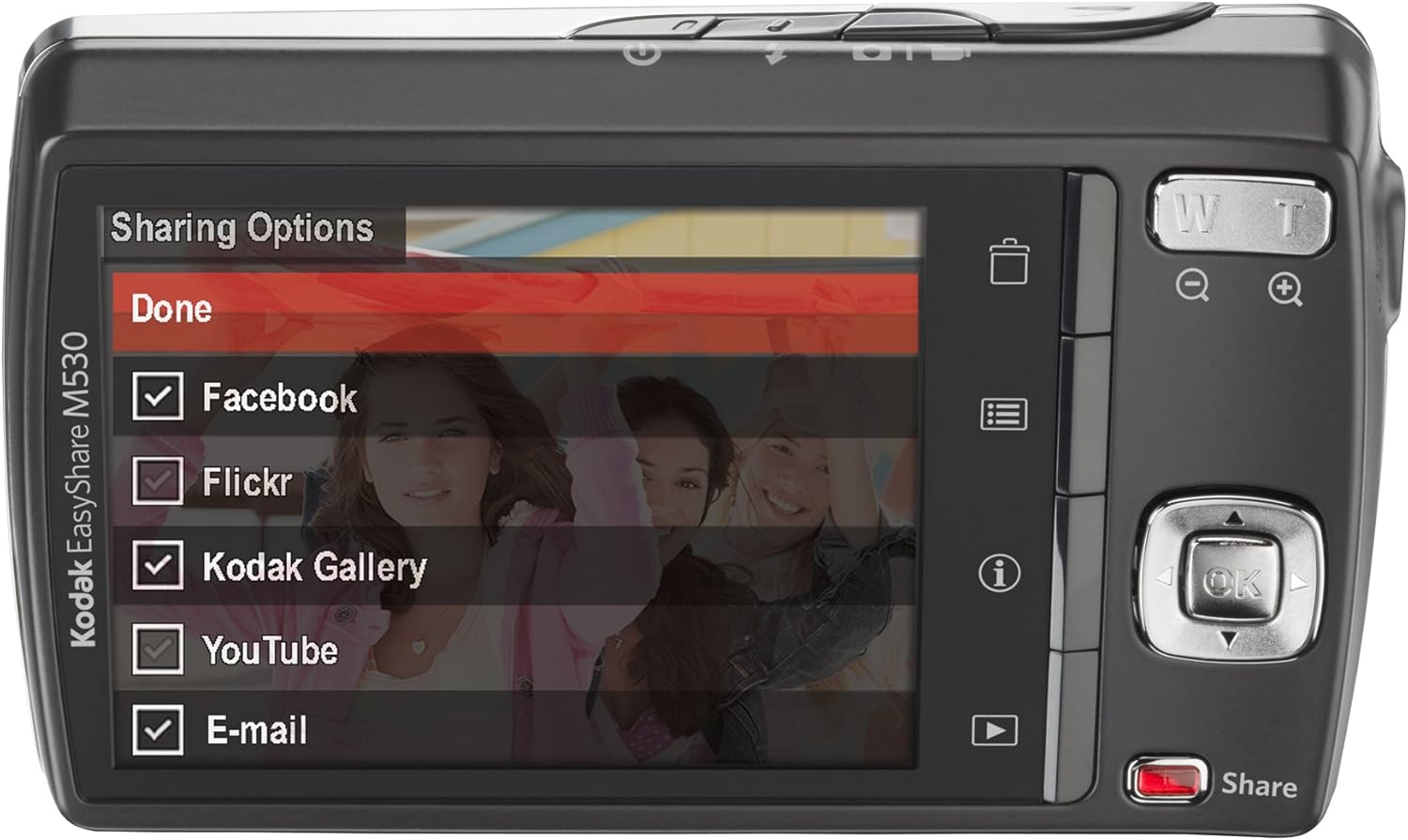
Rajah 5: The camera's LCD screen displaying sharing options, including Facebook, Flickr, Kodak Gallery, YouTube, and Email.
5.8. Sharing Your Content
Utilize the dedicated Share button for easy uploading of your photos and videos to various platforms when connected to a computer with Kodak's EasyShare software.
6. Penyelenggaraan
6.1. Membersihkan Kamera
- Gunakan kain lembut dan tidak berbulu untuk membersihkan badan kamera.
- Untuk kanta dan skrin LCD, gunakan kain dan larutan pembersih kanta khusus. Elakkan bahan kimia yang keras.
6.2. Penjagaan Bateri
- Simpan bateri di tempat yang sejuk dan kering apabila tidak digunakan.
- Elakkan daripada mendedahkan bateri kepada suhu yang melampau.
- Cas bateri sepenuhnya sebelum penyimpanan lanjutan.
6.3. Penyimpanan
When storing the camera for long periods, remove the battery and memory card. Store the camera in a dry, dust-free environment, preferably in a camera bag.
7. Penyelesaian masalah
| Masalah | Kemungkinan Punca | Penyelesaian |
|---|---|---|
| Kamera tidak dihidupkan | Bateri rendah atau habis | Cas bateri sepenuhnya. |
| Bateri dimasukkan dengan salah | Reinsert the battery correctly. | |
| Gambar kabur | Kamera goncang | Hold the camera steady or use a tripod. |
| Subject out of focus | Ensure the camera focuses before fully pressing the shutter. | |
| Ralat kad memori | Card not inserted correctly or corrupted | Reinsert the card. If the problem persists, try formatting the card (this will erase all data) or use a different card. |
| Denyar tidak menyala | Flash mode set to 'Off' | Change the flash mode to Auto or Fill Flash. |
8. Spesifikasi
- Resolusi Penderia Foto: 12 MP
- Zum Optik: 3x
- Saiz Skrin: 2.7 Inci (LCD)
- Resolusi Video: 640 x 480 (30 fps)
- Jenis Bateri: Litium Ion
- Penstabilan Imej: tiada
- Disokong File Format: MENTAH
- Teknologi Ketersambungan: USB
- Berat Barang: 0.33 paun
- warna: Blue (for this specific model variant)
9. Waranti dan Sokongan
Your Kodak Easyshare M530 Digital Camera comes with a 30-day warranty from the manufacturer, Eastman Kodak Company. This warranty covers defects in materials and workmanship under normal use. For warranty claims or technical support, please refer to the contact information provided with your purchase documentation or visit the official Kodak support webtapak.
Untuk sokongan dan sumber tambahan, anda boleh melawati Kedai KODAK di Amazon.


