1. परिचय
This manual provides essential information for the safe and efficient operation of your Philips Evnia 24M2N3200L 24-inch Gaming Monitor. Please read this manual thoroughly before using the product and retain it for future reference.
2. सुरक्षितता माहिती
मॉनिटरला नुकसान टाळण्यासाठी आणि वापरकर्त्याची सुरक्षितता सुनिश्चित करण्यासाठी खालील सुरक्षा खबरदारी घ्या:
- मॉनिटरला पाऊस किंवा ओलावा येऊ देऊ नका.
- मॉनिटर उघडू नका casing; सर्व सेवा पात्र कर्मचाऱ्यांकडे सोपवा.
- मॉनिटरभोवती योग्य वायुवीजन सुनिश्चित करा.
- फक्त मॉनिटरसोबत दिलेला पॉवर अॅडॉप्टर वापरा.
- पॉवर कॉर्डवर जड वस्तू ठेवणे टाळा.
- Clean the screen with a soft, lint-free cloth. Do not use liquid cleaners directly on the screen.
3. पॅकेज सामग्री
पॅकेजमध्ये सर्व वस्तू आहेत का ते तपासा:
- Philips Evnia 24M2N3200L Monitor
- मॉनिटर स्टँड (बेस आणि नेक)
- पॉवर केबल
- HDMI केबल
- डिस्प्लेपोर्ट केबल
- वापरकर्ता मॅन्युअल (हा दस्तऐवज)

Image: The retail packaging box for the Philips Evnia 24M2N3200L monitor, showing the product name and design awards.
4. सेटअप
4.1. स्टँड असेंब्ली
- ओरखडे टाळण्यासाठी मॉनिटरचा चेहरा मऊ, स्वच्छ पृष्ठभागावर खाली ठेवा.
- स्टँड नेक मॉनिटरच्या VESA माउंटिंग एरियाला जोडा. जर दिले असेल तर स्क्रूने सुरक्षित करा.
- Attach the stand base to the bottom of the stand neck. Tighten the thumb screw or screws until secure.

प्रतिमा: मागचा भाग view of the monitor showing the attached stand and the VESA mounting area.
२.२.४. संगणकाशी कनेक्ट करत आहे
The monitor supports HDMI and DisplayPort connections.
- वीज कनेक्शन: पॉवर केबल मॉनिटरच्या पॉवर इनपुटशी आणि नंतर पॉवर आउटलेटशी जोडा.
- व्हिडिओ कनेक्शन:
- HDMI साठी: HDMI केबलचे एक टोक मॉनिटरच्या HDMI पोर्टशी आणि दुसरे टोक तुमच्या संगणकाच्या HDMI आउटपुटशी जोडा.
- For DisplayPort: Connect one end of the DisplayPort cable to the monitor's DisplayPort and the other end to your computer's DisplayPort output.
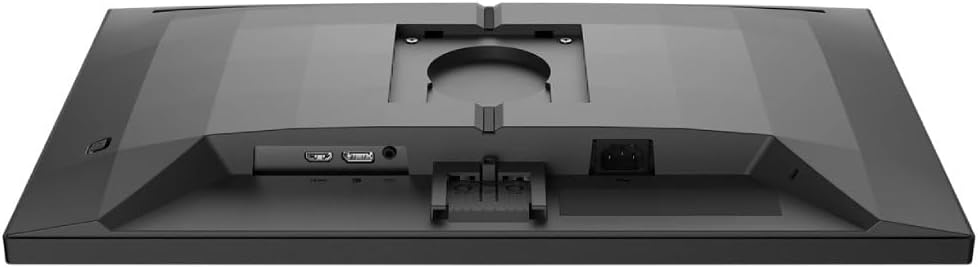
प्रतिमा: तपशीलवार view of the monitor's rear panel, showing the HDMI, DisplayPort, and power input ports.
5. मॉनिटर चालवणे
5.1. पॉवर चालू/बंद
Press the power button, usually located on the bottom right or rear of the monitor, to turn it on or off. The power LED will indicate the monitor's status.
5.2. ऑन-स्क्रीन डिस्प्ले (OSD) मेनू
The OSD menu allows you to adjust various monitor settings. Use the joystick or buttons (refer to your monitor's specific layout) to navigate and select options.
- चित्र: ब्राइटनेस, कॉन्ट्रास्ट, शार्पनेस आणि गॅमा समायोजित करा.
- रंग: रंग तापमान, sRGB मोड किंवा वापरकर्ता-परिभाषित रंग सेटिंग्ज निवडा.
- ऑडिओ: जर मॉनिटरमध्ये बिल्ट-इन स्पीकर किंवा ऑडिओ आउटपुट असेल तर आवाज नियंत्रित करा.
- इनपुट: इनपुट सोर्स (HDMI, डिस्प्लेपोर्ट) मॅन्युअली निवडा.
- गेमिंग: Access specific gaming features like SmartImage Game, Low Input Lag, and Adaptive Sync settings.
- OSD सेटिंग्ज: ओएसडी भाषा, पारदर्शकता आणि टाइमआउट समायोजित करा.

Image: The Philips Evnia 24M2N3200L monitor showcasing a high-quality image from a video game, highlighting its display capabilities.
6. देखभाल
७.१. मॉनिटर साफ करणे
- साफ करण्यापूर्वी मॉनिटर नेहमी अनप्लग करा.
- Use a soft, clean, lint-free cloth to gently wipe the screen.
- हट्टी गुणांसाठी, हलकेचampen the cloth with water or a mild, non-abrasive screen cleaner. Do not spray liquids directly onto the screen.
- मॉनिटर स्वच्छ करा casinमऊ, कोरड्या कापडाने पुसून टाका.
6.2. स्टोरेज
जर मॉनिटर जास्त काळ साठवून ठेवत असाल, तर सर्व केबल्स डिस्कनेक्ट करा आणि धूळ आणि भौतिक नुकसानापासून संरक्षण करण्यासाठी ते त्याच्या मूळ पॅकेजिंगमध्ये पॅक करा. थंड, कोरड्या जागी साठवा.
7. समस्या निवारण
जर तुम्हाला तुमच्या मॉनिटरमध्ये समस्या येत असतील, तर खालील सामान्य समस्या आणि उपाय पहा:
| समस्या | संभाव्य कारण | उपाय |
|---|---|---|
| स्क्रीनवर कोणतीही प्रतिमा नाही | Power cable disconnected, video cable loose, incorrect input source. | Check power and video cable connections. Select correct input source via OSD. |
| प्रतिमा चमकत आहे | Loose video cable, graphics card issue, refresh rate mismatch. | Ensure video cable is secure. Update graphics drivers. Adjust refresh rate in OS settings. |
| रंग चुकीचे आहेत | Incorrect color settings, faulty cable. | Reset color settings in OSD. Try a different video cable. |
| मॉनिटर चालू होत नाही. | No power, faulty power adapter. | Check power outlet and cable. Ensure power adapter is functioning. |
8. तपशील
| वैशिष्ट्य | तपशील |
|---|---|
| मॉडेल क्रमांक | 24M2N3200L |
| स्क्रीन आकार | 24 इंच |
| पॅनेल प्रकार | आयपीएस |
| ठराव | 1920 x 1080 (पूर्ण HD) |
| गुणोत्तर | १६:१० |
| रीफ्रेश दर | 180Hz |
| प्रतिसाद वेळ | 0.5ms (MPRT) |
| कनेक्टिव्हिटी | १x एचडीएमआय, ३x डिस्प्लेपोर्ट |
| उर्जा स्त्रोत | इलेक्ट्रिकल पॉवर |
| उत्पादनाचे परिमाण (स्टँडसह) | २४ x ६९ x २.५ सेमी (खोली x रुंदी x उंची) |
| उत्पादनाचे वजन (स्टँडसह) | 4.96 किलोग्रॅम |
| उत्पादक | फिलिप्स |
9. हमी आणि समर्थन
For warranty information and technical support, please refer to the warranty card included in your package or visit the official Philips support webसाइट. वॉरंटी दाव्यांसाठी खरेदीचा पुरावा म्हणून तुमची खरेदी पावती ठेवा.
ऑनलाइन समर्थन: www.philips.com/support