1. Танилцуулга
Худалдан авалт хийсэнд баярлалааasing the VEVOR Digital Postal Scale. This manual provides essential information for the safe and efficient operation of your scale. Please read it thoroughly before use and retain it for future reference. This scale is designed for accurate weighing of packages, parcels, and luggage, offering dual precision and multiple unit options.
2. Аюулгүй байдлын мэдээлэл
- Нарийвчлалтай уншилтыг хангахын тулд жинг хатуу, хавтгай, тогтвортой гадаргуу дээр байрлуулна.
- Avoid placing the scale in areas with extreme temperatures, high humidity, or strong vibrations.
- Жинлүүрийг 440 фунт (200 кг)-аас хэтрүүлж ачаалж болохгүй.
- Жинлүүрийг хүчтэй цахилгаан соронзон орноос хол байлга.
- Жинлүүрийг зөөлөн арчиж цэвэрлэнэ, damp даавуу. Зүлгүүрийн цэвэрлэгч хэрэглэж болохгүй, эсвэл төхөөрөмжийг усанд дүрж болохгүй.
- Хэрэв жинг удаан хугацаагаар ашиглахгүй бол гоожихоос сэргийлж батерейг нь салгаж авна уу.
3. Багцын агуулга
Таны багцад бүх зүйл байгаа эсэхийг шалгана уу:
- VEVOR Digital Postal Scale Platform
- LCD Display Unit with coiled cable
- 2 х AAA батерей
- USB цэнэглэгч кабель
- Зааварчилгааны гарын авлага
- 3x self-tapping screws ST4x25
- 3x expansion tube

Зураг: Дууслааview of the VEVOR Digital Postal Scale components and included accessories.
4. Бүтээгдэхүүн дууссанview
The VEVOR Digital Postal Scale features a durable platform and a separate LCD display for flexible placement. It offers high accuracy and a robust design for various weighing needs.
Гол онцлогууд:
- 440 lb (200 kg) Capacity: Handles large parcels with ease.
- Dual Precision: Accurate to 0.06 lbs (30g) for precise measurements.
- Four Global Units: Switch between kg, lb, oz, and lb:oz.
- Тара функц: Deducts container weight for net weight measurement.
- барих функц: Freezes the reading for large items that may obstruct the display.
- Separate LCD Display: Allows for wall-mounting or tabletop use.
- Олон тооны тэжээлийн сонголтууд: Operates with AAA batteries, USB cable, or built-in battery.
- Удаан эдэлгээтэй барилга: Non-slip PVC platform and ABS shell with anti-slip feet.

Image: Scale dimensions, capacity, and accuracy details.

Image: Details of the scale's platform, feet, and coiled cable.
5. Тохиргоо
5.1 Жинлүүрийг асаах
The scale can be powered by three methods:
- AAA батерей: Insert the two included AAA batteries into the battery compartment located on the back of the display unit.
- USB кабель: Connect the provided USB cable to the display unit and a compatible USB power source (e.g., computer, USB wall adapter).
- Баригдсан батерей: The scale has a built-in 1 x 3.7V 250mAh battery. It charges when connected via USB.
5.2 Placing the Scale
Place the scale platform on a flat, stable, and level surface. Ensure there are no obstructions that could interfere with the weighing process.
5.3 Display Unit Placement
The separate LCD display unit offers flexibility:
- Ширээний хэрэглээ: Place the display unit on a table or desk near the scale platform.
- Хананд суурилуулсан: Use the provided screws and expansion tubes to mount the display unit on a wall for easy viewing, especially with large packages.

Зураг: Жишээ ньamples of wall-mounted and tabletop display unit setup.
6. Үйл ажиллагаа
6.1 Товчлуурын функцууд

Image: Diagram of display unit buttons and their functions.
- Асаах товч (U): Press to turn the scale ON or OFF.
- Нэгжийн товчлуур (U): Press to cycle through weighing units (kg, lb, oz, lb:oz).
- Hold Button (H): Press to lock the current weight reading. Press again to release.
- Tare Button (T): Press to subtract the weight of a container.
6.2 Weighing an Item
- Turn on the scale by pressing the Power button.
- Ensure the display shows '0.00' before placing any item.
- Gently place the item to be weighed in the center of the scale platform.
- Read the stable weight displayed on the LCD.

Image: A package being weighed on the scale.
6.3 Нэгжийн хувиргалт
Жинлэлтийн нэгжийг өөрчлөхийн тулд:
- Жинлүүрийг асаалттай байхад нь дарна уу Unit (U) товч.
- The display will cycle through kg, lb, oz, and lb:oz. Stop at your desired unit.

Image: Display showing different weighing units.
6.4 Тара функц
The Tare function allows you to subtract the weight of a container to measure only the net weight of its contents.
- Place the empty container on the scale platform.
- Wait for the weight reading to stabilize.
- дээр дарна уу Tare (T) товчлуур. Дэлгэц '0.00' болж дахин тохируулагдана.
- Place the items to be weighed into the container. The display will show the net weight of the items.

Image: Step-by-step guide for the Tare function.
6.5 Баривчлах функц
The Hold function is useful for weighing large items that might obscure the display.
- Тухайн зүйлийг жингийн тавцан дээр байрлуул.
- Wait for the weight reading to stabilize.
- дээр дарна уу барих (H) button. The reading will be locked on the display.
- You can now remove the item, and the weight will remain displayed. Press the барих (H) button again to release the hold and return to normal weighing mode.

Зураг: Жишээ ньamples of Tare and Hold functions.
7. Шалгалт тохируулга
If you suspect the scale's accuracy has drifted, you can perform a calibration. This process restores accuracy and eliminates errors.
- Ensure the scale is on a stable surface and nothing is on the platform.
- дээр дарна уу Tare (T) түлхүүр 4 удаа.
- -г барина уу Tare (T) key until a code appears on the display.
- -г суллана Tare (T) key to enter calibration mode. Follow the on-screen prompts to complete the calibration using a known weight (not included).
8. Засвар үйлчилгээ
8.1 Цэвэрлэгээ
Wipe the scale platform and display unit with a soft, slightly damp cloth. Do not use harsh chemicals, abrasive cleaners, or immerse any part of the scale in water.
8.2 Хадгалалт
Store the scale in a cool, dry place away from direct sunlight and extreme temperatures. If storing for an extended period, remove the AAA batteries from the display unit.
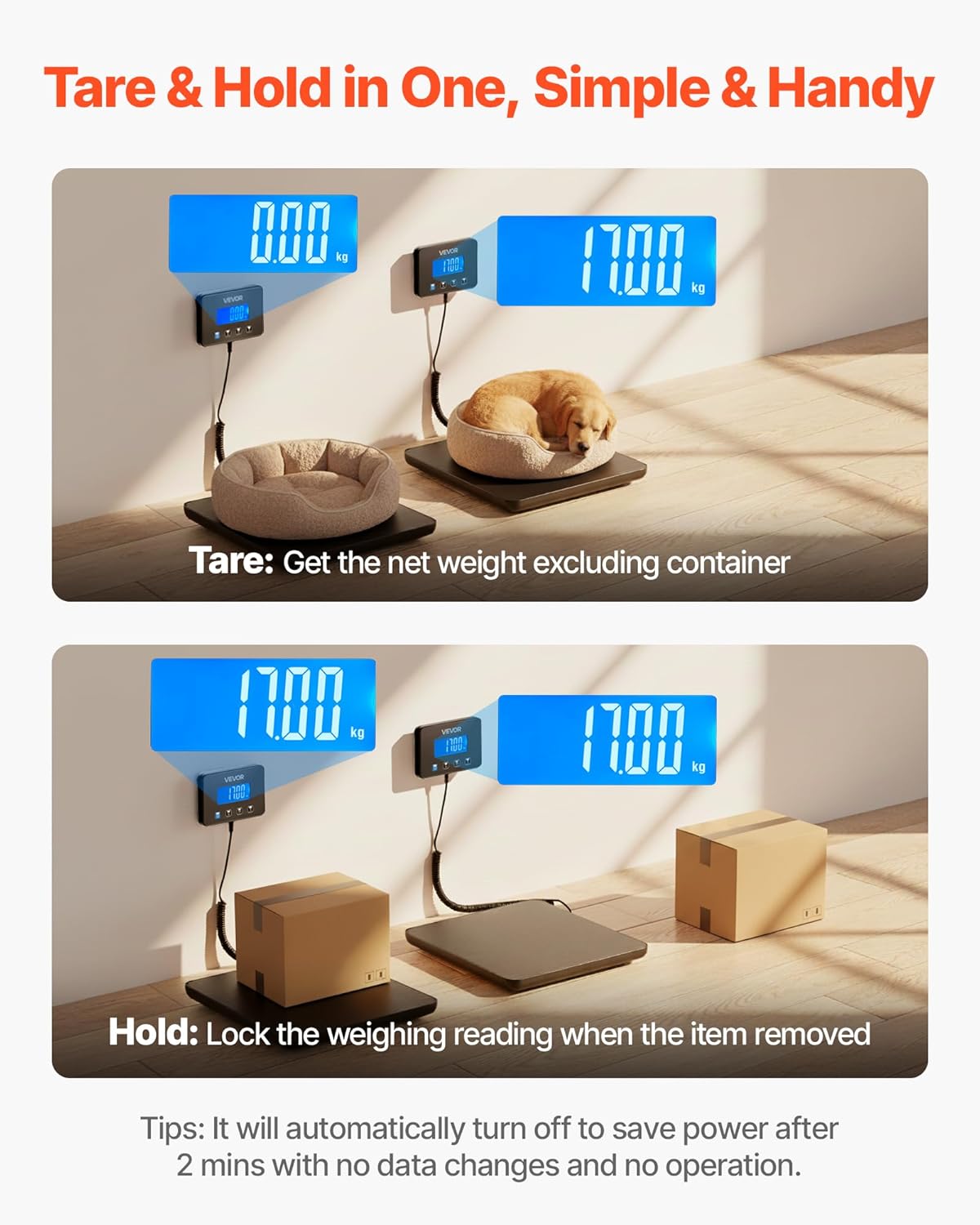
Image: The scale's thin profile хялбар хадгалах зориулалттай.
9. Алдаа засах
| Асуудал | Боломжит шалтгаан | Шийдэл |
|---|---|---|
| Хэмжээ асахгүй байна | Low or dead batteries; No power from USB; Loose connection. | Replace AAA batteries; Ensure USB cable is securely connected and power source is active; Check coiled cable connection. |
| Буруу уншилтууд | Scale not on a flat surface; Overloaded; Needs calibration; Interference. | Place on a firm, level surface; Do not exceed 440 lbs; Perform calibration (see Section 7); Avoid strong electromagnetic fields. |
| Дэлгэц "Lo"-г харуулж байна | Батерей багатай гэсэн дохио. | Replace AAA batteries or recharge the built-in battery via USB. |
| Display shows 'O_Ld' | Хэт ачааллын шинж тэмдэг. | Remove item immediately to prevent damage. Do not exceed 440 lbs. |
10. Техникийн үзүүлэлтүүд
| Онцлог | Тодорхойлолт |
|---|---|
| Загварын дугаар | Postal Scale 0.35 oz Accuracy (P6H) |
| Материал | Tempered Glass, PVC & ABS |
| Хамгийн их жинлэх хүчин чадал | 440 фунт / 200 кг |
| Хамгийн бага жинлэлт | 0.06 фунт / 30 гр |
| Нарийвчлал | 0-20 kg (10 g) / 0-44 lbs (0.02 lbs) 20-200 kg (100 g) / 44-440 lbs (0.2 lbs) |
| Жинлэх нэгж | kg, lb, oz, lb:oz |
| Баригдсан батерей | 1 x 3.7V 250mAh Lithium Ion |
| Эрчим хүчний горим | 2 x AAA Batteries (included) / USB Powered |
| Өргөтгөсөн кабелийн урт | 8.2 фут / 2.5 метр |
| Retracted Cable Length | 2.6 ft / 0.8 meter |
| Бүтээгдэхүүний жин | 2.6 фунт / 1.2 кг |
| Бүтээгдэхүүний хэмжээ | 10.9 x 10.9 x 1 инч / 277 x 277 x 26 мм |
| Дэлгэцийн хэв маяг | LCD |
11. Бүтээгдэхүүний видео
Watch these official product videos for visual demonstrations of the VEVOR Digital Postal Scale's features and operation.
Видео: Дууслааview of the VEVOR Digital Postal Scale (0:45).
Video: Detailed features and usage demonstration (1:41).
Video: Quick demonstration of scale functions (0:43).
Video: Scale in various usage scenarios (0:40).
Video: Vertical format product demonstration (0:44).
12. Баталгаат хугацаа ба дэмжлэг
VEVOR products are designed for durability and performance. For any issues or questions regarding your VEVOR Digital Postal Scale, please refer to the retailer's return policy or contact VEVOR customer support. Please retain your proof of purchase for warranty claims.


