1. Танилцуулга
This manual provides detailed instructions for the installation, operation, and maintenance of your Topcony Outdoor Wireless Security Camera, Model TY11. Please read this manual thoroughly before use to ensure proper functionality and safety.

Figure 1: Topcony TY11 Outdoor Wireless Security Camera. This image shows the camera unit mounted on a wall, with a smartphone displaying a live feed of a dog in a yard, highlighting the 4MP resolution, 2.4G/5G WiFi, and Bluetooth connectivity.
2. Багцын агуулга
Доор жагсаасан бүх зүйл таны багцад байгаа эсэхийг шалгаарай.
- Camera Unit: 1
- Power Adapter (5V 1A): 1
- Mounting Bracket: 1 (pre-attached to camera)
- Шураг: 4
- Screw Caps: 4
- Хэрэглэгчийн гарын авлага: 1

Figure 2: Contents of the Topcony TY11 camera package. The image displays the camera, power adapter, mounting bracket, screws, screw caps, and the user manual.
3. Тохиргоо ба суурилуулалт
3.1 Физик суурилуулалт
The Topcony TY11 camera is designed for easy wall mounting. No special tools or technical skills are required.
- Камерыг суурилуулах: Secure the camera's mounting bracket to a desired outdoor wall using the provided screws and screw caps. Ensure the camera is positioned to cover the desired surveillance area.
- Эрчим хүчийг холбох: Plug the power adapter into the camera and then into a power outlet.
- Сүлжээнд холбогдох: Камерыг Wi-Fi сүлжээнд холбохын тулд програмын зааврыг дагана уу.

Figure 3: Step-by-step guide for installing the camera. It shows mounting the camera on a wall, plugging in the power, and connecting via the smartphone app.
3.2 Bluetooth Pairing and Wi-Fi Connection
The camera supports the latest Bluetooth pairing technology for quick and stable connection, along with both 2.4GHz and 5GHz Wi-Fi bands.
- Блютүүт хослуулах: The camera utilizes Bluetooth for a one-touch connection process, typically completing within one minute. This simplifies the initial setup, making it user-friendly even for first-time users.
- Wi-Fi нийцтэй байдал: The camera supports both 2.4GHz and high-speed 5GHz Wi-Fi. You can switch between these bands based on your environment and needs for a stable and fast network connection.
Холбохын тулд:
- Download the dedicated 'Canny Cam' app (available for iPhone/Android).
- Open the app and follow the on-screen instructions to pair the camera via Bluetooth.
- Once paired, configure your Wi-Fi settings within the app.

Figure 4: Illustrates the Bluetooth pairing process for the Topcony TY11 camera. A hand holds the camera while a smartphone screen shows the app interface for scanning a QR code to connect.

Figure 5: Diagram showing the camera's compatibility with both 2.4GHz and 5GHz Wi-Fi networks, indicating longer transmission distance for 2.4GHz and faster speed for 5GHz, suitable for different home network setups.
4. Ашиглалтын заавар
4.1 Видеоны чанар ба шөнийн хараа
The camera delivers high-resolution images and offers versatile night vision capabilities.
- 4MP өндөр нягтралтай: Equipped with an f3.6mm lens and a 1/2.9-inch color CMOS sensor, the camera captures clear, natural images with minimal distortion. It provides 4 million pixels, allowing for detailed 2K resolution recording.
- Өнгөт шөнийн хараа: Features 6 white LED lights and 6 infrared lights. In infrared night vision mode, it can see up to 20 meters. The camera also supports color night vision, enabling clear color images even in low-light conditions.
- 8x дижитал томруулалт: Utilize the 8x digital zoom function to enlarge images without significant degradation, allowing for clear capture of details like faces or license plates.
- H.265 видео шахалт: This advanced compression technology improves compression efficiency by approximately 50% compared to H.264, allowing for longer high-quality recordings with the same storage capacity.

Figure 6: Comparison of night vision modes. Shows standard night vision, Topcony infrared night vision (monochrome with detected motion highlighted), and Topcony color night vision (full color in low light).

Figure 7: Demonstrates the camera's infrared and color night vision capabilities. The top image shows clear color night vision up to 15m, while the bottom image shows infrared night vision up to 20m, both capturing a car in a driveway at night.
4.2 PTZ Control and Auto-Tracking
Камерыг хянах view remotely and utilize its automatic tracking feature.
- PTZ функц: The camera features a silent Pan-Tilt-Zoom (PTZ) function, allowing for horizontal rotation of 355° and vertical tilt of 90°. You can remotely control the camera's direction via your smartphone to achieve 360° comprehensive surveillance.
- Автоматаар мөрдөх: When motion is detected, the camera can automatically track the moving object. This ensures continuous monitoring of any activity within its field of view.
Note: Ensure the auto-tracking function is enabled in the app settings prior to use.

Figure 8: Shows the auto-tracking feature in action, with the camera following two children walking in a yard. The diagram illustrates the 355° pan and 90° tilt range.

Figure 9: Demonstrates remote PTZ control via a smartphone. A user is viewing the camera feed on their phone, and an inset shows the camera's 355° pan and 90° tilt capabilities.
4.3 Motion/Sound Detection and Alarms
The camera provides comprehensive detection and alarm features to enhance security.
- Нарийвчилсан илрүүлэлт: Combines sound, motion (screen changes), and human body detection technologies for high-precision, real-time monitoring of your surroundings.
- Шуурхай мэдэгдэл: Upon detecting an anomaly, the camera immediately sends notifications to your smartphone, allowing for quick response.
- Light and Sound Alarms: When the alarm function is enabled, the camera can emit a siren sound and flash its lights to deter intruders.

Figure 10: Illustrates the camera's sound and light alarm system. An intruder is shown being deterred by the camera's flashing light and a warning message, indicating the camera's ability to detect and alert.

Figure 11: Shows examples of the camera's detection capabilities: sound detection (crying baby), motion detection (dog in yard), and human detection (person at door). Sensitivity is adjustable.
4.4 Two-Way Audio and Alexa Integration
Communicate through the camera and integrate with smart home systems.
- Хоёр талын аудио: Equipped with a high-sensitivity microphone and a high-quality speaker, the camera enables clear two-way communication. You can talk to family members, pets, or warn intruders from anywhere.
- Alexa нийцтэй байдал: The camera supports Amazon Alexa, allowing you to control it with voice commands. For example, simply say "Alexa, show me the camera" to view the live feed on a compatible device.

Figure 12: Depicts the two-way audio feature. A person at the door is speaking to someone remotely through the camera, demonstrating clear communication.
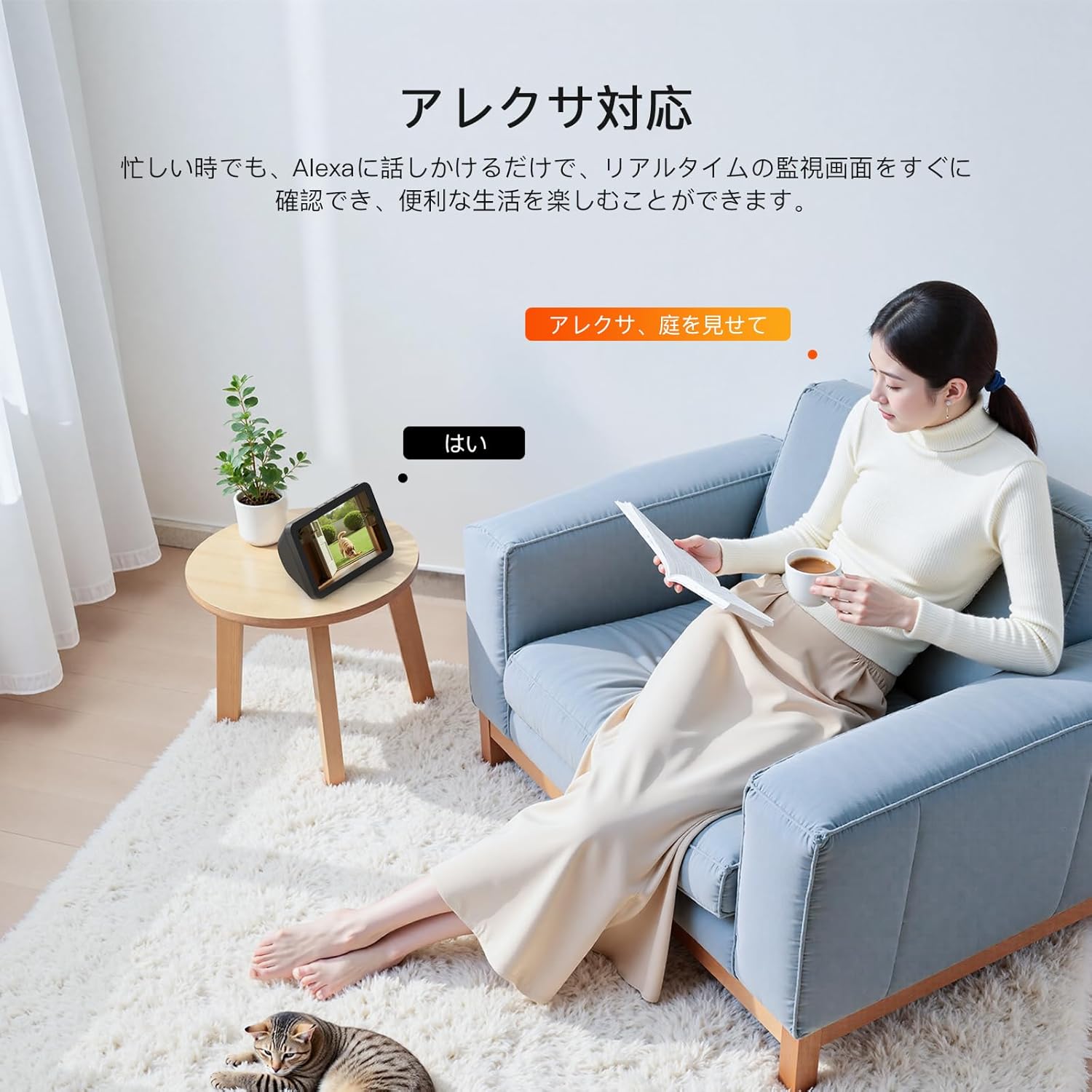
Figure 13: Shows a user interacting with Alexa to view the camera feed. A woman is relaxing in a living room, and an Alexa-enabled device displays the camera's live view, illustrating convenient voice control.
4.5 Бичлэг ба хадгалах
The camera offers continuous recording and flexible storage options.
- 24 цагийн тасралтгүй бичлэг: The camera provides 24/7, 365-day surveillance. It supports loop recording, automatically overwriting older files when the storage is full, so you don't need to worry about memory running out.
- SD карт хадгалах: Supports a maximum of 128GB SD card (not included).
- Үүл хадгалах сан: Paid cloud storage options are available for easy data backup and management.
- Event-Based Recording: In addition to continuous recording, you can set up motion or sound detection recording, where the camera automatically records when an event is detected.
Чухал тэмдэглэл:
- Ensure the recording function is enabled in the app settings.
- To save recorded files, use either a memory card or cloud storage. Without these, you can only view бодит цагийн footage.
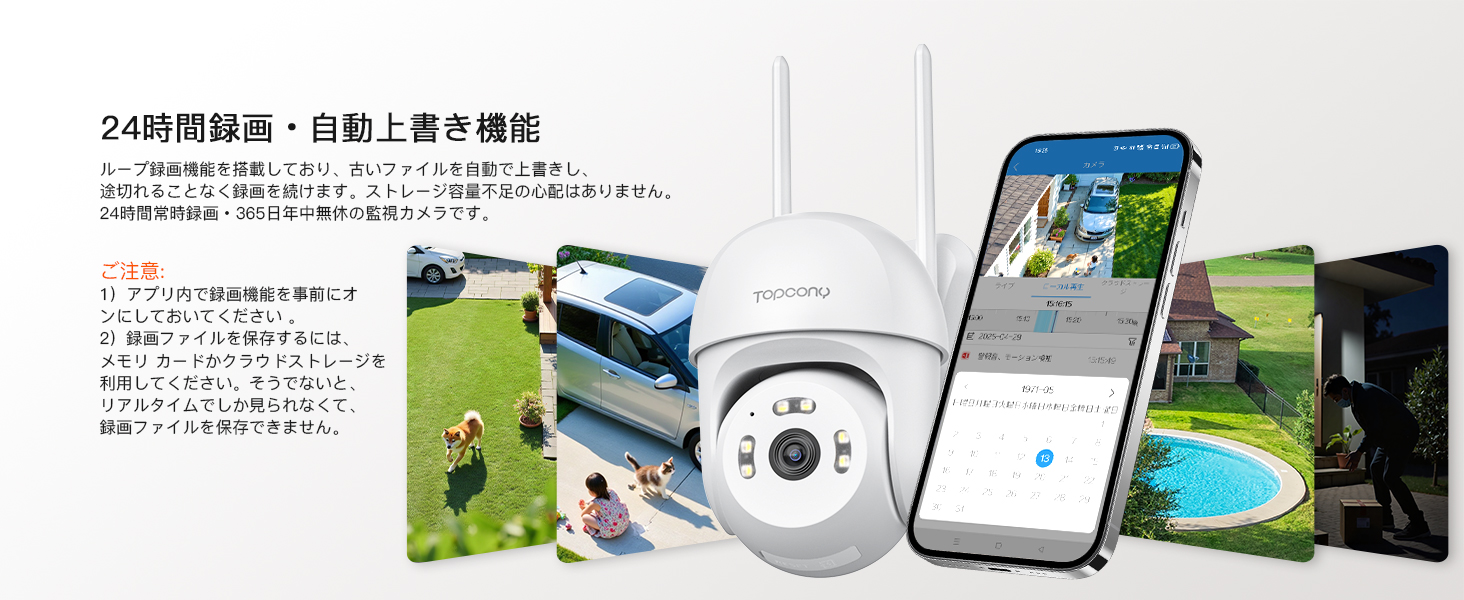
Figure 14: Illustrates the camera's 24-hour recording capability with auto-overwrite. Various scenes from a home environment are shown, along with a smartphone app displaying a recording timeline and calendar.

Figure 15: Shows the two main storage methods: local storage via a memory card (up to 128GB, not included) and cloud storage, emphasizing data accessibility and security.
4.6 Multi-Camera Management and Family Sharing
Manage multiple cameras and share access with family members.
- Multiple Camera Management: The 'Canny Cam' app allows you to add and manage multiple cameras simultaneously, providing broader coverage and enhanced security for your property.
- Гэр бүлийн хуваалцах: You can share camera access with family and friends by granting sharing permissions via a QR code. This allows multiple users to monitor the property together.

Figure 16: Illustrates the ability to manage multiple cameras within the 'Canny Cam' app. A smartphone screen shows live feeds from several cameras, covering different areas of a property.
Figure 17: Shows two smartphones displaying the same camera feed, indicating the family sharing feature. This allows multiple users to monitor the camera simultaneously.
4.7 Нууцлалын хамгаалалт
The camera includes features to protect your privacy.
- Унтах горим: When indoor surveillance is temporarily not needed, you can activate sleep mode remotely via the smartphone app. The camera will stop real-time monitoring and enter a sleep state, ensuring privacy and saving power. It can be reactivated with one touch when surveillance is required again.
- Өгөгдлийн хамгаалалт: The camera employs data encryption technology to effectively prevent privacy breaches and ensure the security of your recorded footage.

Figure 18: Illustrates the privacy protection feature, specifically the sleep mode. A smartphone screen shows the camera app with an option to activate sleep mode, indicating remote control over surveillance activity.

Figure 19: A visual representation of data protection, showing a shield icon and various images, symbolizing the camera's use of encryption to safeguard user data and prevent privacy leaks.
5. Засвар үйлчилгээ
The Topcony TY11 camera is built for durability in various outdoor conditions.
- IP66 Waterproof and Weather Resistant: With an IP66 waterproof rating, the camera is designed to withstand harsh environments, operating reliably in temperatures ranging from -25℃ to 55℃. It is resistant to rain, moisture, strong winds, and dust, ensuring long-term performance outdoors.
- Цэвэрлэгээ: Regularly wipe the camera lens and body with a soft, dry cloth to remove dust and debris. Do not use harsh chemicals or abrasive cleaners.

Figure 20: Shows the Topcony TY11 camera mounted outdoors, with water droplets on its surface, illustrating its IP66 waterproof rating and resistance to various weather conditions like rain and extreme temperatures (-25°C to 55°C).
6. Алдаа засах
If you encounter any issues with your Topcony TY11 camera, please refer to the following common solutions or contact customer support.
- Холболтын асуудал: Ensure your Wi-Fi network is stable and within range. Verify that the camera is powered on. If using Bluetooth pairing, ensure your smartphone's Bluetooth is enabled.
- Auto-Tracking Sound: A slight sound may occur when the camera moves during auto-tracking. This is a normal operational characteristic and not a malfunction.
- Зургийн чанар: Ensure the lens is clean. Check your network connection speed.
- Хуурамч дохиолол: Adjust the detection sensitivity settings within the 'Canny Cam' app to minimize unwanted notifications.
- Manual Discrepancy: If your included manual states the product is not waterproof, please note this is a printing error. The product is indeed IP66 waterproof. We apologize for any confusion.
7. Техникийн үзүүлэлтүүд
| Онцлог | Тодорхойлолт |
|---|---|
| Брэнд | Топкони |
| Загварын дугаар | TY11 |
| Видео бичлэгийн нягтрал | 1440p (4MP) |
| Утасгүй холбооны технологи | Wi-Fi (2.4G and 5GHz compatible), Bluetooth pairing |
| Form Factor | Дом |
| Суурилуулалтын төрөл | Ханын бэхэлгээ |
| Шөнийн харааны хүрээ | 20 метр |
| Бүтээгдэхүүний хэмжээ (LxWxH) | 8 x 12 x 13 см |
| Усны эсэргүүцлийн түвшин | IP66 Усны хамгаалалттай |
| Бүтээгдэхүүний жин | 300 гр |
| Гэрлийн эх үүсвэр | 6 infrared lights and 6 white LED lights built-in |
| Онцлог шинж чанарууд | 2.4G and 5GHz WiFi compatible, Bluetooth pairing, PTZ (Pan 355° Tilt 90°), Smartphone linkage (iPhone/Android compatible), Auto-tracking |
| Дотор/гадаа ашиглах | Гадаа |
| Тохиромжтой төхөөрөмжүүд | Smartphones (iPhone/Android compatible) (App: Canny Cam) |
| Эрчим хүчний эх үүсвэр | Цахилгааны утас |
| Зөвлөмж болгож буй хэрэглээ | Home, garden, entrance, parking lot, shop, garbage area for security measures |
8. Баталгаат хугацаа ба дэмжлэг
Topcony is committed to providing high-quality products and excellent customer service.
- Баталгаат хугацаа: Your Topcony camera comes with a 12-month warranty.
- Хэрэглэгчийн дэмжлэг: In the event of initial defects, missing accessories, or malfunctions, please do not hesitate to contact us. We offer technical support, product exchange, or refunds.
Холбоо барих мэдээлэл:
- Topcony Official Email Address or Official Website (as listed in the manual).
- хайх Line ID: "topcony".
- Through Amazon: Go to "Order History" -> "Purchase History" -> "Ask a Question".


