1. Танилцуулга
This manual provides detailed instructions for the installation, operation, and maintenance of your AZDOME GS63H 4K WiIFi Dash Cam. Please read this manual thoroughly before using the device to ensure proper function and safety.

Image 1.1: AZDOME GS63H Dash Cam, showing the device, its suction mount, a smartphone displaying the companion app, and the included 128GB SD card.
2. Багцын агуулга
Доор жагсаасан бүх зүйл таны багцад байгаа эсэхийг шалгаарай.
- AZDOME GS63H Dash Cam
- Сорох хаалт
- 128 ГБ санах ойн карт
- Цахилгаан кабель (машины цэнэглэгч)
- USB мэдээллийн кабель
- Хэрэглэгчийн гарын авлага

Image 2.1: The included 128GB SD card, designed for fast data transfer speeds, compatible with the AZDOME GS63H dash cam.
3. Бүтээгдэхүүн дууссанview болон онцлог
The AZDOME GS63H is a 4K WiIFi Dash Cam designed to record driving footage. Key features include:
- 4K UHD Recording: Captures video at 2880x2160P resolution for detailed footage.
- Баригдсан WiFi: Allows connection to a smartphone via the AZDOME app for video management.
- Баригдсан GPS: Records driving speed, route, latitude, and longitude data.
- Супер шөнийн хараа: Equipped with WDR (Wide Dynamic Range) and a SONY IMX335 sensor for clear recording in low-light conditions.
- Давталтын бичлэг: Хамгийн эртнийхийг автоматаар дарж бичнэ fileсанах ойн карт дүүрсэн үед.
- G-мэдрэгч: Detects sudden movements or collisions and locks the current video file дарж бичихээс урьдчилан сэргийлэх.
- Зогсоолын монитор: Records automatically when motion or impact is detected while parked (requires hard-wire kit, sold separately).
- Хөдөлгөөн илрүүлэх: Initiates recording when movement is detected in front of the camera.

Image 3.1: Visual representation of the AZDOME GS63H dash cam's core features, including 4K Ultra HD video, WiFi connectivity, GPS, and various recording modes.
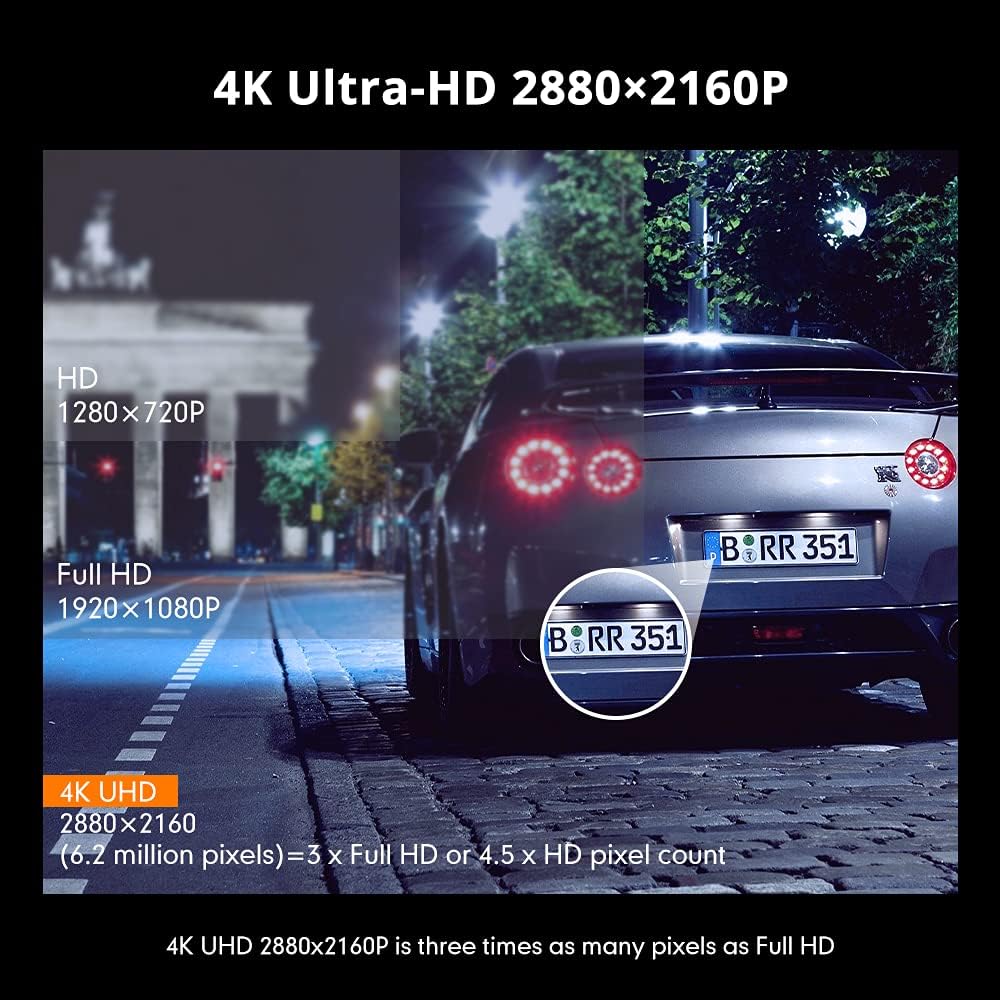
Image 3.2: Comparison illustrating the higher detail of 4K Ultra-HD (2880x2160P) resolution compared to Full HD (1920x1080P) and HD (1280x720P).
4. Тохиргоо
4.1. Зураасны камерыг суурилуулах
- Зураасан камер суурилуулах гэж буй салхины шилний хэсгийг цэвэрлэ.
- Attach the suction bracket to the dash cam.
- Сорогчийг салхины шилэнд хүчтэй дарж, хөшүүргийг эргүүлж бэхлээрэй.
- Тодорхой байхын тулд камерын өнцгийг тохируулна уу view замын.
4.2. SD картыг оруулж байна
- Хяналтын камер унтарсан эсэхийг шалгаарай.
- Locate the SD card slot on the side of the dash cam.
- Insert the 128GB SD card with the gold contacts facing the back of the camera until it clicks into place.
- Авахын тулд картыг гартал нь зөөлөн түлхэнэ үү.
4.3. Цахилгааныг холбох
- Машины цэнэглэгчийг хяналтын камерын тэжээлийн оролтын порт руу холбоно уу.
- Машины цэнэглэгчийн нөгөө үзүүрийг тээврийн хэрэгслийнхээ 12 вольтын цахилгаан залгуурт (тамхины асаагуурын залгуур) залгаарай.
- Тээврийн хэрэгслийн асаалт асаалттай үед хяналтын камер автоматаар асаж, бичлэг хийж эхэлнэ.
5. Ашиглалтын заавар
5.1. Үндсэн бичлэг
Once powered on, the dash cam will automatically start recording. The recording indicator light will flash. Videos are saved in segments (loop recording) to the SD card.
5.2. Цэсийн навигаци
Use the physical buttons on the dash cam to navigate through the menu options. Refer to the on-screen icons for specific functions such as video playback, settings, and mode switching.
5.3. WiFi Connection and AZDOME App
The built-in WiFi allows you to connect your smartphone to the dash cam for live view, video playback, download, and settings adjustment.
- Download the 'AZDOME' app from the Apple App Store or Google Play Store.
- On the dash cam, enable WiFi mode (refer to the dash cam's display for the WiFi icon).
- On your smartphone, go to WiFi settings and connect to the AZDOME dash cam's WiFi network (SSID and password will be displayed on the dash cam screen).
- Open the AZDOME app to access the dash cam's functions.

Image 5.1: Illustration of the built-in WiFi functionality, showing the AZDOME app on a smartphone connected to the dash cam for video management.
5.4. GPS хянах
The integrated GPS module records your driving route, speed, and coordinates. This data can be viewed using the dedicated AZDOME GPS Player software on a computer.
- Download the AZDOME GPS Player from the official AZDOME webсайт.
- Transfer recorded video files-г SD картаас компьютер руугаа хуулж болно.
- Видеог нээ files using the AZDOME GPS Player to view synchronized video and GPS data (route map, speed, etc.).

Image 5.2: A laptop screen displaying the AZDOME GPS Player interface, showing a recorded video alongside a map with the tracked driving route and speed information.
5.5. Advanced Recording Modes
- G-мэдрэгч: When a sudden impact or collision is detected, the G-Sensor automatically locks the current video file, preventing it from being overwritten by loop recording.
- Зогсоолын монитор: If connected to a hard-wire kit (sold separately), the dash cam can detect motion or impact while the vehicle is parked and automatically start recording for a short duration.
- Хөдөлгөөн илрүүлэх: When enabled, the camera will start recording if it detects movement in its field of view while stationary.
- WDR (өргөн динамик хүрээ): This feature enhances video quality in challenging lighting conditions by balancing bright and dark areas of the image.

Image 5.3: Visual explanation of the dash cam's multifunctional capabilities, including Motion Detection, WDR for balanced exposure, G-Sensor for impact detection, and Parking Monitor.
6. Засвар үйлчилгээ
6.1. SD карт форматлах
It is recommended to format the SD card regularly (e.g., once a month) to ensure optimal performance and prevent data corruption. Formatting can be done through the dash cam's menu settings.
6.2. Төхөөрөмжийг цэвэрлэх
Use a soft, dry cloth to clean the dash cam's lens and body. Avoid using abrasive cleaners or solvents that could damage the device.
7. Алдаа засах
- Хяналтын камер асахгүй байна: Ensure the power cable is securely connected to both the dash cam and the vehicle's 12V power outlet. Check if the vehicle's power outlet is functioning.
- Бичлэг гэнэт зогссон: Format the SD card. Ensure the SD card is a high-speed card (Class 10 or higher).
- Video quality is poor: Камерын линзийг цэвэрлэ. Хамгаалалтын хальсыг линзнээс авсан эсэхийг шалгана уу. Видео нягтралын тохиргоог шалгана уу.
- WiFi холболтын асуудал: Ensure the dash cam's WiFi is enabled. Keep the smartphone within 9 feet (3 meters) of the dash cam.
- GPS өгөгдөл бичихгүй байна: Хяналтын камер нь тодорхой байгаа эсэхийг шалгаарай view of the sky for GPS signal reception.
8. Техникийн үзүүлэлтүүд
| Онцлог | Тодорхойлолт |
|---|---|
| Брэнд | AZDOME |
| Загварын нэр | GS63H |
| Видео бичлэгийн нягтрал | 2160p (4K UHD) |
| Холболтын технологи | Wi-Fi |
| Флаш санах ойн төрөл | SD (Supports up to 128GB) |
| Суурилуулах төрөл | Сорох уул |
| Хяналтын арга | Апп |
| Тээврийн хэрэгслийн үйлчилгээний төрөл | Машин |
| Оруулсан бүрэлдэхүүн хэсгүүд | Memory Card, Suction Bracket |
9. Баталгаат хугацаа ба дэмжлэг
For warranty information and technical support, please refer to the official AZDOME website or contact AZDOME customer service directly. Keep your purchase receipt as proof of purchase.


