Бүтээгдэхүүн дууссанview
The AINAVIGO Qualcomm Replacement Stereo Radio is an advanced car multimedia system designed to upgrade your vehicle's infotainment capabilities. Featuring a 10.2-inch IPS touchscreen and powered by Android 12 with a Qualcomm 8-core CPU, 3GB RAM, and 32GB ROM, it offers a fast and responsive user experience. This unit supports wireless Apple CarPlay and Android Auto, integrated GPS navigation, Bluetooth 5.0 for hands-free calling and audio streaming, FM/AM radio, and includes support for a 1080P rear camera.
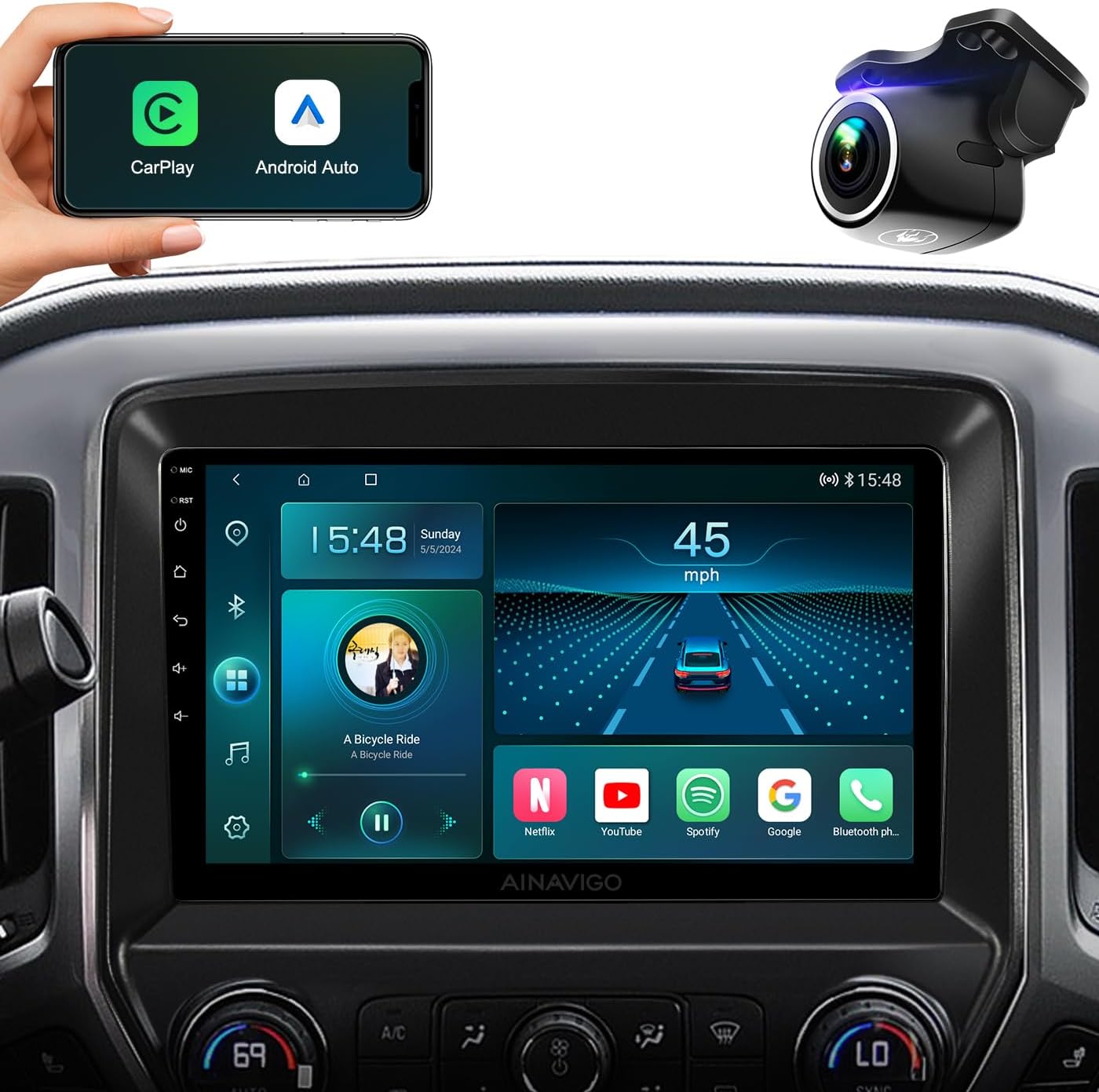
Image: The AINAVIGO Qualcomm Replacement Stereo Radio, showcasing its integration into a vehicle's dashboard. The image highlights the large display, along with icons for CarPlay and Android Auto, indicating seamless smartphone connectivity. A separate dash camera is also shown, suggesting compatibility with external accessories.
Vehicle Compatibility and Important Notes
This stereo radio is specifically designed for Chevrolet Silverado 2014-2018 болон GMC Sierra models. Before purchasing and installing, please verify your vehicle's power cable interface.
- Дэмжихгүй байна: If your car has an optical fiber output, this unit is not compatible.
- Дэмжихгүй байна: If your power cable interface contains only two cables, this unit is not compatible.
- If you are unsure about compatibility, please contact customer support with photos of your car's power cable interface for assistance.

Image: A visual comparison showing the car's dashboard before and after the installation of the AINAVIGO stereo. The "Before" panel illustrates the factory radio, while the "After Modification" panel demonstrates the new 10.2-inch IPS screen perfectly fitted into the dashboard, highlighting the aesthetic and functional upgrade.
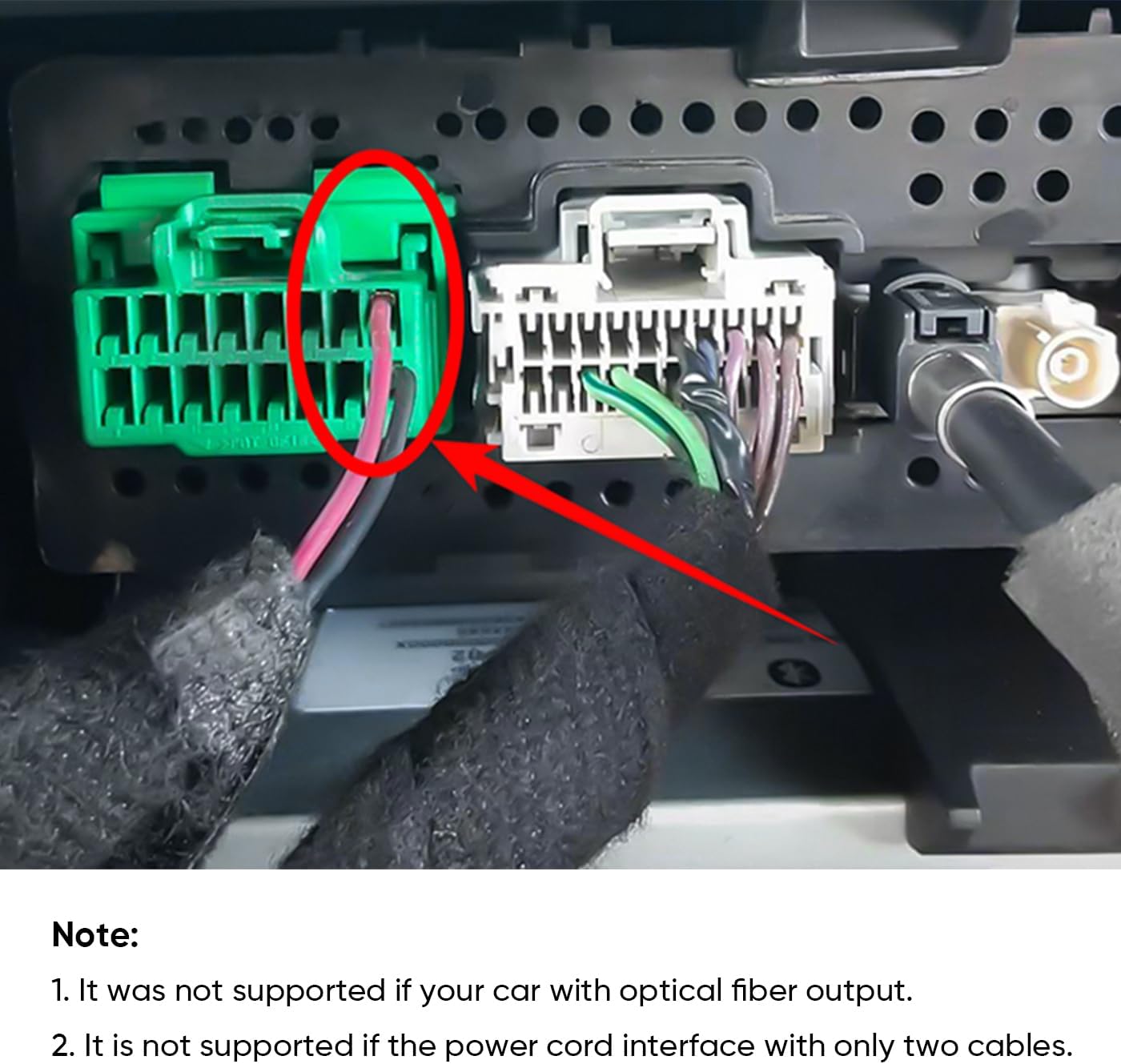
Зураг: Нарийвчилсан view of a car's wiring harness, with a red circle emphasizing a particular connector. This image is accompanied by a crucial note advising that the stereo unit is incompatible with vehicles equipped with an optical fiber output or a power cord interface that only has two cables. This helps users identify potential installation issues.
Тохиргоо ба суурилуулалт
The AINAVIGO stereo is designed for a standard fit, requiring no additional accessories for installation. Follow these general steps for setup. For detailed vehicle-specific instructions, refer to your car's service manual or consult a professional installer.
- Бэлтгэл: Суурилуулалтыг эхлүүлэхийн өмнө тээврийн хэрэгслийн асаалт унтраалттай, батерейг салгасан эсэхийг шалгаарай.
- Хуучин нэгжийг устгах: Carefully remove the existing car radio and trim panels.
- Утас холбох: Connect the provided power cable, GPS antenna, and USB cables to the new head unit. Ensure all connections are secure. Refer to the wiring diagram included in the package.
- Арын камер суурилуулах (заавал биш): If installing the included 1080P rear camera, route the camera cable to the rear of the vehicle and connect it to the designated input on the head unit.
- Mount New Unit: Secure the AINAVIGO head unit into the dashboard opening.
- Туршилтын функц: Reconnect the battery and turn on the ignition to test all functions (power, audio, touchscreen, GPS, Bluetooth, CarPlay/Android Auto, camera).
- Дахин угсрах: Once all functions are verified, reassemble the trim panels.

Image: This image provides a comprehensive overview of the stereo's key features, including its powerful Qualcomm 8-core processor, Android 12 operating system, memory configuration (3GB RAM + 32GB ROM), support for AHD 1080P backup camera, integrated GPS navigation, Bluetooth 5.0 connectivity, and compatibility with both CarPlay and Android Auto, all displayed on a vibrant 10.2-inch IPS screen.
Ашиглалтын заавар
Утасгүй CarPlay & Android Auto
The unit supports both wired and wireless Apple CarPlay and Android Auto. Connect your smartphone via Bluetooth for wireless functionality, or use a USB cable for a wired connection. This allows easy access to your phone's applications, including navigation, calls, messages, and music.
- Идэвхжүүлэх: Once connected, the CarPlay or Android Auto interface will automatically launch on the stereo screen.
- Дуут туслах: Activate Siri or Google Assistant directly from the unit to control apps, make calls, send messages, and get directions hands-free.

Image: The stereo's screen displaying the Apple CarPlay interface, featuring various application icons such as Phone, Maps, and Music. A smartphone is positioned below the screen, illustrating the wireless connection capability for both CarPlay and Android Auto, enabling seamless integration of mobile functionalities.
GPS Navigation & WiFi Connectivity
The head unit comes pre-loaded with North American maps. After connecting the GPS antenna, you can plan your routes offline. For real-time traffic updates and online map applications, connect the unit to a WiFi hotspot (e.g., from your smartphone).
- Онлайн газрын зураг: Download additional map applications from the Play Store for enhanced navigation features.
- Халуун цэгийн холболт: Easily access online navigation apps and download other applications like Instagram, Facebook, and TikTok via WiFi hotspot.
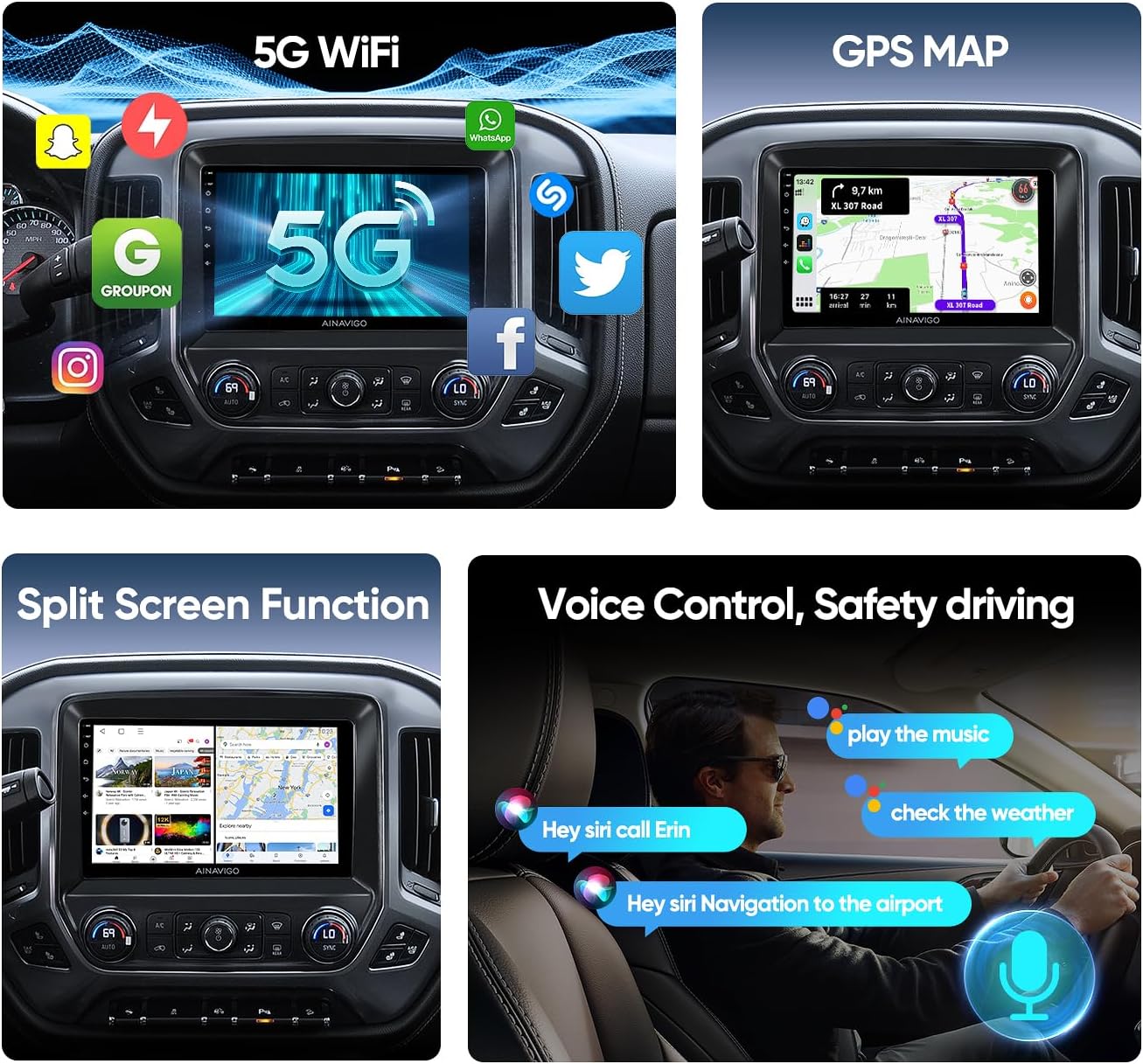
Image: This collage demonstrates several advanced features of the stereo, including its 5G WiFi capability with various app icons, a detailed GPS map for navigation, the split-screen function allowing two applications to run concurrently, and the voice control feature, illustrated with commands such as "play the music" and "navigate to the airport," emphasizing hands-free operation for safer driving.
Bluetooth Calls & DSP
Bluetooth 5.0 ensures faster transmission speeds and stable connections. Pair your smartphone to make hands-free calls and stream music.
- Гар чөлөөтэй дуудлага: The unit includes both a built-in microphone and an external microphone for clear and stable call quality. Download your phonebook for easy access.
- Нэгдсэн DSP: The built-in Digital Sound Processor (DSP) allows precise adjustment of audio settings, enabling you to customize the sound to your preference for a more immersive listening experience.

Image: The stereo's screen displaying the graphic equalizer interface of its built-in Digital Sound Processor (DSP). This visual representation shows adjustable frequency bands and sliders, allowing users to fine-tune the audio output. The accompanying text highlights that the DSP improves the car's original acoustics, providing a high-fidelity and immersive sound experience.
FM/AM радио
The high-quality FM/AM radio allows you to listen to real-time traffic, news broadcasts, and weather forecasts.
Техникийн үзүүлэлтүүд
| Дэлгэцийн хэмжээ | 10.2 инч (26 см харагдах диагональ) |
| Шийдвэр | 1080P (1280 * 720) |
| Үйлдлийн систем | Android 12 |
| Процессор | Qualcomm 8-core CPU |
| RAM | 3 ГБ |
| ROM | 32 ГБ |
| Холболт | Bluetooth 5.0, WiFi (5G supported), GPS |
| Онцлог шинж чанарууд | Wireless CarPlay, Android Auto, Built-in DSP, SWC (Steering Wheel Control) support, 1080P Backup Camera support |
| Аудио гаралтын горим | Стерео |
| Суурилуулалтын төрөл | Хяналтын самбарын бэхэлгээ |
| Оруулсан бүрэлдэхүүн хэсгүүд | Microphone (x1), Blue Tool (x1), GPS System (x1), USB Cables (4-pin & 6-pin), User Manual, Power Cable (x1), Car Head Unit with Frame for Chevrolet Silverado/GMC Sierra 2014-2018 |
| Хүргэлтийн хэмжээ | 39.9 x 34.29 x 14.3 см; 2.59 кг |

Зураг: Нарийвчилсан view of the Qualcomm Snapdragon 8-core processor, emphasizing its role in providing faster response, better sound quality, and improved stability. Key specifications such as 8 cores, 3GB RAM for higher speed, Android 12 as the newest system, and 32GB ROM for more storage are highlighted, illustrating the internal hardware capabilities of the unit.

Image: A comparative illustration highlighting the advantages of the "G+G Full Fit Ultra Clear Screen" technology used in the stereo. It contrasts the full-fit design, which offers full cover body integration, better transparency, clear display, and dust-free fitting, against a "Non full fit" screen, which is prone to dust ingress and light reflection, demonstrating the superior display quality and durability of the AINAVIGO unit.
Алдааг олж засварлах
Энэ хэсэг нь танд тулгарч болох нийтлэг асуудлуудын шийдлүүдийг өгдөг.
- Эрчим хүчгүй:
- Check all power connections to ensure they are secure.
- Verify that your vehicle's power cable interface is compatible (not optical fiber, not two-cable).
- Check vehicle fuses related to the radio.
- No Audio / Intermittent Audio:
- Ensure all speaker wires are correctly connected.
- Check the volume level and mute settings on the unit.
- If the screen feels loose, ensure the four screws on the back are tightened to ensure proper circuit contact. (Based on a customer review, this is a specific fix for audio issues).
- Verify DSP settings are not set to an extreme that mutes sound.
- GPS дохионы алдагдал:
- Ensure the GPS antenna is properly connected and placed in an area with clear sky view.
- Төхөөрөмжийг дахин асаана уу.
- Bluetooth холболтын асуудал:
- Ensure Bluetooth is enabled on both the stereo and your smartphone.
- Delete previous pairings and try pairing again.
- Хоёр төхөөрөмжийг дахин эхлүүлнэ үү.
- CarPlay/Android Auto холбогдоогүй байна:
- Таны утасны үйлдлийн систем шинэчлэгдсэн эсэхийг шалгаарай.
- Try both wired and wireless connections.
- Check USB cable for damage if using wired connection.
- Ensure CarPlay/Android Auto is enabled in the unit's settings.
- Slow Response / Lag:
- Шаардлагагүй дэвсгэр програмуудыг хаа.
- Clear cache from the system settings.
- Perform a factory reset if issues persist (note: this will erase all user data).
Засвар үйлчилгээ
Proper maintenance ensures the longevity and optimal performance of your stereo radio.
- Дэлгэц цэвэрлэх: Мэдрэгчтэй дэлгэцийг зөөлөн, хөвөнгүй даавуугаар арчих. Зөрүүд толбоны хувьд бага зэрэг dampдаавуугаар усаар эсвэл дэлгэцэнд аюулгүй цэвэрлэгчээр угаана. Хүчтэй химийн бодис, зүлгүүрийн материалаас зайлсхий.
- Програм хангамжийн шинэчлэлтүүд: Periodically check for system software updates to ensure optimal performance and access to new features. Updates can typically be found in the system settings or on the manufacturer's webсайт.
- Байгаль орчны нөхцөл: Төхөөрөмжийг хэт өндөр температурт, нарны шууд тусгалд удаан хугацаагаар өртөхөөс зайлсхий.
Баталгаат болон дэмжлэг
The AINAVIGO Qualcomm Replacement Stereo Radio comes with an 18 сарын баталгаат хугацаа for any quality-related issues.
If you have any questions regarding the use or installation of your unit, please do not hesitate to contact our professional technical support team. We are committed to providing assistance and ensuring your satisfaction.
For support, please refer to the contact information provided in your product packaging or visit the official AINAVIGO webсайт.