1. Танилцуулга
This manual provides essential information for setting up, operating, and maintaining your HUAWEI Watch FIT Special Edition. Please read this manual thoroughly to ensure proper use and to maximize the device's features. Keep this manual for future reference.
2. Хайрцагт юу байна
- HUAWEI Watch FIT Special Edition (with strap)
- Цэнэглэх өлгий
- Цэнэглэх кабель
- Түргэн эхлүүлэх гарын авлага
- Аюулгүй байдлын мэдээлэл
3. Анхны тохиргоо
3.1 Төхөөрөмжийг цэнэглэх
Before first use, fully charge your HUAWEI Watch FIT Special Edition. Connect the charging cradle to a power adapter using the provided charging cable, then place the watch onto the cradle, ensuring the charging contacts align. The watch screen will indicate charging status.

Зураг: Урд view of the HUAWEI Watch FIT Special Edition, showing the display and strap. This image represents the device during initial setup or general use.
3.2 HUAWEI Health програмыг татаж аваад суулгаж байна
The HUAWEI Health app is required to manage your watch and access all its features. Scan the QR code provided in the Quick Start Guide or search for "HUAWEI Health" in your smartphone's app store (compatible with Android and iOS). Download and install the application.
3.3 Ухаалаг утастайгаа хослуулах
Open the HUAWEI Health app on your smartphone. Navigate to 'Devices' > 'Add' > 'Smartwatch' and select your HUAWEI Watch FIT Special Edition from the list of available devices. Follow the on-screen instructions to complete the pairing process.

Image: Visual guide for setting up the HUAWEI Health App, showing steps for downloading, pairing, and updating the device.
3.4 Програм хангамжийг шинэчлэх
After pairing, it is recommended to check for and install any available firmware updates. In the HUAWEI Health app, go to 'Personal' > 'Check for updates'. This ensures your watch has the latest features and performance improvements.
4. Ашиглалтын заавар
4.1 Үндсэн навигаци
- Мэдрэгчтэй дэлгэц: Цэс болон мэдэгдлүүдээр шилжихийн тулд дээш, доош, зүүн эсвэл баруун тийш шударна уу. Зүйлс сонгохын тулд товшино уу.
- Хажуугийн товчлуур: Press to wake the screen, return to the home screen, or open the app list. Press and hold to power on/off or restart the device.
4.2 Цагны нүүрийг солих
You can customize your watch face directly on the device or through the HUAWEI Health app. On the watch, press and hold the current watch face, then swipe left or right to browse available options. Tap to select a new watch face.

Image: A HUAWEI Watch FIT Special Edition on a wrist, showcasing a unique watch face design.
5. Эрүүл мэндийн хяналтын онцлог
The HUAWEI Watch FIT Special Edition offers comprehensive health tracking capabilities:
- Зүрхний цохилтын хяналт: Utilizes HUAWEI TruSeen™ 5.0 technology for continuous and accurate heart rate tracking.
- SpO2 хяналт: Цусан дахь хүчилтөрөгчийн ханалтын түвшинг хэмждэг.
- Унтлагын хяналт: HUAWEI TruSleep™ provides detailed analysis of sleep stages ба чанар.
- Стресс хяналт: Стрессийн түвшинг хянаж, стресстэй тэмцэхэд туслах амьсгалын дасгалуудыг санал болгодог.
- Үйл ажиллагааг хянах: Records steps, distance, calories burned, and supports multiple sports modes.

Image: The watch display showing various personal health metrics, including SpO2, heart rate, and stress levels.
6. GPS-ийн функциональ байдал
The integrated GPS allows for precise tracking of your outdoor activities, such as running or cycling, without needing to carry your smartphone. The watch records your route, speed, and distance, which can be viewed in detail on the HUAWEI Health app.
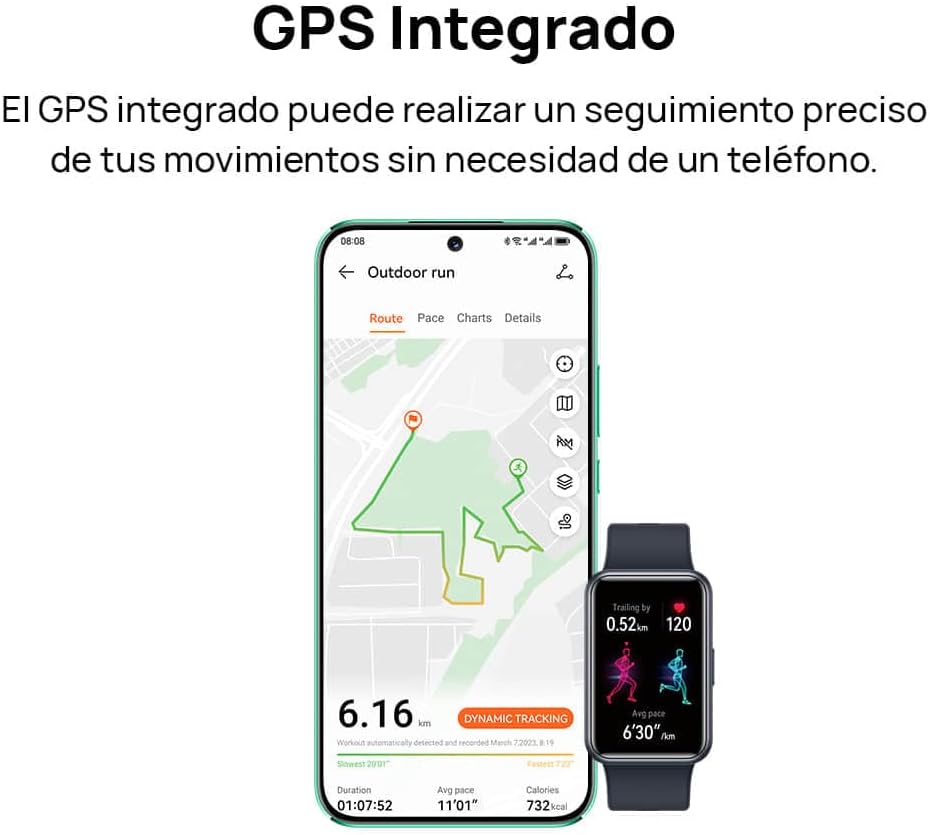
Image: A smartphone screen displaying a tracked outdoor run route, alongside the HUAWEI Watch FIT Special Edition showing activity data.
7. Мэдэгдэл ба холболт
Stay connected with your HUAWEI Watch FIT Special Edition. It supports incoming call notifications and quick message replies directly from your wrist. The watch connects to your smartphone via Bluetooth and is compatible with both Android and iOS devices.

Image: Two HUAWEI Watch FIT Special Edition devices showing an incoming call notification and a quick message reply interface.

Image: A smartphone displaying the HUAWEI Health app interface, illustrating the watch's compatibility with both Android and iOS operating systems.
8. Зайны ашиглалт ба цэнэглэх
The HUAWEI Watch FIT Special Edition is designed for extended battery life. Actual battery performance may vary based on usage patterns and settings. To charge, use the provided charging cradle and cable. Ensure the watch is placed correctly on the cradle for optimal charging.
9. Засвар үйлчилгээ
9.1 Цагийг цэвэрлэх
Regularly clean your watch and strap to prevent skin irritation and maintain functionality. Use a soft, damp Цагны их бие болон оосорыг арчихын тулд даавуугаар арчина. Хүчтэй химийн бодис эсвэл зүлгүүрийн материал хэрэглэхээс зайлсхий. Цэнэглэхийн өмнө цэнэглэгч контактууд цэвэр, хуурай байгаа эсэхийг шалгаарай.
9.2 Усны эсэргүүцэл
The HUAWEI Watch FIT Special Edition has a water resistance rating. Refer to the product specifications for details on its water resistance capabilities. Avoid using the watch in hot water, saunas, or steam rooms, as this may compromise its water resistance.

Image: The back of the HUAWEI Watch FIT Special Edition, showing the optical heart rate sensors and regulatory markings.
10. Алдаа засах
If you encounter issues with your HUAWEI Watch FIT Special Edition, try the following steps:
- Цаг асахгүй байна: Цаг бүрэн цэнэглэгдсэн эсэхийг шалгаарай. Үүнийг дор хаяж 10 минутын турш цэнэглэгчтэй холбоно уу.
- Утастай холбох боломжгүй: Ensure Bluetooth is enabled on your phone and the watch. Restart both devices and try pairing again. Check if the HUAWEI Health app is updated to the latest version.
- Эрүүл мэндийн буруу мэдээлэл: Цагийг хэт бариу эсвэл хэт сул биш, бугуйндаа сайн зүүж байгаарай. Цагны арын хэсэгт мэдрэгчийг цэвэрлэ.
- Мэдэгдэл хүлээж аваагүй: Check notification settings in the HUAWEI Health app and your phone's system settings to ensure permissions are granted.
- Дэлгэц хариу өгөхгүй байна: Restart the watch by pressing and holding the side button until the restart option appears, then confirm. If unresponsive, force restart by holding the button for a longer duration (e.g., 10-15 seconds).
11. Техникийн үзүүлэлтүүд
| Онцлог | Тодорхойлолт |
|---|---|
| Брэнд | HUAWEI |
| Загварын дугаар | 55020BEE-ES |
| Үйлдлийн систем | HUAWEI LiteOS |
| Дэлгэцийн хэмжээ | 1.64 инч |
| Холболт | Bluetooth |
| Онцлог шинж чанарууд | Professional health management, multiple sports modes |
| Тохиромжтой төхөөрөмжүүд | Smartphone (Android and iOS) |
| Батерейны найрлага | Лити-ион |
| Цэнэглэдэг батерей | Тиймээ |
| GPS | Нэгдсэн GPS |
| Хэлбэр | Тэгш өнцөгт |
| Санах ойн хадгалах багтаамж | 4 ГБ |
| Зайны багтаамж | 900 саяampцаг (mAh) |
12. Баталгаат хугацаа ба дэмжлэг
Баталгаат мэдээллийг авахын тулд бүтээгдэхүүндээ дагалдаж буй баталгаат картаас эсвэл албан ёсны HUAWEI-д зочилно уу website. For technical support, troubleshooting assistance, or service inquiries, please contact HUAWEI customer support through their official channels.


