Танилцуулга
Thank you for choosing the GOBOULT Z60 Wireless Earbuds. This manual provides detailed instructions to help you set up, operate, and maintain your earbuds for an optimal audio experience. Please read this manual thoroughly before use and retain it for future reference.

Image: GOBOULT Z60 Earbuds, illustrating the brand transition from BOULT to GOBOULT, highlighting the new logo and packaging while assuring consistent product performance.
Хайрцагт юу байна
Бүх зүйл багцад байгаа эсэхийг шалгаарай:
- GOBOULT Z60 Wireless Earbuds (Left and Right)
- Цэнэглэх хайрцаг
- USB Type-C цэнэглэх кабель
- Чихний үзүүр (янз бүрийн хэмжээтэй)
- Хэрэглэгчийн гарын авлага
- Баталгаат карт

Image: The GOBOULT Z60 Wireless Earbuds and their charging case, showcasing the product's design and included accessories.
Бүтээгдэхүүн дууссанview
The GOBOULT Z60 earbuds are designed for comfort and high-quality audio. Each earbud features a 13mm bass driver and multiple microphones for clear calls. The charging case provides extended battery life.
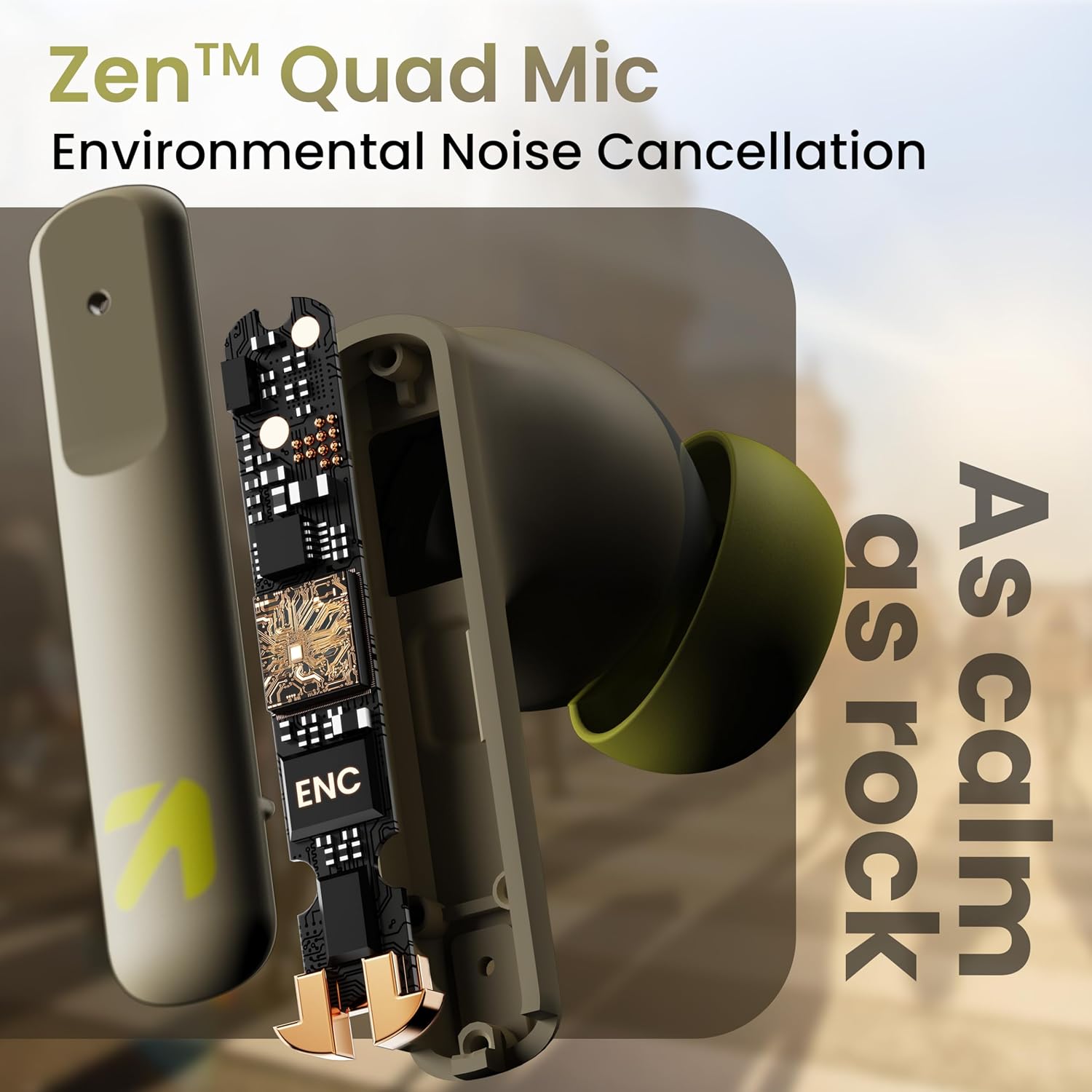
Зураг: Дотоод view of a GOBOULT Z60 earbud, highlighting the Zen Quad Mic Environmental Noise Cancellation (ENC) technology for clear audio.

Image: A close-up of a GOBOULT Z60 earbud, emphasizing the 13mm BoomX Drivers responsible for rich bass and superior sound quality.
Цэнэглэж байна
To charge your GOBOULT Z60 earbuds and charging case:
- Чихэвчийг цэнэглэх хайрцагт хийнэ үү. Тэднийг зөв суулгасан эсэхийг шалгаарай.
- USB Type-C цэнэглэгч кабелийг хайрцаг дээрх цэнэглэгч порт болон тэжээлийн эх үүсвэрт холбоно уу.
- Хайрцаг дээрх LED индикатор нь цэнэглэлтийн төлөвийг харуулна.
A full charge provides up to 60 hours of total playtime with the charging case. A quick 10-minute charge can provide up to 150 minutes of playtime.

Image: The GOBOULT Z60 charging case connected via a Type-C cable, illustrating the fast charging capability with indicators for 10 minutes charge yielding 150 minutes playtime.

Image: GOBOULT Z60 earbuds in their charging case, highlighting the impressive 60 hours of total playtime and 8 hours of playtime on a single earbud charge.
Setup: Pairing with Your Device
The GOBOULT Z60 earbuds utilize Bluetooth 5.3 for stable and efficient wireless connectivity.
- Анхны хослол:
- Цэнэглэх хайрцгийг нээнэ үү. Чихэвч автоматаар хослуулах горимд орно.
- Төхөөрөмж дээрээ (ухаалаг утас, таблет, зөөврийн компьютер) Bluetooth-г идэвхжүүлнэ үү.
- хайх "GOBOULT Z60" in the list of available Bluetooth devices and select it to connect.
- Once connected, you will hear an audio prompt, and the LED indicator on the case will change.
- Дахин холбох: Хэрэв төхөөрөмж дээр Bluetooth асаалттай байвал чихэвчийг гэрнээс нь гаргахад хамгийн сүүлд хослуулсан төхөөрөмжтэй автоматаар холбогдоно.

Image: GOBOULT Z60 earbuds and their open charging case next to a smartphone, illustrating the Bluetooth 5.3 "Blink & Pair" feature for quick and stable connection.
Чихэвчээ ажиллуулах
Удирдлагад хүрнэ үү
The GOBOULT Z60 earbuds feature intuitive touch controls. The specific functions are:
- Хөгжим тоглуулах:
- Нэг товшилт: Тоглуулах/түр зогсоох
- Хоёр товшилт (Баруун чихэвч): Дараагийн дуу
- Хоёр товших (Зүүн чихэвч): Өмнөх дуу
- Гурван удаа товших (Баруун чихэвч): Дууг чангалах
- Зүүн чихэвчийг гурван удаа товших: Дууг багасгах
- Дуудлагын удирдлага:
- Нэг товшилт: Дуудлагад хариулах/дуусах
- Long press: Reject call
- Дуут туслах: Long press (either earbud) to activate Google Assistant or Siri.
- Тоглоомын горим: Tap 4 times on either earbud to activate/deactivate Combat Gaming Mode (50ms low latency).

Image: A visual guide to the GOBOULT Z60's touch controls, detailing actions for music playback (play/pause, next/back, volume), call management, activating voice assistance, and toggling game/music mode.
Тоглоомын горим
Activate the 50ms low latency Combat Gaming Mode for a synchronized audio-visual experience during gaming. Tap 4 times on either earbud to switch between gaming and normal modes.

Image: GOBOULT Z60 earbuds in use with a smartphone displaying a racing game, emphasizing the "Combat Gaming Mode" with 50ms ultra-low latency, activated by tapping the earbud 4 times.
Дуут туслах
Access your device's voice assistant (Google Assistant or Siri) by long-pressing either earbud. This allows for hands-free control of your device.

Image: GOBOULT Z60 earbuds and their charging case, illustrating how to activate voice assistance (Ok Google, Hey Siri) with a long press on an earbud.
Засвар үйлчилгээ
To ensure the longevity and optimal performance of your GOBOULT Z60 earbuds:
- Цэвэрлэгээ: Чихэвч болон цэнэглэгчийн хайрцгийг зөөлөн, хуурай даавуугаар тогтмол цэвэрлэ. Химийн хатуу бодис, зүлгүүрийн материал ашиглахаас зайлсхий.
- Чихний үзүүр: Remove and clean the eartips periodically. Ensure they are dry before reattaching.
- Усны эсэргүүцэл: The earbuds are IPX5 water-resistant, meaning they can withstand sweat and light rain. Do not submerge them in water or expose them to heavy downpours. Ensure the charging port is dry before charging.
- Хадгалах: Ашиглаагүй үед чихэвчийг хамгаалж, цэнэгтэй байлгахын тулд цэнэглэгчдээ хадгалаарай.

Image: A GOBOULT Z60 earbud with water droplets on its surface, illustrating its IPX5 water resistance, suitable for protection against sweat, rain, and splashes.
Алдааг олж засварлах
If you encounter issues with your GOBOULT Z60 earbuds, refer to the following common solutions:
| Асуудал | Боломжит шийдэл |
|---|---|
| Чихэвчийг хослуулахгүй байна |
|
| Нэг чихний чихнээс ямар ч дуу гарахгүй |
|
| Чихэвч цэнэглэхгүй байна |
|
| Дууны хэмжээ бага эсвэл дууны чанар муу |
|
Үзүүлэлтүүд
| Онцлог | Дэлгэрэнгүй |
|---|---|
| Загварын нэр | AirBass (Z60) |
| Холболтын технологи | Утасгүй (Bluetooth) |
| Bluetooth хувилбар | 5.3 |
| Bluetooth хүрээ | 10 метр |
| Аудио драйверын хэмжээ | 13 миллиметр |
| Аудио драйверын төрөл | Динамик драйвер |
| Батерейны ашиглалтын хугацаа (Нийт) | 60 цаг хүртэл (цэнэглэх хайрцагтай) |
| Цэнэглэх хугацаа | Ойролцоогоор 90 минут |
| Хурдан цэнэглэх | 10 минут цэнэглэх = 150 минут тоглох хугацаа |
| Цэнэглэх порт | Төрөл-C |
| Микрофонууд | 4 ENC Mics for Clear Calling |
| Аудио хоцролт | 50 миллисекунд (Тоглоомын горим) |
| Усны эсэргүүцэл | IPX5 (Хөлс нэвтэрдэггүй, бороо нэвтэрдэггүй, цацардаггүй) |
| Хяналтын арга | Хүрч, Дуу |
| Зүйлийн жин | 41.5 грамм |
| Гарал үүслийн улс | Энэтхэг |
Баталгаат болон дэмжлэг
Your GOBOULT Z60 Wireless Earbuds come with a 1 жилийн үйлдвэрлэгчийн баталгаа худалдан авсан өдрөөс.
For any support, warranty claims, or technical assistance, please refer to the contact information provided on your warranty card or visit the official GOBOULT support webсайт.


