1. Бүтээгдэхүүн дууссанview
The Topcony Outdoor WiFi Camera is a sophisticated surveillance device designed to provide comprehensive security for your home or property. Featuring advanced AI human detection, 360-degree pan and tilt capabilities, 1080P Full HD resolution with color night vision, and two-way audio, this camera ensures you stay connected and protected.

Image: The Topcony Outdoor WiFi Camera, showcasing its sleek design and a smartphone displaying its live monitoring capabilities.
Гол онцлогууд:
- Enhanced AI Human Detection: Reduces false alarms by accurately distinguishing human movement from other objects.
- 360° Coverage with Auto Tracking: Offers 355° horizontal and 90° vertical rotation, automatically tracking detected motion to eliminate blind spots.
- 1080P Full HD Color Night Vision: Provides clear, high-definition images day and night with three night vision modes (infrared, color, and smart).
- Dual 5dBi Antennas: Ensures stable 2.4GHz Wi-Fi connectivity for reliable performance.
- Хоёр талын аудио: Built-in microphone and speaker allow for real-time communication and siren activation.
- 24/7 Recording & Multi-User Sharing: Supports continuous recording to an SD card (up to 128GB, not included) and allows multiple users to view камерын тэжээл.
- Олон төхөөрөмжийн нийцтэй байдал: Дэмждэг viewing on phones, computers, and tablets, compatible with ONVIF/RTSP/FTP/NVR.
2. Багцын агуулга
Доор жагсаасан бүх зүйл таны багцад байгаа эсэхийг шалгана уу.

Image: All components included in the Topcony Outdoor WiFi Camera package, laid out for inspection.
- 1 x Topcony External Wi-Fi Camera
- 1 x 3-meter Power Charger
- 1 x LAN кабель
- 4 х эрэг
- 4 х ханын залгуур
- 1 x Waterproof Case for Network Cables
- 1 х хэрэглэгчийн гарын авлага
- 1 х халив
3. Тохируулах гарын авлага
3.1 Камер суурилуулах
Choose a suitable outdoor location for mounting the camera, ensuring it has a clear view of the area you wish to monitor and is within Wi-Fi range. Use the included screws and wall plugs to securely attach the camera to a wall or ceiling. The camera is designed for outdoor use and is waterproof (IP66 rated).

Image: The camera mounted on an exterior wall, illustrating its 355-degree pan and 90-degree tilt capabilities for comprehensive area monitoring.

Image: The camera installed outdoors, demonstrating its IP66 waterproof rating, capable of withstanding various weather conditions.
3.2 Цахилгаан ба сүлжээний холболт
Connect the camera to the power supply using the provided 3-meter power charger. For network connection, you have two options: Wi-Fi or wired Ethernet.
- Wi-Fi холболт: Ensure your Wi-Fi network is 2.4GHz. The camera's dual 5dBi antennas enhance signal stability.
- Ethernet кабелийн холболт: Use the provided LAN cable for a stable wired connection.

Зураг: Ойролцоогоор view of the camera's wired connections, including the power port, Ethernet cable interface, and reset button.

Image: Diagram illustrating the two connection options for the camera: wireless Wi-Fi and wired Ethernet cable.
4. Ашиглалтын заавар
4.1 Апп суулгах болон анхны тохиргоо
Download the "CamHipro" or "CamHi" app from your device's app store. Follow the in-app instructions to add your camera. This typically involves scanning a QR code on the camera or manually entering its ID.
4.2 Амьд View болон PTZ хяналт
Once connected, you can access the live feed from your camera. Use the on-screen controls within the app to pan (355° horizontal) and tilt (90° vertical) the camera remotely, ensuring no blind spots in your monitoring area. You can also set up preset monitoring points for quick navigation.

Image: A smartphone screen showing the live camera feed with on-screen controls for panning and tilting the camera.

Image: An outdoor scene with highlighted areas indicating various preset monitoring points that can be configured for the camera.
4.3 Хөдөлгөөн илрүүлэх, автоматаар хянах
The camera features advanced AI human detection to minimize false alarms. When motion is detected, the camera can automatically track the moving object and send real-time alerts to your phone via the app. You can configure sound and light alarms to deter intruders.

Image: A child playing near a pool, with an overlay showing the camera's AI human detection identifying the person and triggering an alert notification.

Image: Two figures, one appearing to be an intruder, demonstrating the camera's automatic tracking feature as it follows their movement.

Image: An illustration of the camera's automatic tracking and sound-light defense system activating when an intruder is detected, showing sound warnings, sound and light warnings, and email notifications.
4.4 Шөнийн харааны горимууд
Камер нь шөнийн харааны гурван горимтой:
- Хэт улаан туяаны горим: Стандарт хар цагаан шөнийн хараа.
- Өнгөний горим: Utilizes built-in white lights to provide full-color images in low light.
- Ухаалаг горим: Automatically switches between infrared and color mode based on detected motion.

Image: A night scene demonstrating the camera's 1080P Full HD color night vision, illuminating a driveway and car with clear detail.

Image: A smartphone screen showing the option to select different night vision modes (Ordinary, Color, Intelligent) within the camera app, with examples of infrared and color night views.
4.5 Хоёр талын аудио
The integrated microphone and speaker enable two-way communication. You can speak to visitors or deter unwanted guests directly through the camera using the app.

Image: A hand holding a smartphone displaying the camera's live feed, with speech bubbles indicating two-way audio communication.
4.6 Бичлэг хийх, тоглуулах
The camera supports 24/7 continuous recording to a local SD card (not included, up to 128GB). You can also configure event-triggered recording. Review foo бүртгэгдсэнtage directly from the app at any time.
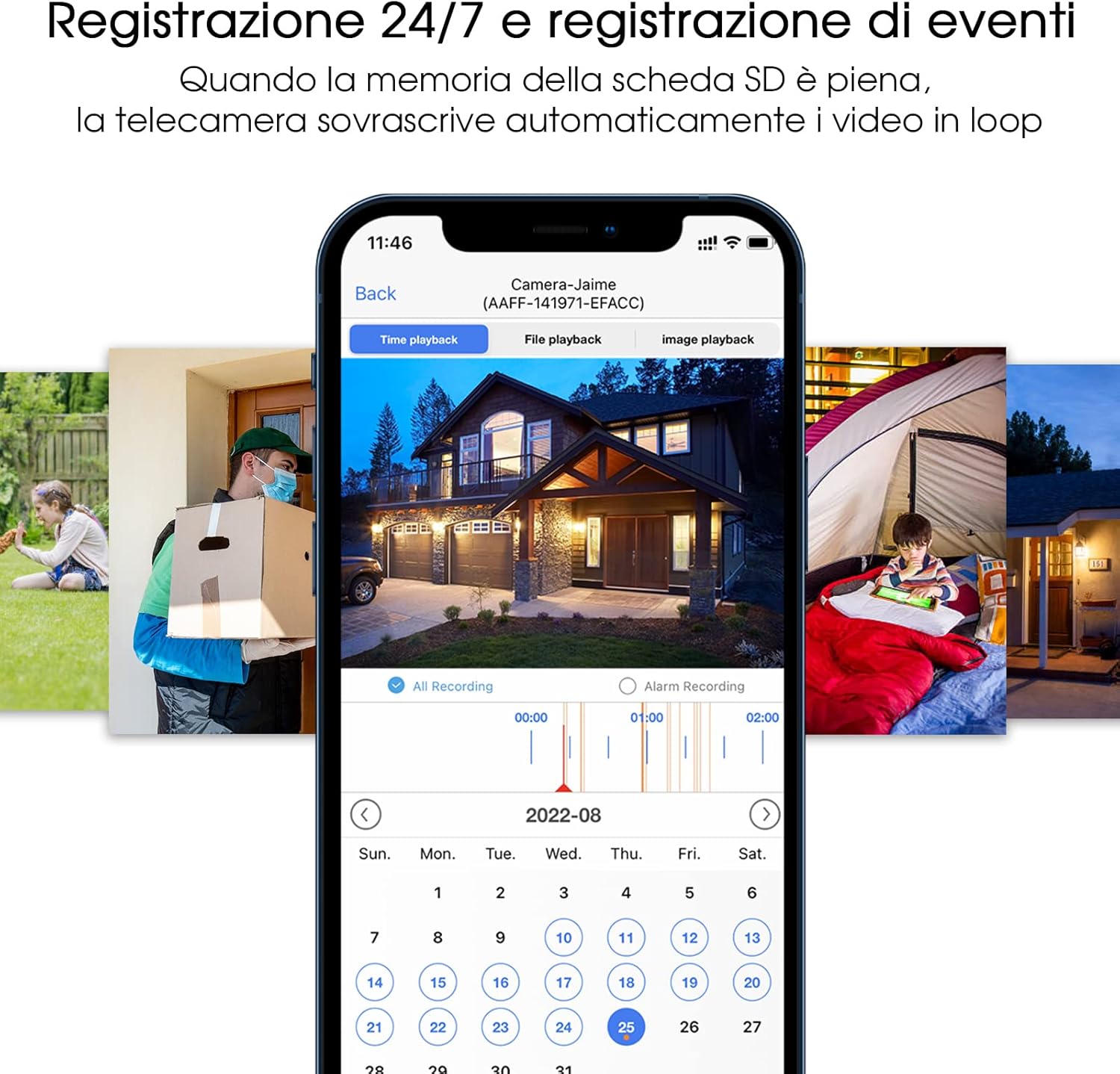
Image: A smartphone screen showing the camera's recording interface, including a timeline for 24/7 recording and options for playback of recorded events.

Зураг: Ойрын зураг view of the camera's underside, highlighting the micro SD card slot for local storage of recordings.
5. Засвар үйлчилгээ
Regular maintenance ensures optimal performance and longevity of your Topcony camera.
- Цэвэрлэгээ: Камерын линз болон их биеийг үе үе зөөлөн арчих damp тоос шороо, шороог арилгах даавуу. Химийн хатуу бодис, зүлгүүрийн материал ашиглахаас зайлсхий.
- Програм хангамжийн шинэчлэлтүүд: Check the CamHipro/CamHi app regularly for available firmware updates. Keeping your camera's firmware up-to-date ensures you have the latest features and security enhancements.
- Эрчим хүчний хангамж: Ensure the power adapter and cable are not damaged and are securely connected.
- Сүлжээний холболт: Verify your Wi-Fi signal strength periodically, especially if you experience connectivity issues. Consider repositioning your router or camera if the signal is weak.
6. Алдаа засах
If you encounter issues with your Topcony camera, refer to the following common problems and solutions:
| Асуудал | Боломжит шалтгаан / шийдэл |
|---|---|
| Камер офлайн / Wi-Fi-д холбогдох боломжгүй |
|
| Зургийн чанар муу байна |
|
| Байнга хуурамч дохиолол |
|
| Хоёр талын аудио ажиллахгүй байна |
|
| SD карт бичихгүй байна |
|
7. Техникийн үзүүлэлтүүд
| Онцлог | Тодорхойлолт |
|---|---|
| Загварын дугаар | TY10HB |
| Видео бичлэгийн нягтрал | 1080p |
| Үр дүнтэй видео нягтрал | 1080 пиксел |
| Өнгө | Цагаан |
| Утасгүй холбооны технологи | Wi-Fi (зөвхөн 2.4 GHz) |
| Материал | Хуванцар |
| Ботьtage | 12 вольт |
| Хүч | 24 ватт |
| Хэмжээ (L x W x H) | 19.2 x 18 x 12 сантиметр |
| Усны эсэргүүцлийн түвшин | Усны хамгаалалттай (IP66) |
| Онцлог шинж чанарууд | Outdoor/Indoor Security, 360° PTZ, Two-Way Audio, Color Night Vision, AI Human Detection, Auto Tracking |
| Томруулах төрөл | Дижитал томруулах |
| Зөвлөмж болгож буй бүтээгдэхүүний хэрэглээ | 360° PTZ, Two-Way Audio, Color Night Vision, AI Human Detection, Auto Tracking |
| Тохиромжтой төхөөрөмжүүд | Phone/Computer/iPad |
| Эрчим хүчний эх үүсвэр | Цахилгаан кабель |
| Хянагчийн төрөл | CamHipro/CamHi APP & Hip2p Software |
| Суурилуулах төрөл | Ханын бэхэлгээ |
8. Баталгаат хугацаа ба дэмжлэг
8.1 Баталгаат хугацааны мэдээлэл
Topcony adheres to a philosophy of high quality and comprehensive service. We offer 12 months of service after purchase, ensuring peace of mind for our customers. This includes technical support and product exchange where applicable.
8.2 Хэрэглэгчийн дэмжлэг
For any inquiries, technical assistance, or support needs, please contact us through the following channels:
- Official Topcony Email: Refer to the contact information provided in this manual or on the official Topcony webсайт.
- Facebook: хайх the Facebook ID "Topcony" to find our official page and connect with our support team.

