1. Танилцуулга
This manual provides essential information for the safe and efficient use of your Samsung QM85R 85-inch 4K UHD LCD Display. Please read this manual thoroughly before operating the device and retain it for future reference. The Samsung QM85R is a commercial-grade display designed for continuous operation, featuring a 4K UHD resolution and integrated MagicINFO S6 and SSSP 6.0 for advanced content management.
2. Аюулгүй байдлын мэдээлэл
Always observe the following safety precautions to prevent electric shock, fire, or damage to the display.
- Эрчим хүчний эх үүсвэр: Use only the specified power supply. Ensure the power cord is securely plugged into an appropriate outlet.
- Агааржуулалт: Do not block ventilation openings. Ensure adequate space around the display for proper airflow to prevent overheating.
- Шингэний нөлөөлөл: Keep the display away from liquids. Do not expose it to rain or moisture.
- Цэвэрлэгээ: Disconnect the power cord before cleaning. Use a soft, dry cloth. Avoid using liquid or aerosol cleaners directly on the screen.
- Суурилуулалт: If wall-mounting, ensure the wall mount is compatible with the display's weight and VESA standards. Professional installation is recommended for large displays.
- Үйлчилгээ: Энэ бүтээгдэхүүнд өөрөө үйлчлэх гэж бүү оролдоорой. Бүх засвар үйлчилгээг мэргэшсэн үйлчилгээний ажилтнуудад хандаарай.
3. Багцын агуулга
Please check that the following items are included with your display. If any items are missing, contact your vendor.
- Samsung QM85R 85-inch 4K UHD LCD Display
- Цахилгааны утас
- Батерейтай алсын удирдлага
- Хэрэглэгчийн гарын авлага (энэ баримт бичиг)
- Баталгаат карт (бүс нутгаас хамаарч өөр өөр байж болно)
4. Тохиргоо
4.1 Физик суурилуулалт
The Samsung QM85R display can be installed using a compatible wall mount or a floor stand (sold separately). Due to its size and weight (approximately 140.4 pounds), professional installation is highly recommended.
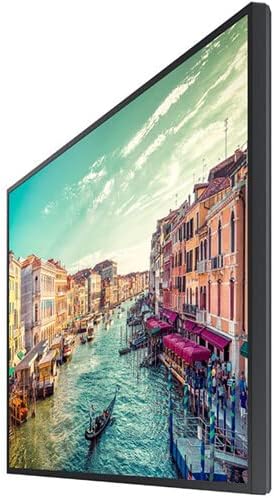
Зураг 1: Хажуу тал view of the Samsung QM85R display. Note the slim design suitable for various mounting options.
4.2 Холбох кабель
Кабелийг холбохын өмнө дэлгэц болон холбогдсон бүх төхөөрөмжийг унтраасан эсэхийг шалгаарай.
- Эрчим хүчний холболт: Connect the power cord to the display's power input and then to a grounded electrical outlet.
- Видео оруулах: Connect your video source (e.g., PC, media player) to one of the display's HDMI or DisplayPort inputs using appropriate cables. The display supports 4K UHD (3840x2160) resolution.
- Сүлжээний холболт: For MagicINFO S6 and SSSP 6.0 functionality, connect an Ethernet cable to the display's LAN port for network access.
- Бусад холболтууд: Connect any other peripheral devices as required (e.g., USB devices, audio output).
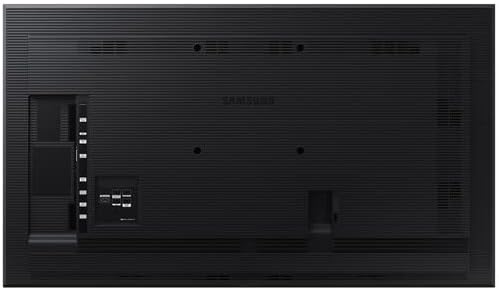
Зураг 2: Арын view of the Samsung QM85R display, illustrating the location of power, video, and network ports.
4.3 Анхдагч асаалттай
After all connections are made, power on the display using the power button on the remote control or the display itself. Follow any on-screen prompts for initial setup, such as language selection and network configuration.
5. Ажиллаж байгаа
5.1 Үндсэн удирдлага
Use the provided remote control to access the display's functions:
- Цахилгаан товч: Дэлгэцийг асааж эсвэл унтраадаг.
- Эх товчлуур: Cycles through available input sources (HDMI1, HDMI2, DisplayPort, etc.).
- Цэсийн товчлуур: Дэлгэц дээрх дэлгэц (OSD) цэсийг нээнэ.
- Навигацийн товчлуурууд (дээш/доошоо/зүүн/баруун): Цэсийн сонголтуудаар шилжинэ үү.
- Нэвтрэх товч: Цэс дэх сонголтыг баталгаажуулна.
5.2 Дэлгэцийн тохиргоо
Төрөл бүрийн дэлгэцийн тохиргоог тохируулахын тулд OSD цэсэнд хандана уу:
- Зургийн горим: Select from preset modes (e.g., Standard, Dynamic, Custom) or adjust individual settings like brightness, contrast, sharpness, and color temperature.
- Шийдвэр: The display natively supports 3840x2160 (4K UHD) resolution. Ensure your source device is configured to output this resolution for optimal clarity.
- Сэргээх хурд: The display operates at a 75Hz refresh rate, providing smooth motion for compatible content.
- Аудио: Adjust volume, mute, and select audio output options if external speakers are connected.
5.3 Smart Signage Platform (SSSP 6.0) and MagicINFO S6
The QM85R features Samsung's integrated Smart Signage Platform (SSSP 6.0) powered by MagicINFO S6. This allows for advanced content management, scheduling, and remote control capabilities. Refer to the dedicated MagicINFO S6 user guide for detailed instructions on utilizing these features.
6. Засвар үйлчилгээ
6.1 Дэлгэц цэвэрлэх
To maintain the display's appearance and performance:
- Дэлгэц: Зөөлөн, хөвөнгүй даавуугаар дэлгэцийг зөөлөн арчина. Зөрүүд тэмдгийн хувьд хөнгөнөөр dampen the cloth with water or a specialized screen cleaner, then wipe dry immediately. Do not spray liquids directly onto the screen.
- Их бие: Wipe the display's frame and back panel with a soft, dry cloth.
- зайлсхийх: Do not use abrasive cleaners, waxes, or solvents (e.g., alcohol, benzene, paint thinner) as they can damage the display surface.
6.2 Байгаль орчны асуудал
Ensure the display is operated within its specified temperature and humidity ranges to ensure longevity and optimal performance. Avoid direct sunlight exposure and extreme temperature fluctuations.
7. Алдаа засах
If you encounter issues with your display, refer to the following common problems and solutions before contacting support.
| Асуудал | Боломжит шалтгаан | Шийдэл |
|---|---|---|
| Хүч чадалгүй | Цахилгааны утас салгагдсан; цахилгаан гаралтын асуудал. | Цахилгааны утас холболтыг шалгана уу. Гаралтыг өөр төхөөрөмжөөр шалгана уу. |
| Дохио алга | Incorrect input source selected; video cable disconnected. | Press the 'Source' button on the remote to select the correct input. Ensure video cables are securely connected. |
| Зургийн чанар муу байна | Incorrect resolution; display settings. | Ensure source device outputs 3840x2160 resolution. Adjust picture settings (brightness, contrast) in the OSD menu. |
| Алсын удирдлага ажиллахгүй байна | Батерей дуусчихсан; бөглөрөл үүссэн. | Replace batteries. Ensure no obstructions between remote and display's IR receiver. |
8. Техникийн үзүүлэлтүүд
| Онцлог | Тодорхойлолт |
|---|---|
| Загварын нэр | QM85R |
| Дэлгэцийн хэмжээ | 85 инч |
| Шийдвэр | 3840 x 2160 (4K UHD) |
| Сэргээх хурд | 75 Гц |
| Гэрэлтүүлэг | 500 NIT |
| Үйл ажиллагааны цаг | 24/7 |
| Суулгасан онцлогууд | MagicINFO S6, SSSP 6.0 |
| Бүтээгдэхүүний хэмжээ (LxWxH) | 82.52 x 49.02 x 10.51 инч |
| Зүйлийн жин | 140.4 фунт |
| Өнгө | Хар |
| Үйлдвэрлэгч | Samsung |
9. Баталгаат хугацаа ба дэмжлэг
Your Samsung QM85R display is covered by a manufacturer's warranty. For specific warranty terms and conditions, please refer to the warranty card included with your product or visit the official Samsung webсайт. Энэхүү гарын авлагаас гадна техникийн туслалцаа авах, алдааг олж засварлах, эсвэл үйлчилгээний талаар лавлах бол Samsung-ийн хэрэглэгчийн дэмжлэгтэй холбогдоно уу.
Онлайн дэмжлэг: зочилно уу www.samsung.com/us/support/
Утасны дэмжлэг: Өөрийн бүс нутгийн Samsung дэмжлэгийн холбоо барих мэдээллийг лавлана уу.


