MITSUBISHI ELECTRIC FX3U-64MR/ES FX3U Үндсэн төхөөрөмжийн зааварчилгааны гарын авлага
Model: FX3U-64MR/ES
1. Бүтээгдэхүүн дууссанview
This manual provides essential information for the safe and efficient operation of the MITSUBISHI ELECTRIC FX3U-64MR/ES FX3U Main Unit. The FX3U series is a high-performance programmable logic controller (PLC) designed for industrial automation applications.
The FX3U-64MR/ES model features an AC power supply and DC inputs, with a total of 64 integrated inputs/outputs. It includes 32 integrated DC inputs and 32 integrated relay outputs.
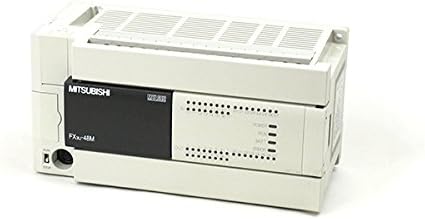
Зураг 1: Урд view of the MITSUBISHI ELECTRIC FX3U-64MR/ES Main Unit. This image displays the primary interface of the PLC, including the MITSUBISHI branding, model designation, and indicator lights for power, run, battery, and error status. Input and output terminal blocks are visible on the right side.
2. Аюулгүй байдлын урьдчилан сэргийлэх арга хэмжээ
Always observe the following safety precautions to prevent electric shock, fire, or damage to the product. Failure to follow these instructions may result in injury or equipment malfunction.
- Суурилуулалт, утас, засвар үйлчилгээ хийхээс өмнө цахилгааныг салгасан эсэхийг шалгаарай.
- Do not operate the unit in environments with excessive dust, corrosive gases, or high humidity.
- Цахилгааны аюулаас урьдчилан сэргийлэхийн тулд төхөөрөмжийг зөв газардуулна.
- Зөвхөн заасан хүчдэлийн эх үүсвэрийн хэмжээг ашиглана ууtages (100-240VAC).
- Refer to local and national electrical codes for installation requirements.
3. Тохиргоо ба суурилуулалт
Proper installation is crucial for the reliable operation of the FX3U-64MR/ES main unit.
3.1 Суурилуулалт
The FX3U-64MR/ES unit is designed for DIN rail mounting or direct panel mounting. Ensure adequate space for ventilation around the unit.
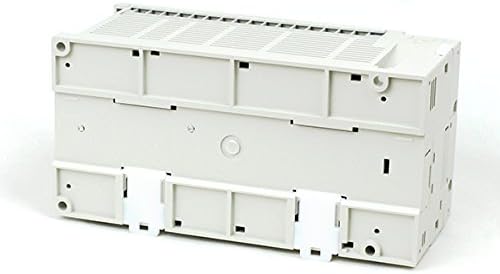
Зураг 2: Доод талд view of the FX3U-64MR/ES Main Unit. This image highlights the mounting features, including the clips for DIN rail attachment, which facilitate secure installation within an industrial control panel.
For DIN rail mounting, attach the unit securely to a standard 35mm DIN rail. For direct panel mounting, use appropriate screws through the designated mounting holes.
3.2 Утас
All wiring should be performed by qualified personnel with power disconnected.
3.2.1 Цахилгаан хангамжийн утас
Connect the 100-240VAC power supply to the designated power terminals. Ensure correct polarity and proper grounding.
3.2.2 Input Wiring (DC Inputs)
Connect DC input devices (e.g., sensors, switches) to the input terminals (X0 to X31). Refer to the wiring diagram for specific terminal assignments.
3.2.3 Output Wiring (Relay Outputs)
Connect output devices (e.g., contactors, indicator lights) to the relay output terminals (Y0 to Y31). Observe the maximum current ratings for each output.
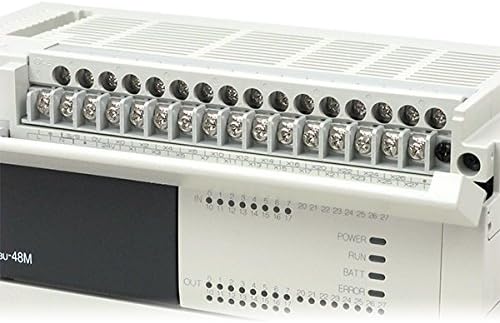
Figure 3: Close-up of the terminal blocks on the FX3U-64MR/ES. This detailed view shows the screw terminals for connecting input (X) and output (Y) wiring, along with their respective numbering, facilitating precise electrical connections.
4. Ашиглалтын заавар
The FX3U-64MR/ES operates based on a user-defined program. Programming is typically done using MITSUBISHI ELECTRIC's GX Works software.
4.1 Асаах
After completing all wiring and ensuring safety, apply power to the unit. The POWER indicator LED should illuminate.
4.2 Program Download and Execution
- Connect a programming device (e.g., PC) to the PLC's communication port.
- Use GX Works software to create or load the desired control program.
- Download the program to the FX3U-64MR/ES unit.
- Switch the PLC to RUN mode. The RUN indicator LED should illuminate.
Monitor the status indicators (POWER, RUN, BATT, ERROR) on the front panel for operational status.
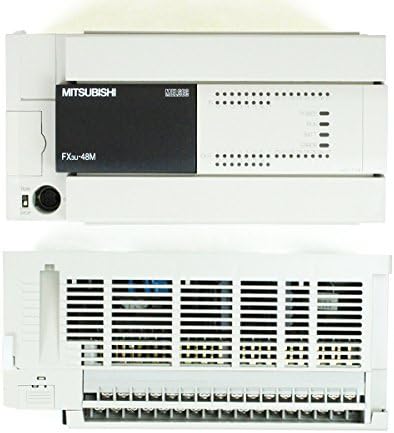
Figure 4: Top and front view of the FX3U-64MR/ES Main Unit. This perspective shows the ventilation grilles on the top surface, essential for heat dissipation, along with the front panel indicators and communication port.
5. Засвар үйлчилгээ
Regular maintenance ensures the longevity and reliable performance of your FX3U-64MR/ES unit.
- Цэвэрлэгээ: Periodically clean the unit's exterior with a soft, dry cloth. Do not use solvents or abrasive cleaners. Ensure ventilation openings are free from dust and debris.
- Шалгалт: Regularly inspect wiring connections for looseness or damage. Check for any signs of overheating or unusual odors.
- Зай солих: The unit contains a battery for retaining program data during power outages. If the BATT indicator illuminates, replace the battery according to the manufacturer's instructions.
- Програм хангамжийн шинэчлэлтүүд: Refer to MITSUBISHI ELECTRIC's official documentation for information on firmware updates.
6. Алдаа засах
This section provides solutions to common issues encountered with the FX3U-64MR/ES main unit.
| Асуудал | Боломжит шалтгаан | Шийдэл |
|---|---|---|
| POWER LED унтраалттай | No power supply, incorrect wiring, or internal fault. | Цахилгааны холболт болон боть шалгахtage. Verify wiring. If problem persists, contact support. |
| ERROR LED On | Program error, hardware fault, or communication error. | Check program logic using GX Works. Inspect hardware for damage. Verify communication settings. |
| RUN LED Off (when expected On) | PLC in STOP mode, no program loaded, or program error. | Switch PLC to RUN mode. Download a valid program. Check for program errors. |
| Input/Output not responding | Incorrect wiring, faulty sensor/actuator, or program logic error. | Verify input/output wiring. Test external devices. Check program logic for correct I/O addressing. |
For more detailed troubleshooting, refer to the comprehensive MITSUBISHI ELECTRIC FX3U series programming and hardware manuals.
7. Техникийн үзүүлэлтүүд
Key technical specifications for the MITSUBISHI ELECTRIC FX3U-64MR/ES Main Unit:
- Загвар: FX3U-64MR/ES
- Integrated Inputs/Outputs: 64 оноо
- Integrated Inputs: 32 points (DC)
- Integrated Outputs: 32 points (Relay)
- Эрчим хүчний хангамж: 100-240VAC
- Эрчим хүчний хэрэглээ: 45 Вт
- Жин: 1.00 кг (ойролцоогоор 35.27 унц)
- Баталгаажуулалт: UL, cUL, CE (EMC)
- Загварын дугаар: FX3U 64MR
- Үйлдвэрлэгч: MITSUBISHI ELECTRIC
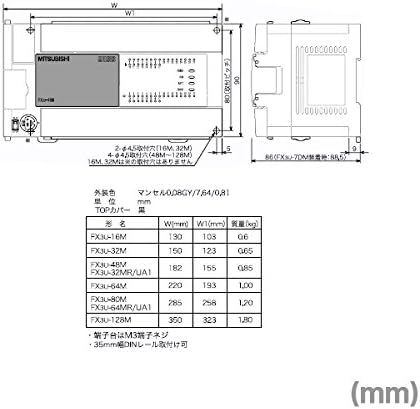
Figure 5: Technical drawing illustrating dimensions for various FX3U series models. This diagram provides critical measurements (W, W1, H) in millimeters, along with weight specifications, aiding in panel design and installation planning.
8. Баталгаат хугацаа ба дэмжлэг
Warranty information for the MITSUBISHI ELECTRIC FX3U-64MR/ES is typically provided with the product packaging or can be obtained directly from MITSUBISHI ELECTRIC or an authorized distributor. Please retain your proof of purchase for warranty claims.
For technical support, programming assistance, or service, please contact your local MITSUBISHI ELECTRIC representative or visit the official MITSUBISHI ELECTRIC webтусламжийн эх сурвалж, холбоо барих мэдээллийн сайт.
Үйлдвэрлэгч: MITSUBISHI ELECTRIC
Брэнд: MITSUBISHI


