Танилцуулга
This manual provides detailed instructions for the installation, operation, and maintenance of your GIGABYTE GA-990FXA-UD3 motherboard. Please read this manual thoroughly before proceeding with installation or use to ensure proper functionality and safety.
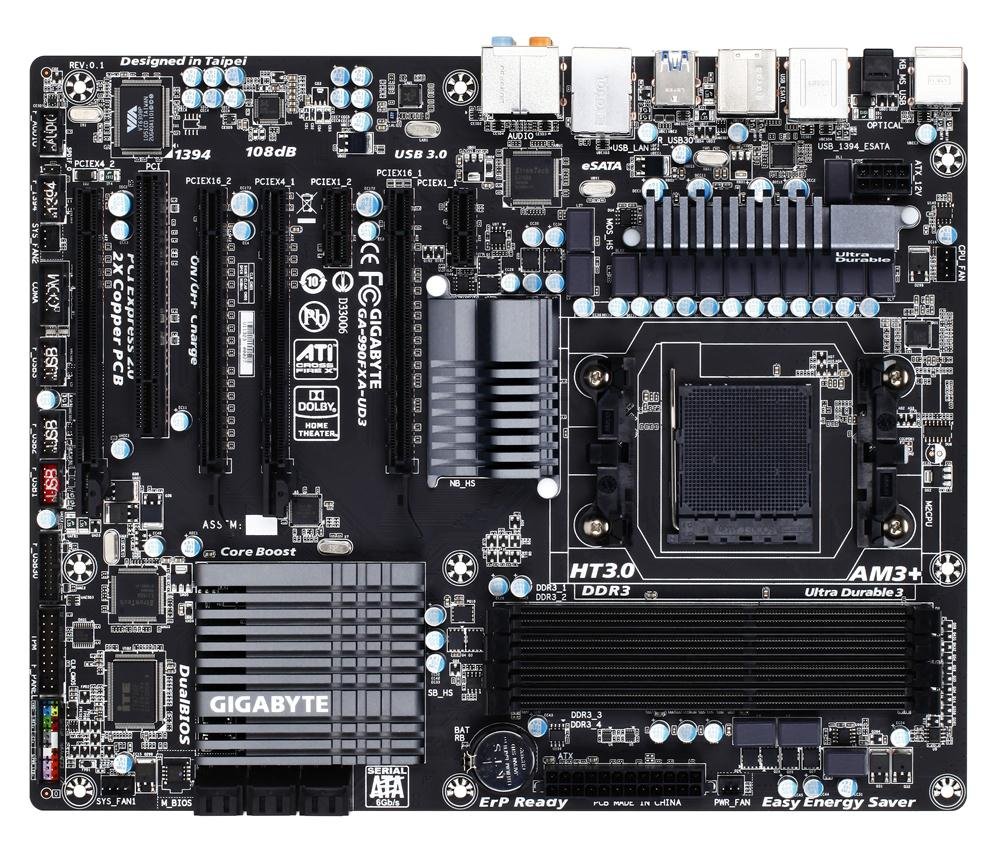
Image showing the GIGABYTE GA-990FXA-UD3 motherboard with its black and gray color scheme, highlighting the CPU socket, DIMM slots, and PCIe slots.
Бүтээгдэхүүн дууссанview
The GIGABYTE GA-990FXA-UD3 is an ATX motherboard designed for AMD AM3+ and AM3 processors. It features the AMD 990FX and SB950 chipsets, offering robust performance and extensive connectivity options for building a high-performance personal computer.
Гол онцлогууд:
- Supports AMD AM3+ FX/AM3 Phenom II series processors.
- Advanced 8+2 phase CPU VRM power design for high-TDP CPU support.
- Multiple PCI-E 2.0 interfaces for 2-way AMD CrossFireX and NVIDIA SLI multi-graphics support.
- AMD SB950 provides 6 native SATA 6Gb/s ports with RAID 0, 1, 5, 10 support.
- Integrated USB 3.0 with superfast transfer rates of up to 5 Gbps.
- GIGABYTE 3x USB Power with On/Off Charge USB ports.
- Ultra Durable 3 Classic Technology for enhanced durability and lower operating temperatures.
- Realtek ALC889 codec with High Definition Audio and Dolby Home Theater support.
- Patented DualBIOS with Hybrid EFI technology for 3TB+ HDD support.
Тохиргоо
Багцын агуулга:
Эх хавтангийн багцад бүх зүйл байгаа эсэхийг шалгана уу:
- GIGABYTE GA-990FXA-UD3 Motherboard
- Хэрэглэгчийн гарын авлага
- Жолоочийн CD
- SATA 6Gb/s Cables (typically 2-4)
- I / O Shield
- SLI Bridge Connector (for multi-GPU configurations)
Аюулгүй байдлын мэдээлэл:
- Аливаа эд ангиудыг суурилуулах эсвэл салгахаасаа өмнө цахилгааны утсыг үргэлж хананы залгуураас салга.
- Бүрэлдэхүүн хэсгүүдэд цахилгаан гүйдэл (ESD) гэмтэхээс сэргийлэхийн тулд эсрэг статик бугуйн оосор зүү.
- Handle components by their edges and avoid touching pins or circuitry.
- Компьютерийн гэр доторх агааржуулалтыг зөв хангана уу.
Motherboard Layout and Connectors:
Эх хавтан дээрх төрөл бүрийн холбогч болон бүрэлдэхүүн хэсгүүдтэй танилцана уу.
- CPU Socket (AM3+): Located centrally, for installing your AMD processor.
- DDR3 DIMM Sockets: Four 1.5V DDR3 sockets for system memory, supporting up to 32 GB.
- PCI Express x16 оролтууд: Two slots for graphics cards, supporting 2-Way CrossFireX and SLI.
- PCI Express x1/x4 Slots: For expansion cards like sound cards or network adapters.
- PCI слотууд: For legacy expansion cards.
- SATA 6Gb/s Connectors: Six ports for connecting storage devices (HDDs, SSDs).
- USB толгой: Internal headers for additional USB 2.0/1.1 and USB 3.0/2.0 ports.
- Урд самбарын толгой: For connecting case buttons, LEDs, and front audio/USB ports.
- Арын самбарын холбогч:
- 1 x PS/2 гар/хулганы порт
- 1 x оптик S/PDIF гаралтын холбогч
- 1 x IEEE 1394 port
- 8 х USB 2.0 / 1.1 портууд
- 2 х USB 3.0 / 2.0 портууд
- 2 x eSATA 6Gb/s connectors
- 1 x RJ-45 LAN порт
- 6 x аудио залгуур
Суулгах алхамууд:
- Кейсийг бэлтгэх: I/O бамбайг компьютерийнхээ арын нүхэнд суулгана уу.
- CPU суулгах: Open the CPU socket lever, align the CPU with the socket (match the golden triangle on the CPU to the triangle on the socket), gently place the CPU into the socket, and close the lever.
- CPU хөргөгчийг суулгах: Follow the cooler manufacturer's instructions to install the CPU cooler onto the motherboard. Connect the CPU fan cable to the CPU_FAN header.
- Санах ойн модулиудыг суулгах: Open the clips on the DIMM slots. Align the memory module notch with the slot key, insert the module firmly until the clips snap into place. For dual-channel operation, refer to the motherboard manual for correct slot pairing.
- Эх хавтанг суурилуулах: Эх хавтанг болгоомжтойгоор хайрцагт хийж, шурагны нүхнүүдийг тулгууруудтай зэрэгцүүлэн байрлуул. Эх хавтанг боолтоор бэхлэнэ.
- Install Graphics Card(s): Insert your PCI Express graphics card(s) into the appropriate PCIe x16 slot(s) until it clicks into place. Secure with a screw or retention clip.
- Хадгалах төхөөрөмжүүдийг суулгах: Connect your SATA HDDs/SSDs to the SATA 6Gb/s ports using the provided SATA cables.
- Цахилгаан хангамжийг холбох: Connect the 24-pin ATX main power connector and the 8-pin ATX 12V power connector from your power supply to the motherboard. Connect power to graphics cards and storage devices.
- Урд самбарын кабелийг холбох: Connect the power button, reset button, HDD LED, power LED, and front panel audio/USB cables to their respective headers on the motherboard.
Ажиллаж байна
BIOS-ийн тохиргоо:
The BIOS (Basic Input/Output System) is firmware that initializes hardware during the boot process. To enter the BIOS setup utility, press the ДЭЛ key repeatedly during system startup. Here you can configure various system settings such as boot order, date/time, CPU/memory settings, and enable/disable integrated peripherals. The GA-990FXA-UD3 features GIGABYTE's DualBIOS with Hybrid EFI technology, providing redundancy and support for large hard drives.
Драйвер суурилуулах:
After installing your operating system, install the necessary drivers for the motherboard's components. You can use the driver CD included in your package or download the latest drivers from the official GIGABYTE webсайт (www.gigabyte.com) for optimal performance and compatibility.
Засвар үйлчилгээ
- Цэвэр байлгах: Regularly clean dust from the motherboard and components using compressed air. Ensure fans are free of obstructions.
- BIOS-ийн шинэчлэлтүүд: GIGABYTE-г үе үе шалгаж байгаарай webBIOS шинэчлэлтийн сайт. BIOS шинэчлэлтүүд нь системийн тогтвортой байдлыг сайжруулж, шинэ техник хангамжийн дэмжлэг нэмэх эсвэл алдааг засах боломжтой. BIOS-г шинэчлэхдээ GIGABYTE-ийн зааврыг анхааралтай дагаж мөрдөөрэй.
- Холболтуудыг шалгах: Ensure all power cables, data cables, and expansion cards are securely seated. Loose connections can cause intermittent issues.
Алдааг олж засварлах
- Эрчим хүчгүй: Ensure the power supply is connected correctly to the motherboard (24-pin and 8-pin connectors) and that the power supply switch is on. Check front panel power button connection.
- Дэлгэц байхгүй: Verify that the graphics card is properly seated in its PCIe slot and that all necessary power connectors are attached. Ensure the monitor cable is securely connected to the graphics card.
- Систем ачаалж чадахгүй байна: Check memory modules are correctly installed. Try booting with only one memory module. Verify boot order in BIOS.
- Unexplained Slow Boot Times: Some users have reported slow boot times with this motherboard, even with SSDs. Ensure your BIOS is updated to the latest stable version. Verify that the SSD/HDD is set as the first boot device in the BIOS.
- Linux Compatibility (IOMMU/USB/Network Issues): For Linux users experiencing issues with network or USB 2.0 ports, it may be necessary to disable IOMMU in the BIOS and add "iommu=soft" to your GRUB boot options.
- Overclocking Instability: If overclocking, ensure adequate cooling and gradually increase voltages and frequencies. Refer to online resources and community forums for stable overclocking profiles for your specific CPU and memory.
- Audio Crackling: If experiencing audio crackling, try reinstalling the audio drivers. Ensure no conflicting audio software is running.
Үзүүлэлтүүд
| Онцлог | Тодорхойлолт |
|---|---|
| CPU залгуур | AM3+ залгуур |
| Тохиромжтой процессорууд | AMD AM3+ FX / AM3 Phenom II / Athlon II series processors |
| Чипсет | AMD 990FX / SB950 |
| Санах ой | 4 x DDR3 DIMM sockets, up to 32 GB, DDR3 2000(O.C.)/1866/1600/1333/1066 MHz |
| Өргөтгөх үүрүүд | 2 x PCI Express x16, 1 x PCI Express x4, 2 x PCI Express x1, 1 x PCI |
| Хадгалах интерфейс | 6 x SATA 6Gb/s (RAID 0, 1, 5, 10, JBOD), 2 x eSATA 6Gb/s (RAID 0, 1) |
| USB портууд | Up to 14 x USB 2.0/1.1, Up to 4 x USB 3.0/2.0 |
| Аудио | Realtek ALC889 codec, High Definition Audio, Dolby Home Theater, 2/4/5.1/7.1-channel |
| LAN | 10/100/1000 Мбит |
| Form Factor | ATX |
| Хэмжээ | 13 x 11 x 3 инч (Бүтээгдэхүүний хэмжээ) |
| Жин | 3.6 фунт |
Баталгаат болон дэмжлэг
GIGABYTE products are covered by a limited warranty. Please refer to the warranty card included with your product or visit the official GIGABYTE website for detailed warranty terms and conditions. For technical support, driver downloads, and further assistance, please visit the GIGABYTE support page at www.gigabyte.com/Support.


