1. Танилцуулга
This manual provides detailed instructions for the safe and efficient operation of your Samsung Glyde U940 mobile phone. Please read this manual thoroughly before using your device to ensure proper functionality and to understand all features.
2. Багцын агуулга
Таны бүтээгдэхүүний багцад дараах зүйлс байгаа эсэхийг шалгаарай.
- Samsung Glyde U940 Mobile Phone
- Стандарт батерей
- Travel Adapter/Charger
- Хэрэглэгчийн гарын авлага (энэ баримт бичиг)
- Note: Specific accessories may vary by region or retailer.
3. Төхөөрөмж дууссанview
The Samsung Glyde U940 features a large touch-sensitive display and a slide-out QWERTY keyboard for versatile input.
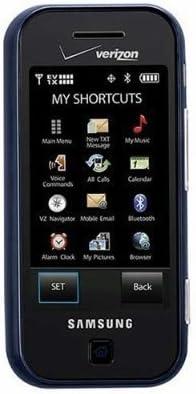
Зураг 3.1: Урд view of the Samsung Glyde U940, showing the 2.8-inch display and navigation buttons. The screen displays "MY SHORTCUTS" with icons for various functions like Main Menu, New TXT Message, My Music, Voice Commands, All Calls, Calendar, Mobile Email, Bluetooth, Alarm Clock, My Pictures, and Browser. "SET" and "Back" buttons are visible below the screen.
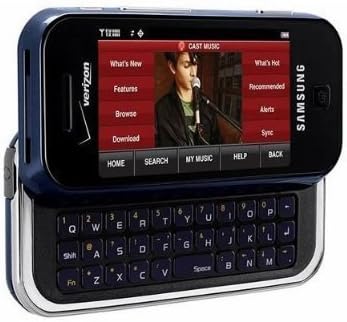
Зураг 3.2: Samsung Glyde U940 with its full QWERTY keyboard extended. The phone is oriented horizontally, displaying a media interface on the screen with options like "What's New", "Features", "Browse", "Download", "What's Hot", "Recommended", "Alerts", and "Sync". Navigation buttons for "HOME", "SEARCH", "MY MUSIC", "HELP", and "BACK" are visible below the screen.
Гол онцлогууд:
- Large 2.8" Display
- Slide-out QWERTY Keyboard
- Мэдрэгчтэй дэлгэцийн интерфэйс
- Full HTML Browser
- 2.0 MP Camera and Camcorder
4. Тохиргоо
4.1. Батерейг суурилуулах
- Утасны ар талд байгаа батерейны тагийг олоорой.
- Gently remove the battery cover by sliding or lifting it.
- Батерейны алтан контактуудыг батерейны тасалгааны контактуудтай зэрэгцүүл.
- Insert the battery firmly into place.
- Replace the battery cover, ensuring it clicks securely.
4.2. Батерейг цэнэглэж байна
- Connect the travel adapter to the charging port on your phone.
- Plug the other end of the travel adapter into a standard electrical outlet.
- Allow the phone to charge completely before initial use. The battery indicator on the screen will show charging status.
- Батерейг бүрэн цэнэглэсний дараа цэнэглэгчийг салга.
4.3. Асаах/унтраах
- Асаахын тулд: Press and hold the Power/End key until the screen lights up.
- Унтраахын тулд: Press and hold the Power/End key until the power-off options appear, then select "Power off".
5. Ашиглалтын заавар
5.1. Мэдрэгчтэй дэлгэц ашиглах
The Samsung Glyde U940 features a resistive touch screen. Use your fingertip or a stylus (if provided) to interact with the display.
- Товш: Lightly touch the screen once to select an item or open an application.
- Чирэх: Touch and hold an item, then move your finger across the screen to reposition it.
- Гүйлгэх: Slide your finger up or down on the screen to navigate through lists or web хуудаснууд.
5.2. QWERTY гар ашиглах нь
Slide the screen horizontally to reveal the full QWERTY keyboard. This keyboard is ideal for typing messages, emails, and web хаягууд.
- Press individual keys to input characters.
- -г ашиглана уу Шилжилт key for uppercase letters and symbols.
- The Fn key provides access to additional functions or symbols.
5.3. Дуудлага хийх, хүлээн авах
- Дуудлага хийх: From the home screen, tap the Phone icon or dial the number using the keypad and press the Call key.
- Дуудлага хүлээн авах: When a call comes in, tap the "Answer" button on the screen.
- Дуудлага дуусгах: Tap the "End" button on the screen or press the Power/End key.
5.4. Мессеж (SMS/MMS)
To send a text or multimedia message:
- From the main menu, select "Messages" or "New TXT Message".
- Хүлээн авагчийн утасны дугаарыг оруулна уу эсвэл харилцагчдаасаа сонгоно уу.
- Type your message using either the touch screen or the QWERTY keyboard.
- To add multimedia (pictures, videos, audio), select the attachment option.
- "Илгээх" дээр товшино уу.
5.5. Camera and Camcorder Functions
The Glyde U940 is equipped with a 2.0 MP camera.
- Зураг авах: Open the Camera application, frame your shot, and press the dedicated camera button or tap the capture icon on the screen.
- Видео бичлэг хийх: Switch to camcorder mode within the Camera application, press the record button to start, and press again to stop.
- Access your captured media in the "My Pictures" or "Gallery" application.
5.6. Web Хөтөч
Utilize the full HTML browser to access the internet.
- From the main menu, select "Browser".
- Хүссэн зүйлээ оруулна уу web дахь хаяг URL баар.
- Use the touch screen to navigate pages, zoom in/out, and click links.
6. Засвар үйлчилгээ
6.1. Зайны арчилгаа
- Батерейг хэт өндөр температурт байлгахаас зайлсхий.
- Зайг цоолж, гэмтээж болохгүй.
- For optimal battery life, avoid frequent partial discharges and charges.
- Хэрэв утсыг удаан хугацаагаар ашиглахгүй бол хагас цэнэгтэй батерейтай нь хадгална уу.
6.2. Төхөөрөмжийг цэвэрлэх
- Use a soft, lint-free cloth to clean the screen and exterior of the phone.
- Түрэмгий химийн бодис, цэвэрлэгээний шүршигч эсвэл зүлгүүрийн материал бүү хэрэглэ.
- Ensure no moisture enters openings such as the charging port or headphone jack.
6.3. Програм хангамжийн шинэчлэлтүүд
Periodically check for available software updates to improve performance and add new features. Consult your service provider or the Samsung webшинэчлэлтийн журмын сайт.
7. Алдаа засах
This section addresses common issues you might encounter with your Samsung Glyde U940.
| Асуудал | Боломжит шийдэл |
|---|---|
| Утас асахгүй байна. | Ensure the battery is correctly installed and fully charged. Connect the charger and attempt to power on. |
| Touch screen is unresponsive or erratic. |
|
| Батерей хурдан дуусдаг. |
|
| Дуудлага хийх эсвэл хүлээн авах боломжгүй. | Check network signal strength. Ensure "Airplane Mode" is not enabled. Contact your service provider if network issues persist. |
| QWERTY keyboard input is incorrect. | Ensure the keyboard is fully extended and locked into position. Restart the device if keys are unresponsive. |
8. Техникийн үзүүлэлтүүд
| Онцлог | Дэлгэрэнгүй |
|---|---|
| Загварын дугаар | U940 |
| Дэлгэц | 2.8 Inches, Touch Screen |
| Оролтын арга | Touch Screen, Slide-out QWERTY Keyboard |
| Камер | 2.0 MP (Camera and Camcorder) |
| Хөтөч | Full HTML Browser |
| Зүйлийн жин | 11.2 унц |
| Хэмжээ | 8.1 x 5.4 x 2.2 инч (Багцын хэмжээ) |
| Холболт | Wireless, USB 2.0 |
| Үйлдвэрлэгч | Samsung |
9. Баталгаат хугацаа ба дэмжлэг
Баталгаат мэдээллийг авахын тулд бүтээгдэхүүндээ дагалдаж буй баталгаат картаас эсвэл албан ёсны Samsung-д зочилно уу website. For technical support, contact your service provider or Samsung customer service.
Samsung хэрэглэгчийн үйлчилгээ: www.samsung.com/us/support/


