
1. ഓവർview
The Philips TAZ2200 is a versatile portable sound machine designed for enjoying various audio formats. It features a top-loading CD player, a front-loading cassette player, FM radio, Bluetooth 6.0 connectivity, USB playback, and a 3.5mm audio input. Equipped with dynamic bass boost and 6W stereo speakers, it delivers rich sound. The unit can be powered by AC mains or batteries and includes a carrying handle for portability.
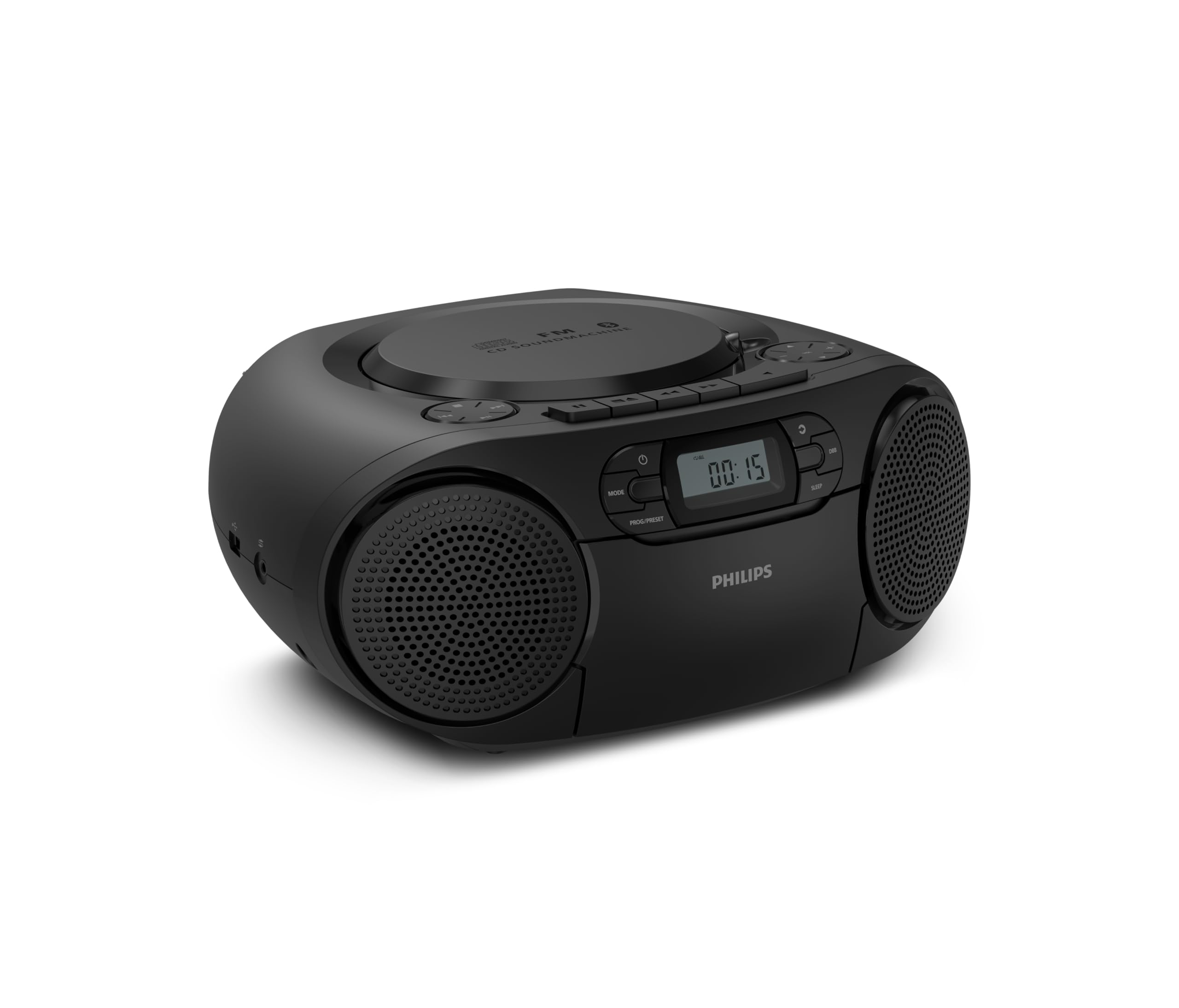
ഫ്രണ്ട് view of the Philips TAZ2200 CD Soundmachine, showing the main display and control buttons.
2 സുരക്ഷാ വിവരങ്ങൾ
Please read these safety instructions carefully before using your device and keep them for future reference. Incorrect use may result in hazards.
- ഊർജ്ജ സ്രോതസ്സ്: നിർദ്ദിഷ്ട പവർ അഡാപ്റ്ററോ ബാറ്ററികളോ മാത്രം ഉപയോഗിക്കുക. വോളിയം ഉറപ്പാക്കുക.tage യൂണിറ്റിന്റെ ആവശ്യകതകളുമായി പൊരുത്തപ്പെടുന്നു.
- ജലവും ഈർപ്പവും: യൂണിറ്റ് മഴ, ഈർപ്പം, തുള്ളികൾ, തെറിക്കൽ എന്നിവയ്ക്ക് വിധേയമാക്കരുത്. പാത്രങ്ങൾ പോലുള്ള ദ്രാവകങ്ങൾ നിറച്ച വസ്തുക്കൾ യൂണിറ്റിൽ വയ്ക്കരുത്.
- വെൻ്റിലേഷൻ: Ensure adequate ventilation. Do not block any ventilation openings. Maintain a minimum distance around the unit for sufficient ventilation.
- ചൂട്: റേഡിയേറ്ററുകൾ, ഹീറ്റ് രജിസ്റ്ററുകൾ, സ്റ്റൗകൾ അല്ലെങ്കിൽ മറ്റ് ഉപകരണങ്ങൾ (ഉൾപ്പെടെ) പോലുള്ള താപ സ്രോതസ്സുകൾക്ക് സമീപം യൂണിറ്റ് സ്ഥാപിക്കരുത്. ampലൈഫയറുകൾ) ചൂട് ഉത്പാദിപ്പിക്കുന്നത്.
- ബാറ്ററികൾ: Follow correct polarity when inserting batteries. Do not mix old and new batteries, or different types of batteries. Remove batteries if the unit is not used for a long period.
- വൃത്തിയാക്കൽ: വൃത്തിയാക്കുന്നതിന് മുമ്പ് പവർ ഔട്ട്ലെറ്റിൽ നിന്ന് യൂണിറ്റ് പ്ലഗ് അൺപ്ലഗ് ചെയ്യുക. മൃദുവായതും ഉണങ്ങിയതുമായ തുണി ഉപയോഗിക്കുക. ലിക്വിഡ് ക്ലീനറുകളോ എയറോസോൾ ക്ലീനറുകളോ ഉപയോഗിക്കരുത്.
- സേവനം: ഈ ഉൽപ്പന്നം സ്വയം സേവിക്കാൻ ശ്രമിക്കരുത്. യോഗ്യതയുള്ള സേവന ഉദ്യോഗസ്ഥർക്ക് എല്ലാ സേവനങ്ങളും റഫർ ചെയ്യുക.
3. ബോക്സിൽ എന്താണുള്ളത്?
അൺപാക്ക് ചെയ്യുമ്പോൾ, താഴെ ലിസ്റ്റ് ചെയ്തിരിക്കുന്ന എല്ലാ ഇനങ്ങളും ഉണ്ടെന്ന് ഉറപ്പാക്കുക:
- Philips TAZ2200 CD Soundmachine
- പവർ കേബിൾ
- ദ്രുത ആരംഭ ഗൈഡ്
- വാറൻ്റി ബുക്ക്ലെറ്റ്
- സുരക്ഷാ ഷീറ്റ്
4. നിയന്ത്രണങ്ങളും കണക്ഷനുകളും
ഫ്രണ്ട് പാനൽ നിയന്ത്രണങ്ങൾ
The front panel features the main display, power button, mode selection, program/preset buttons, and dynamic bass boost (DBB) control. Playback controls for CD and USB are also located here.

വിശദമായ മുൻഭാഗം view showing the display, power, mode, program/preset, and DBB buttons.
Side and Rear Connections
The side of the unit provides a USB port for digital audio playback and a 3.5mm audio input jack for connecting external devices.

വശം view illustrating the USB port and Audio Input jack.
The top of the unit houses the CD compartment and additional playback controls, while the rear features the AC power input and the FM antenna.

മുകളിൽ view showing the CD compartment and associated controls.

പിൻഭാഗം view displaying the AC power input and the telescopic FM antenna.
5. സജ്ജീകരണം
5.1 പവർ സപ്ലൈ
എസി പവർ
- യൂണിറ്റ് സ്വിച്ച് ഓഫ് ആണെന്ന് ഉറപ്പാക്കുക.
- Connect the supplied power cable to the AC IN socket on the rear of the sound machine.
- Plug the other end of the power cable into a wall power outlet.
ബാറ്ററി പവർ
For portable use, the unit can operate on 6 x C-type batteries (not included).
- യൂണിറ്റിന്റെ അടിയിൽ സ്ഥിതിചെയ്യുന്ന ബാറ്ററി കമ്പാർട്ട്മെന്റ് കവർ തുറക്കുക.
- Insert 6 C-type batteries, ensuring correct polarity (+/-) as indicated inside the compartment.
- ബാറ്ററി കമ്പാർട്ട്മെൻ്റ് കവർ സുരക്ഷിതമായി അടയ്ക്കുക.
5.2 ആന്റിന ക്രമീകരണം
For optimal FM radio reception, fully extend the telescopic antenna located at the rear of the unit. Adjust its position and angle to achieve the clearest signal.
6. പ്രവർത്തന നിർദ്ദേശങ്ങൾ
6.1 പൊതു പ്രവർത്തനം
- പവർ ഓൺ/ഓഫ്: അമർത്തുക പവർ യൂണിറ്റ് ഓണാക്കാനോ ഓഫാക്കാനോ ഉള്ള ബട്ടൺ.
- വോളിയം നിയന്ത്രണം: ഉപയോഗിക്കുക VOL+ or വോളിയം - വോളിയം നില ക്രമീകരിക്കുന്നതിനുള്ള ബട്ടണുകൾ.
- ഡൈനാമിക് ബാസ് ബൂസ്റ്റ് (DBB): അമർത്തുക ഡി.ബി.ബി. button to activate or deactivate the dynamic bass boost feature for enhanced bass sound.
- മോഡ് തിരഞ്ഞെടുക്കൽ: അമർത്തുക മോഡ് button repeatedly to switch between CD, Cassette, FM Radio, Bluetooth, USB, and Audio Input modes.
6.2 സിഡി പ്ലേബാക്ക്
- Open the CD compartment cover on top of the unit.
- Place a CD (CD, CD-R, or CD-RW) with the label side facing up onto the spindle.
- സിഡി കമ്പാർട്ട്മെന്റ് കവർ അടയ്ക്കുക.
- അമർത്തുക മോഡ് സിഡി മോഡ് തിരഞ്ഞെടുക്കാനുള്ള ബട്ടൺ.
- അമർത്തുക പ്ലേ/താൽക്കാലികമായി നിർത്തുക പ്ലേബാക്ക് ആരംഭിക്കുന്നതിനുള്ള ബട്ടൺ.
- ഉപയോഗിക്കുക ഒഴിവാക്കുക ബട്ടണുകൾ (|< or >> |) ട്രാക്കുകൾ ഒഴിവാക്കുക.
- അമർത്തിപ്പിടിക്കുക |< or >> | to search within a track.
- അമർത്തുക നിർത്തുക പ്ലേബാക്ക് നിർത്താനുള്ള ബട്ടൺ.
6.3 കാസറ്റ് പ്ലേബാക്ക്
- Open the cassette compartment door on the front of the unit.
- തുറന്ന അറ്റം മുകളിലേക്ക് അഭിമുഖമായി ഒരു കാസറ്റ് ടേപ്പ് തിരുകുക.
- കാസറ്റ് കമ്പാർട്ട്മെന്റിന്റെ വാതിൽ അടയ്ക്കുക.
- അമർത്തുക മോഡ് കാസറ്റ് മോഡ് തിരഞ്ഞെടുക്കാൻ ബട്ടൺ.
- അമർത്തുക കളിക്കുക പ്ലേബാക്ക് ആരംഭിക്കുന്നതിനുള്ള ബട്ടൺ.
- ഉപയോഗിക്കുക ഫാസ്റ്റ് ഫോർവേഡ് or റിവൈൻഡ് ചെയ്യുക buttons to quickly advance or rewind the tape.
- അമർത്തുക നിർത്തുക പ്ലേബാക്ക് നിർത്താനുള്ള ബട്ടൺ.
6.4 എഫ്എം റേഡിയോ
- അമർത്തുക മോഡ് എഫ്എം റേഡിയോ മോഡ് തിരഞ്ഞെടുക്കാൻ ബട്ടൺ.
- ഓട്ടോ സ്കാൻ: അമർത്തിപ്പിടിക്കുക PROG/PRESET ലഭ്യമായ എഫ്എം സ്റ്റേഷനുകൾ സ്വയമേവ സ്കാൻ ചെയ്യാനും സംഭരിക്കാനും ബട്ടൺ.
- സ്വമേധയാലുള്ള ട്യൂണിംഗ്: അമർത്തുക ട്യൂണിംഗ് ബട്ടണുകൾ (|< or >> |) to manually tune to a desired frequency.
- പ്രീസെറ്റുകൾ സംരക്ഷിക്കുന്നു: After tuning to a station, press PROG/PRESET once, then use |< or >> | ഒരു പ്രീസെറ്റ് നമ്പർ തിരഞ്ഞെടുത്ത് അമർത്താൻ PROG/PRESET സ്ഥിരീകരിക്കാൻ വീണ്ടും.
- പ്രീസെറ്റുകൾ തിരിച്ചുവിളിക്കുന്നു: എഫ്എം മോഡിൽ, അമർത്തുക PROG/PRESET repeatedly to cycle through saved preset stations.
6.5 ബ്ലൂടൂത്ത് പ്ലേബാക്ക്
- അമർത്തുക മോഡ് button to select Bluetooth mode. The display will show 'BT' and flash, indicating it's in pairing mode.
- നിങ്ങളുടെ ബ്ലൂടൂത്ത് പ്രാപ്തമാക്കിയ ഉപകരണത്തിൽ (സ്മാർട്ട്ഫോൺ, ടാബ്ലെറ്റ്), ബ്ലൂടൂത്ത് പ്രാപ്തമാക്കി ലഭ്യമായ ഉപകരണങ്ങൾക്കായി തിരയുക.
- Select "Philips TAZ2200" from the list of devices.
- Once paired, the unit will emit a confirmation sound, and 'BT' will stop flashing.
- Start playing audio on your connected device. The sound will be streamed to the sound machine.
6.6 യുഎസ്ബി പ്ലേബാക്ക്
- Insert a USB flash drive into the USB port on the side of the unit.
- അമർത്തുക മോഡ് USB മോഡ് തിരഞ്ഞെടുക്കാനുള്ള ബട്ടൺ.
- യൂണിറ്റ് യാന്ത്രികമായി കണ്ടെത്തി അനുയോജ്യമായ ഓഡിയോ പ്ലേ ചെയ്യാൻ തുടങ്ങും. file(എംപി 3, ഡബ്ല്യുഎവി, ഡബ്ല്യുഎംഎ).
- പ്ലേബാക്ക് നിയന്ത്രണങ്ങൾ ഉപയോഗിക്കുക (പ്ലേ/താൽക്കാലികമായി നിർത്തുക, ഒഴിവാക്കുക, നിർത്തുക) as you would for CD playback.
6.7 Audio Input (AUX)
- Connect one end of a 3.5mm audio cable (not included) to the AUDIO IN jack on the side of the sound machine.
- Connect the other end of the audio cable to the headphone jack or audio output of your external device (e.g., MP3 player, turntable).
- അമർത്തുക മോഡ് button to select Audio Input mode.
- Start playing audio on your external device. The sound will be played through the sound machine.
7. പരിപാലനം
- യൂണിറ്റ് വൃത്തിയാക്കൽ: യൂണിറ്റിന്റെ പുറംഭാഗം മൃദുവായ, ചെറുതായി ഡി-ടച്ച് ഉപയോഗിച്ച് തുടയ്ക്കുക.amp തുണി. ഉരച്ചിലുകളുള്ള ക്ലീനറുകളോ ലായകങ്ങളോ ഉപയോഗിക്കരുത്.
- CD Player Care: Keep the CD compartment clean. If the lens is dirty, use a specialized CD lens cleaner. Avoid touching the lens.
- കാസറ്റ് പ്ലെയർ കെയർ: ഇടയ്ക്കിടെ ടേപ്പ് ഹെഡുകളും പിഞ്ച് റോളറുകളും ഒരു കോട്ടൺ സ്വാബ് ഉപയോഗിച്ച് ചെറുതായി വൃത്തിയാക്കുക d.ampഐസോപ്രോപൈൽ ആൽക്കഹോൾ ഉപയോഗിച്ചാണ് നിർവഹിച്ചത്.
- ബാറ്ററി മാറ്റിസ്ഥാപിക്കൽ: If using batteries, replace all 6 C-type batteries when the unit's performance diminishes or if the unit will not be used for an extended period.
- സംഭരണം: ഉപയോഗത്തിലില്ലാത്തപ്പോൾ, നേരിട്ടുള്ള സൂര്യപ്രകാശത്തിൽ നിന്നും കടുത്ത താപനിലയിൽ നിന്നും മാറി വൃത്തിയുള്ളതും വരണ്ടതുമായ സ്ഥലത്ത് യൂണിറ്റ് സൂക്ഷിക്കുക.
8. പ്രശ്നപരിഹാരം
If you encounter any issues with your Philips TAZ2200, please refer to the table below for common problems and solutions.
| പ്രശ്നം | സാധ്യമായ കാരണം | പരിഹാരം |
|---|---|---|
| ശക്തിയില്ല | പവർ കേബിൾ ബന്ധിപ്പിച്ചിട്ടില്ല; ബാറ്ററികൾ തീർന്നു അല്ലെങ്കിൽ തെറ്റായി ചേർത്തിരിക്കുന്നു. | Check AC power connection; Replace batteries or ensure correct polarity. |
| ശബ്ദമില്ല | ശബ്ദം വളരെ കുറവാണ്; തെറ്റായ മോഡ് തിരഞ്ഞെടുത്തു; ഹെഡ്ഫോണുകൾ കണക്റ്റ് ചെയ്തു. | Increase volume; Select the correct source mode (CD, FM, BT, etc.); Disconnect headphones. |
| സിഡി പ്ലേ ചെയ്യുന്നില്ല | CD inserted incorrectly; CD is dirty or scratched; CD format not supported. | Insert CD with label side up; Clean or replace CD; Ensure CD is CD-R/RW compatible. |
| കാസറ്റ് പ്ലേ ചെയ്യുന്നില്ല | Cassette inserted incorrectly; Tape is damaged. | Insert cassette correctly; Try a different cassette. |
| മോശം എഫ്എം സ്വീകരണം | Antenna not extended or positioned correctly; Weak signal. | ടെലിസ്കോപ്പിക് ആന്റിന പൂർണ്ണമായും നീട്ടി ക്രമീകരിക്കുക; യൂണിറ്റ് മറ്റൊരു സ്ഥലത്തേക്ക് മാറ്റാൻ ശ്രമിക്കുക. |
| ബ്ലൂടൂത്ത് കണക്റ്റ് ചെയ്യുന്നില്ല | Unit not in pairing mode; Bluetooth device too far; Device already paired with another unit. | Ensure unit is in Bluetooth mode and flashing; Move device closer; Disconnect from other devices. |
| USB പ്ലേബാക്ക് പ്രശ്നങ്ങൾ | USB drive not inserted correctly; Incompatible file format; USB drive corrupted. | Reinsert USB drive; Ensure files are MP3, WAV, or WMA; Try a different USB drive. |
9 സ്പെസിഫിക്കേഷനുകൾ
| ഫീച്ചർ | സ്പെസിഫിക്കേഷൻ |
|---|---|
| ബ്രാൻഡ് | ഫിലിപ്പ് |
| മോഡൽ നമ്പർ | TAZ2200/10 |
| കണക്റ്റിവിറ്റി ടെക്നോളജി | Bluetooth 6.0, USB, Audio Input (3.5mm) |
| സ്പീക്കർ തരം | Stereo (2 speakers) |
| ഔട്ട്പുട്ട് പവർ | 6 വാട്ട്സ് (പരമാവധി) |
| പിന്തുണയ്ക്കുന്ന മീഡിയ | CD, CD-R, CD-RW, Cassette, USB (MP3, WAV, WMA) |
| റേഡിയോ ട്യൂണർ | Digital FM with 20 presets |
| പവർ ഉറവിടം | AC (wired), 6 x C-type batteries (not included) |
| അളവുകൾ (LxWxH) | 24.5 x 28.5 x 12.5 സെ.മീ |
| ഭാരം | 1.35 കിലോഗ്രാം |
| നിറം | വെള്ളി |
10. വാറൻ്റിയും പിന്തുണയും
10.1 ഉൽപ്പന്ന വാറന്റി
This Philips TAZ2200 CD Soundmachine comes with a 2 വർഷത്തെ വാറൻ്റി വാങ്ങിയ തീയതി മുതൽ. വാറന്റി ക്ലെയിമുകൾക്കായി നിങ്ങളുടെ വാങ്ങിയതിന്റെ തെളിവ് സൂക്ഷിക്കുക. സാധാരണ ഉപയോഗ സാഹചര്യങ്ങളിൽ നിർമ്മാണ വൈകല്യങ്ങളും തകരാറുകളും വാറന്റിയിൽ ഉൾപ്പെടുന്നു.
10.2 ഉപഭോക്തൃ പിന്തുണ
For technical assistance, troubleshooting beyond this manual, or warranty service, please refer to the contact information provided in the warranty booklet included with your product. You can also visit the official Philips support website for your region for further assistance and FAQs.