
1. ആമുഖം
This manual provides essential information for the safe and efficient use of your HP 17.3 Inch FHD Business Laptop. Please read this guide thoroughly before operating your device to ensure optimal performance and longevity. This laptop is designed for business and everyday computing tasks, offering a large display, robust performance, and portability.
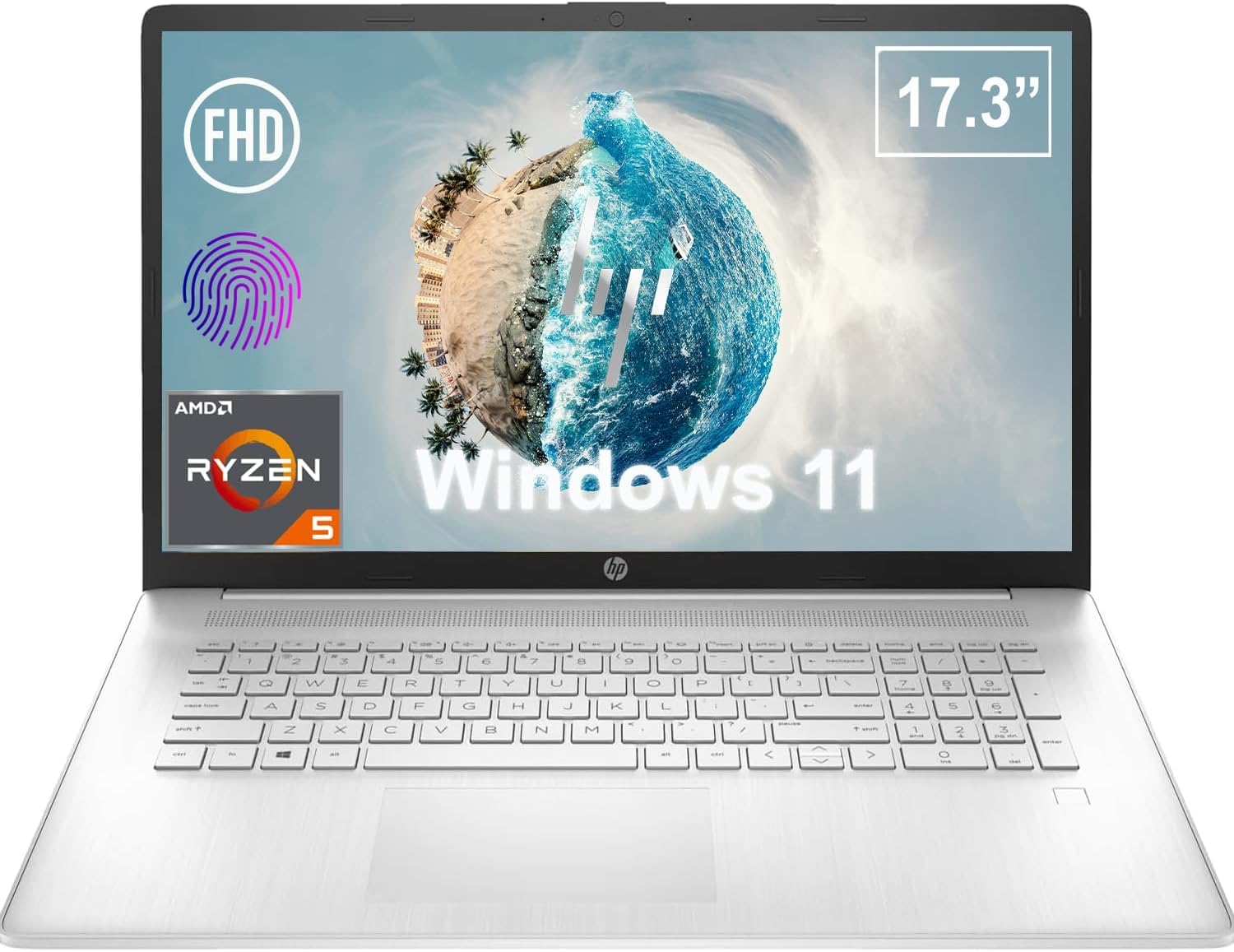
ചിത്രം 1.1: മുൻഭാഗം view of the HP 17.3 Inch FHD Business Laptop, showcasing the large display and keyboard.
2. സജ്ജീകരണം
2.1 അൺബോക്സിംഗും പ്രാരംഭ പരിശോധനയും
പാക്കേജിംഗിൽ നിന്ന് എല്ലാ ഘടകങ്ങളും ശ്രദ്ധാപൂർവ്വം നീക്കം ചെയ്യുക. ഇനിപ്പറയുന്ന ഇനങ്ങൾ ഉണ്ടെന്ന് ഉറപ്പാക്കുക:
- HP 17.3 Inch FHD Business Laptop
- Power Adapter (45 W Smart AC Power Adapter)
- ഡോക്യുമെന്റേഷൻ (ഈ മാനുവൽ, വാറന്റി വിവരങ്ങൾ)
Inspect the laptop and accessories for any signs of damage. If any items are missing or damaged, contact your retailer or HP support immediately.
2.2 പവർ അഡാപ്റ്റർ ബന്ധിപ്പിക്കുന്നു
Before first use, ensure the laptop is fully charged. Connect the power adapter to the AC smart pin port on the side of the laptop and then plug the adapter into a power outlet.
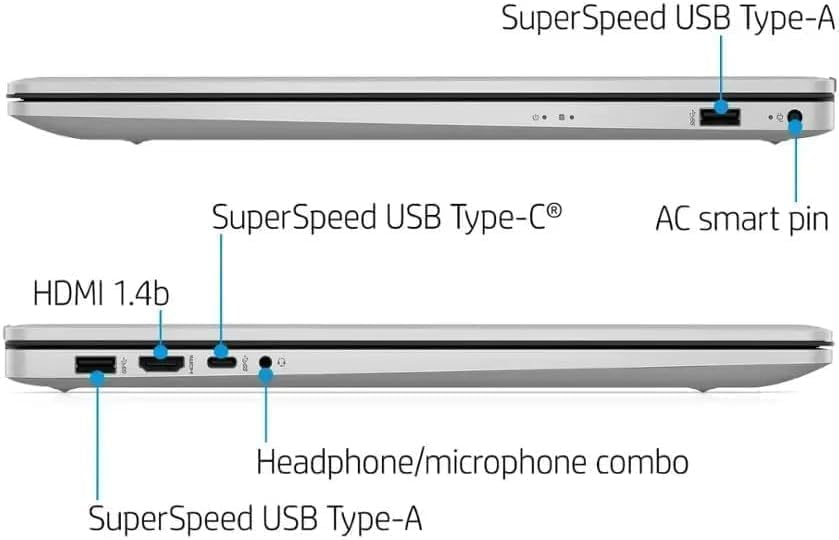
ചിത്രം 2.1: വശം view illustrating the location of the AC smart pin and other ports.
2.3 പ്രാരംഭ പവർ ഓണും വിൻഡോസ് സജ്ജീകരണവും
Press the power button to turn on the laptop. Follow the on-screen instructions to complete the Windows 11 Home setup process. This includes setting up your user account, network connection, and initial preferences.
3. ലാപ്ടോപ്പ് പ്രവർത്തിപ്പിക്കൽ
3.1 കീബോർഡും ടച്ച്പാഡും
The laptop features a full-size QWERTY keyboard with a 10-key number pad for efficient data entry. The integrated touchpad provides precise cursor control. Refer to the operating system's settings for customizing touchpad gestures and keyboard shortcuts.
3.2 ഫിംഗർപ്രിന്റ് റീഡർ
For enhanced security and convenient login, utilize the integrated fingerprint reader. Set up your fingerprints through Windows Hello in the Windows 11 settings.
3.3 Webക്യാമറയും മൈക്രോഫോണുകളും
The HP True Vision 720p HD Camera and integrated dual array digital microphones are located at the top of the display. These are suitable for video conferencing and online communication.
3.4 കണക്റ്റിവിറ്റി
- വൈഫൈ: The laptop supports 802.11a/b/g/n/ac Wi-Fi for wireless internet access. Connect to available networks via the Windows network settings.
- ബ്ലൂടൂത്ത്: Bluetooth 5 allows for wireless connection to compatible devices such as headphones, mice, and keyboards. Enable and manage Bluetooth devices through Windows settings.
3.5 Ports and External Devices
ബാഹ്യ ഉപകരണങ്ങൾ ബന്ധിപ്പിക്കുന്നതിന് ലാപ്ടോപ്പിൽ വിവിധ പോർട്ടുകൾ സജ്ജീകരിച്ചിരിക്കുന്നു:
- 1 x USB Type-C (5Gbps, Data Only): For connecting USB-C compatible devices and data transfer.
- 2 x USB Type-A (5Gbps): For connecting standard USB devices like external drives, mice, or keyboards.
- 1 x HDMI 1.4b: For connecting to external displays or projectors.
- 1 x Headphone/Microphone Combo: For connecting a headset with a single 3.5mm jack.
- 1 x AC Smart Pin: For connecting the power adapter.

Figure 3.1: Open view of the laptop, highlighting the keyboard and touchpad area.
3.6 ബാറ്ററി മാനേജ്മെൻ്റ്
The laptop is powered by a 3-Cell, 41 Wh Li-ion battery, offering up to 8 hours and 30 minutes of video playback. Use the provided 45 W Smart AC Power Adapter for charging. HP Fast Charge technology allows for quicker charging times.
4. പരിപാലനം
4.1 ലാപ്ടോപ്പ് വൃത്തിയാക്കൽ
To maintain the laptop's appearance and functionality:
- മൃദുവായ, ലിന്റ് രഹിത തുണി ഉപയോഗിക്കുകampened with water or a specialized screen cleaner for the display.
- കീബോർഡിനും ഷാസിക്കും മൃദുവായതും ഉണങ്ങിയതുമായ തുണി ഉപയോഗിക്കുക. കഠിനമായ രാസവസ്തുക്കളോ ഉരച്ചിലുകളോ ഉള്ള വസ്തുക്കൾ ഒഴിവാക്കുക.
- വൃത്തിയാക്കുന്നതിനുമുമ്പ് ലാപ്ടോപ്പ് പവർ ഓഫ് ചെയ്തിട്ടുണ്ടെന്നും പ്ലഗ് ഊരിവെച്ചിട്ടുണ്ടെന്നും ഉറപ്പാക്കുക.
4.2 സോഫ്റ്റ്വെയർ അപ്ഡേറ്റുകൾ
മികച്ച പ്രകടനം, സുരക്ഷ, അനുയോജ്യത എന്നിവ ഉറപ്പാക്കാൻ നിങ്ങളുടെ വിൻഡോസ് ഓപ്പറേറ്റിംഗ് സിസ്റ്റവും ഡ്രൈവറുകളും പതിവായി അപ്ഡേറ്റ് ചെയ്യുക. ക്രമീകരണ മെനുവിലൂടെ വിൻഡോസ് അപ്ഡേറ്റ് ആക്സസ് ചെയ്യാൻ കഴിയും.
4.3 Security Software
The laptop comes preloaded with McAfee LiveSafe for security. Ensure this software is active and updated to protect against viruses and other threats.
5. പ്രശ്നപരിഹാരം
നിങ്ങളുടെ HP ലാപ്ടോപ്പിൽ നിങ്ങൾ നേരിട്ടേക്കാവുന്ന സാധാരണ പ്രശ്നങ്ങൾ ഈ വിഭാഗം അഭിസംബോധന ചെയ്യുന്നു.
5.1 വൈദ്യുതി പ്രശ്നങ്ങൾ
- ലാപ്ടോപ്പ് ഓണാകുന്നില്ല: Ensure the power adapter is securely connected to both the laptop and a working power outlet. Verify the battery is charged.
- ബാറ്ററി ചാർജ്ജുചെയ്യുന്നില്ല: പവർ അഡാപ്റ്ററിനും കേബിളിനും കേടുപാടുകൾ സംഭവിച്ചിട്ടുണ്ടോ എന്ന് പരിശോധിക്കുക. മറ്റൊരു പവർ ഔട്ട്ലെറ്റ് പരീക്ഷിക്കുക.
5.2 ഡിസ്പ്ലേ പ്രശ്നങ്ങൾ
- സ്ക്രീനിൽ ചിത്രമൊന്നുമില്ല: ലാപ്ടോപ്പിന്റെ ഡിസ്പ്ലേയിലാണോ പ്രശ്നം എന്ന് പരിശോധിക്കാൻ ഒരു ബാഹ്യ മോണിറ്റർ ബന്ധിപ്പിക്കുക. ലാപ്ടോപ്പ് പുനരാരംഭിക്കുക.
- മിന്നിമറയുന്ന അല്ലെങ്കിൽ വികലമായ ചിത്രം: ഗ്രാഫിക്സ് ഡ്രൈവറുകൾ അപ്ഡേറ്റ് ചെയ്യുക. വിൻഡോസ് സെറ്റിംഗ്സിൽ ഡിസ്പ്ലേ റെസല്യൂഷനും പുതുക്കൽ നിരക്കും ക്രമീകരിക്കുക.
5.3 കണക്റ്റിവിറ്റി പ്രശ്നങ്ങൾ
- വൈഫൈ കണക്റ്റ് ചെയ്യുന്നില്ല: Ensure Wi-Fi is enabled. Restart your router and the laptop. Check network settings for correct password and configuration.
- ബ്ലൂടൂത്ത് ഉപകരണം ജോടിയാക്കുന്നില്ല: Ensure Bluetooth is enabled on both devices. Make sure the device is in pairing mode and within range.
കൂടുതൽ സങ്കീർണ്ണമായ പ്രശ്നങ്ങൾക്ക്, HP പിന്തുണ പരിശോധിക്കുക. webസൈറ്റ് അല്ലെങ്കിൽ ഉപഭോക്തൃ സേവനവുമായി ബന്ധപ്പെടുക.
6 സ്പെസിഫിക്കേഷനുകൾ
| ഫീച്ചർ | വിശദാംശങ്ങൾ |
|---|---|
| ബ്രാൻഡ് | HP |
| മോഡലിൻ്റെ പേര് | HP17 |
| മോഡൽ നമ്പർ | i5-1135G7 |
| സ്ക്രീൻ വലിപ്പം | 17.3 ഇഞ്ച് |
| ഡിസ്പ്ലേ തരം | IPS, Anti-Glare, LED |
| റെസലൂഷൻ | 1920 x 1080 (FHD) |
| പുതുക്കിയ നിരക്ക് | 60 Hz |
| പ്രോസസ്സർ | AMD Ryzen 5 5500U (6 Cores, 12 Threads, up to 4.0 GHz Max Boost Clock) |
| ഗ്രാഫിക്സ് | ഇന്റഗ്രേറ്റഡ് എഎംഡി റേഡിയൻ ഗ്രാഫിക്സ് |
| റാം മെമ്മറി | 32 GB DDR4-3200 MHz (Max 64 GB) |
| സംഭരണം | 1 ടിബി പിസിഐഇ എൻവിഎംഇ എം.2 എസ്എസ്ഡി |
| ഓപ്പറേറ്റിംഗ് സിസ്റ്റം | Windows 11 Home, 64-bit, English |
| വയർലെസ് കണക്റ്റിവിറ്റി | 802.11a/b/g/n/ac Wi-Fi, Bluetooth 5 |
| തുറമുഖങ്ങൾ | 1x USB Type-C (5Gbps), 2x USB Type-A (5Gbps), 1x HDMI 1.4b, 1x Headphone/Microphone Combo, 1x AC Smart Pin |
| Webക്യാമറ | എച്ച്പി ട്രൂ വിഷൻ 720p എച്ച്ഡി ക്യാമറ |
| ഓഡിയോ | Dual Speakers, Integrated Dual Array Digital Microphones |
| ബാറ്ററി | 3-Cell, 41 Wh Li-ion (Up to 8.5 hours video playback) |
| പവർ അഡാപ്റ്റർ | 45 W Smart AC Power Adapter |
| അളവുകൾ (W x D x H) | 40.07 x 25.78 x 2.06 cm (14.14"L x 9.31"W x 0.78"Th) |
| ഭാരം | 2.07 കിലോയിൽ ആരംഭിക്കുന്നു |
| പ്രത്യേക സവിശേഷതകൾ | Fingerprint Reader, Lightweight Design, HP Fast Charge |
7. വാറണ്ടിയും പിന്തുണയും
7.1 വാറൻ്റി വിവരങ്ങൾ
This HP laptop comes with a 1-year manufacturer's limited warranty. For detailed terms and conditions, please refer to the warranty documentation included with your product or visit the official HP support webസൈറ്റ്.
7.2 ഉപഭോക്തൃ പിന്തുണ
If you encounter issues that cannot be resolved using the troubleshooting steps in this manual, please contact HP customer support. You can find contact information and additional resources on the official HP webസൈറ്റ്:
- HP പിന്തുണ Webസൈറ്റ്: support.hp.com
- HP സ്റ്റോർ: ആമസോണിലെ HP സ്റ്റോർ