
1. ആമുഖം
This manual provides essential instructions for the safe and efficient use of your Samsung Galaxy A15 5G smartphone, model SM-S156V. This device is designed for use with Tracfone services. Please read this manual thoroughly before operating your device to ensure optimal performance and longevity. The Galaxy A15 5G features a 6.5-inch Super AMOLED display, a MediaTek Dimensity 6100+ processor, 4GB of RAM, and a versatile triple-camera system, powered by a 5000mAh battery.
2. സജ്ജീകരണം
2.1. അൺബോക്സിംഗും പ്രാരംഭ പരിശോധനയും
Carefully remove all items from the packaging. Ensure the device and included USB cable are present and undamaged. This renewed device may not include additional accessories such as a wall adapter or headphones.
2.2. സിം കാർഡ് ഇടുന്നു
Your Samsung Galaxy A15 5G SM-S156V is locked to Tracfone. You will need a Tracfone compatible SIM card. Locate the SIM card tray on the side of the device. Use the SIM ejector tool (if provided, otherwise a small paperclip) to open the tray. Place the SIM card into the tray with the gold contacts facing down, ensuring it is correctly oriented. Gently push the tray back into the slot until it clicks into place.
2.3 ഉപകരണം ചാർജ് ചെയ്യുന്നു
Before first use, fully charge the device. Connect the USB cable to the phone's charging port and the other end to a compatible USB power adapter (not included) or a computer's USB port. The charging indicator will appear on the screen. Allow the device to charge until the battery icon shows a full charge.
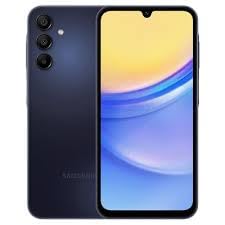
ചിത്രം 1: Samsung Galaxy A15 5G SM-S156V. This image displays the device's front screen and a partial view of its side, highlighting its sleek design and blue-black finish. The charging port is typically located at the bottom edge of the device.
2.4. പവർ ഓണും പ്രാരംഭ സജ്ജീകരണവും
Press and hold the Power/Side key until the Samsung logo appears. Follow the on-screen prompts to complete the initial setup:
- ഭാഷ തിരഞ്ഞെടുക്കൽ: നിങ്ങൾ തിരഞ്ഞെടുത്ത ഭാഷ തിരഞ്ഞെടുക്കുക.
- Wi-Fi കണക്ഷൻ: വേഗത്തിലുള്ള സജ്ജീകരണത്തിനും സോഫ്റ്റ്വെയർ അപ്ഡേറ്റുകൾക്കും ഒരു വൈഫൈ നെറ്റ്വർക്കിലേക്ക് കണക്റ്റുചെയ്യുക.
- Google അക്കൗണ്ട്: Sign in with your Google account or create a new one. This is essential for downloading apps from the Google Play Store and accessing Google services.
- ഡാറ്റ കൈമാറ്റം: If you are transferring data from an old device, follow the instructions provided.
- സുരക്ഷാ സജ്ജീകരണം: Set up a screen lock (PIN, pattern, password) and consider enabling fingerprint or face recognition for enhanced security.
3. നിങ്ങളുടെ ഉപകരണം പ്രവർത്തിപ്പിക്കുന്നു
3.1. അടിസ്ഥാന നാവിഗേഷൻ
The Galaxy A15 5G uses a touchscreen interface. Use gestures such as tapping, swiping, pinching, and spreading to navigate. The navigation bar at the bottom of the screen typically includes Home, Back, and Recent Apps buttons (or gestures, depending on your settings).
3.2. കോളുകൾ ചെയ്യുക, സന്ദേശങ്ങൾ അയയ്ക്കുക
- കോളുകൾ: ടാപ്പ് ചെയ്യുക ഫോൺ icon, enter the number, and tap the call button.
- സന്ദേശങ്ങൾ: ടാപ്പ് ചെയ്യുക സന്ദേശങ്ങൾ icon, tap the new message button, enter the recipient and your message, then send.
3.3. Internet Connectivity (Wi-Fi and 5G)
- വൈഫൈ: പോകുക ക്രമീകരണങ്ങൾ > കണക്ഷനുകൾ > വൈ-ഫൈ. Turn Wi-Fi on and select your desired network. Enter the password if required.
- 5G Mobile Data: Ensure your Tracfone plan includes 5G data. Go to ക്രമീകരണങ്ങൾ > കണക്ഷനുകൾ > ഡാറ്റ ഉപയോഗം and ensure Mobile data is enabled.
3.4. ക്യാമറ ഉപയോഗിക്കുന്നത്
The Galaxy A15 5G features a versatile triple-camera system. Tap the ക്യാമറ icon to open the camera app. Select your desired mode (Photo, Video, Portrait, etc.), frame your shot, and tap the shutter button to capture images or start/stop video recording.
3.5. ആപ്പ് മാനേജ്മെന്റ്
Download new applications from the Google Play Store. To manage installed apps, go to ക്രമീകരണങ്ങൾ > ആപ്പുകൾ. From here, you can uninstall, force stop, or clear data for individual applications.
3.6. സുരക്ഷാ സവിശേഷതകൾ
Protect your device and data by setting up security features. Navigate to ക്രമീകരണങ്ങൾ > സുരക്ഷയും സ്വകാര്യതയും to configure screen lock options (PIN, pattern, password), fingerprint recognition, and face recognition.
3.7. ഓഡിയോ putട്ട്പുട്ട്
Please note that the Samsung Galaxy A15 5G SM-S156V does അല്ല include a traditional 3.5mm headphone jack. Audio output is primarily through the device's speakers, Bluetooth headphones, or USB-C compatible audio accessories.
4. പരിപാലനം
4.1. നിങ്ങളുടെ ഉപകരണം വൃത്തിയാക്കൽ
നിങ്ങളുടെ ഫോൺ വൃത്തിയാക്കാൻ, മൃദുവായതും ലിന്റ് രഹിതവുമായ ഒരു തുണി ഉപയോഗിക്കുക. കഠിനമായ പാടുകൾക്ക്, ചെറുതായി dampen the cloth with water or a screen cleaner specifically designed for electronics. Avoid using harsh chemicals, abrasive materials, or excessive moisture, as these can damage the device.
4.2. സോഫ്റ്റ്വെയർ അപ്ഡേറ്റുകൾ
Keep your device's software up to date to ensure optimal performance, security, and access to new features. Go to ക്രമീകരണങ്ങൾ > സോഫ്റ്റ്വെയർ അപ്ഡേറ്റ് ടാപ്പ് ചെയ്യുക ഡൗൺലോഡ് ചെയ്ത് ഇൻസ്റ്റാൾ ചെയ്യുക. Ensure your device is connected to Wi-Fi and has sufficient battery charge before performing an update.
4.3. ബാറ്ററി പരിചരണം
The Galaxy A15 5G is equipped with a 5000mAh battery. To prolong battery life:
- തീവ്രമായ താപനില ഒഴിവാക്കുക.
- ബാറ്ററി ഇടയ്ക്കിടെ പൂർണ്ണമായും തീർന്നുപോകാൻ അനുവദിക്കരുത്.
- Use the original or certified compatible chargers.
- പശ്ചാത്തല ആപ്പ് ഉപയോഗവും സ്ക്രീൻ തെളിച്ചവും നിയന്ത്രിക്കുക.
4.4. സ്റ്റോറേജ് മാനേജ്മെൻ്റ്
Your device comes with 64GB of internal storage. Regularly check your storage usage by going to ക്രമീകരണങ്ങൾ > ബാറ്ററിയും ഉപകരണ പരിപാലനവും > സംഭരണംഅനാവശ്യമായത് ഇല്ലാതാക്കുക files, clear app caches, and uninstall unused apps to free up space and maintain performance.
5. പ്രശ്നപരിഹാരം
നിങ്ങളുടെ ഉപകരണത്തിൽ നിങ്ങൾ നേരിട്ടേക്കാവുന്ന സാധാരണ പ്രശ്നങ്ങളെ ഈ വിഭാഗം അഭിസംബോധന ചെയ്യുന്നു.
5.1. ഉപകരണം ഓണാക്കുന്നില്ല
- ബാറ്ററി ചാർജ്ജ് ചെയ്തിട്ടുണ്ടെന്ന് ഉറപ്പാക്കുക. ചാർജർ കണക്റ്റ് ചെയ്ത് പവർ ഓൺ ചെയ്യാൻ ശ്രമിക്കുന്നതിന് മുമ്പ് കുറച്ച് മിനിറ്റ് കാത്തിരിക്കുക.
- Perform a forced restart: Press and hold the Volume Down key and the Power/Side key simultaneously for more than 7 seconds.
5.2. നെറ്റ്വർക്ക് കണക്റ്റിവിറ്റി പ്രശ്നങ്ങൾ
- No Signal/Calls: Check if the SIM card is properly inserted. Ensure mobile data is enabled in settings. Contact Tracfone customer support to verify your service plan.
- Wi-Fi കണക്ഷൻ പ്രശ്നങ്ങൾ: Restart your router and the phone. Forget the network in Wi-Fi settings and reconnect.
5.3. ആപ്പുകൾ ക്രാഷാകുകയോ മരവിപ്പിക്കുകയോ ചെയ്യുന്നു
- ആപ്പ് അടച്ച് വീണ്ടും തുറക്കുക.
- ആപ്പിന്റെ കാഷെ മായ്ക്കുക: പോകുക ക്രമീകരണങ്ങൾ > ആപ്പുകൾ, select the app, then സംഭരണം > കാഷെ മായ്ക്കുക.
- ഗൂഗിൾ പ്ലേ സ്റ്റോറിൽ നിന്ന് ആപ്പ് അപ്ഡേറ്റ് ചെയ്യുക.
- പ്രശ്നം നിലനിൽക്കുകയാണെങ്കിൽ, ആപ്പ് അൺഇൻസ്റ്റാൾ ചെയ്ത് വീണ്ടും ഇൻസ്റ്റാൾ ചെയ്യുക.
5.4. ബാറ്ററി വേഗത്തിൽ തീർന്നു പോകുന്നു
- ബാറ്ററി ഉപയോഗം പരിശോധിക്കുക ക്രമീകരണങ്ങൾ > ബാറ്ററിയും ഉപകരണ പരിപാലനവും > ബാറ്ററി പവർ-ആകർഷകമായ ആപ്പുകൾ തിരിച്ചറിയാൻ.
- ഉപയോഗത്തിലില്ലാത്തപ്പോൾ സ്ക്രീൻ തെളിച്ചം കുറയ്ക്കുക, GPS, ബ്ലൂടൂത്ത് അല്ലെങ്കിൽ Wi-Fi പോലുള്ള അനാവശ്യ സവിശേഷതകൾ പ്രവർത്തനരഹിതമാക്കുക.
- എല്ലാ ആപ്പുകളും അപ്ഡേറ്റ് ചെയ്തിട്ടുണ്ടെന്ന് ഉറപ്പാക്കുക.
5.5. ഒരു ഫാക്ടറി റീസെറ്റ് നടത്തുന്നു
നിങ്ങൾക്ക് സ്ഥിരമായ പ്രശ്നങ്ങൾ അനുഭവപ്പെടുകയാണെങ്കിൽ, ഫാക്ടറി റീസെറ്റ് വഴി അവ പരിഹരിക്കപ്പെട്ടേക്കാം. മുന്നറിയിപ്പ്: ഇത് നിങ്ങളുടെ ഉപകരണത്തിലെ എല്ലാ ഡാറ്റയും മായ്ക്കും. തുടരുന്നതിന് മുമ്പ് പ്രധാനപ്പെട്ട ഡാറ്റയുടെ ബാക്കപ്പ് എടുക്കുക. ഇതിലേക്ക് പോകുക ക്രമീകരണങ്ങൾ > ജനറൽ മാനേജ്മെന്റ് > റീസെറ്റ് > ഫാക്ടറി ഡാറ്റ റീസെറ്റ് കൂടാതെ സ്ക്രീനിലെ നിർദ്ദേശങ്ങൾ പാലിക്കുക.
6 സ്പെസിഫിക്കേഷനുകൾ
Key technical specifications for the Samsung Galaxy A15 5G SM-S156V:
| ഫീച്ചർ | സ്പെസിഫിക്കേഷൻ |
|---|---|
| മോഡലിൻ്റെ പേര് | Galaxy A15 5G (SM-S156V) |
| ഓപ്പറേറ്റിംഗ് സിസ്റ്റം | ആൻഡ്രോയിഡ് 14 |
| പ്രദർശിപ്പിക്കുക | 6.5-inch Super AMOLED, 1080 x 2400 resolution, 90Hz Refresh Rate |
| പ്രോസസ്സർ | MediaTek Dimensity 6100+ (2.2 GHz CPU Speed) |
| റാം | 4 ജിബി |
| ആന്തരിക സംഭരണം | 64 ജിബി |
| ബാറ്ററി ശേഷി | 5000 mAh |
| കണക്റ്റിവിറ്റി | 5ജി, വൈ-ഫൈ, ബ്ലൂടൂത്ത്, ജിപിഎസ് |
| ഓഡിയോ ജാക്ക് | ഹെഡ്ഫോൺ ജാക്ക് ഇല്ല |
| അളവുകൾ (L x W x H) | 6.3 x 3.02 x 0.33 ഇഞ്ച് |
| ഇനത്തിൻ്റെ ഭാരം | 7 ഔൺസ് |
| വയർലെസ് കാരിയർ | ട്രാക്ക്ഫോൺ (ലോക്ക് ചെയ്തു) |
| ബോക്സിൽ എന്താണുള്ളത് | USB കേബിൾ |
7. വാറൻ്റിയും പിന്തുണയും
As a renewed product, your Samsung Galaxy A15 5G SM-S156V may come with a specific warranty provided by the seller or the Amazon Renewed program, rather than a standard manufacturer's warranty. Please refer to the purchase documentation or contact your seller, ElectroDealz LLC, for details regarding the warranty period and coverage.
For technical support related to device functionality, you may contact Samsung customer service. For service-related inquiries (e.g., plan, billing, network issues), please contact Tracfone customer support directly.
- സാംസങ് പിന്തുണ: ഔദ്യോഗിക സാംസങ് സന്ദർശിക്കുക webപിന്തുണാ ഉറവിടങ്ങൾ, പതിവുചോദ്യങ്ങൾ, ബന്ധപ്പെടാനുള്ള വിവരങ്ങൾ എന്നിവയ്ക്കുള്ള സൈറ്റ്.
- Tracfone Support: Visit the official Tracfone website or call their customer service number for assistance with your mobile service.
- വിൽപ്പനക്കാരുടെ പിന്തുണ: For issues related to the renewed condition or specific seller warranty, contact ElectroDealz LLC via your Amazon order history.