
1. ഓവർview
The BALILA CM900 Conference Speakerphone is designed to provide clear and efficient audio communication for meetings and calls. Featuring 4 AI omnidirectional microphones with 360° voice pickup up to 20 feet (7 meters), advanced noise reduction, and versatile connectivity options (USB-C and Bluetooth 5.3), this device is suitable for small to mid-sized meeting rooms and home offices. It ensures high-quality audio for up to 16 participants and is compatible with major conferencing platforms.

Figure 1: BALILA CM900 Conference Speakerphone
2. എന്താണ് ഉൾപ്പെടുത്തിയിരിക്കുന്നത്
എല്ലാ ഇനങ്ങളും ഉണ്ടെന്ന് ഉറപ്പാക്കാൻ പാക്കേജ് ഉള്ളടക്കങ്ങൾ പരിശോധിക്കുക:
- 1x BALILA CM900 Speakerphone
- 1x USB-C to USB Cable
- 1x USB-A Adapter
- 1x ഉപയോക്തൃ മാനുവൽ

Video 1: BALILA CM900 Conference Speaker and Microphone overview. This video demonstrates the physical product and its included accessories.
3. ഉൽപ്പന്ന ഡയഗ്രമും നിയന്ത്രണങ്ങളും
Familiarize yourself with the buttons and ports on your CM900 speakerphone:

Figure 2: Diagram illustrating the user-friendly controls and ports of the BALILA CM900 speakerphone.
- പവർ ബട്ടൺ: ഉപകരണം ഓണാക്കാനോ ഓഫാക്കാനോ അമർത്തിപ്പിടിക്കുക.
- നിശബ്ദമാക്കുക/അൺമ്യൂട്ടുചെയ്യുക ബട്ടൺ: Press to mute or unmute the microphones.
- വോളിയം - ബട്ടൺ: സ്പീക്കർ വോളിയം കുറയ്ക്കാൻ അമർത്തുക.
- വോളിയം + ബട്ടൺ: സ്പീക്കർ വോളിയം വർദ്ധിപ്പിക്കാൻ അമർത്തുക.
- ബ്ലൂടൂത്ത് ബട്ടൺ: ബ്ലൂടൂത്ത് ജോടിയാക്കൽ മോഡിൽ പ്രവേശിക്കാൻ അമർത്തുക.
- ഫോൺ ബട്ടൺ: കോൾ മാനേജ്മെന്റിനായി ഉപയോഗിക്കുന്നു (കോളുകൾക്ക് ഉത്തരം നൽകുക/അവസാനിപ്പിക്കുക).
- യുഎസ്ബി-സി പോർട്ട്: ചാർജ് ചെയ്യുന്നതിനും കമ്പ്യൂട്ടറിലേക്ക് വയർ വഴി ബന്ധിപ്പിക്കുന്നതിനും.
4. സജ്ജീകരണം
4.1 ഉപകരണം ചാർജ് ചെയ്യുന്നു
Before first use, fully charge your CM900 speakerphone. A full charge takes approximately 3 hours and provides over 12 hours of talk time.
- Connect the provided USB-C to USB cable to the USB-C port on the speakerphone.
- കേബിളിന്റെ മറ്റേ അറ്റം ഒരു USB പവർ അഡാപ്റ്ററുമായി (ഉൾപ്പെടുത്തിയിട്ടില്ല) അല്ലെങ്കിൽ ഒരു കമ്പ്യൂട്ടറിന്റെ USB പോർട്ടുമായി ബന്ധിപ്പിക്കുക.
- The indicator light will show charging status and turn off when fully charged.
4.2 ബ്ലൂടൂത്ത് വഴി ബന്ധിപ്പിക്കുന്നു
The CM900 supports Bluetooth 5.3 for wireless connection up to 66 feet (20 meters).
- Press and hold the Power button to turn on the speakerphone. It will announce "Power on, Bluetooth mode" and the Bluetooth indicator will flash blue.
- നിങ്ങളുടെ ഉപകരണത്തിൽ (സ്മാർട്ട്ഫോൺ, ടാബ്ലെറ്റ്, കമ്പ്യൂട്ടർ), ബ്ലൂടൂത്ത് പ്രവർത്തനക്ഷമമാക്കി ലഭ്യമായ ഉപകരണങ്ങൾക്കായി തിരയുക.
- Select "BALILA CM900" from the list of devices.
- Once connected, the speakerphone will announce "Bluetooth connected" and the indicator light will turn solid blue.
4.3 Connecting via USB-C
For a wired connection, use the provided USB-C to USB cable.
- Connect the USB-C end of the cable to the speakerphone's USB-C port.
- Connect the USB-A end of the cable to your computer's USB port. If your computer only has USB-C ports, use the included USB-A adapter.
- The device will be automatically recognized by your computer, requiring no additional drivers.

Figure 3: Demonstrates the plug-and-play connectivity options for the BALILA CM900, including Bluetooth and USB-C.
5. ഓപ്പറേഷൻ
5.1 പവർ ഓൺ/ഓഫ്
- പവർ ഓൺ ചെയ്യാൻ: അമർത്തിപ്പിടിക്കുക ശക്തി button until you hear "Power on".
- പവർ ഓഫ് ചെയ്യാൻ: അമർത്തിപ്പിടിക്കുക ശക്തി button until you hear "Power off".
5.2 വോളിയം നിയന്ത്രണം
- Increase volume: Press the വോളിയം + ബട്ടൺ.
- Decrease volume: Press the വ്യാപ്തം - ബട്ടൺ.
5.3 Mute/Unmute Microphones
- To mute: Press the നിശബ്ദമാക്കുക button. The indicator light will turn red.
- To unmute: Press the നിശബ്ദമാക്കുക button again. The indicator light will return to blue.

Figure 4: Visual representation of the mute function on the BALILA CM900 speakerphone.
5.4 കോൾ മാനേജ്മെന്റ്
- Answer call: Press the ഫോൺ ബട്ടൺ.
- End call: Press the ഫോൺ ബട്ടൺ.
5.5 പ്ലാറ്റ്ഫോം അനുയോജ്യത
The BALILA CM900 is compatible with a wide range of operating systems and conferencing platforms:
- ഓപ്പറേറ്റിംഗ് സിസ്റ്റങ്ങൾ: Windows 7/8/10/11, macOS 10.4 or higher, original Android system, Linux, iOS system.
- Conferencing Platforms: Zoom, Microsoft Teams, Skype, Webex Meeting, Line, Google Hangouts, Facetime, WhatsApp for Business, and more.

Figure 5: Illustrates the universal compatibility of the BALILA CM900 with various operating systems and conferencing applications.
6 പ്രധാന സവിശേഷതകൾ
6.1 360° Voice Pickup with 4 AI Microphones
Equipped with 4 built-in AI omnidirectional microphones, the CM900 captures voices from every angle, providing a 360° voice pickup coverage range of up to 20 feet (7 meters). This makes it ideal for meetings with up to 16 people in small to mid-sized rooms.

Figure 6: Depicts the 360-degree voice pickup capability of the BALILA CM900 speakerphone in a meeting environment.
6.2 AI Noise Reduction and Echo Cancellation
The exclusive AI algorithm chip uses deep learning technology to effectively eliminate ambient noise and echo. This ensures your voice is isolated from distractions, providing clear audio for all participants, even in noisy environments.
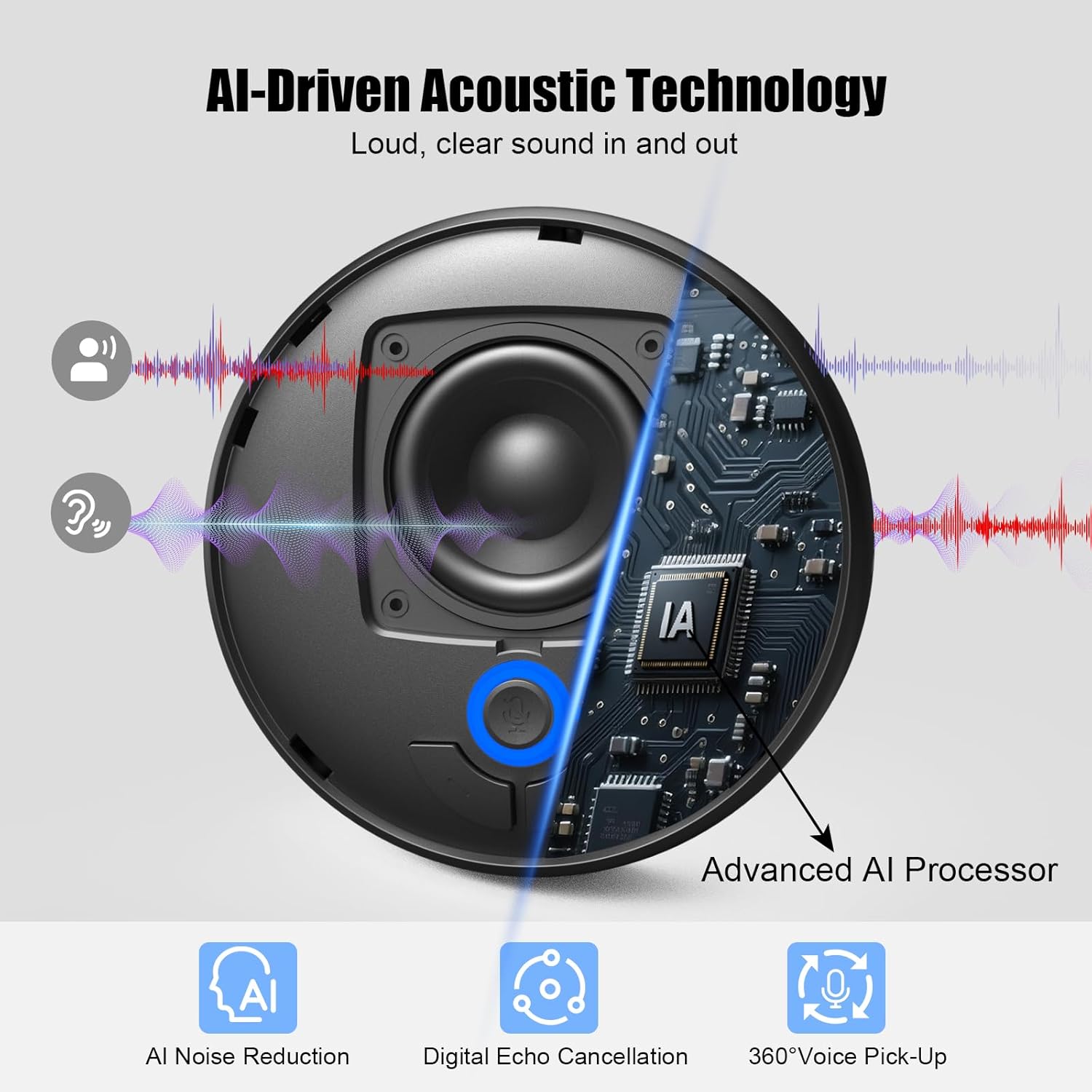
Figure 7: Highlights the AI-driven acoustic technology of the BALILA CM900, including noise reduction and echo cancellation.
6.3 Studio-Quality Audio Delivery
Outfitted with a 5W (89dB) premium speaker, the CM900 fills the room with evenly spread sound, ensuring no details are missed. It features built-in full-duplex microphones for natural simultaneous conversation and Virtual Bass for balanced voice clarity.
6.4 നീണ്ട ബാറ്ററി ലൈഫ്
The large capacity battery supports over 12 hours of talk time on a single 3-hour charge, making it suitable for all-day meetings and business trips.
7 സ്പെസിഫിക്കേഷനുകൾ
| ഫീച്ചർ | വിശദാംശങ്ങൾ |
|---|---|
| മോഡലിൻ്റെ പേര് | CM900 |
| ബ്രാൻഡ് | BALILA |
| മൈക്രോഫോൺ ഫോം ഫാക്ടർ | ഡെസ്ക്ടോപ്പ് |
| മൈക്രോഫോണുകളുടെ എണ്ണം | 4 (AI Omnidirectional) |
| വോയ്സ് പിക്കപ്പ് ശ്രേണി | 20 അടി (7 മീറ്റർ) വരെ |
| കണക്റ്റിവിറ്റി ടെക്നോളജി | ബ്ലൂടൂത്ത് 5.3, USB-C |
| പ്രത്യേക ഫീച്ചർ | AI Noise Reduction, Echo Cancellation, Full-Duplex Audio |
| സ്പീക്കർ ഔട്ട്പുട്ട് | 5W (89dB) |
| ബാറ്ററി ലൈഫ് | Over 12 hours talk time |
| ചാർജിംഗ് സമയം | ഏകദേശം 3 മണിക്കൂർ |
| ഉൽപ്പന്ന അളവുകൾ | 3.9 x 3.9 x 1.2 ഇഞ്ച് |
| ഇനത്തിൻ്റെ ഭാരം | 10.8 ഔൺസ് |
| മെറ്റീരിയൽ | പ്ലാസ്റ്റിക് |
| അനുയോജ്യമായ ഉപകരണങ്ങൾ | Facetime, Google Hangouts, MS Team, Webex Meetings, Zoom, etc. |
8. പരിപാലനം
To ensure the longevity and optimal performance of your BALILA CM900 speakerphone, follow these maintenance guidelines:
- വൃത്തിയാക്കൽ: ഉപകരണം വൃത്തിയാക്കാൻ മൃദുവായതും ഉണങ്ങിയതുമായ തുണി ഉപയോഗിക്കുക. ലിക്വിഡ് ക്ലീനറുകളോ എയറോസോളുകളോ ഉപയോഗിക്കരുത്.
- സംഭരണം: നേരിട്ടുള്ള സൂര്യപ്രകാശത്തിൽ നിന്നും കടുത്ത താപനിലയിൽ നിന്നും മാറി തണുത്തതും വരണ്ടതുമായ സ്ഥലത്ത് ഉപകരണം സൂക്ഷിക്കുക.
- കൈകാര്യം ചെയ്യൽ: ഉപകരണം താഴെയിടുകയോ ശക്തമായ ആഘാതങ്ങൾക്ക് വിധേയമാക്കുകയോ ചെയ്യുന്നത് ഒഴിവാക്കുക.
- വാട്ടർ എക്സ്പോഷർ: ഈ ഉപകരണം വാട്ടർപ്രൂഫ് അല്ല. വെള്ളത്തിലോ അമിതമായ ഈർപ്പത്തിലോ സമ്പർക്കം ഒഴിവാക്കുക.
9. പ്രശ്നപരിഹാരം
If you encounter issues with your CM900 speakerphone, refer to the following common solutions:
- ഉപകരണം ഓണാക്കുന്നില്ല: ഉപകരണം പൂർണ്ണമായും ചാർജ് ചെയ്തിട്ടുണ്ടെന്ന് ഉറപ്പാക്കുക. നൽകിയിരിക്കുന്ന USB-C കേബിൾ ഉപയോഗിച്ച് ഒരു പവർ സ്രോതസ്സിലേക്ക് അത് ബന്ധിപ്പിക്കുക.
- ബ്ലൂടൂത്ത് വഴി ബന്ധിപ്പിക്കാൻ കഴിയില്ല:
- Ensure the speakerphone is in Bluetooth pairing mode (flashing blue light).
- Check that Bluetooth is enabled on your connecting device.
- Make sure the speakerphone is within the 66ft (20m) Bluetooth range.
- Forget the device from your connecting device's Bluetooth list and try pairing again.
- ശബ്ദമില്ല അല്ലെങ്കിൽ മോശം ഓഡിയോ നിലവാരം:
- സ്പീക്കർഫോണിലും കണക്റ്റുചെയ്ത ഉപകരണത്തിലും വോളിയം ലെവലുകൾ പരിശോധിക്കുക.
- Ensure the microphones are not muted (red indicator light).
- If connected via USB-C, ensure the cable is securely plugged in and the device is selected as the audio input/output in your computer's sound settings.
- Restart both the speakerphone and the connected device.
- Microphone not picking up voice:
- മൈക്രോഫോൺ നിശബ്ദമാക്കിയിട്ടില്ലെന്ന് ഉറപ്പാക്കുക.
- Ensure the speakerphone is placed centrally in the meeting area for optimal 360° pickup.
- Check the input device selection in your conferencing software settings.
10. വാറണ്ടിയും പിന്തുണയും
BALILA offers a 2 വർഷത്തെ വാറന്റി പോളിസി for the CM900 Conference Speakerphone. We are committed to customer satisfaction and encourage you to follow the provided instructions for optimal performance.
Our dedicated team is available 24/7 to address any queries or concerns you may have. Please refer to the contact information provided in your product packaging or visit the official BALILA webപിന്തുണയ്ക്കുള്ള സൈറ്റ്.
- വാറൻ്റി കാലയളവ്: 2 വർഷം
- പിന്തുണ: 24/7 customer service and technical team support.