
DF Models 3145
DF മോഡലുകൾ Z-10 കോംപറ്റീഷൻ ട്രഗ്ഗി BR ബ്രഷ്ഡ് RTR യൂസർ മാനുവൽ
മോഡൽ: 3145
ആമുഖം
This manual provides essential information for the safe and effective operation, maintenance, and troubleshooting of your DF Models Z-10 Competition Truggy BR. Please read this manual thoroughly before operating the vehicle.

Figure 1: The DF Models Z-10 Competition Truggy BR.
സുരക്ഷാ വിവരങ്ങൾ
Always prioritize safety when operating your RC vehicle. Failure to follow safety guidelines can result in injury or damage to the product or property.
- Recommended age for operation is 14 years and up.
- ആളുകൾ, വളർത്തുമൃഗങ്ങൾ, തടസ്സങ്ങൾ എന്നിവയ്ക്ക് സമീപം പ്രവർത്തിക്കരുത്.
- Ensure the battery is fully charged and securely installed before use.
- Avoid operating in wet conditions to prevent damage to electronic components.
- ഉപയോഗത്തിലില്ലാത്തപ്പോൾ എപ്പോഴും വാഹനവും റിമോട്ട് കൺട്രോളും ഓഫ് ചെയ്യുക.
- ചലിക്കുന്ന ഭാഗങ്ങളിൽ നിന്ന് കൈകളും അയഞ്ഞ വസ്ത്രങ്ങളും സൂക്ഷിക്കുക.
- The motor and electronic speed controller (ESC) can become hot during operation. Avoid touching them immediately after use.
പാക്കേജ് ഉള്ളടക്കം
പാക്കേജിൽ എല്ലാ ഘടകങ്ങളും ഉണ്ടെന്ന് ഉറപ്പാക്കുക:
- Z-10 Competition Truggy BR (RTR)
- 2.4 GHz റിമോട്ട് കൺട്രോൾ
- NiMH 7.2 V 3500 mAh Battery
- യുഎസ്ബി ചാർജിംഗ് കേബിൾ
- നിർദ്ദേശ മാനുവൽ (ഈ പ്രമാണം)
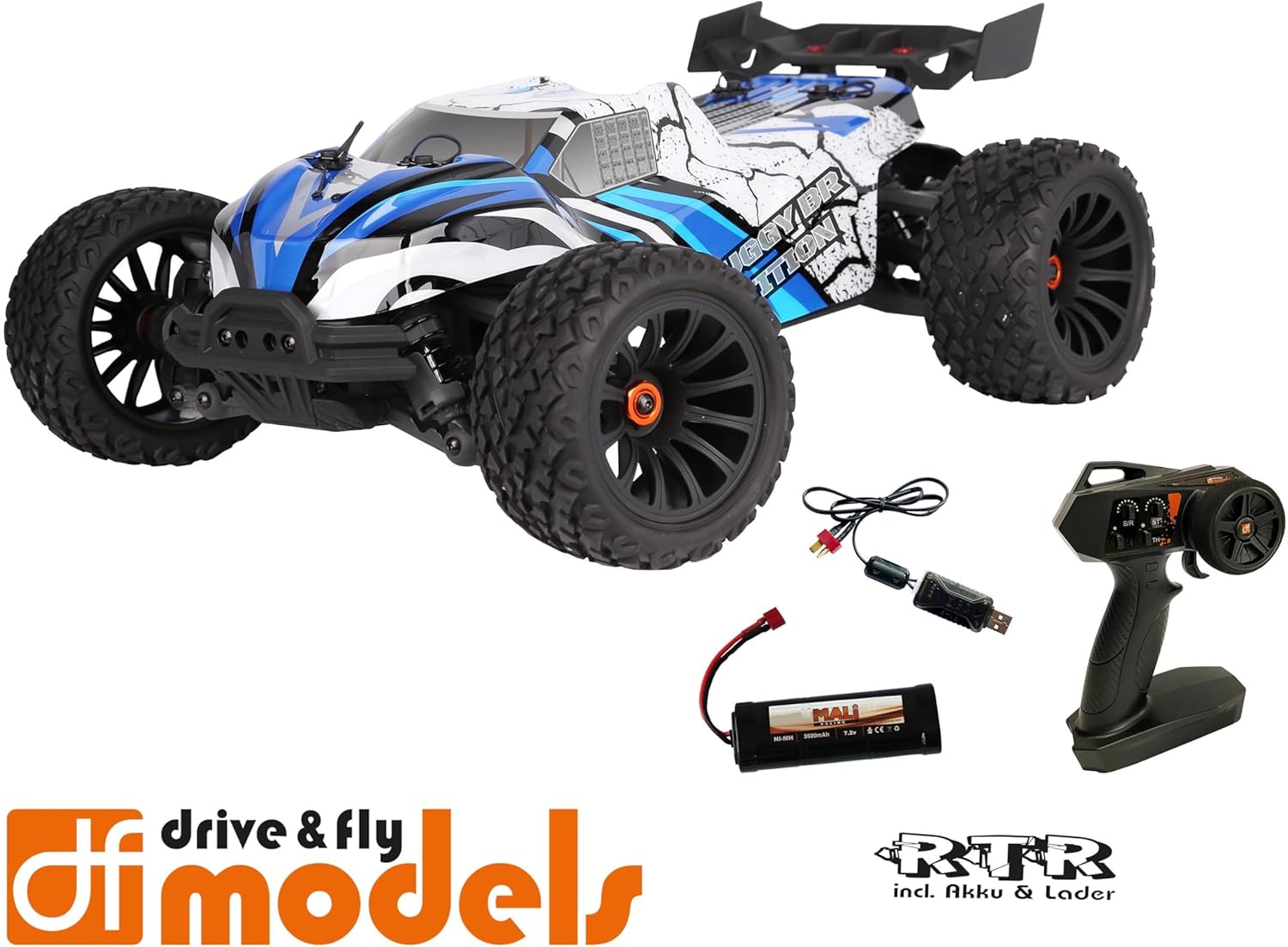
Figure 2: Included components: Truggy, remote control, battery, and USB charging cable.
സജ്ജമാക്കുക
1 ബാറ്ററി ചാർജ് ചെയ്യുന്നു
Before first use, fully charge the included NiMH 7.2V 3500 mAh battery using the provided USB charging cable. Connect the USB cable to a compatible USB power source (e.g., computer USB port, USB wall adapter) and the battery connector.
- ഊർജ്ജ സ്രോതസ്സിനെ ആശ്രയിച്ച് ചാർജിംഗ് സമയം വ്യത്യാസപ്പെടാം.
- ചാർജ് ചെയ്യുമ്പോൾ ബാറ്ററി ശ്രദ്ധിക്കാതെ വിടരുത്.
- ബാറ്ററി പൂർണ്ണമായി ചാർജ് ചെയ്തുകഴിഞ്ഞാൽ ചാർജർ വിച്ഛേദിക്കുക.
2. ബാറ്ററി ഇൻസ്റ്റാൾ ചെയ്യുന്നു
Locate the battery compartment on the Truggy. Securely insert the charged battery and connect it to the vehicle's power connector. Ensure the battery is properly seated and secured with the retention clip.

Figure 3: Battery retention clip for secure battery installation.
3. റിമോട്ട് കൺട്രോൾ തയ്യാറാക്കൽ
Install the required batteries (not included) into the 2.4 GHz remote control. Ensure correct polarity. The remote control features a speed adjustment switch (100%, 75%, 50%) for different skill levels.

Figure 4: Remote control with adjustable speed settings (100%, 75%, 50%).
പ്രവർത്തന നിർദ്ദേശങ്ങൾ
1. പവർ ചെയ്യുന്നു
- ആദ്യം റിമോട്ട് കൺട്രോൾ ഓണാക്കുക.
- Then, turn on the power switch on the Truggy.
- The vehicle and remote control should automatically pair.
2. Driving the Truggy
- Use the trigger on the remote control to control forward and reverse movement.
- Use the steering wheel to control left and right turns.
- Adjust the speed limit switch on the remote control as needed (100% for maximum speed, 75% or 50% for reduced speed, ideal for beginners).
3. പവർ ഓഫ്
- Turn off the power switch on the Truggy first.
- Then, turn off the remote control.
- Disconnect the battery from the Truggy for storage.

Figure 5: The Truggy in operation on varied terrain.
മെയിൻ്റനൻസ്
Regular maintenance ensures the longevity and optimal performance of your Truggy.
- വൃത്തിയാക്കൽ: After each use, especially in dusty or dirty conditions, clean the vehicle to remove debris. Use a soft brush or compressed air. Avoid using water directly on electronic components.
- ഘടകങ്ങൾ പരിശോധിക്കുന്നു: Regularly check for loose screws, damaged parts, or worn tires. Tighten any loose fasteners.
- ബാറ്ററി കെയർ: Store batteries in a cool, dry place. Do not overcharge or over-discharge.
- മോട്ടോറും ESCയും: Ensure proper ventilation. The motor and ESC can get hot; allow them to cool down between runs.
- Oil Pressure Shock Absorbers: Check for leaks and ensure smooth operation. Refill or replace oil as needed (advanced maintenance).
- വ്യത്യാസങ്ങൾ: Inspect for smooth operation and proper lubrication.

Figure 6: Internal components including the motor and ESC, which require occasional inspection.
ട്രബിൾഷൂട്ടിംഗ്
| പ്രശ്നം | സാധ്യമായ കാരണം | പരിഹാരം |
|---|---|---|
| വാഹനം പ്രതികരിക്കുന്നില്ല. | Battery not charged or connected. Remote control batteries low/dead. Vehicle/remote not powered on. Not paired. | Charge vehicle battery. Replace remote control batteries. Ensure both are powered on. Re-pair vehicle and remote. |
| വേഗത അല്ലെങ്കിൽ പവർ കുറച്ചു. | Low vehicle battery. Speed limit switch on remote set to 50% or 75%. | Recharge vehicle battery. Adjust speed limit switch to 100% for full power. |
| സ്റ്റിയറിംഗ് പ്രശ്നങ്ങൾ. | Steering trim incorrect. Damaged steering servo or linkage. | Adjust steering trim on remote control. Inspect steering components for damage. |
| മോട്ടോർ/ഇഎസ്സി അമിതമായി ചൂടാകൽ. | Continuous heavy use. Insufficient airflow. | Allow vehicle to cool down between runs. Ensure chassis is clear of debris for airflow. |
സ്പെസിഫിക്കേഷനുകൾ
| ഫീച്ചർ | വിശദാംശങ്ങൾ |
|---|---|
| മോഡൽ | DF Models Z-10 Competition Truggy BR |
| മോഡൽ നമ്പർ | 3145 |
| സ്കെയിൽ | 1:10XL RTR |
| ഡ്രൈവ് ചെയ്യുക | 4WD Brushed |
| നീളം | 500 മിമി (50 സെ.മീ) |
| വീതി | 360 മിമി (36 സെ.മീ) |
| ഉയരം | 230 മിമി (23 സെ.മീ) |
| വീൽബേസ് | 300 മി.മീ |
| പരമാവധി. വേഗത | മണിക്കൂറിൽ 40 കി.മീ |
| ബാറ്ററി | NiMH 7.2 V 3500 mAh (included) |
| സ്റ്റിയറിംഗ് സെർവോ | 10 kg with metal gear |
| ഇഎസ്സി | 60A DF-1060 controller |
| ശുപാർശ ചെയ്യുന്ന പ്രായം | 14 വർഷവും അതിൽ കൂടുതലും |
| മെറ്റീരിയൽ | പ്ലാസ്റ്റിക് |

Figure 7: Key dimensions of the Truggy.
വാറൻ്റിയും പിന്തുണയും
For warranty information, technical support, or spare parts, please contact DF Models customer service. Refer to the official DF Models webബന്ധപ്പെടാനുള്ള വിശദാംശങ്ങൾക്ക് സൈറ്റ് അല്ലെങ്കിൽ നിങ്ങളുടെ വാങ്ങൽ ഡോക്യുമെന്റേഷൻ.
കുറിപ്പ്: Unauthorized modifications or improper use may void the product warranty.
Ask a question about this manual
Ask about setup, troubleshooting, compatibility, parts, safety, or missing instructions. Manuals+ will review the question and use this page’s manual context to help answer it.