
VERMESS 353DSG
VERMESS 63" Dresser with Charging Station User Manual
Model: 353DSG
1. ആമുഖം
Thank you for choosing the VERMESS 63-inch wide dresser. This versatile furniture piece is designed to provide ample storage with its 11 fabric drawers and features an integrated charging station, making it ideal for bedrooms, living rooms, or hallways. It also serves as a sturdy TV stand, accommodating televisions up to 75 inches. This manual provides essential information for safe assembly, proper operation, and effective maintenance of your new dresser.

Image 1.1: The VERMESS 63-inch dresser functioning as a TV stand, providing both storage and media support.
2 സുരക്ഷാ വിവരങ്ങൾ
- അസംബ്ലി നിർദ്ദേശങ്ങൾ എപ്പോഴും ശ്രദ്ധാപൂർവ്വം പാലിക്കുക.
- ഡ്രോയറുകൾ ഓവർലോഡ് ചെയ്യരുത്. ഭാരം തുല്യമായി വിതരണം ചെയ്ത് അവ ടിപ്പ് ആകുന്നത് തടയുക.
- Utilize the included anti-tip kits to secure the dresser to a wall, especially in households with children or pets. This is crucial for stability and safety.
- വൈദ്യുത അപകടങ്ങൾ തടയാൻ ചാർജിംഗ് സ്റ്റേഷനിൽ നിന്ന് ദ്രാവകങ്ങൾ അകറ്റി നിർത്തുക.
- Ensure all electrical connections are secure and meet local safety standards.
- Do not climb on or hang from the dresser.
3. പാക്കേജ് ഉള്ളടക്കം
Before beginning assembly, verify that all components are present and undamaged. If any parts are missing or defective, please contact customer support.
| ഘടകം | അളവ് | വിവരണം |
|---|---|---|
| മെറ്റൽ ഫ്രെയിം ഭാഗങ്ങൾ | 1 സെറ്റ് | Structural supports for the dresser. |
| Wooden Top Panel | 1 | The main surface for placing items or a TV. |
| ഫാബ്രിക് ഡ്രോയറുകൾ | 11 | Collapsible storage drawers. |
| ഡ്രോയർ ഹാൻഡിലുകൾ | 11 | For opening and closing drawers. |
| ചാർജിംഗ് സ്റ്റേഷൻ യൂണിറ്റ് | 1 | Power outlets and USB/Type-C ports. |
| ക്രമീകരിക്കാവുന്ന പാദങ്ങൾ | 8 | For leveling the dresser on uneven surfaces. |
| ആന്റി-ടിപ്പ് കിറ്റ് | 1 സെറ്റ് | Hardware to secure the dresser to a wall. |
| അസംബ്ലി ഹാർഡ്വെയർ | 1 സെറ്റ് | അസംബ്ലിക്ക് ആവശ്യമായ സ്ക്രൂകൾ, ബോൾട്ടുകൾ, ഉപകരണങ്ങൾ. |
| ഇൻസ്ട്രക്ഷൻ മാനുവൽ | 1 | ഈ പ്രമാണം. |
4. സജ്ജീകരണവും അസംബ്ലിയും
Assembly of the VERMESS dresser is designed to be straightforward, typically taking around 30 minutes. Follow the detailed instructions provided in the separate assembly guide included with your package. Ensure you have adequate space and the necessary tools (usually a screwdriver, often included).
4.1 Key Assembly Steps:
- ഫ്രെയിം നിർമ്മാണം: Assemble the robust metal frame according to the diagrams. Ensure all connections are tightened securely.
- ടോപ്പ് പാനൽ ഇൻസ്റ്റാളേഷൻ: Attach the durable wooden top panel to the assembled metal frame.
- ഡ്രോയർ അസംബ്ലി: Unfold and insert the fabric drawers into their designated slots within the frame. Attach the handles to each drawer.
- ക്രമീകരിക്കാവുന്ന പാദങ്ങൾ: Screw in the 8 adjustable feet at the bottom of the dresser. Adjust them as needed to ensure the dresser is level and stable on your floor, preventing wobbling and protecting your flooring.
- Charging Station Integration: Install the charging station unit into its designated slot on the top panel. Ensure it is securely fastened.
- ആൻ്റി-ടിപ്പ് കിറ്റ് ഇൻസ്റ്റാളേഷൻ: For safety, always install the anti-tip kit. Follow the instructions to secure the dresser to a wall using the provided hardware.

Image 4.1: Key components of the VERMESS dresser, including the charging station and adjustable feet.
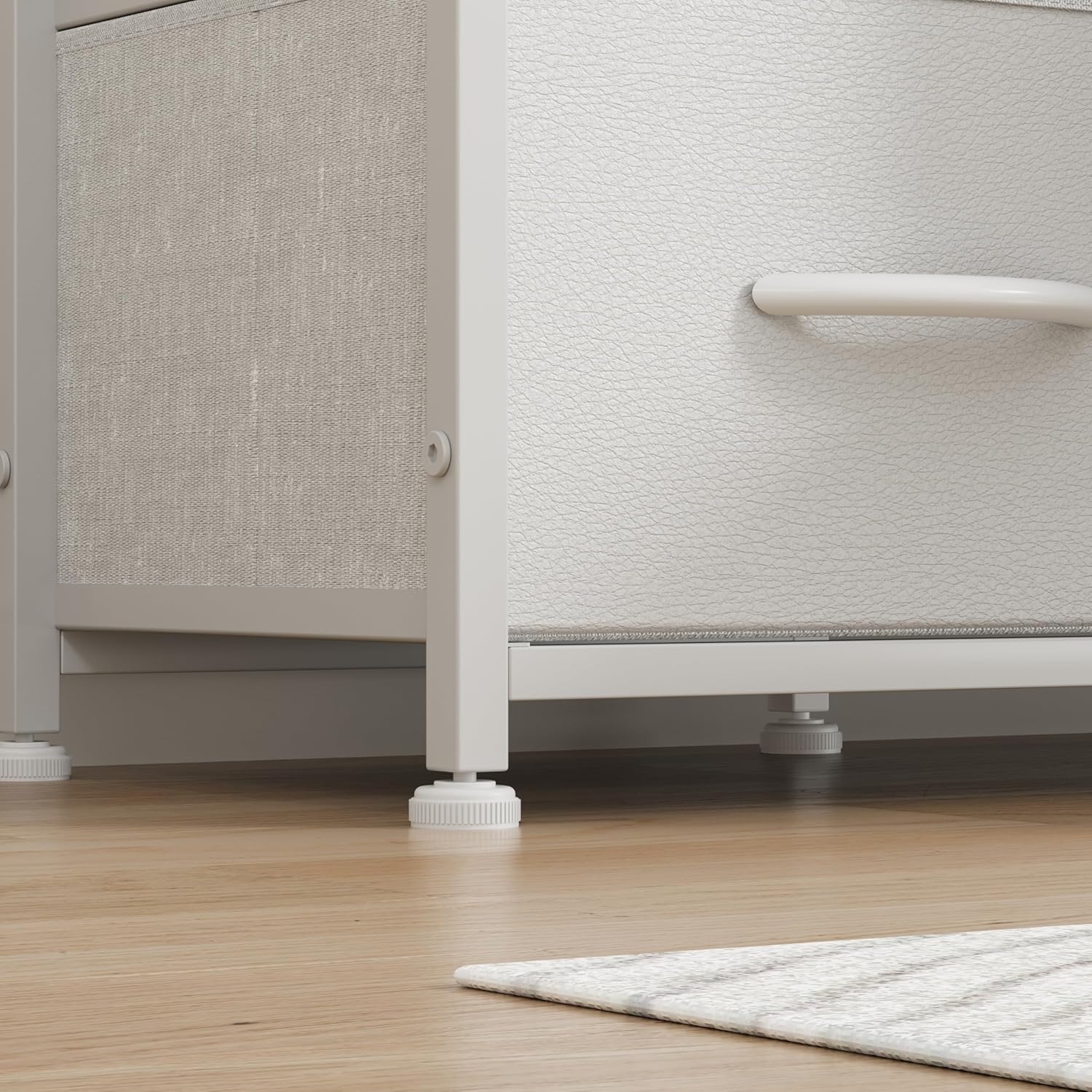
Image 4.2: Detail of the adjustable feet for leveling and floor protection.
5. പ്രവർത്തന നിർദ്ദേശങ്ങൾ
5.1 Drawer Usage:
The 11 deep fabric drawers provide ample storage. Gently pull the handles to open and push to close. Avoid forcing drawers if they feel stuck; check for obstructions. The drawers are suitable for storing clothes, bedding, media collections, gaming accessories, and various household items.

Image 5.1: Illustrating the ample storage capacity of the fabric drawers.
5.2 Integrated Charging Station:
The dresser features a convenient charging station with 3 standard outlets, 1 USB port, and 1 Type-C port. To use, plug the charging station's power cord into a wall outlet. You can then connect your electronic devices for charging. Ensure devices are compatible with the provided ports and voltage.

Image 5.2: Detail of the integrated charging station.
5.3 Using as a TV Stand:
The wide desktop is designed to accommodate televisions ranging from 55 to 75 inches. Place your TV centrally on the wooden top. The open shelves and drawers below can house media devices, gaming consoles, and accessories, keeping your entertainment area organized.
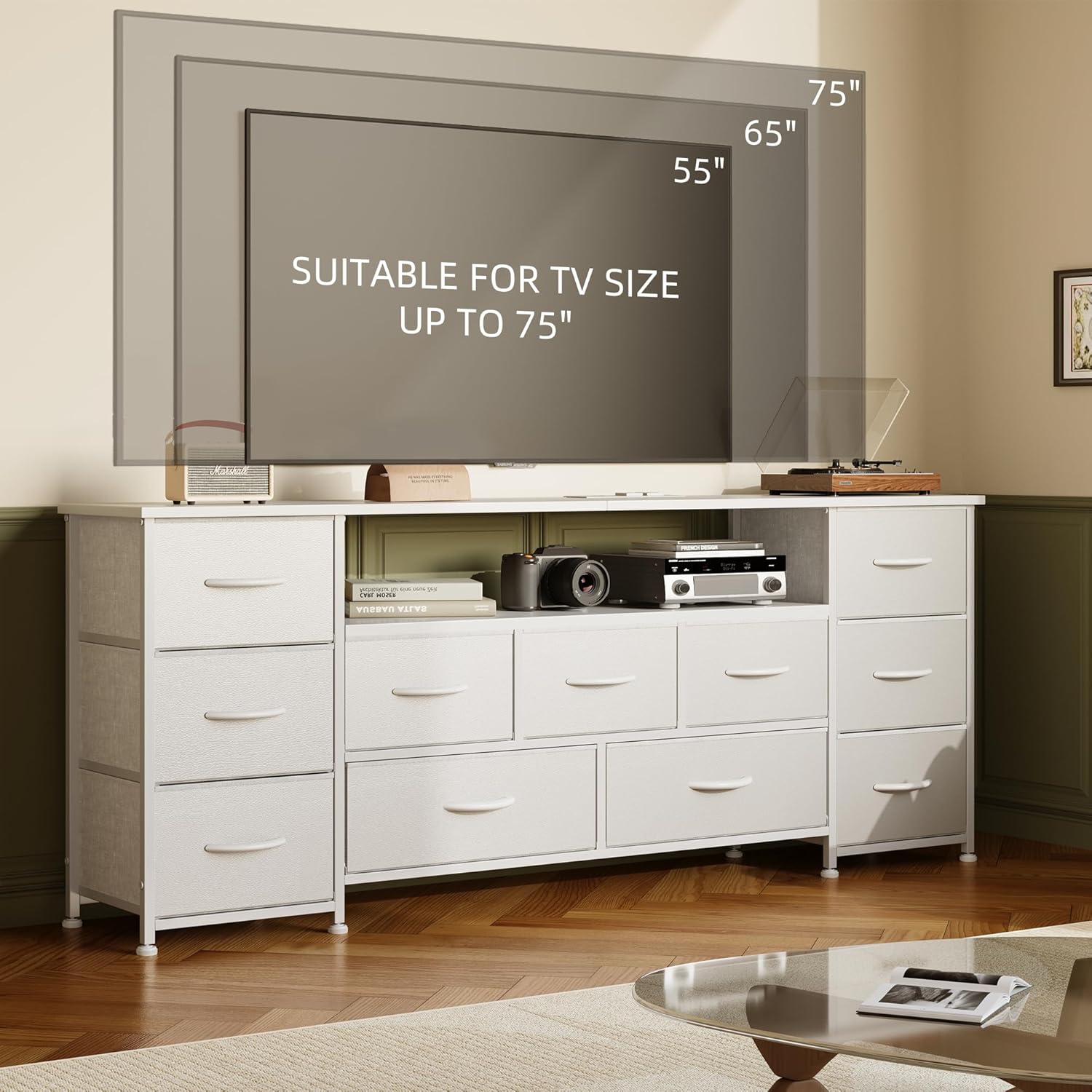
Image 5.3: TV size compatibility for the dresser.

Image 5.4: The dresser integrated into a living room as a TV stand.
5.4 Multi-functional Placement:
This dresser is versatile and can be used in various rooms:
- കിടപ്പുമുറി: For clothing, linens, and personal items.
- ലിവിംഗ് റൂം: As a TV console, media storage, or general storage.
- Closet/Hallway: For organizing seasonal items, shoes, or entryway essentials.
- Nursery: For baby clothes, diapers, and other necessities.

Image 5.5: The dresser in a bedroom setting.
6. പരിപാലനം
Regular maintenance will help preserve the appearance and functionality of your VERMESS dresser.
- മരത്തിന്റെ മുകൾഭാഗം വൃത്തിയാക്കൽ: മൃദുവുപയോഗിച്ച് തുടയ്ക്കുക, ഡിamp cloth. Avoid harsh chemicals or abrasive cleaners that could damage the finish. Dry immediately.
- തുണി ഡ്രോയറുകൾ വൃത്തിയാക്കൽ: നേരിയ ഡിറ്റർജൻ്റും പരസ്യവും ഉപയോഗിച്ച് സ്പോട്ട് വൃത്തിയാക്കുകamp cloth. Do not machine wash. Allow to air dry completely before reinserting into the frame.
- മെറ്റൽ ഫ്രെയിം: മൃദുവായതോ, ഉണങ്ങിയതോ അല്ലെങ്കിൽ ചെറുതായി ഡി-ടാപ്പിംഗ് മെഷീനോ ഉപയോഗിച്ച് തുടയ്ക്കുക.amp പൊടി നീക്കം ചെയ്യാനുള്ള തുണി.
- ചാർജിംഗ് സ്റ്റേഷൻ: Keep the charging station clean and free of dust. Do not use liquid cleaners directly on the ports or outlets. Unplug from the wall before cleaning.
- പൊതു പരിചരണം: എല്ലാ സ്ക്രൂകളും കണക്ഷനുകളും ഇറുകിയതാണെന്ന് ഉറപ്പാക്കാൻ ഇടയ്ക്കിടെ പരിശോധിക്കുക. ആവശ്യമെങ്കിൽ വീണ്ടും മുറുക്കുക.
7. പ്രശ്നപരിഹാരം
If you encounter issues with your dresser, refer to the following common problems and solutions:
| പ്രശ്നം | സാധ്യമായ കാരണം | പരിഹാരം |
|---|---|---|
| Dresser is wobbly/unstable. | അസമമായ തറ; അയഞ്ഞ കണക്ഷനുകൾ. | Adjust the leveling feet at the bottom until stable. Check and tighten all assembly screws. |
| ഡ്രോയറുകൾ സുഗമമായി സ്ലൈഡ് ചെയ്യുന്നില്ല. | Overloaded drawer; obstruction; incorrect insertion. | Reduce drawer contents. Check for items blocking the drawer path. Ensure drawers are inserted correctly into their slots. |
| ചാർജിംഗ് സ്റ്റേഷൻ പ്രവർത്തിക്കുന്നില്ല. | പ്ലഗ് ഇൻ ചെയ്തിട്ടില്ല; പവർ അല്ലെങ്കിൽtage; faulty device. | Ensure the charging station's power cord is securely plugged into a working wall outlet. Check your home's circuit breaker. Test with a different device. |
| Dresser appears crooked. | Uneven assembly; uneven floor. | Disassemble and reassemble carefully, ensuring all parts are aligned. Adjust leveling feet. |
8 സ്പെസിഫിക്കേഷനുകൾ
| ആട്രിബ്യൂട്ട് | വിശദാംശങ്ങൾ |
|---|---|
| ബ്രാൻഡ് | വെർമെസ് |
| മോഡൽ നമ്പർ | 353ഡിഎസ്ജി |
| നിറം | വെള്ള |
| ഉൽപ്പന്ന അളവുകൾ (L x W x H) | 160 x 30 x 68.5 സെ.മീ (63 x 11.8 x 27 ഇഞ്ച്) |
| ഇനത്തിൻ്റെ ഭാരം | 21.3 കി.ഗ്രാം (47 പൗണ്ട്) |
| മെറ്റീരിയൽ | Engineered Wood (top), Metal (frame), Fabric (drawers) |
| മൗണ്ടിംഗ് തരം | ഫ്ലോർ മൗണ്ട് |
| അസംബ്ലി ആവശ്യമാണ് | അതെ |
| ചാർജിംഗ് സ്റ്റേഷൻ | 3 Outlets, 1 USB Port, 1 Type-C Port |
| TV Size Accommodation | 75 ഇഞ്ച് വരെ |
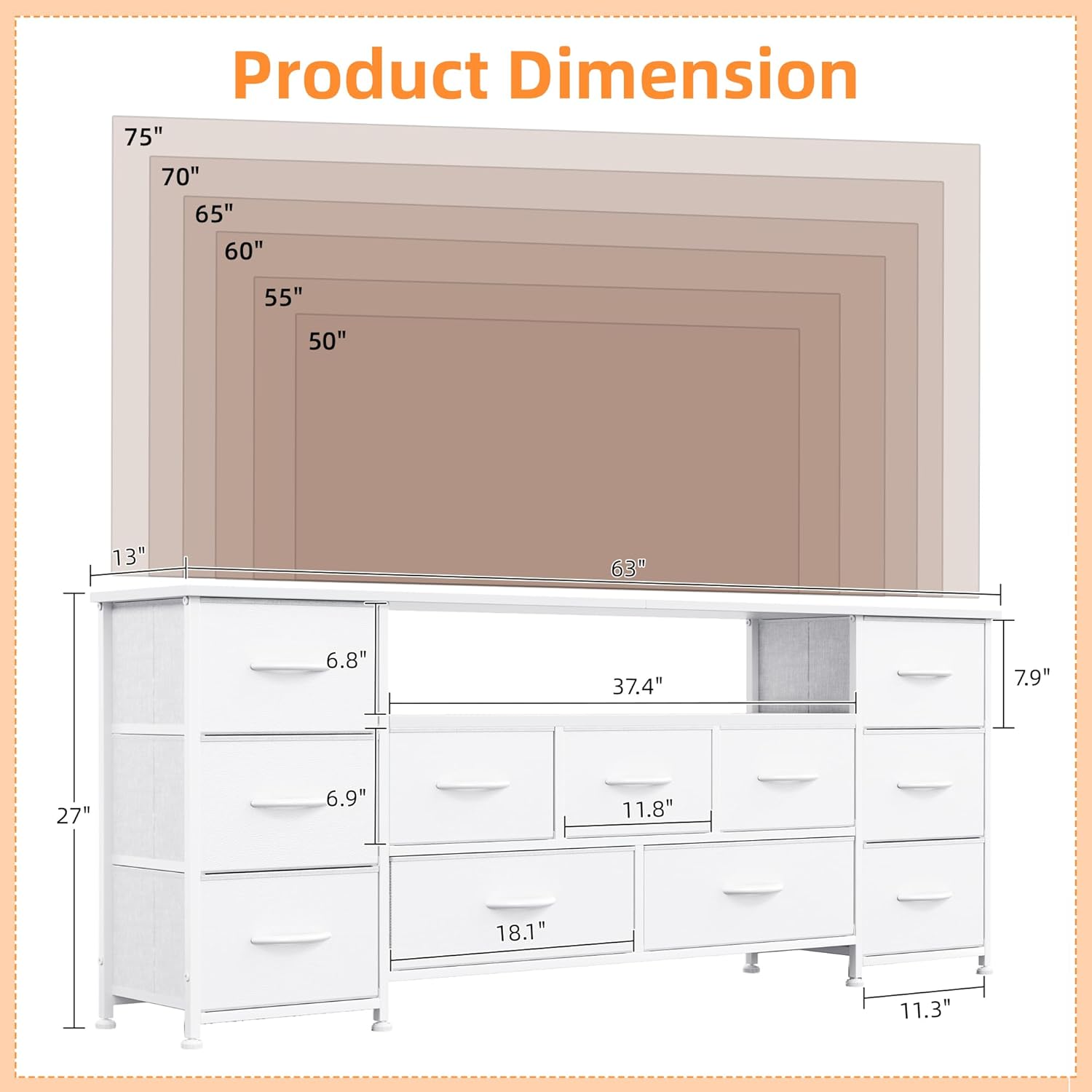
Image 8.1: Product dimensions overview.
9. വാറൻ്റിയും പിന്തുണയും
For specific warranty information regarding your VERMESS dresser, please refer to the documentation included with your purchase or contact the seller directly. Warranty terms typically cover manufacturing defects for a specified period from the date of purchase.
9.1 ഉപഭോക്തൃ പിന്തുണ:
If you have any questions, require assistance with assembly, or need to report missing/damaged parts, please contact VERMESS customer support through the retailer's platform or the official VERMESS website. Have your model number (353DSG) and purchase details ready for faster service.
Ask a question about this manual
Ask about setup, troubleshooting, compatibility, parts, safety, or missing instructions. Manuals+ will review the question and use this page’s manual context to help answer it.