
HEARTH DISPLAY HD-SALE-HDP-DSP-MB-27-FBA
Hearth Display 27" Digital Calendar User Manual
Model: HD-SALE-HDP-DSP-MB-27-FBA
ആമുഖം
The Hearth Display is a centralized, interactive touchscreen designed to simplify family organization. It allows for the creation of unique profiles, management of shared calendars, custom lists, and routines, all accessible via the display and a companion mobile application. This manual provides essential information for setting up, operating, and maintaining your Hearth Display.
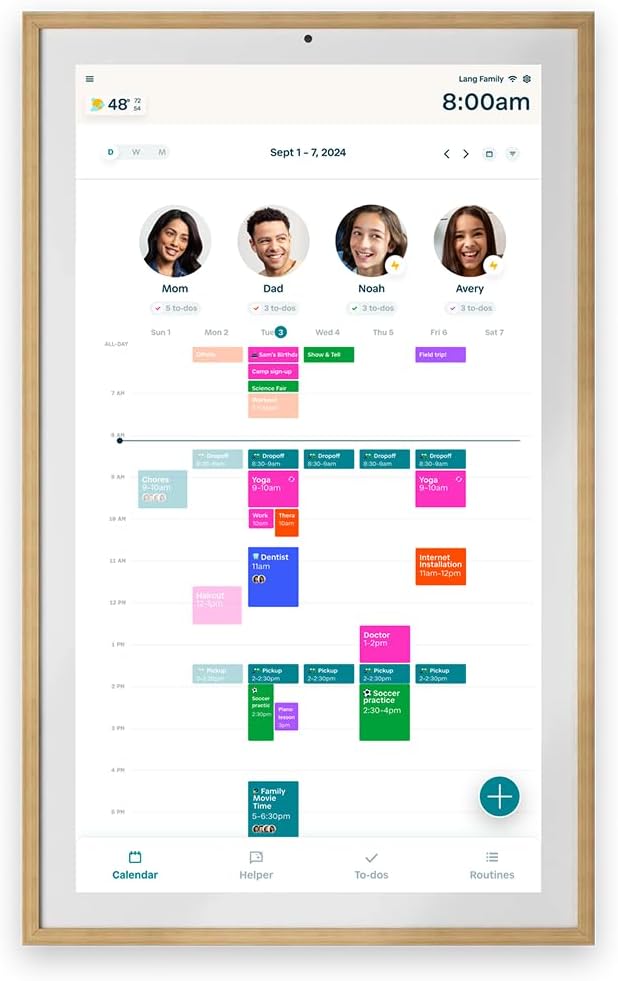
Figure 1: Hearth Display 27-inch Digital Calendar with Light Wood Frame, showing a family calendar interface.
സുരക്ഷാ വിവരങ്ങൾ
Please read all safety instructions before using your Hearth Display. Failure to follow these instructions may result in fire, electric shock, or other injury or damage.
- Ensure the device is securely mounted to a wall using appropriate hardware to prevent falling.
- നൽകിയിരിക്കുന്ന പവർ അഡാപ്റ്റർ മാത്രം ഉപയോഗിക്കുക.
- ഉപകരണം വെള്ളത്തിലോ അമിതമായ ഈർപ്പത്തിലോ തുറന്നുകാട്ടരുത്.
- നേരിട്ട് സൂര്യപ്രകാശത്തിലോ ചൂട് സ്രോതസ്സുകൾക്ക് സമീപമോ ഉപകരണം സ്ഥാപിക്കുന്നത് ഒഴിവാക്കുക.
- Keep out of reach of small children to prevent accidental damage or injury.
സജ്ജമാക്കുക
ഇൻസ്റ്റലേഷൻ ഘട്ടങ്ങൾ
The Hearth Display is designed for simple wall mounting and quick setup.
- Mount the display securely to your wall using the provided wall mount.
- Plug in the device using the power adapter.
- Connect the display to your home Wi-Fi network.
- Scan the personalized QR code displayed on the screen to set up your account.
- Follow the on-screen instructions to activate your Hearth Family Membership (if applicable).
- Connect to the companion app on your iOS or Android device and customize your display settings.

Figure 2: Visual guide illustrating the four simple steps for installing the Hearth Display, including mounting, connecting to Wi-Fi, scanning a QR code, and connecting to the companion app.
ഉൽപ്പന്ന അളവുകൾ
Understanding the dimensions of your Hearth Display is important for proper placement.
| അളക്കൽ | മൂല്യം |
|---|---|
| വീതി | 16.5 ഇഞ്ച് (41.9 സെ.മീ) |
| ഉയരം | 26.7 ഇഞ്ച് (67.8 സെ.മീ) |
| ആഴം | 1.2 ഇഞ്ച് (3.0 സെ.മീ) |
| ഇനത്തിൻ്റെ ഭാരം | 20.4 പൗണ്ട് (9.25 കി.ഗ്രാം) |

Figure 3: Diagram illustrating the width, height, and depth of the Hearth Display.
Operating the Hearth Display
ഡിജിറ്റൽ ഡിസ്പ്ലേ സവിശേഷതകൾ
The Hearth Display offers a range of features to enhance family organization:
- Centralized Touchscreen: An interactive interface for managing family schedules and tasks.
- ഉപയോക്തൃ പ്രോfiles: അതുല്യമായ പ്രോ സൃഷ്ടിക്കുകfiles for each family member with customizable kid-friendly icons.
- Routines & Streaks: Establish and track daily routines and gamify tasks to build consistent habits.
- Wipeable, Anti-Glare, Smudge-Resistant Screen: Designed for durability and clear visibility.
- Adjustable Brightness & Sleep Mode: Control screen brightness and set dimming schedules.
- ഇഷ്ടാനുസൃതമാക്കാവുന്ന ഭക്ഷണ പദ്ധതികൾ: Plan meals, cater to dietary needs, and manage snacks.
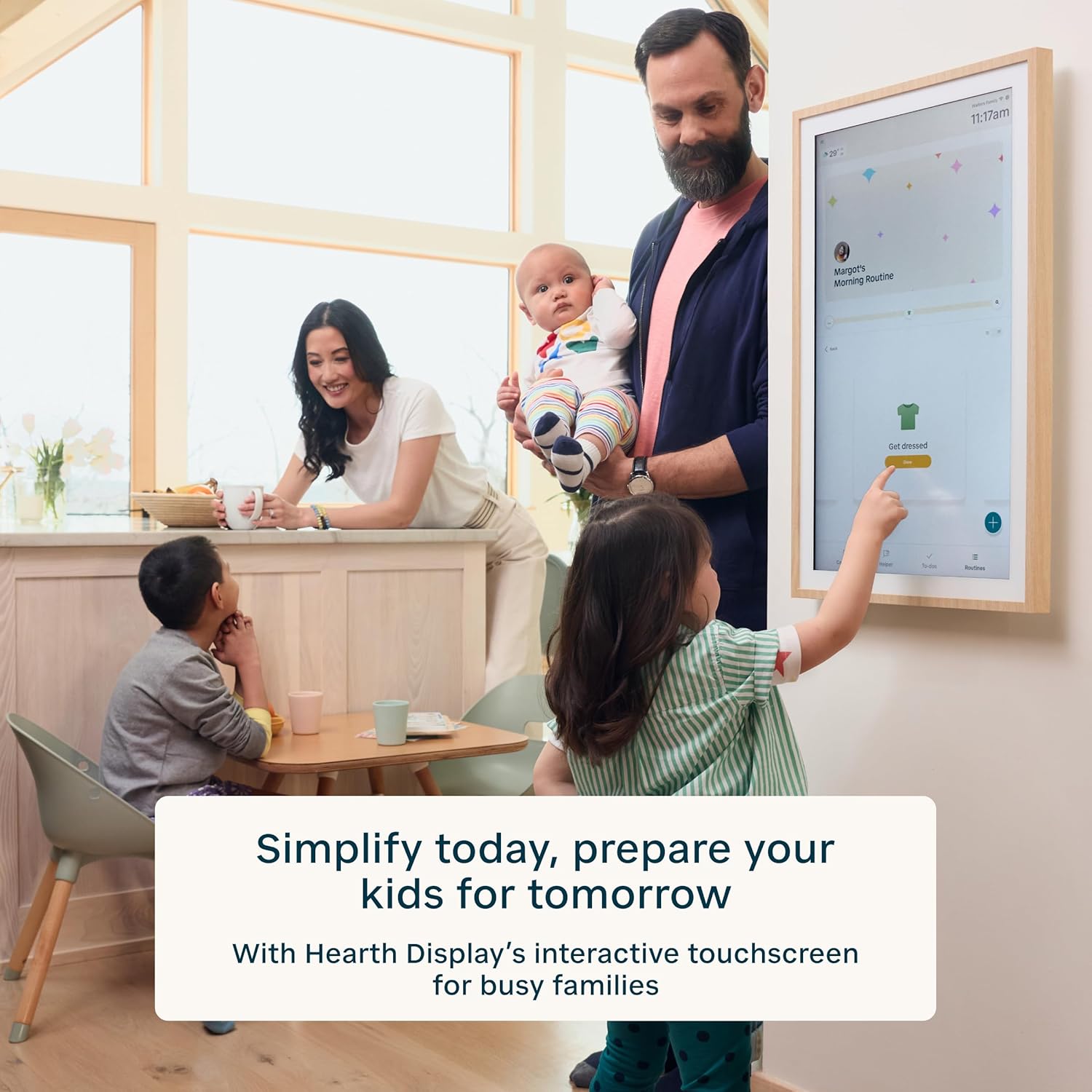
Figure 4: A family interacting with the Hearth Display, demonstrating its central role in family life.

Figure 5: A child engaging with the Hearth Display, highlighting features like custom lists, routines, reward streaks, and customizable profiles.
കമ്പാനിയൻ ആപ്പ്
The Hearth Display is complemented by a powerful companion app, available for iOS and Android devices. This app allows you to manage your shared calendars, profiles, and custom lists remotely.
- റിമോട്ട് മാനേജ്മെൻ്റ്: Update events, to-dos, and lists from anywhere.
- Calendar Syncing: Connect existing Google, Apple iCal, or Outlook electronic calendars to seamlessly sync your family's schedules.
- Hearth Helper: An AI calendar companion that digitizes and uploads photos of paper calendars and invites to your display.

Figure 6: The Hearth Display companion app interface on a smartphone, demonstrating remote management capabilities.

Figure 7: The Hearth Display showcasing its ability to sync with various electronic calendars like Google Calendar and Outlook.

Figure 8: An individual utilizing the Hearth Helper feature on their smartphone to digitize a paper calendar, integrating it with the Hearth Display.
Transitioning from Physical Calendars
The Hearth Display offers a modern alternative to traditional paper calendars, providing a dynamic and easily updateable solution for family scheduling.

Figure 9: A visual comparison demonstrating the transition from a traditional, cluttered physical calendar to the streamlined and organized digital interface of the Hearth Display.
സബ്സ്ക്രിപ്ഷൻ വിവരങ്ങൾ
To unlock the full potential of your Hearth Display, a Hearth Family Membership is available. Upon initial setup, a one-month trial is included.
- ട്രയൽ കാലയളവ്: Enjoy a one-month trial of the Hearth Family Membership.
- പ്രീമിയം സവിശേഷതകൾ: Access advanced features such as Hearth Helper, customizable routines, task management lists, integrated companion app, weather widget, Privacy Mode, and all future software releases.
- Membership Cost: After the trial, continue premium access for $9.00/month. You can cancel anytime.
- Free Plan: A free plan is available, offering basic calendar features without the premium functionalities.

Figure 10: Details regarding the included 30-day trial of the Hearth Family Membership and its benefits.
മെയിൻ്റനൻസ്
Proper maintenance ensures the longevity and optimal performance of your Hearth Display.
- സ്ക്രീൻ വൃത്തിയാക്കൽ: സ്ക്രീൻ മൃദുവായി തുടയ്ക്കാൻ മൃദുവായ, ലിന്റ് രഹിത തുണി ഉപയോഗിക്കുക. കഠിനമായ കറകൾക്ക്, ചെറുതായി dampതുണിയിൽ വെള്ളം ഒഴിക്കുക. കഠിനമായ രാസവസ്തുക്കളോ ഉരച്ചിലുകളോ ഉള്ള വസ്തുക്കൾ ഒഴിവാക്കുക.
- പൊതുവായ ശുചീകരണം: Dust the frame and back of the device regularly with a dry cloth.
- ഊർജ്ജനിയന്ത്രണം: Unplug the device during electrical storms or when unused for long periods.
ട്രബിൾഷൂട്ടിംഗ്
If you encounter issues with your Hearth Display, try the following basic troubleshooting steps:
- ശക്തിയില്ല: Ensure the power adapter is securely plugged into both the display and a working electrical outlet.
- വൈഫൈ കണക്ഷൻ ഇല്ല: Check your home Wi-Fi router and ensure it is functioning correctly. Reconnect the Hearth Display to the Wi-Fi network through its settings.
- പ്രതികരിക്കാത്ത ടച്ച്സ്ക്രീൻ: Try restarting the device by unplugging it from the power source for 10 seconds, then plugging it back in.
- ആപ്പ് സമന്വയ പ്രശ്നങ്ങൾ: Ensure your companion app is updated to the latest version. Check your internet connection on your mobile device.
- Display Content Not Updating: Verify that your external calendars (Google, Apple iCal, Outlook) are correctly linked and that your device has an active internet connection.
പ്രശ്നങ്ങൾ നിലനിൽക്കുകയാണെങ്കിൽ, കൂടുതൽ സഹായത്തിനായി ദയവായി പിന്തുണാ വിഭാഗം പരിശോധിക്കുക.
സ്പെസിഫിക്കേഷനുകൾ
Detailed technical specifications for the Hearth Display 27" Digital Calendar.
| ഫീച്ചർ | വിശദാംശങ്ങൾ |
|---|---|
| ബ്രാൻഡ് | HEARTH DISPLAY |
| മോഡൽ നമ്പർ | HD-SALE-HDP-DSP-MB-27-FBA |
| സ്ക്രീൻ വലിപ്പം | 27 ഇഞ്ച് |
| ഡിസ്പ്ലേ തരം | ഇന്ററാക്ടീവ് ടച്ച്സ്ക്രീൻ |
| ഫ്രെയിം നിറം | Light Wood (other variants available) |
| ഉൽപ്പന്ന അളവുകൾ (W x H x D) | 16.5 x 26.7 x 1.2 ഇഞ്ച് |
| ഇനത്തിൻ്റെ ഭാരം | 20.4 പൗണ്ട് |
| കണക്റ്റിവിറ്റി | വൈഫൈ |
| യു.പി.സി | 860009281707 |
| ആദ്യ തീയതി ലഭ്യമാണ് | 31 മാർച്ച് 2025 |
വാറൻ്റിയും പിന്തുണയും
For warranty information and technical support, please contact Hearth Display customer service. Details can typically be found on the official Hearth Display webഉൽപ്പന്ന പാക്കേജിംഗിനുള്ളിൽ.
ഓൺലൈൻ ഉറവിടങ്ങൾ: സന്ദർശിക്കുക HEARTH DISPLAY Store on Amazon കൂടുതൽ ഉൽപ്പന്ന വിവരങ്ങൾക്കും പിന്തുണയ്ക്കും.
Ask a question about this manual
Ask about setup, troubleshooting, compatibility, parts, safety, or missing instructions. Manuals+ will review the question and use this page’s manual context to help answer it.