
BALILA CM6
BALILA CM6 Speakerphone User Manual
Your guide to setting up and using your BALILA CM6 Conference Speakerphone.
1. ആമുഖം
Thank you for choosing the BALILA CM6 Speakerphone. This device is designed to provide clear, high-quality audio for online meetings, remote work, video conferencing, and online education. With its 360° omnidirectional sound pickup and advanced noise cancellation technology, it ensures effective communication in various environments. This manual will guide you through the setup, operation, and maintenance of your speakerphone.
2. ഉൽപ്പന്നം കഴിഞ്ഞുview
2.1. പാക്കേജ് ഉള്ളടക്കം
- 1 x BALILA CM6 Speakerphone
- 6 x ലാവലിയർ മൈക്രോഫോണുകൾ
- 1 x യുഎസ്ബി കേബിൾ (ടൈപ്പ്-സി)
- 1 x ഉപയോക്തൃ മാനുവൽ
2.2 പ്രധാന സവിശേഷതകൾ
- 360° Omnidirectional Sound Pickup: Equipped with 6 omnidirectional microphones to capture sound from all directions, ideal for 6-8 person meetings.
- വിപുലമായ ഓഡിയോ പ്രോസസ്സിംഗ്: Features echo cancellation, reverberation suppression, and noise reduction for crystal-clear calls.
- പ്ലഗ്-ആൻഡ്-പ്ലേ യുഎസ്ബി കണക്റ്റിവിറ്റി: Simple USB Type-A and Type-C connection, no driver installation required.
- വിശാലമായ അനുയോജ്യത: Works seamlessly with popular online meeting platforms like Zoom, Skype, GoToMeeting, WebEx, and more.
- ഒതുക്കമുള്ള & പോർട്ടബിൾ ഡിസൈൻ: Palm-sized and lightweight, making it easy to carry for meetings on the go.
- സൗകര്യപ്രദമായ നിയന്ത്രണങ്ങൾ: Integrated mute button and volume controls directly on the unit for easy operation.
- വിപുലീകരിച്ച ബാറ്ററി ലൈഫ്: Up to 10 hours of continuous use, ensuring long meeting sessions without power concerns.
2.3. ഉൽപ്പന്ന ഡയഗ്രം
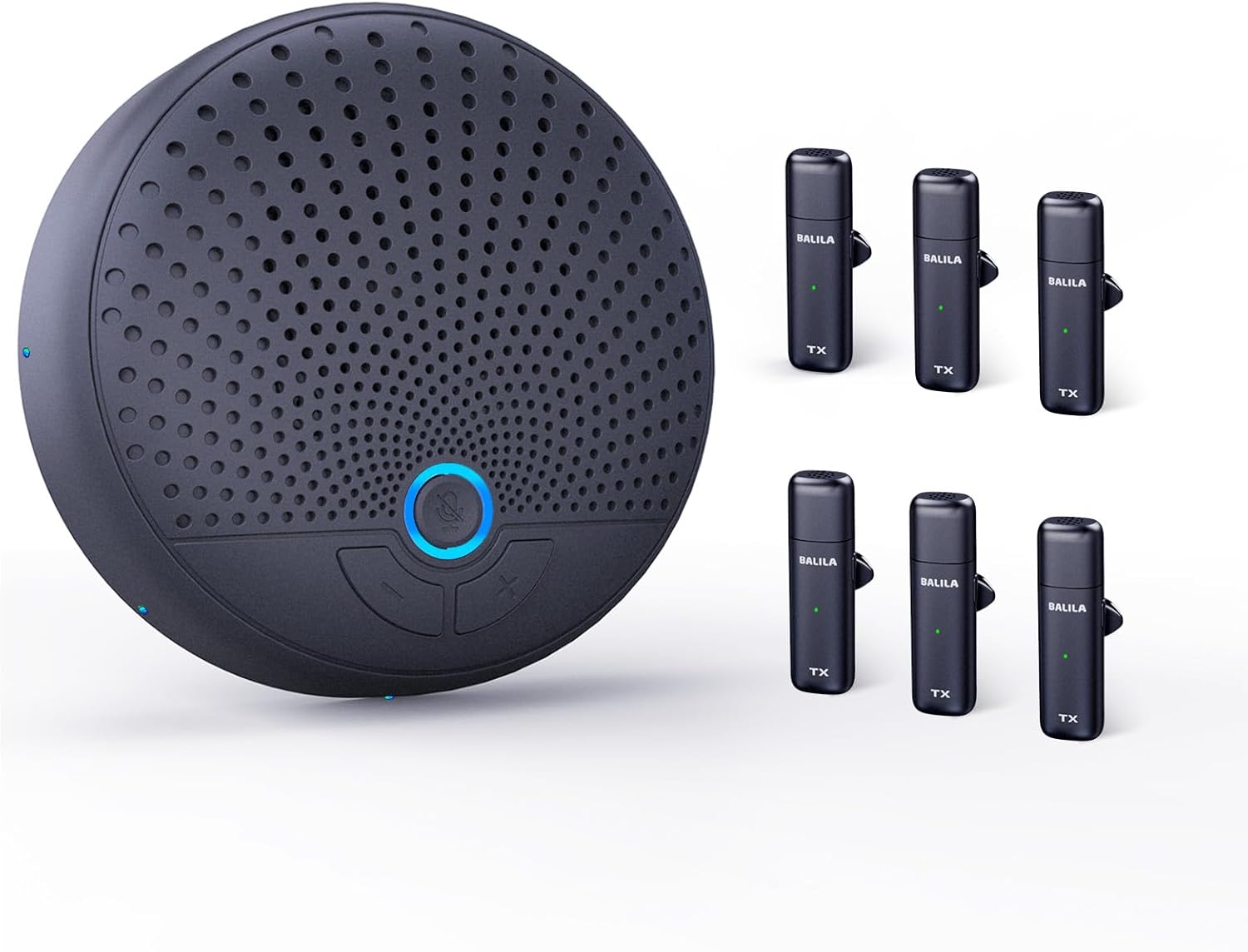
Figure 2.3.1: BALILA CM6 Speakerphone and included lavalier microphones.

Figure 2.3.2: Close-up of the convenient mute button and LED indicator on the speakerphone.
3. സജ്ജീകരണ ഗൈഡ്
- Connect the Speakerphone: Use the provided USB Type-C cable to connect the BALILA CM6 speakerphone to your computer's USB-A or USB-C port. The device is plug-and-play, so no additional drivers are typically needed.

Figure 3.1: Connecting the speakerphone via USB-C or USB-A.
- Connect Lavalier Microphones: The 6 lavalier microphones are designed to connect wirelessly to the speakerphone. Ensure they are charged and powered on. They will automatically pair with the main unit.
- Select Audio Device:
On your computer, navigate to your sound settings (e.g., Windows: Sound Settings > Sound Control Panel; macOS: System Settings > Sound). Select "USB PHONE" as both your input (microphone) and output (speaker) device.

Figure 3.2: Selecting "USB PHONE" in your computer's sound settings.
- Launch Meeting Software: Open your preferred online meeting application (e.g., Zoom, Skype, Microsoft Teams) and ensure that "USB PHONE" is selected as the audio input and output device within the application's settings.
4. പ്രവർത്തന നിർദ്ദേശങ്ങൾ
4.1. അടിസ്ഥാന പ്രവർത്തനം
- പവർ ഓൺ/ഓഫ്: The speakerphone powers on automatically when connected via USB. The lavalier microphones have their own power buttons.
- വോളിയം നിയന്ത്രണം: Use the volume up (+) and volume down (-) buttons on the speakerphone to adjust the audio output level.
- മൈക്രോഫോൺ നിശബ്ദമാക്കുക/അൺമ്യൂട്ടുചെയ്യുക: Press the dedicated mute button on the speakerphone to mute or unmute the microphones. A blue LED indicator will show the microphone status (blue light on: recording; blue light off: muted).
4.2. ഉപയോഗ സാഹചര്യങ്ങൾ
The BALILA CM6 is versatile and suitable for various communication needs:
- ഓൺലൈൻ മീറ്റിംഗുകൾ: Ideal for small to medium-sized conference rooms (6-8 people) or individual use.
- Remote Work/Home Office: Provides clear audio for virtual team collaborations.
- വീഡിയോ കോൺഫറൻസിങ്: Enhances the audio experience for video calls.
- Online Education/Webഇന്നാർ: Ensures participants can hear and be heard clearly during lectures or presentations.

Figure 4.2.1: The BALILA CM6 speakerphone is suitable for diverse environments.

Figure 4.2.2: Optimal for large meetings with its multiple microphones.
5. പരിപാലനം
- മൃദുവായതും ഉണങ്ങിയതുമായ തുണി ഉപയോഗിച്ച് തുടച്ച് ഉപകരണം വൃത്തിയായി സൂക്ഷിക്കുക.
- Avoid exposing the speakerphone to extreme temperatures, humidity, or direct sunlight.
- ഉപകരണം സ്വയം ഡിസ്അസംബ്ലിംഗ് ചെയ്യാനോ നന്നാക്കാനോ ശ്രമിക്കരുത്. സഹായത്തിന് ഉപഭോക്തൃ പിന്തുണയുമായി ബന്ധപ്പെടുക.
- Store the speakerphone and microphones in a cool, dry place when not in use.
6. പ്രശ്നപരിഹാരം
| പ്രശ്നം | സാധ്യമായ കാരണം | പരിഹാരം |
|---|---|---|
| No sound from speakerphone / Speakerphone not recognized by computer. |
|
|
| Microphone not picking up sound / Other participants cannot hear me. |
|
|
| Audio quality is poor (echo, noise). |
|
|
| Volume is too low/high. |
|
|
7 സ്പെസിഫിക്കേഷനുകൾ
| ഫീച്ചർ | വിശദാംശങ്ങൾ |
|---|---|
| മോഡലിൻ്റെ പേര് | CM6 |
| ബ്രാൻഡ് | BALILA |
| കണക്റ്റിവിറ്റി ടെക്നോളജി | USB |
| കണക്റ്റർ തരം | യുഎസ്ബി ടൈപ്പ്-സി |
| മൈക്രോഫോൺ ഫോം ഫാക്ടർ | ലാവലിയർ |
| പോളാർ പാറ്റേൺ | ഓമ്നിഡയറക്ഷണൽ |
| ഫ്രീക്വൻസി പ്രതികരണം | 20 ഹെർട്സ് - 120 കിലോ ഹെർട്സ് |
| ഉൽപ്പന്ന അളവുകൾ | 10 x 10 x 2 സെ.മീ; 430 ഗ്രാം |
| പവർ ഉറവിടം | കോർഡഡ് ഇലക്ട്രിക് |
| ബാറ്ററി ഉൾപ്പെടുത്തിയിട്ടുണ്ട് | Yes (for lavalier mics) |
| അനുയോജ്യമായ ഉപകരണങ്ങൾ | Smartphones, Desktop PCs, Laptops |
| പ്രത്യേക സവിശേഷതകൾ | Echo Control, Clip-on, Noise Reduction, Battery Indicator Light, Mute Function |
| ശുപാർശ ചെയ്യുന്ന ഉപയോഗങ്ങൾ | Online Education, Streaming, Video Conferencing, Business Travel |
8. വാറൻ്റിയും പിന്തുണയും
For warranty information and technical support, please refer to the official BALILA website or contact BALILA customer service directly. Keep your purchase receipt for warranty claims.
കൂടുതൽ സഹായത്തിന്, ദയവായി സന്ദർശിക്കുക: BALILA Official Store on Amazon
Ask a question about this manual
Ask about setup, troubleshooting, compatibility, parts, safety, or missing instructions. Manuals+ will review the question and use this page’s manual context to help answer it.