
ആമുഖം
This manual provides detailed instructions for the safe and effective use of your Mivo GM-901T Rechargeable Hearing Aids. These devices are designed to enhance sound clarity and reduce background noise, offering an improved listening experience. Please read this manual thoroughly before using your hearing aids and retain it for future reference.
പ്രധാനപ്പെട്ട സുരക്ഷാ വിവരങ്ങൾ
Always read and follow all safety instructions. Failure to do so may result in injury or damage to the device.
- Consult a medical professional if you experience sudden hearing loss, dizziness, or ear pain.
- ചെറിയ ഭാഗങ്ങൾ ആകസ്മികമായി അകത്താക്കുന്നത് തടയാൻ ഉപകരണം കുട്ടികൾക്കും വളർത്തുമൃഗങ്ങൾക്കും ലഭ്യമാകാതെ സൂക്ഷിക്കുക.
- Do not expose the hearing aids to extreme temperatures, humidity, or direct sunlight.
- ഉപകരണം ഉപേക്ഷിക്കുകയോ ശക്തമായ ആഘാതങ്ങൾക്ക് വിധേയമാക്കുകയോ ചെയ്യരുത്.
- Do not attempt to repair or modify the hearing aids yourself. Contact customer support for assistance.
- Remove hearing aids before showering, swimming, or using hairspray/perfume.
ബോക്സിൽ എന്താണുള്ളത്
Carefully unpack your Mivo GM-901T hearing aids and ensure all items are present:
- Mivo GM-901T Hearing Aids (Pair)
- റീചാർജ് ചെയ്യാവുന്ന ചാർജിംഗ് കേസ്
- യുഎസ്ബി ചാർജിംഗ് കേബിൾ
- ഒന്നിലധികം വലുപ്പത്തിലുള്ള സിലിക്കൺ ഇയർ ടിപ്പുകൾ
- ക്ലീനിംഗ് ബ്രഷ്
- Small Screwdriver (for adjustments, if applicable)
- ഉപയോക്തൃ മാനുവൽ (ഈ പ്രമാണം)

Image: The Mivo GM-901T hearing aids, showing their compact size and the accompanying charging case.
ഉൽപ്പന്ന സവിശേഷതകൾ
- അസാധാരണമായ വ്യക്തത: Designed to enhance speech and everyday sounds for improved communication.
- ഉപയോക്തൃ-സൗഹൃദ ഡിസൈൻ: Simple controls and comfortable fit for ease of use.
- വിപുലമായ ശബ്ദം കുറയ്ക്കൽ: Automatic noise reduction feature to minimize background distractions.
- റീചാർജ് ചെയ്യാവുന്ന സൗകര്യം: Long-lasting performance with a quick 2-hour charge time.
- Discreet and Stylish: Compact design that blends seamlessly for confident wear.
- 16-Channel Sound Processing: Advanced digital chip technology for precise sound management.
- Nano Titanium Diaphragm: Filters noise and restores sound quality for clearer audio.

Image: A visual representation of the 16-channel sound processing chip, highlighting its advanced digital technology.

ചിത്രം: പൊട്ടിത്തെറിച്ച ഒരു view of the hearing aid's internal speaker components, illustrating the nano titanium diaphragm for sound quality restoration.
സജ്ജമാക്കുക
1. ശ്രവണ സഹായികൾ ചാർജ് ചെയ്യുന്നു
Before first use, fully charge your hearing aids and the charging case.
- Place the hearing aids into their respective slots in the charging case. Ensure they are correctly seated.
- Connect the USB charging cable to the charging case and a suitable power adapter (not included).
- The digital display on the charging case will indicate the charging status. A full charge typically takes about 2 hours.
- Once fully charged, the hearing aids provide approximately 30 hours of single running time, and the case holds enough power for 4 full recharges, offering 5-6 days of total use.
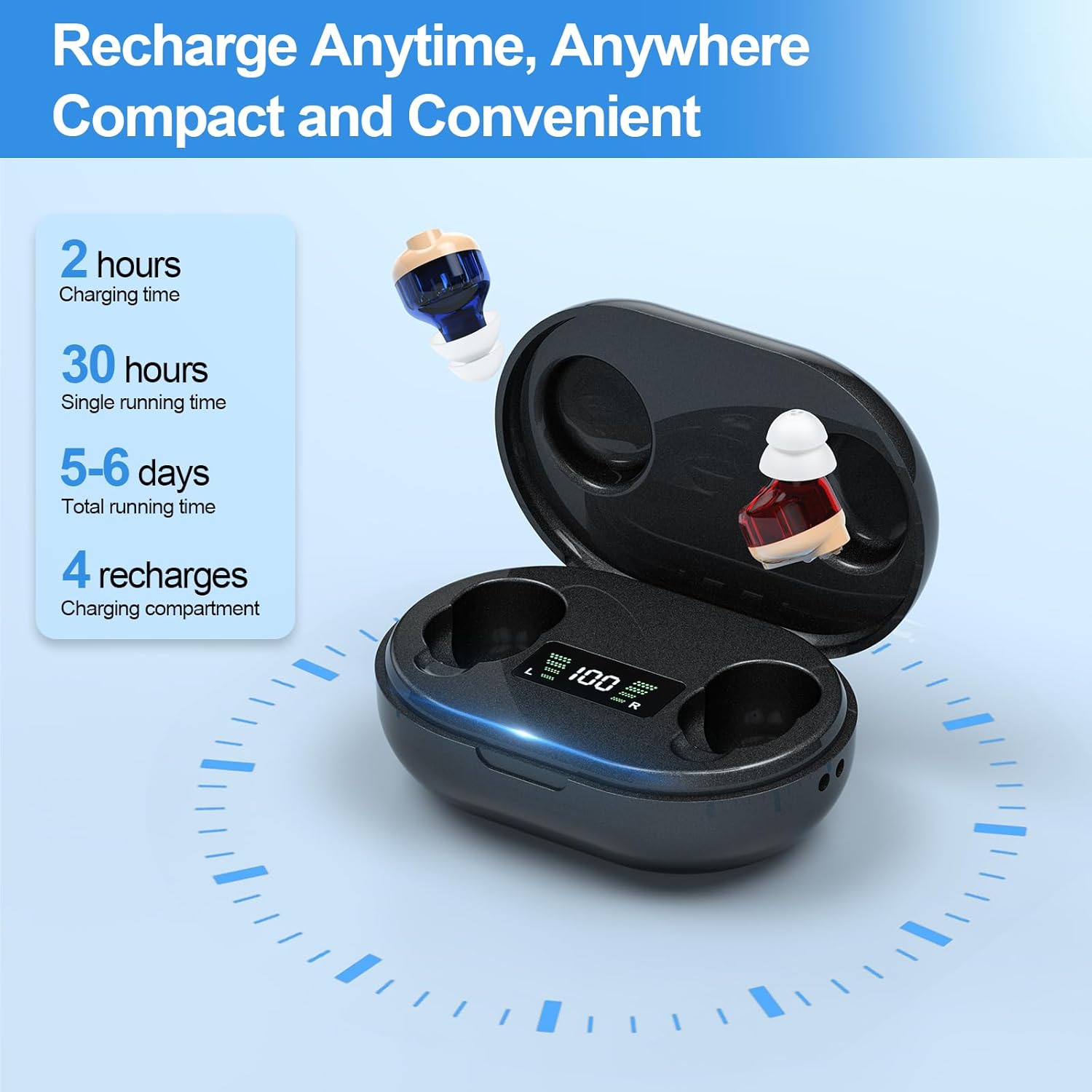
Image: The Mivo hearing aids placed in their charging case, with the digital display showing battery charge levels for both the case and individual hearing aids.
2. ഇയർ ടിപ്പുകൾ തിരഞ്ഞെടുത്ത് ഫിറ്റ് ചെയ്യുക
Choosing the correct ear tip size is crucial for comfort and optimal sound quality.
- Experiment with the different sizes of silicone ear tips provided.
- Select a tip that fits snugly in your ear canal without causing discomfort. A good fit helps prevent feedback (whistling) and ensures sound is directed effectively.
- Gently attach the chosen ear tip to the hearing aid.

Image: A senior man wearing a Mivo hearing aid, with an illustration of various ear tip sizes to ensure a comfortable and effective fit for different users.
3. Inserting the Hearing Aids
- Hold the hearing aid with the ear tip pointing towards your ear canal.
- Gently insert the hearing aid into your ear canal until it feels secure and comfortable.
- Ensure the hearing aid is flush with your outer ear.

ചിത്രം: ഒരു ക്ലോസ്-അപ്പ് view demonstrating the correct insertion of a Mivo hearing aid into the ear, showing its discreet placement.
പ്രവർത്തന നിർദ്ദേശങ്ങൾ

Image: A detailed diagram illustrating the key components and controls of the Mivo hearing aid, including the power switch, volume adjustment, microphone, and ear tip.
1. പവർ ഓൺ/ഓഫ്
- പവർ ഓൺ: The hearing aids automatically turn on when removed from the charging case.
- പവർ ഓഫ്: Place the hearing aids back into the charging case to automatically turn them off and begin charging.
- Alternatively, use the designated Power Switch on the device for manual control.
2. വോളിയം അഡ്ജസ്റ്റ്മെൻ്റ്
Adjust the volume to a comfortable level using the "Turning Volume" control located on the hearing aid.
- Rotate the volume wheel gently to increase or decrease the sound ampലിഫിക്കേഷൻ.
- Start with a lower volume and gradually increase it until sounds are clear and comfortable, avoiding excessively loud settings.
3. ശബ്ദം കുറയ്ക്കൽ
The Mivo GM-901T features automatic noise reduction to enhance speech clarity in various environments.
- The device is designed to automatically detect and minimize background noise, allowing you to focus on conversations.
- This feature is particularly effective in environments with consistent background sounds.

Image: An illustration depicting a social gathering, demonstrating the effect of automatic noise cancellation in reducing background distractions for clearer hearing.

Image: Two comparative scenes illustrating the hearing aids' performance in different acoustic environments: a quiet library setting and a noisy outdoor gathering.
മെയിൻ്റനൻസ്
1. നിങ്ങളുടെ ശ്രവണസഹായികൾ വൃത്തിയാക്കൽ
മികച്ച പ്രകടനത്തിനും ശുചിത്വത്തിനും പതിവായി വൃത്തിയാക്കൽ അത്യാവശ്യമാണ്.
- Use the provided cleaning brush to gently remove any earwax or debris from the ear tips and sound ports daily.
- Wipe the body of the hearing aids with a soft, dry cloth. Do not use water or cleaning solutions directly on the device.
- Ensure the charging contacts on both the hearing aids and the charging case are clean and free of debris.
2. സംഭരണം
- When not in use, store your hearing aids in the charging case to protect them and keep them charged.
- Store the charging case in a cool, dry place, away from direct sunlight and extreme temperatures.
ട്രബിൾഷൂട്ടിംഗ്
| പ്രശ്നം | സാധ്യമായ കാരണം | പരിഹാരം |
|---|---|---|
| ശബ്ദമോ ദുർബലമായ ശബ്ദമോ ഇല്ല |
|
|
| Whistling or feedback noise |
|
|
| Distorted sound or static |
|
|
| Hearing aid does not charge |
|
|
സ്പെസിഫിക്കേഷനുകൾ
- മോഡലിൻ്റെ പേര്: GM-901T
- ബ്രാൻഡ്: Mivo
- ശൈലി: ഇൻ-ഇയർ
- മെറ്റീരിയൽ: പ്ലാസ്റ്റിക്
- നിറം: കറുപ്പ്
- ഇനത്തിൻ്റെ ഭാരം: 5.6 ഔൺസ് (ആകെ പാക്കേജ്)
- പാക്കേജ് അളവുകൾ: 4.92 x 3.78 x 1.77 ഇഞ്ച്
- ബാറ്ററികൾ: 1 ലിഥിയം അയോൺ ബാറ്ററി ആവശ്യമാണ് (ഉൾപ്പെടുത്തിയിരിക്കുന്നു)
- ചാർജിംഗ് സമയം: ഏകദേശം 2 മണിക്കൂർ
- സിംഗിൾ റണ്ണിംഗ് സമയം: ഏകദേശം 30 മണിക്കൂർ
- Total Running Time (with case recharges): 5-6 days (up to 150 hours)
- നിർമ്മാതാവ്: HONG YU KANG TECHNOLOGY (GUANGDONG) CO., LTD.
വാറൻ്റിയും പിന്തുണയും
Your Mivo GM-901T Hearing Aids come with a 2 വർഷത്തെ വാറൻ്റി വാങ്ങിയ തീയതി മുതൽ, നിർമ്മാണ വൈകല്യങ്ങൾ ഉൾക്കൊള്ളുന്നു.
For technical assistance, troubleshooting, or warranty claims, please contact Mivo customer support. Our dedicated team is available to assist you.
Contact information can typically be found on the product packaging or the official Mivo webസൈറ്റ്.

Image: A senior man wearing a Mivo hearing aid, illustrating the lightweight and comfortable design for extended wear.