
ECOVACS N30 PRO OMNI
ECOVACS DEEBOT N30 PRO OMNI Instruction Manual
Model: N30 PRO OMNI
ബ്രാൻഡ്: ECOVACS
1. സജ്ജീകരണം
Before first use, carefully unbox all components and ensure everything is present. The package includes the OMNI station, DEEBOT N30 PRO OMNI Robot Vacuum, mopping kits, main brush, side brush, filter, dust bag, power cable, and user manual.

ചിത്രം 1: ബോക്സിൽ എന്താണുള്ളത്
Place the OMNI station in an open area with good 2.4G WiFi coverage and connect it to a 100V-120V power outlet. Download the ECOVACS HOME App on your smartphone for seamless control and advanced features. For initial mapping, ensure your robot is connected to the app and online. Use the voice command "OK YIKO, Quick Mapping" or navigate to Smart Cleaning > Quick Mapping in the app. If you have large mirrors, cover them during initial mapping to avoid misidentifying obstacles.
2. പ്രവർത്തന നിർദ്ദേശങ്ങൾ
The DEEBOT N30 PRO OMNI offers comprehensive cleaning capabilities. It features an unbeatable 10,000Pa suction power for deep cleaning various surfaces, effectively removing dirt, debris, and pet hair. The ZeroTangle 2.0 anti-tangle technology minimizes hair wrap-ups on the main brush.

Figure 2: Powerful 10,000Pa Suction for Pet Hair
The Dual OZMO Turbo Spinning Mopping System mimics human hand movements with a 25,000 RPM motor, applying 6N scrubbing pressure and rotating at 200 RPM for effective stain removal. TruEdge Adaptive Edge Mopping ensures 1mm accuracy for 99% coverage in corners and edges. The robot automatically lifts the mop by 9mm when detecting carpets to prevent cross-contamination and boosts suction power for deep carpet cleaning.

Figure 3: OZMO Turbo Mopping System

Figure 4: Automatic Mop Lifting for Carpets
Advanced navigation with TrueDetect 3D 3.0 and TrueMapping 2.0 allows for precise obstacle avoidance and quick mapping of your home (up to 100 square meters in 6 minutes). The robot supports multi-floor maps and offers up to 320 minutes of runtime on a single charge, covering up to 550m² in silent or vacuum-only mode.
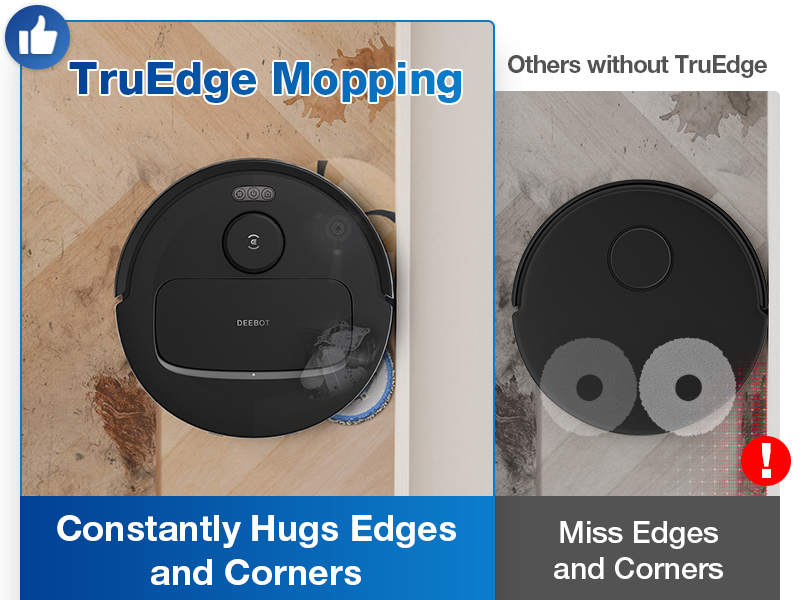
Figure 5: Advanced Navigation and Obstacle Avoidance
Control your DEEBOT N30 PRO OMNI via the ECOVACS HOME App, offering customizable settings for suction power, water flow, cleaning modes, and scheduling. It also supports voice control through Amazon Echo and Google Home. For quick tasks, use the intuitive buttons on the robot for spot cleaning, starting/pausing, or returning to the station.

Figure 6: Intuitive App and Voice Controls
3. പരിപാലനം
The All-in-One OMNI Station provides hands-free maintenance. It supports automatic 140℉ hot water mop washing and 104℉ hot air drying to prevent odors. The 2.6L dust bag can hold up to 75 days of dust, and the filter system offers up to 150 days of maintenance-free operation. The long-lasting solid cleaning agent provides up to 30 days of deep cleaning.

Figure 7: All-in-One OMNI Station
The baseplate of the station is fully detachable and can be rinsed with a faucet for easy cleaning, eliminating the need for prolonged bending or kneeling.

Figure 8: Detachable Baseplate for Easy Cleaning
4. പ്രശ്നപരിഹാരം
- How do I quickly map my house when using it for the first time?
Ensure your robot is connected to the ECOVACS HOME App and is online. Use the voice command "OK YIKO, Quick Mapping" or open the ECOVACS HOME app, go to Smart Cleaning > Quick Mapping. Once mapping is complete, the robot will announce that the mapping is finished. You can check the map in the app. - What if the map is incomplete?
The map will automatically update during the cleaning process. - How should I use the DEEBOT N30 PRO OMNI if I have large mirrors in my house?
To avoid the robot misidentifying obstacles, please cover the mirrors during the initial mapping of your house. - What should I do if the waste water in the cleaning sink cannot be recycled?
If the waste water cannot be recycled, remove the robot and check the cleaning sink in the station. Ensure there is no debris blocking the suction nozzle, and clean it if necessary. - Where can I buy accessories?
You can purchase accessories by searching for the model keywords on Amazon or by visiting the official ECOVACS flagship store and webസൈറ്റ്. - Why is the performance not as good as during the first use after some time?
Please check if any accessories need to be replaced.
5 സ്പെസിഫിക്കേഷനുകൾ
| ബ്രാൻഡ് | ഇക്കോവാക്സ് |
| മോഡലിൻ്റെ പേര് | ഡീബോട്ട് |
| പ്രത്യേക ഫീച്ചർ | Innovative ZeroTangle Technology, TruEdge Adaptive Edge Mopping Technology |
| നിറം | N30 Pro Omni |
| ഉൽപ്പന്ന അളവുകൾ | 13.38"L x 19.09"W x 21.26"H |
| ഉൾപ്പെടുത്തിയ ഘടകങ്ങൾ | OMNI station*1, Mopping Kits*2, N30 Pro OMNI Robot Vacuum*1 |
| ഫിൽട്ടർ തരം | കഴുകാവുന്നത് |
| ബാറ്ററി ലൈഫ് | 200 മിനിറ്റ് |
| വാല്യംtage | 110 വോൾട്ട് |
| പവർ ഉറവിടം | ബാറ്ററി പവർ |
| ബാറ്ററികൾ ഉൾപ്പെടുത്തിയിട്ടുണ്ട് | അതെ |
| അനുയോജ്യമായ ഉപകരണങ്ങൾ | സ്മാർട്ട്ഫോണുകൾ, ആമസോൺ എക്കോ, ഗൂഗിൾ ഹോം |
| ഫോം ഫാക്ടർ | റോബോട്ടിക് |
| യു.പി.സി | 850058335919 |
| ഇനത്തിൻ്റെ ഭാരം | 33.3 പൗണ്ട് |
| നിർമ്മാതാവ് | ഇക്കോവാക്സ് |
| ASIN | B0DBVD8G12 |
| മാതൃരാജ്യം | ചൈന |
| ഇനത്തിൻ്റെ മോഡൽ നമ്പർ | N30 PRO OMNI |
| ബാറ്ററികൾ | 1 ലിഥിയം അയോൺ ബാറ്ററികൾ ആവശ്യമാണ്. (ഉൾപ്പെടുന്നു) |
6. വാറൻ്റിയും പിന്തുണയും
For warranty information and customer support, please refer to the documentation included in your product packaging or visit the official ECOVACS website. You can also find additional support and accessories by visiting the ആമസോണിലെ ECOVACS സ്റ്റോർ.
Ask a question about this manual
Ask about setup, troubleshooting, compatibility, parts, safety, or missing instructions. Manuals+ will review the question and use this page’s manual context to help answer it.