
TCL MW513U
TCL Linkzone 5G UW (MW513U) User Manual
Your comprehensive guide to setting up and using your 5G MiFi Hotspot Router.
1. ആമുഖം
The TCL LINKZONE 5G UW (Model MW513U) is a portable 5G MiFi Hotspot Router designed to provide high-speed internet connectivity on the go. It allows you to create a secure Wi-Fi network for multiple devices, monitor usage, and customize settings through its integrated display or a web-based management tool. Equipped with a 4500mAh battery, it also supports On-The-Go (OTG) reverse charging for other mobile devices.
2. ബോക്സിൽ എന്താണുള്ളത്?
എല്ലാ ഇനങ്ങളും ഉണ്ടെന്ന് ഉറപ്പാക്കാൻ പാക്കേജ് ഉള്ളടക്കങ്ങൾ പരിശോധിക്കുക:
- TCL Linkzone 5G UW Router
- ബാറ്ററി
- യുഎസ്ബി പവർ അഡാപ്റ്റർ
- യുഎസ്ബി-സി കേബിൾ
3. ഉൽപ്പന്നം കഴിഞ്ഞുview
Familiarize yourself with the physical components of your TCL Linkzone 5G UW device.

ചിത്രം 3.1: മുൻഭാഗം View. The front of the device features a 2.4-inch display showing network status, data usage, Wi-Fi information, and menu navigation options. The TCL logo is visible on the right side.
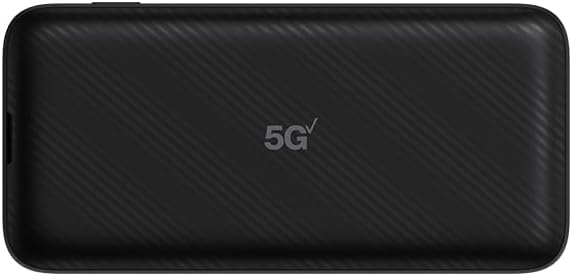
ചിത്രം 3.2: പിന്നിലേക്ക് View. The back of the device features a subtle textured pattern and the "5G UW" logo, indicating its 5G Ultra Wideband capability.

Figure 3.3: Top/Bottom View (Ports). ഇത് view shows the USB-C charging port, a LAN port for wired connections, and a small reset button.

ചിത്രം 3.4: വശം View (Power Button). The side of the device features the power button, used for turning the device on/off and waking the screen.
4. സജ്ജീകരണം
4.1. സിം കാർഡ് ഇടുന്നു
- Locate the SIM card slot, typically under the battery cover or on the side of the device.
- Carefully open the SIM card slot cover.
- Insert your activated Nano-SIM card into the slot with the gold contacts facing down and the notched corner aligned correctly.
- സിം കാർഡ് സ്ലോട്ട് കവർ സുരക്ഷിതമായി അടയ്ക്കുക.
4.2. ബാറ്ററി ഇൻസ്റ്റാൾ ചെയ്യുന്നു
- ഉപകരണത്തിന്റെ പിൻ കവർ നീക്കം ചെയ്യുക.
- ബാറ്ററി കമ്പാർട്ടുമെന്റിനുള്ളിലെ ടെർമിനലുകളുമായി ബാറ്ററി കോൺടാക്റ്റുകൾ വിന്യസിക്കുക.
- Gently press the battery into place until it is seated securely.
- പുറംചട്ട മാറ്റിസ്ഥാപിക്കുക.
4.3. പ്രാരംഭ പവർ ഓൺ
Press and hold the Power button (refer to Figure 3.4) for a few seconds until the screen illuminates. The device will boot up and attempt to connect to the cellular network.
5. ഉപകരണം പ്രവർത്തിപ്പിക്കുന്നു
5.1. വൈ-ഫൈ വഴി ഉപകരണങ്ങൾ ബന്ധിപ്പിക്കൽ
The TCL Linkzone 5G UW can connect up to 32 devices simultaneously via Wi-Fi.
- On the Linkzone's display, navigate to the "Wi-Fi Name/Password" section to view the network SSID (Wi-Fi name) and password.
- On your device (smartphone, tablet, laptop), open your Wi-Fi settings.
- Select the Linkzone's SSID from the list of available networks.
- ആവശ്യപ്പെടുമ്പോൾ Wi-Fi പാസ്വേഡ് നൽകുക.
- Once connected, your device will have internet access through the Linkzone.
5.2. Using the Touchscreen Display
The 2.4-inch touchscreen allows you to monitor your connection, data usage, and adjust basic settings directly on the device. Tap icons to navigate menus and view വിശദമായ വിവരങ്ങൾ.
5.3. Web-based Management Tool
For advanced settings and detailed network management, access the web-based management tool. Connect a device to the Linkzone's Wi-Fi, then open a web browser and enter the IP address displayed on the Linkzone's screen (or found in the manual/device settings). Log in using the default credentials (usually found on a sticker inside the device or in the quick start guide).
5.4. On-The-Go (OTG) Reverse Charging
The 4500mAh battery allows the Linkzone to act as a power bank. Connect your mobile device to the Linkzone's USB-C port using a compatible cable to charge it.
6. പരിപാലനം
6.1. ബാറ്ററി പരിചരണം
- Charge the device regularly using the provided USB-C cable and power adapter.
- ബാറ്ററിയുടെ പ്രകടനം മോശമാക്കാൻ സാധ്യതയുള്ള തീവ്രമായ താപനിലയിലേക്ക് ഉപകരണം തുറന്നുകാട്ടുന്നത് ഒഴിവാക്കുക.
- If storing the device for extended periods, ensure the battery is charged to approximately 50%.
6.2. വൃത്തിയാക്കൽ
Use a soft, dry, lint-free cloth to clean the device. Avoid using harsh chemicals or abrasive materials that could damage the screen or casing.
7. പ്രശ്നപരിഹാരം
| പ്രശ്നം | സാധ്യമായ പരിഹാരം |
|---|---|
| ഉപകരണം പവർ ഓണാക്കുന്നില്ല. | Ensure the battery is correctly installed and charged. Connect the device to the power adapter and try again. |
| ഇൻ്റർനെറ്റ് കണക്ഷനില്ല. |
|
| Cannot connect devices to Wi-Fi. |
|
| ഉപകരണം മന്ദഗതിയിലാണ് അല്ലെങ്കിൽ പ്രതികരിക്കുന്നില്ല. | Restart the device. If the issue persists, perform a factory reset (refer to the device's web management tool for instructions, as this will erase custom settings). |
| Activation issues with service provider (e.g., Verizon). | Contact your service provider's customer support directly for assistance with SIM card activation and service provisioning. Ensure the device is compatible with their network. |
8 സ്പെസിഫിക്കേഷനുകൾ
| ഫീച്ചർ | വിശദാംശങ്ങൾ |
|---|---|
| മോഡലിൻ്റെ പേര് | TCL Linkzone 5G UW |
| മോഡൽ നമ്പർ | MW513U |
| ബ്രാൻഡ് | ടി.സി.എൽ |
| കണക്റ്റിവിറ്റി ടെക്നോളജി | 5G, Wi-Fi, USB |
| വയർലെസ് കമ്മ്യൂണിക്കേഷൻ സ്റ്റാൻഡേർഡ് | 802.11n, 802.11b, 802.11ax, 802.11g |
| ഫ്രീക്വൻസി ബാൻഡ് ക്ലാസ് | ഡ്യുവൽ-ബാൻഡ് |
| ആവൃത്തി | 5 GHz |
| ബാറ്ററി ശേഷി | 4500mAh ലിഥിയം അയൺ (ഉൾപ്പെടുത്തിയത്) |
| പരമാവധി ബന്ധിപ്പിച്ച ഉപകരണങ്ങൾ | 32 വരെ |
| പ്രദർശിപ്പിക്കുക | 2.4" Touchscreen |
| ഇനത്തിൻ്റെ ഭാരം | 14.4 ഔൺസ് |
| പാക്കേജ് അളവുകൾ | 7 x 4 x 2 ഇഞ്ച് |
| അനുയോജ്യമായ ഉപകരണങ്ങൾ | പേഴ്സണൽ കമ്പ്യൂട്ടർ, ടാബ്ലെറ്റ്, സ്മാർട്ട്ഫോൺ |
| ശുപാർശ ചെയ്യുന്ന ഉപയോഗങ്ങൾ | വീട്, ബിസിനസ് |
9. വാറൻ്റിയും പിന്തുണയും
For warranty information, technical support, or to view additional resources, please visit the official TCL support webസൈറ്റ് അല്ലെങ്കിൽ നിങ്ങളുടെ ഉൽപ്പന്നത്തിൽ ഉൾപ്പെടുത്തിയിരിക്കുന്ന ഡോക്യുമെന്റേഷൻ പരിശോധിക്കുക. നിങ്ങൾക്ക് സന്ദർശിക്കാനും കഴിയും ആമസോണിലെ ടിസിഎൽ സ്റ്റോർ ഉൽപ്പന്ന വിവരങ്ങൾക്കും അപ്ഡേറ്റുകൾക്കും.
Protection plans are available for purchase separately to extend coverage beyond the standard manufacturer's warranty. Please refer to the product listing for details on available protection plans.
Ask a question about this manual
Ask about setup, troubleshooting, compatibility, parts, safety, or missing instructions. Manuals+ will review the question and use this page’s manual context to help answer it.