
ആമുഖം
Welcome to the user manual for your HICSHON 4K Waterproof Video Camera. This camera is designed for capturing high-quality photos and videos both on land and underwater, featuring 4K Ultra HD video recording, 48MP still image capture, dual screens for easy selfies, and a waterproof design up to 11 feet (3.3 meters). Please read this manual carefully to ensure proper operation and maintenance of your device.

Figure 1: HICSHON 4K Waterproof Video Camera and included accessories: 64GB memory card and two lithium-ion batteries.
പാക്കേജ് ഉള്ളടക്കം
എല്ലാ ഇനങ്ങളും ഉണ്ടെന്ന് ഉറപ്പാക്കാൻ പാക്കേജ് പരിശോധിക്കുക:
- HICSHON 4K Waterproof Video Camera (Model: WDC901)
- 64 ജിബി മൈക്രോ എസ്ഡി കാർഡ്
- Lithium-Ion Batteries (x2)
- യുഎസ്ബി ചാർജിംഗ് കേബിൾ
- റിസ്റ്റ് സ്ട്രാപ്പ്
- ഉപയോക്തൃ മാനുവൽ
സജ്ജമാക്കുക
1. ബാറ്ററി ഇൻസ്റ്റാളേഷൻ
The camera requires two Lithium-Ion batteries. Ensure correct polarity when inserting.
- Locate the battery compartment door on the bottom of the camera.
- Slide the lock mechanism to open the door.
- Insert the two Lithium-Ion batteries according to the polarity indicators (+/-) inside the compartment.
- Close the battery compartment door firmly until it clicks into place, ensuring a waterproof seal.
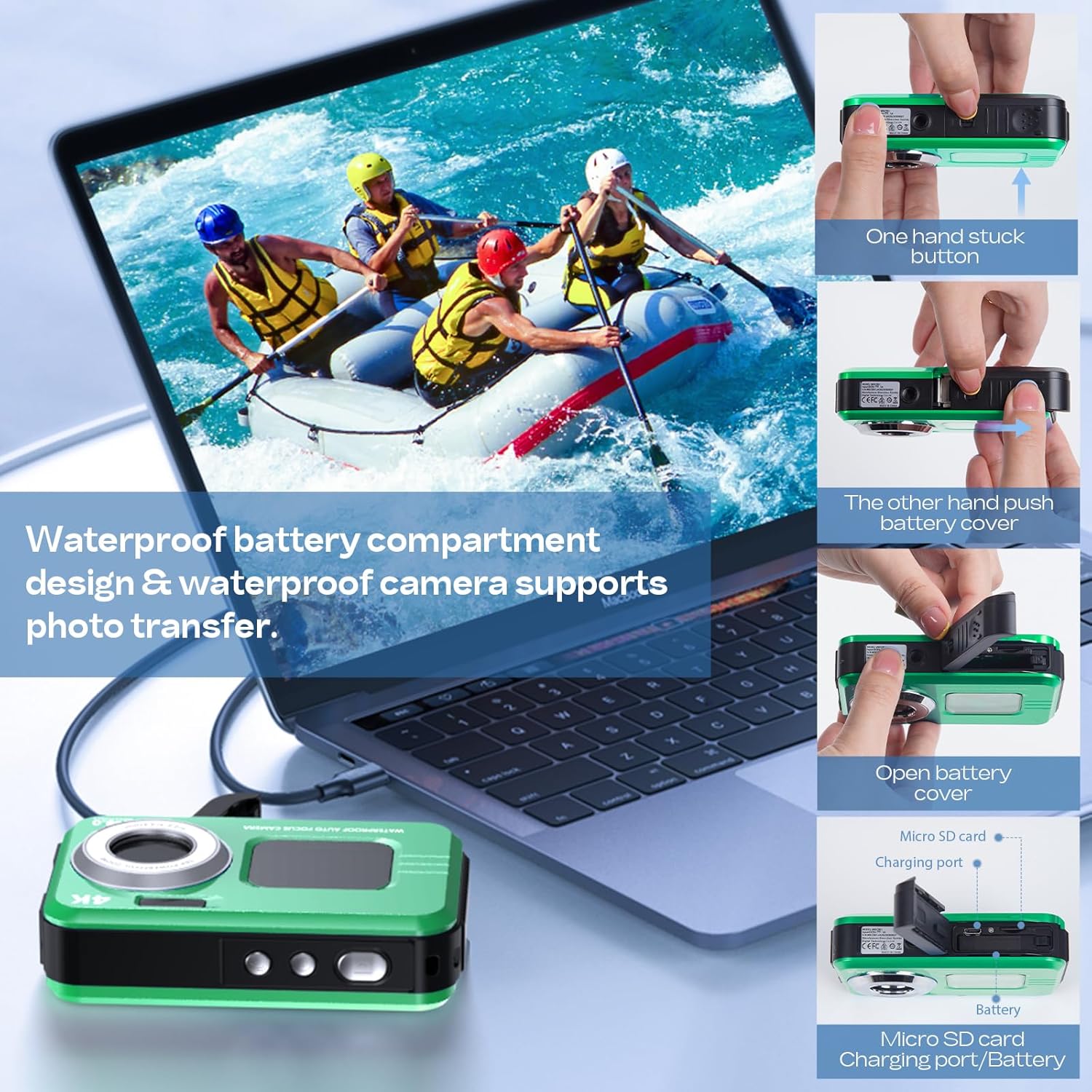
Figure 2: Battery and Micro SD card compartment location.
2. മെമ്മറി കാർഡ് ഇൻസ്റ്റാളേഷൻ
A 64GB Micro SD card is included. The camera supports Micro SD cards up to 128GB (Class 10 or higher recommended).
- Open the battery compartment door as described above.
- Locate the Micro SD card slot next to the battery compartment.
- സ്വർണ്ണ കോൺടാക്റ്റുകൾ താഴേക്ക് അഭിമുഖമായി വരുന്ന വിധത്തിൽ മൈക്രോ എസ്ഡി കാർഡ് ഇടുക, അങ്ങനെ അത് സ്ഥലത്ത് ക്ലിക്ക് ആകുന്നതുവരെ.
- ബാറ്ററി കമ്പാർട്ട്മെന്റ് വാതിൽ സുരക്ഷിതമായി അടയ്ക്കുക.
3. പ്രാരംഭ ചാർജിംഗ്
Before first use, fully charge the batteries.
- Connect the USB charging cable to the camera's charging port (located within the battery compartment).
- USB കേബിളിന്റെ മറ്റേ അറ്റം ഒരു USB പവർ അഡാപ്റ്ററുമായി (ഉൾപ്പെടുത്തിയിട്ടില്ല) അല്ലെങ്കിൽ ഒരു കമ്പ്യൂട്ടറിന്റെ USB പോർട്ടുമായി ബന്ധിപ്പിക്കുക.
- ചാർജിംഗ് ഇൻഡിക്കേറ്റർ ലൈറ്റ് പ്രകാശിക്കും. ചാർജിംഗ് പൂർത്തിയാകുമ്പോൾ അത് ഓഫാകും അല്ലെങ്കിൽ നിറം മാറും.
ക്യാമറ പ്രവർത്തിപ്പിക്കുന്നത്
1. പവർ ഓൺ/ഓഫ്
അമർത്തിപ്പിടിക്കുക പവർ ബട്ടൺ (usually located on the top or side) for a few seconds to turn the camera on or off.
2. അടിസ്ഥാന നിയന്ത്രണങ്ങൾ
ക്യാമറയുടെ ബട്ടണുകൾ ഉപയോഗിച്ച് സ്വയം പരിചയപ്പെടുക:
- ഷട്ടർ ബട്ടൺ: Press to take a photo or start/stop video recording.
- മോഡ് ബട്ടൺ: Cycles through different modes (Photo, Video, Playback, Settings).
- Zoom Buttons (W/T): Adjusts digital zoom (Wide/Telephoto).
- മെനു ബട്ടൺ: ക്യാമറ ക്രമീകരണങ്ങൾ ആക്സസ് ചെയ്യുന്നു.
- ശരി/സ്ഥിരീകരിക്കുക ബട്ടൺ: മെനുകളിലെ തിരഞ്ഞെടുപ്പുകൾ സ്ഥിരീകരിക്കുന്നു.

Figure 3: Camera interface and button layout.
3. Switching Screens (Dual Screen Feature)
The HICSHON camera features dual screens (front and rear) for versatile shooting, especially for selfies and vlogging.
- To switch between the front and rear screens, locate the dedicated screen switch button (often labeled with a screen icon or "M").
- Press this button to toggle the active display.
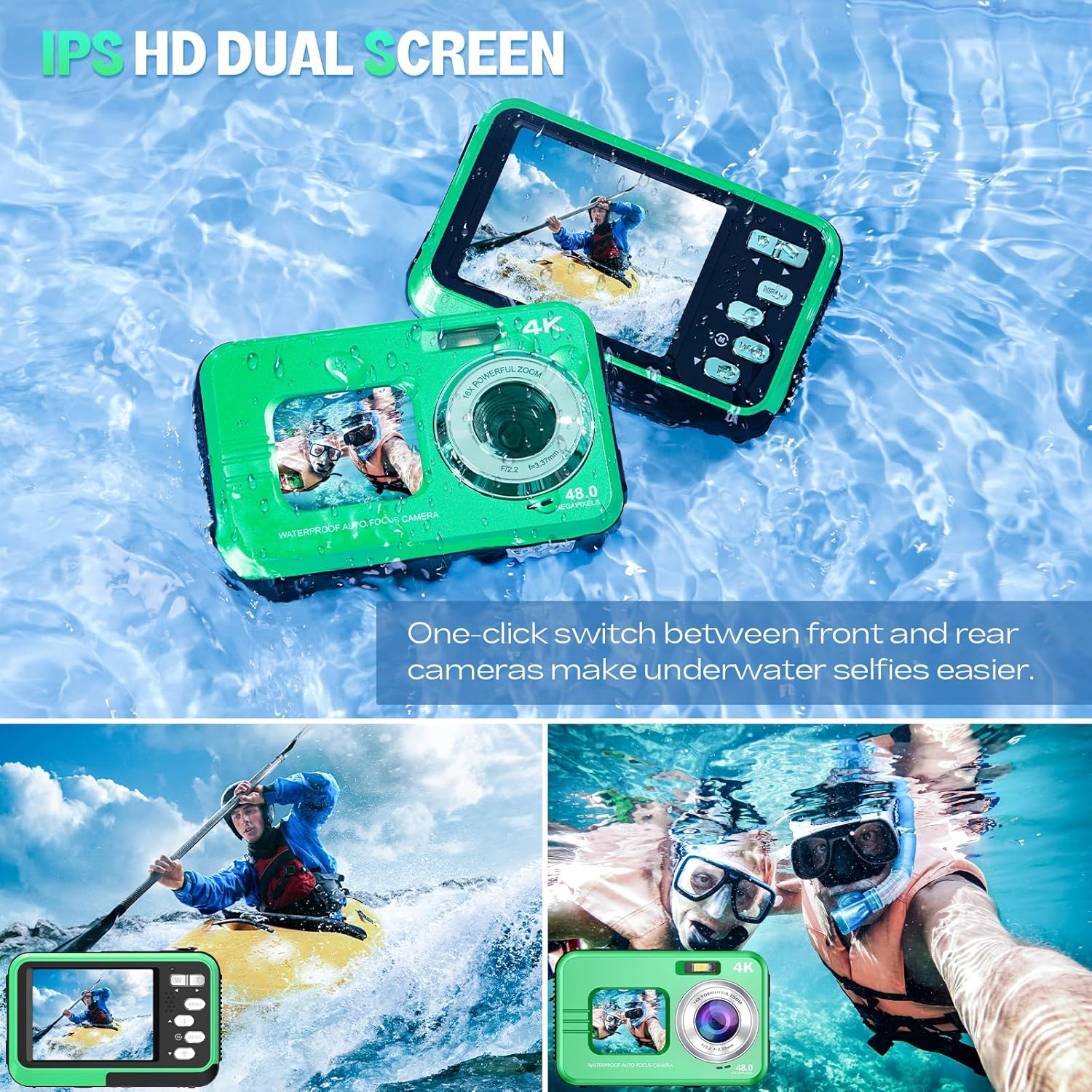
Figure 4: Dual screen functionality for easy selfies and vlogging.
4. ഫോട്ടോ എടുക്കൽ
- Turn on the camera and ensure it is in Photo mode (check the display icon).
- സ്ക്രീൻ ഉപയോഗിച്ച് നിങ്ങളുടെ ഷോട്ട് ഫ്രെയിം ചെയ്യുക.
- Press the Shutter button halfway down to activate autofocus. The focus frame will turn green when focus is achieved.
- Press the Shutter button fully down to capture the image.
5. വീഡിയോകൾ റെക്കോർഡുചെയ്യുന്നു
- Turn on the camera and switch to Video mode using the Mode button.
- Frame your scene.
- Press the Shutter button once to start recording. A recording indicator (e.g., red dot or timer) will appear on the screen.
- റെക്കോർഡിംഗ് നിർത്താൻ ഷട്ടർ ബട്ടൺ വീണ്ടും അമർത്തുക.

Figure 5: Capturing high-resolution underwater video.
6. സൂം ഫംഗ്ഷൻ
The camera features 16X digital zoom.
- In Photo or Video mode, press the T (Telephoto) button സൂം ഇൻ ചെയ്യാൻ.
- അമർത്തുക W (Wide) button സൂം ഔട്ട് ചെയ്യാൻ.
7. അണ്ടർവാട്ടർ ഉപയോഗം
The HICSHON camera is waterproof up to 11 feet (3.3 meters) and meets IP68 international waterproof standards. Follow these guidelines for underwater operation:
- Before submerging, ensure the battery and memory card compartment door is securely closed and locked.
- Check the rubber seal around the compartment for any debris or damage. A clean, intact seal is crucial for waterproofing.
- Do not open the compartment underwater.
- After use in saltwater, rinse the camera with fresh water and dry thoroughly before opening any compartments.

Figure 6: Camera's waterproof depth capability.
8. പ്രത്യേക സവിശേഷതകൾ
Fill Light & Anti-Shake
The built-in fill light assists in capturing quality pictures in low-light conditions, especially underwater. The anti-shake feature helps stabilize images and videos, reducing blur caused by camera movement.
- Access these features through the camera's menu settings.
- Enable the fill light for darker environments.
- Ensure anti-shake is enabled for smoother footage.

Figure 7: Benefits of Fill Light and Anti-Shake features.
Time Lapse, Continuous Shooting, Self-Timer, and Effects
Explore various creative shooting modes:
- ടൈം ലാപ്സ്: Capture a series of photos over time to create a time-lapse video.
- 3-Continuous Shooting: വേഗത്തിൽ ഒന്നിനുപുറകെ ഒന്നായി ഒന്നിലധികം ഫോട്ടോകൾ എടുക്കുക.
- സ്വയം-ടൈമർ: Set a delay (e.g., 2s, 5s, 10s) before the photo is taken, useful for group shots.
- 16 Effects: Apply various filters or effects to your photos directly from the camera.

Figure 8: Creative shooting modes available.
ഡാറ്റ കൈമാറ്റം
Transferring Photos and Videos
You can transfer your captured media to a computer or other device.
- നൽകിയിരിക്കുന്ന USB കേബിൾ ഉപയോഗിച്ച് നിങ്ങളുടെ കമ്പ്യൂട്ടറിലേക്ക് ക്യാമറ ബന്ധിപ്പിക്കുക.
- Turn on the camera. It should appear as a removable disk or mass storage device on your computer.
- Navigate to the camera's storage (usually a DCIM folder) to access your photos and videos.
- ആവശ്യമുള്ളത് പകർത്തുക fileനിങ്ങളുടെ കമ്പ്യൂട്ടറിലേക്ക് എസ്.
- Safely eject the camera from your computer before disconnecting the USB cable.
മെയിൻ്റനൻസ്
1. ക്യാമറ വൃത്തിയാക്കൽ
- Use a soft, lint-free cloth to clean the camera body and screens.
- For the lens, use a specialized lens cleaning cloth and solution. Avoid touching the lens with fingers.
- After underwater use, rinse the camera with fresh water and allow it to air dry completely before opening any compartments.
2. ബാറ്ററി പരിചരണം
- ഉപയോഗത്തിലില്ലാത്തപ്പോൾ തണുത്തതും ഉണങ്ങിയതുമായ സ്ഥലത്ത് ബാറ്ററികൾ സൂക്ഷിക്കുക.
- ബാറ്ററികളുടെ ആയുസ്സ് വർദ്ധിപ്പിക്കുന്നതിന് ഇടയ്ക്കിടെ പൂർണ്ണമായും ഡിസ്ചാർജ് ചെയ്യുന്നത് ഒഴിവാക്കുക.
- ദീർഘനേരം സൂക്ഷിക്കുകയാണെങ്കിൽ, ബാറ്ററികൾ ഏകദേശം 50% ശേഷി വരെ ചാർജ് ചെയ്യുക.
3. വാട്ടർപ്രൂഫ് സീൽ കെയർ
- Regularly inspect the rubber seal around the battery/memory card compartment for dirt, sand, hair, or any damage.
- Clean the seal gently with a soft, damp cloth. Do not use sharp objects.
- Ensure the seal is properly seated and free of obstructions before closing the compartment for waterproof use.
ട്രബിൾഷൂട്ടിംഗ്
If you encounter issues with your HICSHON camera, refer to the following common problems and solutions:
| പ്രശ്നം | സാധ്യമായ കാരണം / പരിഹാരം |
|---|---|
| ക്യാമറ ഓണാകുന്നില്ല. |
|
| ചിത്രങ്ങൾ മങ്ങിയതോ ഫോക്കസിന് പുറത്തോ ആണ്. |
|
| Lens fogs up (especially underwater). |
|
| മെമ്മറി കാർഡ് പിശക്. |
|
| കൈമാറാൻ കഴിയില്ല fileകമ്പ്യൂട്ടറിലേക്ക്. |
|
സ്പെസിഫിക്കേഷനുകൾ
| ഫീച്ചർ | വിശദാംശങ്ങൾ |
|---|---|
| മോഡലിൻ്റെ പേര് | WDC901 |
| ബ്രാൻഡ് | ഹിക്ഷോൺ |
| പരമാവധി ഇമേജ് റെസല്യൂഷൻ | 48 എം.പി |
| ഫോട്ടോ സെൻസർ ടെക്നോളജി | CMOS |
| ഫോട്ടോ സെൻസർ വലുപ്പം | 1/3.2-ഇഞ്ച് |
| ഇമേജ് സ്റ്റെബിലൈസേഷൻ | ഡിജിറ്റൽ |
| പിന്തുണച്ചു File ഫോർമാറ്റ് | JPEG |
| കുറഞ്ഞ ഷട്ടർ സ്പീഡ് | 1/60 സെക്കൻഡ് |
| മീറ്ററിംഗ് വിവരണം | സെന്റർ വെയ്റ്റഡ് |
| അനുയോജ്യമായ മൗണ്ടിംഗുകൾ | മൈക്രോ നാലിലൊന്ന് |
| ബാറ്ററികൾ | 2 ലിഥിയം അയോൺ ബാറ്ററികൾ (ഉൾപ്പെട്ടിരിക്കുന്നു) |
| പാക്കേജ് അളവുകൾ | 12.19 x 9.3 x 8.71 സെ.മീ |
| ഭാരം | 340 ഗ്രാം |
| വാട്ടർപ്രൂഫ് ആഴം | 11 അടി വരെ (3.3 മീറ്റർ) |
വാറൻ്റിയും പിന്തുണയും
HICSHON products are manufactured to high quality standards. For information regarding warranty coverage, please refer to the warranty card included with your product or visit the official HICSHON webസൈറ്റ്.
If you require technical assistance or have questions not covered in this manual, please contact HICSHON customer support through their official channels. Please have your model number (WDC901) and purchase details ready when contacting support.