
ഹമ 00184196
Hama Freedom Lit II Bluetooth® Headphones
ഇൻസ്ട്രക്ഷൻ മാനുവൽ
ഉൽപ്പന്നം കഴിഞ്ഞുview
The Hama Freedom Lit II Bluetooth® Headphones are designed for wireless music enjoyment and hands-free calling. Featuring an on-ear, foldable design, these headphones offer comfort and portability. They include an integrated microphone and volume controls directly on the earcup for convenient operation.
പ്രധാന സവിശേഷതകളിൽ ഇവ ഉൾപ്പെടുന്നു:
- Wireless Bluetooth® stereo audio.
- Up to 15 hours of music playback on a full charge.
- Integrated microphone for calls.
- Direct volume control on the headphones.
- ഒതുക്കമുള്ള സംഭരണത്തിനായി മടക്കാവുന്ന ഡിസൈൻ.
- Compatibility with Siri and Google Assistant.
- Padded headband for comfortable extended use.
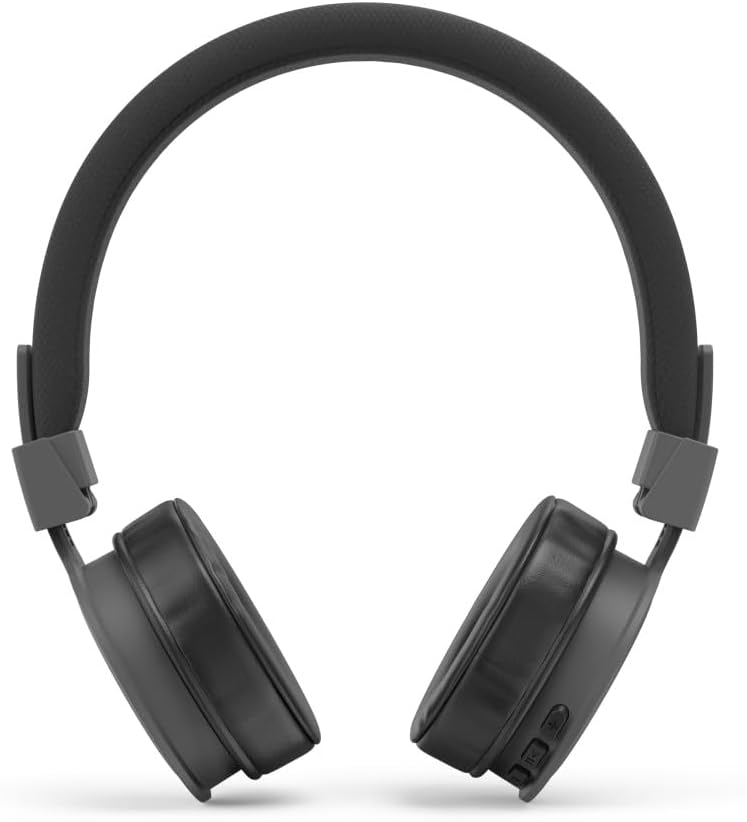
ചിത്രം: മുൻഭാഗം view of the Hama Freedom Lit II Bluetooth Headphones, showcasing മൊത്തത്തിലുള്ള രൂപകൽപ്പന.
സജ്ജമാക്കുക
1. ഹെഡ്ഫോണുകൾ ചാർജ് ചെയ്യുന്നു
Before first use, fully charge the headphones. Use the included USB-C charging cable.
- Connect the USB-C end of the charging cable to the charging port on the headphone earcup.
- Connect the USB-A end of the cable to a compatible USB power source (e.g., computer USB port, USB wall adapter).
- ചാർജിംഗ് ഇൻഡിക്കേറ്റർ ലൈറ്റ് പ്രകാശിക്കും. പൂർണ്ണമായി ചാർജ് ചെയ്യാൻ ഏകദേശം 3 മണിക്കൂർ എടുക്കും.
- Once fully charged, the indicator light will change or turn off (refer to specific LED behavior in the quick guide). Disconnect the charging cable.
2. ബ്ലൂടൂത്ത് ജോടിയാക്കൽ
To connect the headphones to your device (smartphone, tablet, computer), follow these steps:
- ഹെഡ്ഫോണുകൾ ഓഫാണെന്ന് ഉറപ്പാക്കുക.
- Press and hold the Power/Multi-function button on the headphones until the LED indicator flashes blue and red alternately, indicating pairing mode.
- നിങ്ങളുടെ ഉപകരണത്തിൽ, ബ്ലൂടൂത്ത് ക്രമീകരണങ്ങളിലേക്ക് പോയി ബ്ലൂടൂത്ത് പ്രവർത്തനക്ഷമമാക്കിയിട്ടുണ്ടെന്ന് ഉറപ്പാക്കുക.
- ഇതിനായി തിരയുക available devices. Select "Hama Freedom Lit II" from the list.
- Once connected, the LED indicator on the headphones will typically flash blue slowly or turn solid blue.
- ഒരു പാസ്കോഡ് ആവശ്യപ്പെടുകയാണെങ്കിൽ, "0000" (നാല് പൂജ്യങ്ങൾ) നൽകുക.

ചിത്രം: ആംഗിൾഡ് view of the Hama Freedom Lit II headphones, highlighting the Hama branding on the headband.
പ്രവർത്തന നിർദ്ദേശങ്ങൾ
പവർ ഓൺ/ഓഫ്
- പവർ ഓണാക്കാൻ: LED ഇൻഡിക്കേറ്റർ നീല നിറത്തിൽ മിന്നുന്നത് വരെ പവർ/മൾട്ടി-ഫംഗ്ഷൻ ബട്ടൺ ഏകദേശം 3 സെക്കൻഡ് അമർത്തിപ്പിടിക്കുക.
- പവർ ഓഫ് ചെയ്യാൻ: LED ഇൻഡിക്കേറ്റർ ചുവപ്പ് നിറത്തിൽ മിന്നിമറയുന്നതുവരെ പവർ/മൾട്ടി-ഫംഗ്ഷൻ ബട്ടൺ ഏകദേശം 5 സെക്കൻഡ് അമർത്തിപ്പിടിക്കുക, തുടർന്ന് ഓഫാകും.
സംഗീത പ്ലേബാക്ക്

ചിത്രം: ക്ലോസ്-അപ്പ് view of the right earcup, showing the control buttons for volume, track control, and power/multi-function.
- പ്ലേ/താൽക്കാലികമായി നിർത്തുക: Press the Power/Multi-function button once.
- വോളിയം കൂട്ടുക: "+" ബട്ടൺ അമർത്തുക.
- വോളിയം താഴേക്ക്: "-" ബട്ടൺ അമർത്തുക.
- അടുത്ത ട്രാക്ക്: "+" ബട്ടൺ അമർത്തിപ്പിടിക്കുക.
- മുമ്പത്തെ ട്രാക്ക്: "-" ബട്ടൺ അമർത്തിപ്പിടിക്കുക.
കോൾ മാനേജുമെന്റ്
- ഉത്തരം/അവസാന കോൾ: Press the Power/Multi-function button once.
- കോൾ നിരസിക്കുക: Press and hold the Power/Multi-function button for approximately 2 seconds.
- അവസാന നമ്പർ വീണ്ടും ഡയൽ ചെയ്യുക: Double-press the Power/Multi-function button.
വോയ്സ് അസിസ്റ്റന്റ് ആക്റ്റിവേഷൻ
- വോയ്സ് അസിസ്റ്റന്റ് (സിരി/ഗൂഗിൾ അസിസ്റ്റന്റ്) സജീവമാക്കുക: Triple-press the Power/Multi-function button.
സംഭരണത്തിനായി മടക്കിക്കളയുന്നു
The headphones feature a foldable design for easy portability and compact storage.

Image: The Hama Freedom Lit II headphones shown in their folded configuration, demonstrating their compact storage capability.
Gently fold the earcups inwards towards the headband until they lock into place. To unfold, reverse the process.
മെയിൻ്റനൻസ്
- Clean the headphones only with a slightly damp, ലിന്റ് രഹിത തുണി. ആക്രമണാത്മക ക്ലീനിംഗ് ഏജന്റുകൾ ഉപയോഗിക്കരുത്.
- തീവ്രമായ താപനില, നേരിട്ടുള്ള സൂര്യപ്രകാശം, അല്ലെങ്കിൽ ഉയർന്ന ഈർപ്പം എന്നിവയിൽ ഹെഡ്ഫോണുകൾ തുറന്നുകാട്ടുന്നത് ഒഴിവാക്കുക.
- Store the headphones in a dry, dust-free environment when not in use.
- Do not attempt to disassemble or repair the headphones yourself. This will void the warranty.
ട്രബിൾഷൂട്ടിംഗ്
| പ്രശ്നം | സാധ്യമായ കാരണം | പരിഹാരം |
|---|---|---|
| ഹെഡ്ഫോണുകൾ ഓണാക്കുന്നില്ല. | ബാറ്ററി തീർന്നു. | ഹെഡ്ഫോണുകൾ പൂർണ്ണമായും ചാർജ് ചെയ്യുക. |
| ഉപകരണവുമായി ജോടിയാക്കാൻ കഴിയില്ല. | ഹെഡ്ഫോണുകൾ ജോടിയാക്കൽ മോഡിൽ ഇല്ല; ഉപകരണ ബ്ലൂടൂത്ത് ഓഫാണ്; ഉപകരണത്തിൽ നിന്ന് വളരെ അകലെയാണ്. | Ensure headphones are in pairing mode (flashing blue/red). Turn device Bluetooth off and on. Move headphones closer to device. Clear previous pairings on device. |
| ശബ്ദമില്ല അല്ലെങ്കിൽ കുറഞ്ഞ ശബ്ദമില്ല. | Volume too low on headphones or device; Not properly connected. | ഹെഡ്ഫോണുകളിലും ഉപകരണത്തിലും ശബ്ദം വർദ്ധിപ്പിക്കുക. ഹെഡ്ഫോണുകൾ വീണ്ടും ജോടിയാക്കുക. |
| മോശം ശബ്ദ നിലവാരം. | ഇടപെടൽ; ഉപകരണം വളരെ അകലെയാണ്; ബാറ്ററി കുറവാണ്. | Move away from sources of interference. Move closer to device. Charge headphones. |
സ്പെസിഫിക്കേഷനുകൾ
- ബ്രാൻഡ്: ഹമാ
- മോഡലിൻ്റെ പേര്: Freedom Lit II
- മോഡൽ നമ്പർ: 00184196
- കണക്റ്റിവിറ്റി ടെക്നോളജി: വയർലെസ് (ബ്ലൂടൂത്ത്)
- ചെവി സ്ഥാപിക്കൽ: ചെവിയിൽ
- ഫോം ഘടകം: On-Ear, Foldable
- നിറം: കറുപ്പ്
- ശബ്ദ നിയന്ത്രണം: നിഷ്ക്രിയ ശബ്ദം റദ്ദാക്കൽ
- സംഗീത പ്ലേബാക്ക് സമയം: 15 മണിക്കൂർ വരെ
- സംസാര സമയം: 15 മണിക്കൂർ വരെ
- ചാർജിംഗ് സമയം: ഏകദേശം 3 മണിക്കൂർ
- ചാർജിംഗ് പോർട്ട്: USB-C
- ഉൾപ്പെടുത്തിയ ഘടകങ്ങൾ: 1 x Bluetooth Headset, 1 x USB-C Charging Cable, 1 x Quick Guide, 1 x Safety Instructions.
വാറൻ്റിയും പിന്തുണയും
For detailed warranty information and technical support, please refer to the included Quick Guide and Safety Instructions, or visit the official Hama webസൈറ്റ്. വാറന്റി ക്ലെയിമുകൾക്കായി നിങ്ങളുടെ വാങ്ങലിന്റെ തെളിവ് സൂക്ഷിക്കുക.
നിർമ്മാതാവ്: ഹമാ
ASIN: B0CMTSNVFQ
Ask a question about this manual
Ask about setup, troubleshooting, compatibility, parts, safety, or missing instructions. Manuals+ will review the question and use this page’s manual context to help answer it.