
1. ആമുഖം
This manual provides essential information for the proper setup, operation, and maintenance of your HAYEAR HY-900B USB3.0 Digital Microscope Camera. This 8-megapixel camera is designed for various applications including industrial vision, visual inspection, and integration with microscopes and astronomical telescopes. It offers high-speed video transmission and compatibility with multiple operating systems.
2. പാക്കേജ് ഉള്ളടക്കം
താഴെ ലിസ്റ്റ് ചെയ്തിരിക്കുന്ന എല്ലാ ഇനങ്ങളും നിങ്ങളുടെ പാക്കേജിൽ ഉൾപ്പെടുത്തിയിട്ടുണ്ടെന്ന് ഉറപ്പാക്കുക:
- 1 x HAYEAR HY-900B USB3.0 Digital Microscope Camera
- 1 x യുഎസ്ബി 3.0 കേബിൾ
- 1 x Software Disk
3. ഉൽപ്പന്നം കഴിഞ്ഞുview
The HAYEAR HY-900B is a compact and versatile digital microscope camera. Familiarize yourself with its components:
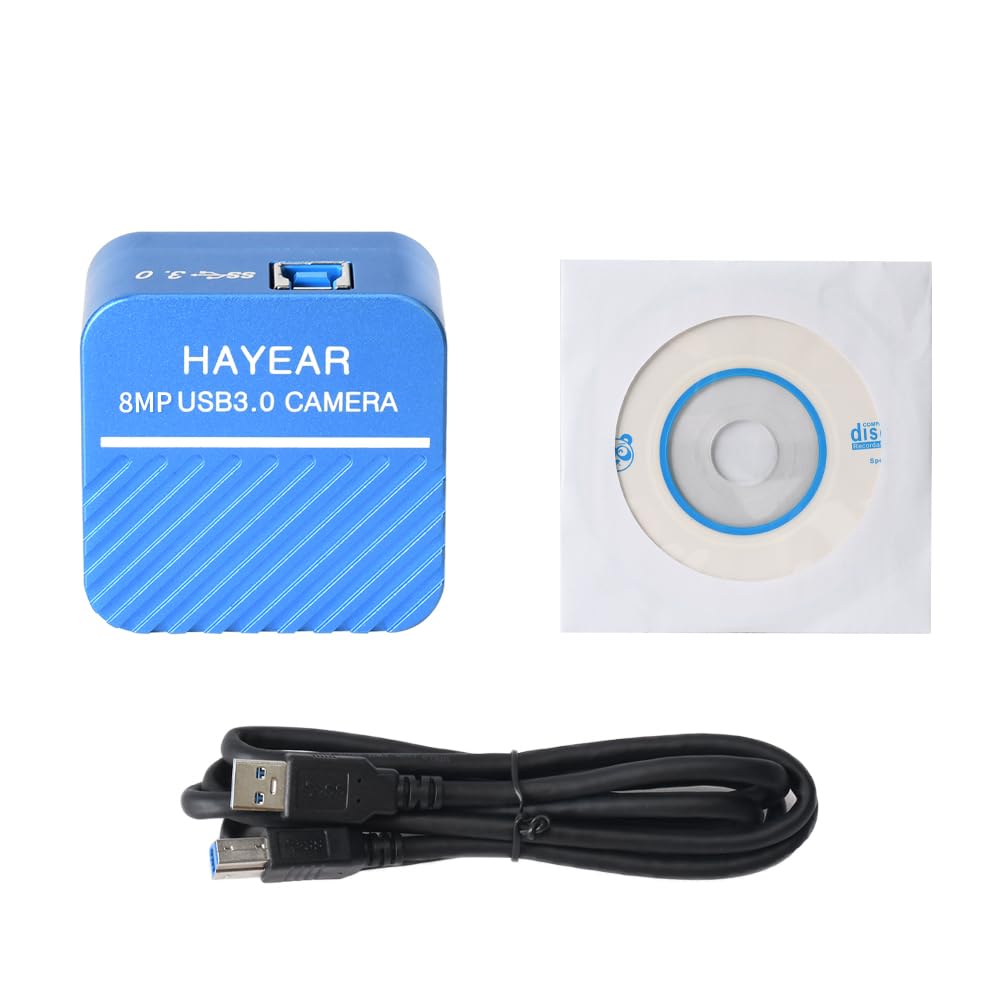
ചിത്രം 3.1: ഫ്രണ്ട് view of the HAYEAR HY-900B camera, showing the brand and 8MP USB3.0 Camera label.
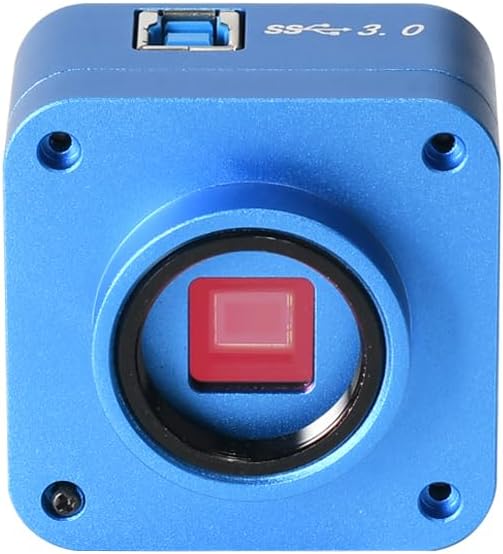
ചിത്രം 3.2: ഫ്രണ്ട് view of the camera, highlighting the C-mount lens interface and the sensor.

ചിത്രം 3.3: മുകളിൽ view of the camera, showing the USB 3.0 port for high-speed data transfer.

ചിത്രം 3.4: കോണാകൃതിയിലുള്ളത് view of the camera with the USB 3.0 cable connected, demonstrating its compact form factor.
4. സജ്ജീകരണ നിർദ്ദേശങ്ങൾ
Follow these steps to set up your HAYEAR HY-900B camera:
- ക്യാമറ ബന്ധിപ്പിക്കുക: Connect the HAYEAR HY-900B camera to your computer using the provided USB3.0 cable. Ensure it is connected to a USB3.0 port on your PC or laptop for optimal performance and to prevent low power issues.
- സോഫ്റ്റ്വെയർ ഇൻസ്റ്റാൾ ചെയ്യുക: Insert the included software disk into your computer's optical drive. Follow the on-screen instructions to install the HAYEAR measurement software. This software is compatible with Windows, Linux, and Mac OS (UVC compatible).
- ഡ്രൈവർ ഇൻസ്റ്റാളേഷൻ: The camera supports USB Video Class (UVC) protocols, meaning it is generally plug-and-play and does not require separate driver installation on most modern operating systems (WinXP/Win7/Win10/Win11, Linux, Android, MAC-OS X10.4.8 or later).
- മൗണ്ടിംഗ് (ഓപ്ഷണൽ): The camera features a standard C-mount. It can be directly attached to compatible monocular zoom lenses or, with a CS ring adapter, to stereo trinocular microscopes, FA machine vision lenses, or other 2D/3D monocular lenses.
5. ക്യാമറ പ്രവർത്തിപ്പിക്കുക
Once the camera is connected and software is installed, you can begin operation:
- സോഫ്റ്റ്വെയർ സമാരംഭിക്കുക: Open the HAYEAR measurement software on your computer. The camera's live feed should appear in the software interface.
- ക്രമീകരണങ്ങൾ ക്രമീകരിക്കുക: The software provides controls for various image parameters, including Exposure, Gamma, Color, Gain, Contrast, and Brightness. Adjust these settings to achieve optimal image quality for your specific application.
- ഫോക്കസിംഗ്: If using with a microscope or lens, adjust the focus mechanism of your optical equipment to bring the specimen into sharp view.
- അപേക്ഷകൾ: The HY-900B camera is suitable for a wide range of applications, including detailed visual inspection of circuit boards, biological samples, and other microscopic subjects.
വീഡിയോ 5.1: Demonstration of the HAYEAR 4K Microscope Camera (HY-900B) in use, showcasing its capabilities for inspecting circuit boards and biological samples under magnification.
6. പരിപാലനം
നിങ്ങളുടെ ക്യാമറയുടെ ദീർഘായുസ്സും മികച്ച പ്രകടനവും ഉറപ്പാക്കാൻ:
- വൃത്തിയാക്കൽ: Use a soft, dry cloth to clean the camera body. For the lens and sensor, use specialized optical cleaning solutions and cloths to avoid scratches or damage.
- സംഭരണം: നേരിട്ടുള്ള സൂര്യപ്രകാശവും ഉയർന്ന താപനിലയും ഏൽക്കാത്ത തണുത്തതും വരണ്ടതുമായ സ്ഥലത്ത് ക്യാമറ സൂക്ഷിക്കുക.
- കൈകാര്യം ചെയ്യൽ: ക്യാമറ താഴെയിടുകയോ ശക്തമായ ആഘാതങ്ങൾക്ക് വിധേയമാക്കുകയോ ചെയ്യുന്നത് ഒഴിവാക്കുക.
7. പ്രശ്നപരിഹാരം
If you encounter issues with your HAYEAR HY-900B camera, refer to the following common solutions:
- Camera Not Detected/Low Power: Ensure the camera is connected to a USB3.0 port on your PC or laptop. USB2.0 ports may not provide sufficient power or data bandwidth, leading to detection issues or poor performance.
- ഇമേജ്/കറുത്ത സ്ക്രീൻ ഇല്ല: Verify that the software is correctly installed and launched. Check all cable connections. Ensure the lens cap (if applicable) is removed and any connected microscope or lens is properly configured.
- മോശം ചിത്രത്തിന്റെ ഗുണനിലവാരം: Adjust the focus of your optical equipment. Use the software's image settings (Exposure, Gain, Brightness, Contrast) to optimize the image. Ensure adequate lighting for your specimen.
- സോഫ്റ്റ്വെയർ പ്രതികരിക്കുന്നില്ല: Close and restart the software. If the issue persists, restart your computer.
8 സ്പെസിഫിക്കേഷനുകൾ
Technical specifications for the HAYEAR HY-900B USB3.0 Digital Microscope Camera:
| ഫീച്ചർ | വിശദാംശങ്ങൾ |
|---|---|
| മോഡൽ | HY-900B USB3.0 Color CMOS USB camera |
| സെൻസർ | 1/2.5" Color CMOS IMX317 |
| സെൻസർ വലിപ്പം | 8.365mm(H) x 6.615mm(V) |
| പിക്സൽ വലിപ്പം | 1.62µm(H) x 1.62µm(V) |
| സ്പെക്ട്രൽ പ്രതികരണം | 400nm~700nm |
| റെസലൂഷൻ | 3840x2160; 2560x1440; 1920x1080 |
| ഇമേജ് ഫോർമാറ്റ് | MJPEG / YUV422 |
| വീഡിയോ റെസല്യൂഷൻ | 3840x2160 @30fps; 2560x1440 @30fps; 1920x1080 @30fps; 1280x720 @30fps; 1024x576 @30fps; 640x480 @30fps; 640x360 @30fps |
| ഡൈനാമിക് റേഞ്ച് | dB (Linear) - dB (HDR) |
| വൈറ്റ് ബാലൻസ് | സ്വയമേവ/മാനുവൽ |
| ഇമേജ് ഔട്ട്പുട്ട് | USB3.0, 5Gbit/s |
| പ്രവർത്തനങ്ങൾ | Exposure, Gamma, Color, Gain, Contrast, Brightness |
| പ്രോട്ടോക്കോളുകൾ | USB വീഡിയോ ക്ലാസ് (UVC) |
| സിസ്റ്റം പിന്തുണ | WinXP/Win7/Win10/Win11; Linux / Android (compatible UVC), MAC-OS X10.4.8 or latest (compatible UVC) |
| ഷൂട്ടിംഗ് മോഡുകൾ | ഓട്ടോമാറ്റിക് |
| എക്സ്പോഷർ നിയന്ത്രണ തരം | മാനുവൽ, യാന്ത്രിക |
| വീഡിയോ ക്യാപ്ചർ റെസല്യൂഷൻ | 2160p |
| മീഡിയ തരം | USB |
| ജല പ്രതിരോധ നില | വാട്ടർ റെസിസ്റ്റൻ്റ് അല്ല |
| വീഡിയോ ക്യാപ്ചർ ഫോർമാറ്റ് | എംജെപിഇജി |
| ഫലപ്രദമായ സ്റ്റിൽ റെസല്യൂഷൻ | 8294400 പിക്സലുകൾ |
| Viewഫൈൻഡർ തരം | LCD screen (via connected device) |
| അനുയോജ്യമായ ഉപകരണങ്ങൾ | ലാപ്ടോപ്പ്, പേഴ്സണൽ കമ്പ്യൂട്ടർ |
| ISO ശ്രേണി | 100-3200 |
| ഓഡിയോ റെക്കോർഡിംഗ് | ഇല്ല |
| വീക്ഷണാനുപാതം | 16:9 |
| ഫോക്കസ് തരം | Autofocus or Manual Focus (depending on connected lens) |
| ഓട്ടോഫോക്കസ് | Yes (depending on connected lens) |
| ഫ്ലാഷ് തരം | Internal (if applicable, typically for illumination) |
| നിർമ്മാതാവ് | ഹയർ |
| ഇനത്തിൻ്റെ ഭാരം | 1 കിലോഗ്രാം |
9. വാറൻ്റിയും പിന്തുണയും
വാറൻ്റി: The HAYEAR HY-900B USB3.0 Digital Microscope Camera comes with a 1-year manufacturer's warranty.
പിന്തുണ: For any questions, feedback, or technical assistance, please contact HAYEAR customer support. Your inquiries are welcome.