
1. ആമുഖം
This manual provides detailed instructions for the installation, operation, and maintenance of your FLITI 110V Motion Sensor Outdoor Flood Light. Please read this manual thoroughly before installation and use to ensure proper function and safety. This hardwired security light offers 2500 lumens of brightness, an 8-meter sensing distance, and convenient remote control functionality with multiple lighting modes.
2. ഉൽപ്പന്ന സവിശേഷതകൾ
- Super Bright Hardwired Design: 15-watt LED equivalent to 150-watt traditional halogen bulbs, providing 2500 lumens of high brightness. Requires connection to a power cord; not solar or battery-powered.
- റിമോട്ട് കൺട്രോൾ പ്രവർത്തനം: Easily change lighting modes without needing to access the physical unit.
- Five Night Lighting Modes:
- Motion-activated: High brightness (2500LM) when motion is detected, then turns off.
- Motion-activated with low brightness standby: Low brightness (300LM) standby, switches to high brightness (2500LM) upon motion detection, then returns to low brightness.
- Always On (Micro Brightness): Maintains a constant micro brightness (300LM).
- Always On (Medium Brightness): Maintains a constant medium brightness (700LM).
- Always On (High Brightness): Maintains a constant high brightness (1000LM).
- Durable for Cold Climates: Designed with low-temperature resistant material, suitable for temperatures from -40°C to 0°C, making it ideal for Canadian winters.
- ഫ്ലെക്സിബിൾ റൊട്ടേഷൻ ഡിസൈൻ: Adjustable light heads and sensor for optimal coverage.
- IP65 വാട്ടർപ്രൂഫ് റേറ്റിംഗ്: Resistant to rain, snow, and dust for reliable outdoor use.
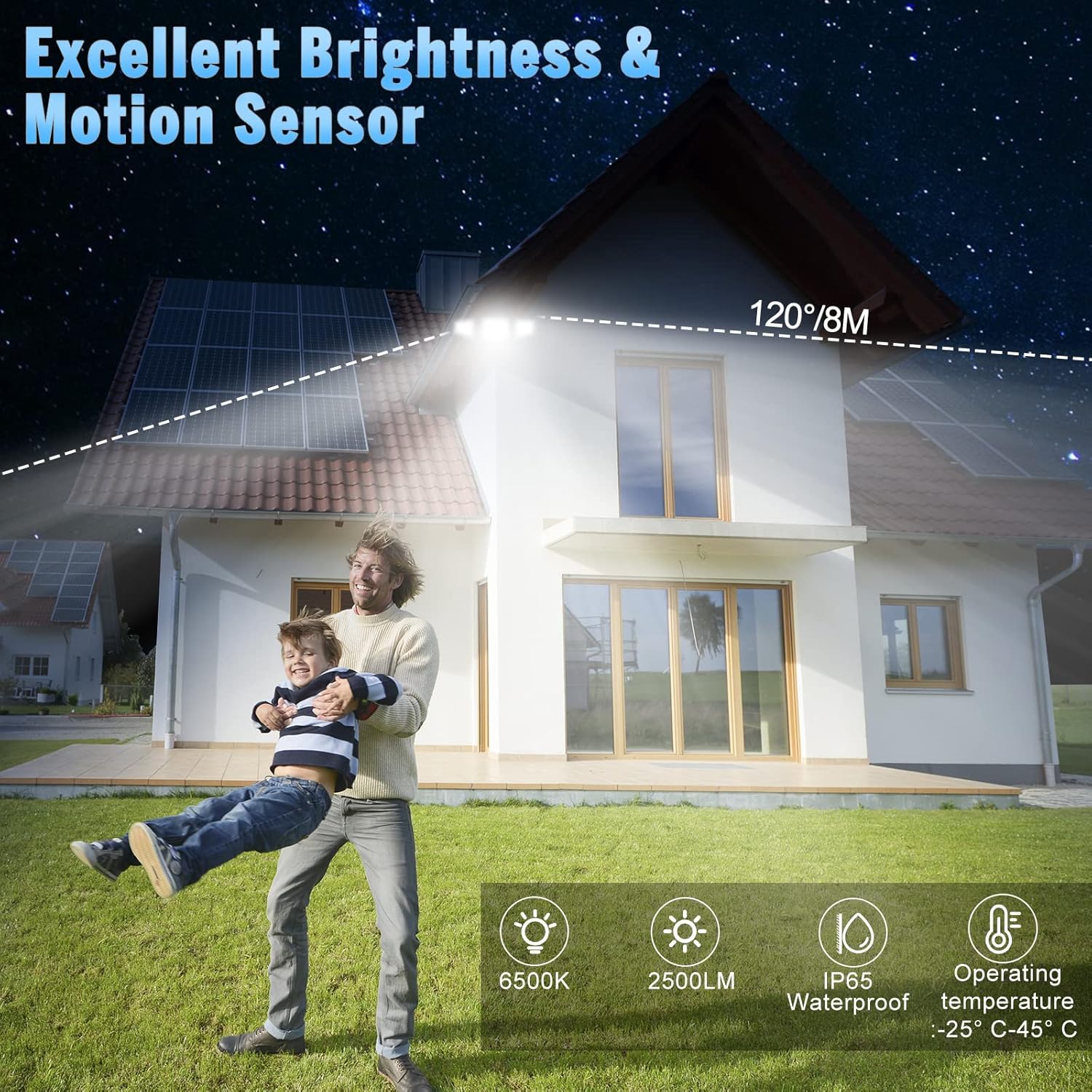
Image: The flood light illuminates a wide area with a 120-degree beam and 8-meter sensing distance. It features 6500K color temperature, 2500LM brightness, IP65 waterproof rating, and operates between -25°C and 45°C.

Image: The flood light features a flexible rotation design, allowing the light heads to adjust 360 degrees horizontally and 90 degrees vertically, and the sensor to adjust 360 degrees horizontally.
3 സുരക്ഷാ വിവരങ്ങൾ
- ഇൻസ്റ്റാളേഷൻ അല്ലെങ്കിൽ സർവീസ് ചെയ്യുന്നതിന് മുമ്പ് സർക്യൂട്ട് ബ്രേക്കറിൽ എല്ലായ്പ്പോഴും പവർ ഓഫ് ചെയ്യുക.
- ഇൻസ്റ്റാളേഷൻ പ്രക്രിയയെക്കുറിച്ച് നിങ്ങൾക്ക് ഉറപ്പില്ലെങ്കിൽ യോഗ്യതയുള്ള ഒരു ഇലക്ട്രീഷ്യനെ സമീപിക്കുക.
- ഉൽപ്പന്നത്തിൽ മാറ്റങ്ങൾ വരുത്താൻ ശ്രമിക്കരുത്. ഏതെങ്കിലും മാറ്റങ്ങൾ വാറന്റി അസാധുവാക്കുകയും സുരക്ഷാ അപകടങ്ങൾ ഉണ്ടാക്കുകയും ചെയ്തേക്കാം.
- എല്ലാ കണക്ഷനുകളും സുരക്ഷിതവും ശരിയായി ഇൻസുലേറ്റ് ചെയ്തതുമാണെന്ന് ഉറപ്പാക്കുക.
- Do not look directly into the LED light source when illuminated, as it may cause eye damage.
- തീപിടിക്കുന്ന വസ്തുക്കളിൽ നിന്ന് ഉൽപ്പന്നം സൂക്ഷിക്കുക.
4. ഇൻസ്റ്റലേഷൻ
This flood light is designed for wall mounting and requires hardwired electrical connection. Professional installation is recommended.
4.1 വയറിംഗ് നിർദ്ദേശങ്ങൾ
- പ്രധാന സർക്യൂട്ട് ബ്രേക്കറിൽ പവർ ഓഫ് ചെയ്യുക.
- Remove your existing light fixture, if applicable.
- Connect the live wire (black) from the flood light to the live wire from your electrical box using a wire nut.
- Connect the neutral wire (white) from the flood light to the neutral wire from your electrical box using a wire nut.
- Connect the ground wire (green/yellow) from the flood light to the ground wire from your electrical box.
- എല്ലാ കണക്ഷനുകളും ഇറുകിയതും സുരക്ഷിതവുമാണെന്ന് ഉറപ്പാക്കുക.

Image: Wiring diagram showing connections for live, neutral, and ground wires. Ensure proper insulation and secure connections.
4.2 ഫിക്സ്ചർ മൌണ്ട് ചെയ്യുന്നു
- After wiring, align the mounting plate of the flood light with the junction box.
- Secure the fixture to the wall using the provided screws. Ensure it is firmly attached.
- Adjust the light heads and motion sensor to your desired angles.
- Apply silicone sealant around the top and sides of the mounting plate to prevent water ingress, leaving the bottom open for drainage.
- സർക്യൂട്ട് ബ്രേക്കറിൽ വൈദ്യുതി പുനഃസ്ഥാപിക്കുക.

Image: Step-by-step illustration of mounting the flood light to a wall, showing wiring connections and securing the fixture.
5. പ്രവർത്തന നിർദ്ദേശങ്ങൾ
The FLITI Motion Sensor Outdoor Flood Light can be controlled using the included remote control.
5.1 വിദൂര നിയന്ത്രണ പ്രവർത്തനങ്ങൾ

Image: The remote control features ON/OFF buttons and numbered buttons (1-5) corresponding to different lighting modes.
- ഓൺ/ഓഫ്: ലൈറ്റ് ഓണാക്കുകയോ ഓഫാക്കുകയോ ചെയ്യുന്നു.
- Mode 1 (Motion Sensor - High Brightness): Light remains off until motion is detected, then illuminates at 2500LM for a set duration (e.g., 20 seconds) before turning off.
- Mode 2 (Low Brightness Standby + Motion Sensor - High Brightness): Light stays at a low brightness (300LM) until motion is detected, then switches to 2500LM. After motion ceases, it returns to low brightness.
- Mode 3 (Always On - Micro Brightness): Light stays on continuously at 300LM.
- Mode 4 (Always On - Medium Brightness): Light stays on continuously at 700LM.
- Mode 5 (Always On - High Brightness): Light stays on continuously at 1000LM.

ചിത്രം: വിഷ്വൽ എക്സ്amples of the five lighting modes, illustrating how the light behaves with and without motion detection at different brightness levels.
5.2 സെൻസർ ക്രമീകരണം
The motion sensor can be adjusted for sensitivity and duration. Refer to the sensor unit for specific dial settings (e.g., DISTANCE, TIME).
Video: Demonstration of Mode 1 (off to high light for 20 seconds) and Mode 2 (dim to high light for 20 seconds) in action, showing how the light responds to motion.
Video: Explanation of motion sensor settings, including adjustments for sensing distance (L, M, H) and light duration (1 min, 3 min, 10 min), and a test mode.
6. പരിപാലനം
- വൃത്തിയാക്കൽ: ലൈറ്റ് ഫിക്ചർ ഇടയ്ക്കിടെ മൃദുവായ, ഡി-ക്ലാസ് ഉപയോഗിച്ച് വൃത്തിയാക്കുക.amp തുണി. ഉരച്ചിലുകളുള്ള ക്ലീനറുകളോ ലായകങ്ങളോ ഉപയോഗിക്കരുത്.
- പരിശോധന: വയറിങ്ങും ഹൗസിംഗും കേടുപാടുകൾ അല്ലെങ്കിൽ തേയ്മാനം എന്നിവയുടെ ലക്ഷണങ്ങൾക്കായി പതിവായി പരിശോധിക്കുക.
- LED- കൾ: LED പ്രകാശ സ്രോതസ്സ് സംയോജിപ്പിച്ചിരിക്കുന്നു, ഉപയോക്താവിന് മാറ്റിസ്ഥാപിക്കാൻ കഴിയില്ല.
7. പ്രശ്നപരിഹാരം
| പ്രശ്നം | സാധ്യമായ കാരണം | പരിഹാരം |
|---|---|---|
| ലൈറ്റ് ഓണാക്കില്ല. | No power; faulty wiring; sensor malfunction. | Check circuit breaker. Verify wiring connections. Test sensor sensitivity. |
| മോഷൻ സെൻസർ കണ്ടെത്തുന്നില്ല. | Sensor obstructed; incorrect sensitivity setting; ambient light interference. | Clear obstructions. Adjust sensor sensitivity (DISTANCE dial). Ensure sensor is not facing direct light sources. |
| Light stays on continuously (in motion modes). | Continuous motion detected; incorrect mode selected; sensor malfunction. | Ensure no constant motion in sensor range. Verify correct mode (Mode 1 or 2). Adjust sensor settings. |
| റിമോട്ട് കൺട്രോൾ പ്രവർത്തിക്കുന്നില്ല. | Battery depleted; remote out of range; obstruction. | Replace remote battery. Ensure remote is within effective range and pointed towards the light. Remove obstructions. |
8 സ്പെസിഫിക്കേഷനുകൾ
| ഫീച്ചർ | സ്പെസിഫിക്കേഷൻ |
|---|---|
| മോഡൽ നമ്പർ | വെളിച്ചം-12.5 |
| പവർ ഉറവിടം | Electric (Hardwired) |
| വാല്യംtage | 120 വോൾട്ട് |
| വാട്ട്tage | 15 വാട്ട്സ് |
| തെളിച്ചം | 2500 ല്യൂമൻസ് (പരമാവധി) |
| വർണ്ണ താപനില | 6500 കെൽവിൻ |
| നിയന്ത്രണ രീതി | റിമോട്ട് കൺട്രോൾ |
| ഇൻഡോർ/ഔട്ട്ഡോർ ഉപയോഗം | ഔട്ട്ഡോർ |
| ജല പ്രതിരോധ നില | IP65 വാട്ടർപ്രൂഫ് |
| മെറ്റീരിയൽ | പ്ലാസ്റ്റിക്, ഗ്ലാസ് (ഷേഡ്) |
| ഉൽപ്പന്ന അളവുകൾ | 25L x 25W x 25H മില്ലിമീറ്റർ |
| ഇനത്തിൻ്റെ ഭാരം | 0.96 കിലോഗ്രാം |
| മൗണ്ടിംഗ് തരം | Wall Mount, Semi Flush Mount |
9. വാറൻ്റിയും പിന്തുണയും
FLITI offers a 1 വർഷത്തെ വാറൻ്റി for this product from the date of purchase. We also provide a 30-day money-back guarantee. If you encounter any issues or have questions regarding your FLITI Motion Sensor Outdoor Flood Light, please contact our customer support for assistance. Our goal is to provide professional and reliable LED lamps and excellent after-sales experience.