
1. ആമുഖം
Thank you for choosing the V9 Mini Drone. This user manual provides essential information for the safe operation, setup, and maintenance of your new drone. Please read this manual thoroughly before operating the drone to ensure proper use and to maximize your flying experience. The V9 Mini Drone is a compact, foldable quadcopter equipped with a 4K camera, 2.4Ghz WiFi FPV, and intelligent flight features designed for both beginners and experienced pilots.
2. ഉൽപ്പന്നം കഴിഞ്ഞുview
2.1 പാക്കേജ് ഉള്ളടക്കം
അൺബോക്സ് ചെയ്യുമ്പോൾ, എല്ലാ ഘടകങ്ങളും ഉണ്ടെന്ന് ദയവായി പരിശോധിക്കുക:
- V9 Mini Drone
- റിമോട്ട് കൺട്രോളർ
- Modular Batteries (Quantity may vary based on package)
- യുഎസ്ബി ചാർജിംഗ് കേബിൾ
- സ്പെയർ പ്രൊപ്പല്ലറുകൾ
- പ്രൊപ്പല്ലർ ഗാർഡുകൾ
- സ്ക്രൂഡ്രൈവർ
- ഉപയോക്തൃ മാനുവൽ

Figure 2.1: V9 Mini Drone and its complete set of accessories, including the drone, remote controller, batteries, charging cable, spare propellers, propeller guards, and a screwdriver.
2.2 ഡ്രോൺ ഘടകങ്ങൾ
- മടക്കാവുന്ന കൈകൾ: ഒതുക്കമുള്ള സംഭരണത്തിനും പോർട്ടബിലിറ്റിക്കും.
- പ്രൊപ്പല്ലറുകൾ: ലിഫ്റ്റിനും ത്രസ്റ്റിനുമുള്ള നാല് പ്രധാന പ്രൊപ്പല്ലറുകൾ.
- 4K ഫ്രണ്ട് ക്യാമറ: High-resolution camera for aerial photography and videography.
- 1080P Bottom Camera: Secondary camera for optical flow positioning and alternative viewകോണുകൾ.
- Modular Battery Compartment: Easy-to-install and remove battery for convenient charging and replacement.

ചിത്രം 2.2: ക്ലോസപ്പ് view of the V9 Mini Drone's dual camera system, highlighting the 4K front camera and the 1080P bottom camera, which allows for switchable viewing angles during flight.

ചിത്രം 2.3: വിശദമായി view of the V9 Mini Drone's 4K front camera lens, featuring a 110-degree ultra-wide-angle capture capability for expansive aerial photography.

Figure 2.4: The V9 Mini Drone in its folded state, demonstrating its compact size and ease of portability, fitting comfortably in the palm of a hand.
2.3 റിമോട്ട് കൺട്രോളർ കഴിഞ്ഞുview
Familiarize yourself with the remote controller's layout and functions:

Figure 2.5: Diagram illustrating the various controls and indicators on the V9 Mini Drone's remote controller, including joysticks, fine-tuning buttons, and special function buttons.
- വേഗത നിയന്ത്രണം: ഫ്ലൈറ്റ് വേഗത ക്രമീകരിക്കുന്നു.
- ത്രോട്ടിൽ ലിവർ: Controls altitude (left joystick).
- Steering Rod: Controls direction (right joystick).
- ഫൈൻ-ട്യൂണിംഗ് ബട്ടണുകൾ: For precise adjustments to drone stability.
- One-click Take-off/Landing: ഓട്ടോമാറ്റിക് ടേക്ക് ഓഫ് അല്ലെങ്കിൽ ലാൻഡിംഗ് ആരംഭിക്കുന്നു.
- Emergency Stop/Calibration: Stops motors or calibrates the drone.
- Headless/Return: Activates headless mode or initiates return-to-home.
- 360° റോൾ: Performs a stunt roll.
3. സജ്ജീകരണം
3.1 ബാറ്ററി ചാർജ് ചെയ്യുന്നു
The V9 Mini Drone uses modular lithium batteries. Ensure the battery is fully charged before first use.
- Remove the modular battery from the drone.
- USB ചാർജിംഗ് കേബിളിലേക്ക് ബാറ്ററി ബന്ധിപ്പിക്കുക.
- Plug the USB cable into a 5V/1A USB power adapter (not included) or a computer USB port.
- The charging indicator light will show charging status (refer to battery or cable for specific light behavior).
- Charging typically takes approximately 60-90 minutes. A full charge provides about 15 minutes of flight time.
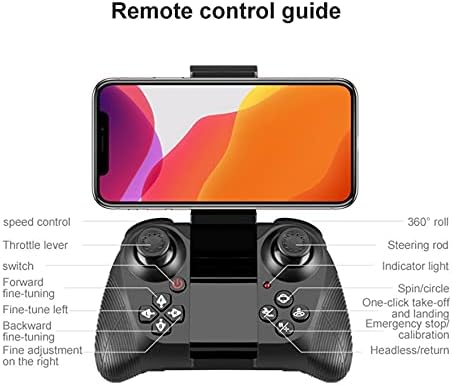
Figure 3.1: Illustration of the V9 Mini Drone's modular battery design, highlighting its easy loading and unloading for convenient charging and extended play time.
3.2 ബാറ്ററി ഇൻസ്റ്റാൾ ചെയ്യുന്നു
Once charged, insert the modular battery into the drone's battery compartment until it clicks securely into place.
3.3 Installing Propeller Guards (Optional)
For added protection, especially for beginners, attach the propeller guards to the drone's arms. Ensure they are firmly clipped.
3.4 Unfolding the Drone Arms
Gently unfold all four arms of the drone until they lock into their extended position. Ensure they are fully extended before flight.
4. പ്രവർത്തന നിർദ്ദേശങ്ങൾ
4.1 പവർ ഓണും ജോടിയാക്കലും
- ഡ്രോൺ പരന്നതും ലെവൽ ഉപരിതലത്തിൽ വയ്ക്കുക.
- Press and hold the power button on the drone until the indicator lights flash.
- Turn on the remote controller. The controller's indicator light will flash.
- Push the left joystick (throttle) all the way up, then all the way down. The drone and controller lights will become solid, indicating successful pairing.
4.2 ഗൈറോസ്കോപ്പ് കാലിബ്രേഷൻ
After pairing, perform gyroscope calibration for stable flight. Push both joysticks down and to the right simultaneously. The drone's lights will flash rapidly and then become solid, indicating successful calibration.
4.3 ടേക്ക് ഓഫും ലാൻഡിംഗും
- മാനുവൽ ടേക്ക് ഓഫ്: Push both joysticks down and outwards to start the propellers. Slowly push the left joystick (throttle) up to ascend.
- വൺ-കീ ടേക്ക്-ഓഫ്: Press the one-key take-off button on the remote controller. The drone will automatically ascend to a stable height.
- മാനുവൽ ലാൻഡിംഗ്: Slowly pull the left joystick (throttle) down until the drone lands. Once on the ground, hold the joystick down for a few seconds until the propellers stop.
- വൺ-കീ ലാൻഡിംഗ്: Press the one-key landing button. The drone will automatically descend and land.

Figure 4.1: Visual representation of the one-key take-off/landing/return function and the headless mode feature, which simplifies flight by eliminating the need to discern the drone's front direction.
4.4 ഫ്ലൈറ്റ് നിയന്ത്രണങ്ങൾ
- ഇടത് ജോയ്സ്റ്റിക്ക് (ത്രോട്ടിൽ): Up/Down for altitude; Left/Right for rotation (yaw).
- വലത് ജോയ്സ്റ്റിക്ക് (ദിശ): Up/Down for forward/backward; Left/Right for left/right sideward flight.
- സ്പീഡ് സ്വിച്ച്: Press the speed control button to cycle through different flight speeds (e.g., low, medium, high).
- തലയില്ലാത്ത മോഡ്: Press the headless mode button. In this mode, the drone's orientation is relative to the pilot, making it easier to control regardless of which way the drone is facing.
- 360° റോൾ: Fly the drone to a height of at least 3 meters. Press the 360° roll button, then push the right joystick in the desired direction to perform a flip.
4.5 ക്യാമറ പ്രവർത്തനം
The V9 Mini Drone features a 4K front camera and a 1080P bottom camera. Connect your smartphone to the drone's Wi-Fi network (usually named "V9-XXXXXX") and use the dedicated app (refer to packaging for app name/QR code) to view live FPV feed, capture photos, and record videos. The app allows you to switch between the front and bottom cameras.
5. പരിപാലനം
5.1 ബാറ്ററി കെയർ
- ബാറ്ററി അമിതമായി ചാർജ് ചെയ്യുകയോ ഡിസ്ചാർജ് ചെയ്യുകയോ ചെയ്യരുത്.
- നേരിട്ടുള്ള സൂര്യപ്രകാശത്തിൽ നിന്ന് അകലെ തണുത്തതും വരണ്ടതുമായ സ്ഥലത്ത് ബാറ്ററികൾ സൂക്ഷിക്കുക.
- If not used for extended periods, charge the battery to about 50% every three months.
5.2 വൃത്തിയാക്കൽ
Use a soft, dry cloth to clean the drone body and camera lenses. Avoid using liquid cleaners or solvents.
5.3 പ്രൊപ്പല്ലർ മാറ്റിസ്ഥാപിക്കൽ
If propellers are damaged or bent, replace them with spare ones. Ensure the correct propeller (A or B, usually marked on the propeller and drone arm) is installed in the corresponding position.
6. പ്രശ്നപരിഹാരം
| പ്രശ്നം | സാധ്യമായ കാരണം | പരിഹാരം |
|---|---|---|
| Drone does not respond to controller | Not paired; Low battery; Interference | Re-pair drone and controller; Charge drone/controller battery; Move to an area with less interference |
| പറക്കലിനിടെ ഡ്രോൺ തെന്നിമാറി | Not calibrated; Uneven surface during take-off; Damaged propeller | Perform gyroscope calibration; Take off from a flat surface; Replace damaged propellers |
| Camera feed is blurry or distorted | Dirty lens; Poor Wi-Fi connection | Clean camera lens; Ensure strong Wi-Fi signal between drone and phone; Reduce distance to drone |
| ചെറിയ ഫ്ലൈറ്റ് സമയം | ബാറ്ററി പൂർണ്ണമായും ചാർജ് ചെയ്തിട്ടില്ല; പഴയ ബാറ്ററി; ആക്രമണാത്മകമായി പറക്കുന്നു | Fully charge battery; Consider replacing battery; Fly more conservatively |
7 സ്പെസിഫിക്കേഷനുകൾ
| ഫീച്ചർ | വിശദാംശങ്ങൾ |
|---|---|
| മോഡലിൻ്റെ പേര് | V9 |
| വീഡിയോ ക്യാപ്ചർ റെസല്യൂഷൻ | 4K (Front Camera), 1080P (Bottom Camera) |
| കണക്റ്റിവിറ്റി ടെക്നോളജി | Wi-Fi (2.4Ghz FPV) |
| പ്രത്യേക സവിശേഷതകൾ | Integrated Camera, Foldable, Rechargeable, Height Keep, Headless Mode, One-Key Take-off/Landing |
| നിയന്ത്രണ തരം | റിമോട്ട് കൺട്രോൾ |
| നൈപുണ്യ നില | Advanced, Professional |
| ബാറ്ററി ലൈഫ് | Approx. 15 minutes (per battery) |
| പ്രായപരിധി (വിവരണം) | മുതിർന്നവർ |
8. വാറൻ്റിയും പിന്തുണയും
This product is subject to the warranty terms provided by the seller at the time of purchase. Please refer to your purchase documentation for specific warranty details and duration.
For technical support, troubleshooting assistance beyond this manual, or warranty claims, please contact the seller or manufacturer directly through the platform where the product was purchased. Provide your order number and a detailed description of the issue for prompt assistance.