
ആമുഖം
This manual provides comprehensive instructions for setting up, operating, maintaining, and troubleshooting your Mistel X-VIII Mechanical Keyboard. Designed for optimal performance and durability, this full-size keyboard features Cherry MX Brown switches, PBT double-shot keycaps, and a detachable USB Type-C cable, making it suitable for both gaming and office use.
ബോക്സിൽ എന്താണുള്ളത്
Your Mistel X-VIII Mechanical Keyboard package includes the following items:
- Mistel X-VIII Mechanical Keyboard
- യുഎസ്ബി ടൈപ്പ്-സി കേബിൾ
- കീക്യാപ് പുള്ളർ
- Spare Keycap
- സ്വിച്ച് ടെസ്റ്റർ
- പൊടി കവർ
- ഉപയോക്തൃ മാനുവൽ (ഈ പ്രമാണം)

Description: This image displays all components included in the Mistel X-VIII Mechanical Keyboard package, neatly arranged. It shows the keyboard itself, a detachable USB Type-C cable, a keycap puller tool, a spare keycap, a switch tester, a dust cover, and the user manual.
സജ്ജമാക്കുക
Follow these steps to set up your Mistel X-VIII Mechanical Keyboard:
കീബോർഡ് അൺപാക്ക് ചെയ്യുക: പാക്കേജിംഗിൽ നിന്ന് കീബോർഡും എല്ലാ അനുബന്ധ ഉപകരണങ്ങളും ശ്രദ്ധാപൂർവ്വം നീക്കം ചെയ്യുക.
യുഎസ്ബി ടൈപ്പ്-സി കേബിൾ ബന്ധിപ്പിക്കുക: Locate the USB Type-C port on the back or top edge of the keyboard. Insert one end of the provided USB Type-C cable into this port. Connect the other end (USB-A) to an available USB port on your computer (desktop or laptop).

Description: This image highlights the detachable USB Type-C cable connection point on the Mistel X-VIII keyboard, emphasizing its stable connection feature.
ഡ്രൈവർ ഇൻസ്റ്റാളേഷൻ: The Mistel X-VIII keyboard is plug-and-play. Your operating system (Windows, macOS, Linux) should automatically detect and install the necessary drivers. No manual driver installation is typically required.
പ്ലേസ്മെൻ്റ്: Place the keyboard on a stable, flat surface. Adjust the keyboard feet on the underside if you prefer an angled typing position.
പ്രവർത്തന നിർദ്ദേശങ്ങൾ
അടിസ്ഥാന ഉപയോഗം
The Mistel X-VIII is a standard full-size mechanical keyboard. Simply connect it to your computer, and you can begin typing immediately. All standard keys function as expected.
Function Keys (Fn Combinations)
The keyboard features a row of function keys (F1-F12) that can perform secondary actions when combined with the Fn key. Specific functions may vary, but commonly include:

Description: This image provides a visual representation of the Mistel X-VIII keyboard, specifically highlighting the F1 through F12 keys and the Fn (Function) key, which are used in combination to access various multimedia and system controls.
- എഫ്എൻ + എഫ്1-എഫ്12: Typically control multimedia playback (play/pause, stop, previous/next track), volume (mute, volume up/down), and other system functions (e.g., opening calculator, email, web browser). Refer to the keycap legends for specific icons indicating these functions.
- എഫ്എൻ + വിൻഡോസ് കീ: May lock or unlock the Windows key to prevent accidental presses during gaming.
മാക്രോ പിന്തുണ
The Mistel X-VIII keyboard supports macro programming. For detailed instructions on how to record and assign macros, please refer to the dedicated software or advanced user guide available on the Mistel official website. This feature allows you to automate complex key sequences for enhanced productivity or gaming.
കീക്യാപ്പ് നീക്കം ചെയ്യലും മാറ്റിസ്ഥാപിക്കലും
Your keyboard comes with a keycap puller for easy removal and replacement of keycaps. This is useful for cleaning or customizing your keyboard.
നീക്കം ചെയ്യാൻ: Gently place the keycap puller over the keycap you wish to remove, ensuring the two arms of the puller hook underneath the keycap. Apply even, upward pressure until the keycap detaches from the switch stem.
മാറ്റിസ്ഥാപിക്കാൻ: Align the keycap with the switch stem. Press down firmly and evenly until you feel a click, indicating the keycap is securely seated on the switch.
പ്രധാന സവിശേഷതകൾ
- Cherry MX Brown Switches: Provides a tactile bump without an audible click, offering a balanced typing experience suitable for both gaming and office environments.
- PBT Double Shot Keycaps: Manufactured using a double-shot molding process, these keycaps feature legends that will not fade or wear off over time. PBT material offers superior durability and a textured feel compared to ABS keycaps.
Description: This image provides a detailed close-up of the keyboard's keycaps, showcasing the quality of the PBT material and the clarity of the double-shot legends.
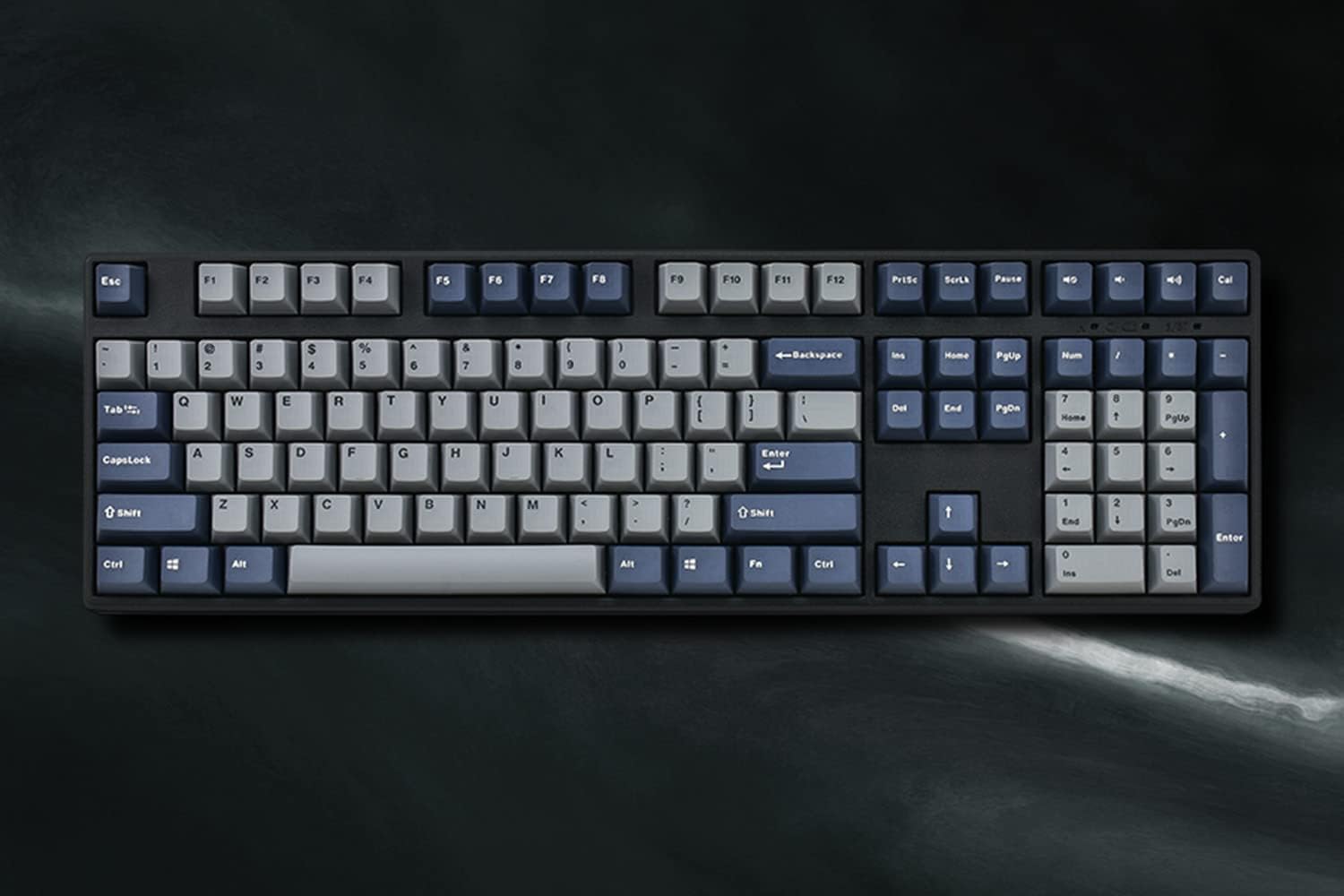
- പൂർണ്ണ വലുപ്പത്തിലുള്ള ലേഔട്ട്: Includes a full numeric keypad and dedicated navigation keys, providing complete functionality for various tasks.

Description: This image presents a clear, overhead view of the Mistel X-VIII Mechanical Keyboard, highlighting its complete full-size layout.
- Ergonomic Design (OEM Profile Keycaps): The keycaps are sculpted with an OEM profile, meaning each row has a different shape to conform to the natural curve of your fingers, promoting a more comfortable typing posture.

Description: This image illustrates the ergonomic design of the keyboard, specifically showing the OEM profile of the keycaps which are sculpted to provide a comfortable typing angle and promote better posture.
- വേർപെടുത്താവുന്ന യുഎസ്ബി ടൈപ്പ്-സി കേബിൾ: Offers a stable and reliable connection, and its detachable nature enhances portability and simplifies cable management.
മെയിൻ്റനൻസ്
Proper maintenance will extend the lifespan of your Mistel X-VIII Mechanical Keyboard.
- പൊതുവായ ശുചീകരണം: Use a soft, lint-free cloth to wipe down the keyboard surface regularly. For dust and debris between keycaps, use compressed air.
- കീക്യാപ്പ് ക്ലീനിംഗ്: If keycaps become dirty, they can be removed using the provided keycap puller and cleaned with mild soap and water. Ensure they are completely dry before reattaching them to the keyboard.
- ദ്രാവകങ്ങൾ ഒഴിവാക്കുക: കീബോർഡിൽ ദ്രാവകങ്ങൾ ഒഴിക്കരുത്. ചോർച്ച സംഭവിച്ചാൽ, ഉടൻ തന്നെ കമ്പ്യൂട്ടറിൽ നിന്ന് കീബോർഡ് വിച്ഛേദിച്ച് പൂർണ്ണമായും ഉണങ്ങാൻ അനുവദിക്കുക, തുടർന്ന് വീണ്ടും ബന്ധിപ്പിക്കുക.
ട്രബിൾഷൂട്ടിംഗ്
If you encounter issues with your Mistel X-VIII Mechanical Keyboard, try the following troubleshooting steps:
| പ്രശ്നം | പരിഹാരം |
|---|---|
| കീബോർഡ് പ്രതികരിക്കുന്നില്ല. |
|
| Specific keys are not working. |
|
| Fn key combinations are not working. |
|
സ്പെസിഫിക്കേഷനുകൾ
| ഫീച്ചർ | വിശദാംശങ്ങൾ |
|---|---|
| ബ്രാൻഡ് | Mistel |
| മോഡൽ | X-VIII |
| കീബോർഡ് വിവരണം | മെക്കാനിക്കൽ |
| സ്വിച്ച് തരം | ചെറി എംഎക്സ് ബ്രൗൺ |
| കീക്യാപ് മെറ്റീരിയൽ | പോളിബ്യൂട്ടിലീൻ ടെറെഫ്താലേറ്റ് (PBT) |
| കീകളുടെ എണ്ണം | 108 |
| കണക്റ്റിവിറ്റി ടെക്നോളജി | USB, USB-C (Detachable Cable) |
| അനുയോജ്യമായ ഉപകരണങ്ങൾ | PC (Windows, macOS, Linux compatible) |
| നിറം | Black (with Black and White Letter Nimitz PBT Double Shot Keycaps) |
| ശുപാർശ ചെയ്യുന്ന ഉപയോഗങ്ങൾ | ഓഫീസ്, ഗെയിമിംഗ് |
| ഉൽപ്പന്ന അളവുകൾ | 17.99 x 7.99 x 2.01 ഇഞ്ച് |
| ഇനത്തിൻ്റെ ഭാരം | 3.64 പൗണ്ട് |
| പവർ ഉറവിടം | യുഎസ്ബി പവർ |
വാറൻ്റിയും പിന്തുണയും
Mistel products are manufactured to high-quality standards. For information regarding warranty coverage, please refer to the warranty card included with your product or visit the official Mistel website. For technical support, troubleshooting assistance beyond this manual, or inquiries about replacement parts, please contact Mistel customer service through their official channels.
Mistel Official Webസൈറ്റ്: www.mistelkeyboard.com