
R-Music RM483874
R-Music Novo RM483874 Wireless Bluetooth Earbuds User Manual
മോഡൽ: RM483874
1. ആമുഖം
Thank you for choosing the R-Music Novo RM483874 Wireless Bluetooth Earbuds. This manual provides essential information for setting up, operating, and maintaining your earbuds to ensure optimal performance and longevity. Please read this manual thoroughly before use.
2. പാക്കേജ് ഉള്ളടക്കം
നിങ്ങളുടെ പാക്കേജിൽ എല്ലാ ഇനങ്ങളും ഉണ്ടെന്ന് ഉറപ്പാക്കുക:
- R-Music Novo RM483874 Wireless Earbuds
- വയർലെസ് ചാർജിംഗ് കേസ്
- USB-C ചാർജിംഗ് കേബിൾ
- ഉപയോക്തൃ മാനുവൽ
3. ഉൽപ്പന്നം കഴിഞ്ഞുview
The R-Music Novo RM483874 earbuds are designed for daily use, offering clear stereo sound and an integrated microphone for calls. The compact charging case provides extended battery life.

Figure 3.1: R-Music Novo RM483874 wireless earbuds and open charging case.
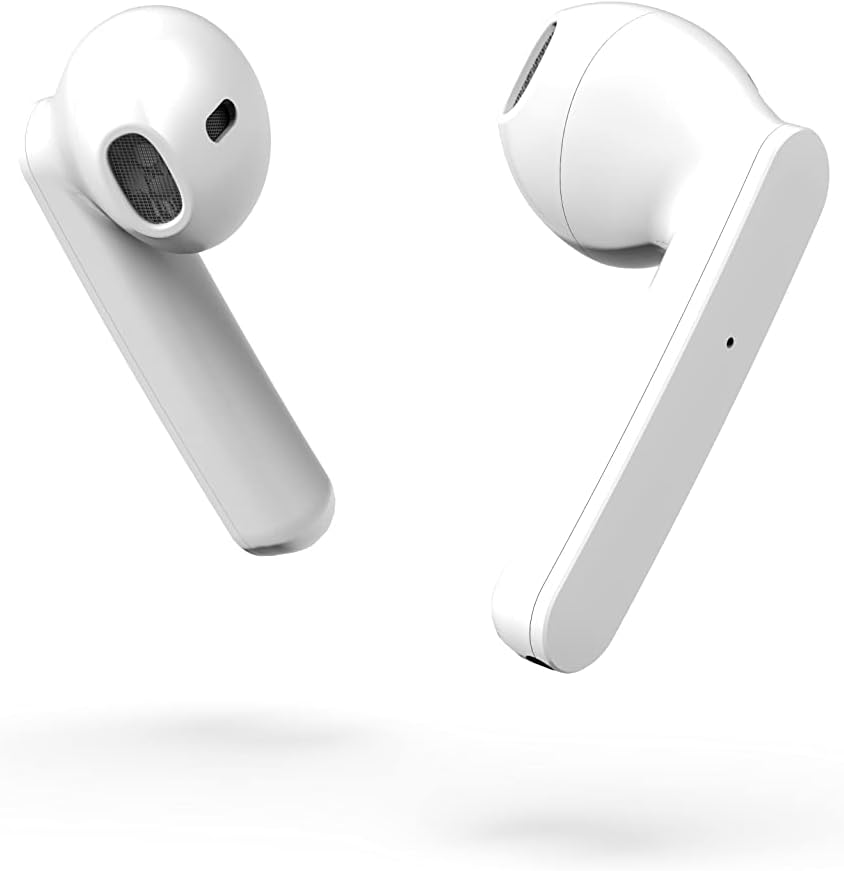
ചിത്രം 3.2: ക്ലോസ്-അപ്പ് വശം view of the earbuds, highlighting their design.
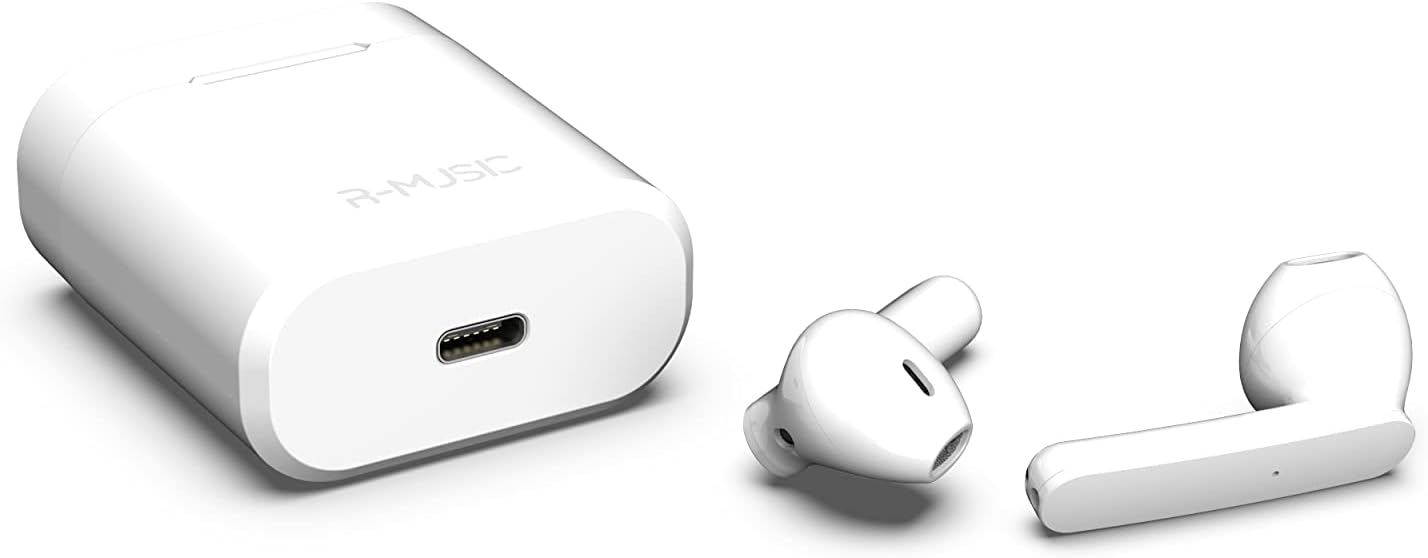
Figure 3.3: Charging case with USB-C port and earbuds.
4. സജ്ജീകരണം
4.1 പ്രാരംഭ ചാർജിംഗ്
- ആദ്യ ഉപയോഗത്തിന് മുമ്പ്, രണ്ട് ഇയർബഡുകളും ചാർജിംഗ് കേസിൽ വയ്ക്കുക.
- Connect the USB-C charging cable to the port on the charging case and to a power source.
- An indicator light inside the case will show the battery level during charging. Ensure the case and earbuds are fully charged.
4.2 ഒരു ഉപകരണവുമായി ജോടിയാക്കൽ
The R-Music Novo RM483874 earbuds feature quick and easy pairing:
- ചാർജിംഗ് കേസ് തുറന്ന് രണ്ട് ഇയർബഡുകളും നീക്കം ചെയ്യുക. അവ സ്വയമേവ ജോടിയാക്കൽ മോഡിലേക്ക് പ്രവേശിക്കും.
- On your device (e.g., smartphone), navigate to the Bluetooth settings.
- ഇതിനായി തിരയുക available devices and select "R-Music Novo" (or similar name) from the list.
- കണക്റ്റ് ചെയ്തുകഴിഞ്ഞാൽ, നിങ്ങൾക്ക് ഒരു ഓഡിയോ സ്ഥിരീകരണം കേൾക്കാൻ കഴിയും, ഇയർബഡുകൾ ഉപയോഗത്തിന് തയ്യാറാകും.
5. പ്രവർത്തന നിർദ്ദേശങ്ങൾ
5.1 പവർ ഓൺ/ഓഫ്
- പവർ ഓൺ: ചാർജിംഗ് കെയ്സിൽ നിന്ന് ഇയർബഡുകൾ നീക്കം ചെയ്യുക. അവ സ്വയമേവ പവർ ഓണാകുകയും അവസാനം ജോടിയാക്കിയ ഉപകരണത്തിലേക്ക് കണക്റ്റ് ചെയ്യാൻ ശ്രമിക്കുകയും ചെയ്യും.
- പവർ ഓഫ്: ഇയർബഡുകൾ ചാർജിംഗ് കെയ്സിലേക്ക് തിരികെ വയ്ക്കുക. അവ സ്വയമേവ ഓഫാകുകയും ചാർജ് ചെയ്യാൻ തുടങ്ങുകയും ചെയ്യും.
5.2 ടച്ച് നിയന്ത്രണങ്ങൾ
The earbuds are equipped with touch controls for convenient operation:
- പ്ലേ/താൽക്കാലികമായി നിർത്തുക: ഇയർബഡുകളിൽ ഏതെങ്കിലുമൊന്നിൽ ഒറ്റ ടാപ്പ് ചെയ്യുക.
- അടുത്ത ട്രാക്ക്: വലതുവശത്തെ ഇയർബഡിൽ രണ്ടുതവണ ടാപ്പ് ചെയ്യുക.
- മുമ്പത്തെ ട്രാക്ക്: ഇടതുവശത്തെ ഇയർബഡിൽ രണ്ടുതവണ ടാപ്പ് ചെയ്യുക.
- ഉത്തരം/അവസാന കോൾ: ഇൻകമിംഗ് കോളിലോ സജീവ കോളിലോ ഇയർബഡിൽ ഒറ്റ ടാപ്പ് ചെയ്യുക.
- കോൾ നിരസിക്കുക: ഇൻകമിംഗ് കോൾ വരുമ്പോൾ ഏതെങ്കിലും ഒരു ഇയർബഡിൽ അമർത്തിപ്പിടിക്കുക.
- വോയ്സ് അസിസ്റ്റന്റിനെ സജീവമാക്കുക: ഇയർബഡുകളിൽ ഏതെങ്കിലുമൊന്നിൽ മൂന്ന് തവണ ടാപ്പ് ചെയ്യുക (ഉപകരണത്തിനനുസരിച്ച് പ്രവർത്തനക്ഷമത വ്യത്യാസപ്പെടാം).
5.3 കോളുകൾ ചെയ്യുന്നു
The integrated microphone allows for hands-free calling. Ensure the earbuds are connected to your phone via Bluetooth. Use the touch controls to manage calls.
5.4 സംഗീതം കേൾക്കൽ
Enjoy clear and balanced stereo sound. Use the touch controls to manage playback.
6. ചാർജിംഗ്
The earbuds provide approximately 3 hours of playback on a single charge. The charging case offers an additional 11 hours of battery life, allowing for multiple recharges on the go.
- ഇയർബഡുകൾ ചാർജ് ചെയ്യുന്നു: Place the earbuds into the charging case. They will automatically charge.
- ചാർജിംഗ് കേസ്: Connect the supplied USB-C cable to the charging port on the case and a compatible USB power adapter. The indicator light will show charging status and battery level.
7. പരിപാലനം
- വൃത്തിയാക്കൽ: ഇയർബഡുകളും ചാർജിംഗ് കെയ്സും വൃത്തിയാക്കാൻ മൃദുവായതും ഉണങ്ങിയതുമായ തുണി ഉപയോഗിക്കുക. കഠിനമായ രാസവസ്തുക്കളോ ഉരച്ചിലുകളോ ഉള്ള വസ്തുക്കൾ ഉപയോഗിക്കുന്നത് ഒഴിവാക്കുക.
- സംഭരണം: ഉപയോഗത്തിലില്ലാത്തപ്പോൾ, ഇയർബഡുകൾ സംരക്ഷിക്കുന്നതിനും ചാർജ്ജ് ചെയ്ത നിലയിൽ നിലനിർത്തുന്നതിനും അവ ചാർജിംഗ് കേസിൽ സൂക്ഷിക്കുക.
- ജല പ്രതിരോധം: The earbuds are water-resistant. However, they are not designed for swimming or prolonged submersion. Avoid exposure to saltwater or other corrosive liquids.
8. പ്രശ്നപരിഹാരം
| പ്രശ്നം | സാധ്യമായ പരിഹാരം |
|---|---|
| ഇയർബഡുകൾ പവർ ഓൺ ആകുന്നില്ല. | Ensure the charging case and earbuds are charged. Place earbuds in case, then remove them. |
| Earbuds do not pair. | Make sure Bluetooth is enabled on your device. Forget the device in your Bluetooth settings and try pairing again. Ensure earbuds are removed from the case. |
| ഒരു ഇയർബഡിൽ നിന്ന് ശബ്ദമില്ല. | Place both earbuds back into the charging case, close the lid, then reopen and remove them. Check device audio settings. |
| ചാർജിംഗ് കേസ് ചാർജ് ചെയ്യുന്നില്ല. | Check the USB-C cable and power adapter. Ensure the cable is securely connected. |
9 സ്പെസിഫിക്കേഷനുകൾ
| ഫീച്ചർ | വിശദാംശങ്ങൾ |
|---|---|
| മോഡലിൻ്റെ പേര് | നവോ |
| മോഡൽ നമ്പർ | RM483874 |
| കണക്റ്റിവിറ്റി ടെക്നോളജി | ബ്ലൂടൂത്ത് (വയർലെസ്) |
| നിയന്ത്രണ തരം | ടച്ച് നിയന്ത്രണം |
| മൈക്രോഫോൺ | സംയോജിപ്പിച്ചത് |
| ബാറ്ററി ലൈഫ് (ഇയർബഡുകൾ) | ഏകദേശം 3 മണിക്കൂർ |
| ബാറ്ററി ലൈഫ് (കേസിനൊപ്പം) | Approx. 3H + 11H (total 14 hours) |
| ചാർജിംഗ് പോർട്ട് | USB-C |
| ജല പ്രതിരോധ നില | വെള്ളത്തെ പ്രതിരോധിക്കുന്ന |
| മെറ്റീരിയൽ | പ്ലാസ്റ്റിക് |
| ഭാരം | 37 ഗ്രാം |
| അളവുകൾ | 5.3 x 4.7 x 2.4 സെ.മീ |
| പ്രതിരോധം | 3 ഓം |
| ശബ്ദ നിയന്ത്രണം | അക്കോസ്റ്റിക് ഐസൊലേഷൻ |
| ഫ്രീക്വൻസി പ്രതികരണം | 20 Hz |
| സംവേദനക്ഷമത | 109 ഡി.ബി |
10 സുരക്ഷാ വിവരങ്ങൾ
- ഉൽപ്പന്നം ഡിസ്അസംബ്ലിംഗ് ചെയ്യരുത്, നന്നാക്കരുത് അല്ലെങ്കിൽ പരിഷ്ക്കരിക്കുക.
- Keep the earbuds and charging case away from extreme temperatures, direct sunlight, and moisture.
- കേൾവിക്ക് കേടുപാടുകൾ സംഭവിക്കുന്നത് തടയാൻ ദീർഘനേരം ഉയർന്ന ശബ്ദത്തിൽ കേൾക്കുന്നത് ഒഴിവാക്കുക.
- കുട്ടികൾക്കും വളർത്തുമൃഗങ്ങൾക്കും ലഭ്യമാകാതെ സൂക്ഷിക്കുക.
- പ്രാദേശിക ചട്ടങ്ങൾക്കനുസൃതമായി ഉൽപ്പന്നം ഉത്തരവാദിത്തത്തോടെ വിനിയോഗിക്കുക.
11. വാറൻ്റിയും പിന്തുണയും
R-Music products are designed for reliability and performance. For warranty information or technical support, please refer to the contact details provided at the point of purchase or visit the official R-Music webസൈറ്റ്. വാറന്റി ക്ലെയിമുകൾക്കായി നിങ്ങളുടെ വാങ്ങലിന്റെ തെളിവ് സൂക്ഷിക്കുക.
Ask a question about this manual
Ask about setup, troubleshooting, compatibility, parts, safety, or missing instructions. Manuals+ will review the question and use this page’s manual context to help answer it.