
1. ആമുഖം
This manual provides detailed instructions for the operation and maintenance of your Jectse Bluetooth Speaker Alarm Clock. Please read this manual thoroughly before using the product to ensure proper function and longevity.
The Jectse Bluetooth Speaker Alarm Clock is a multi-functional device featuring a digital clock, dual alarm capabilities, an LED mirror display, FM radio, and Bluetooth connectivity for audio playback. It also supports music playback via a memory card.
2. ഉൽപ്പന്നം കഴിഞ്ഞുview
2.1 പ്രധാന സവിശേഷതകൾ
- ബ്ലൂടൂത്ത് 5.0 കണക്റ്റിവിറ്റി: Wirelessly stream audio from compatible devices.
- ഇരട്ട അലാറം ക്ലോക്ക്: Set two independent alarms for different wake-up times.
- LED Mirror Display: Clear digital time display that also functions as a mirror.
- എഫ്എം റേഡിയോ: Digitally tuned FM radio (87.5MHz-108MHz) for news, music, and weather.
- മെമ്മറി കാർഡ് പ്ലേബാക്ക്: Supports music playback from a memory card (up to 32GB, not included).
- ബിൽറ്റ്-ഇൻ റീചാർജ് ചെയ്യാവുന്ന ബാറ്ററി: 1600mAh lithium battery for portable use.
- കോംപാക്റ്റ് ഡിസൈൻ: Product dimensions are approximately 116 x 51 x 33mm (4.6 x 2 x 1.3 inches).
2.2. പാക്കേജ് ഉള്ളടക്കം
- 1 x Jectse Alarm Clock Speaker
- 1 x മൈക്രോ USB ചാർജിംഗ് കേബിൾ
- 1 x ഉപയോക്തൃ മാനുവൽ (ഈ പ്രമാണം)
2.3. ഉൽപ്പന്ന ഡയഗ്രം
Refer to the image below for an overview of the device's components and controls.
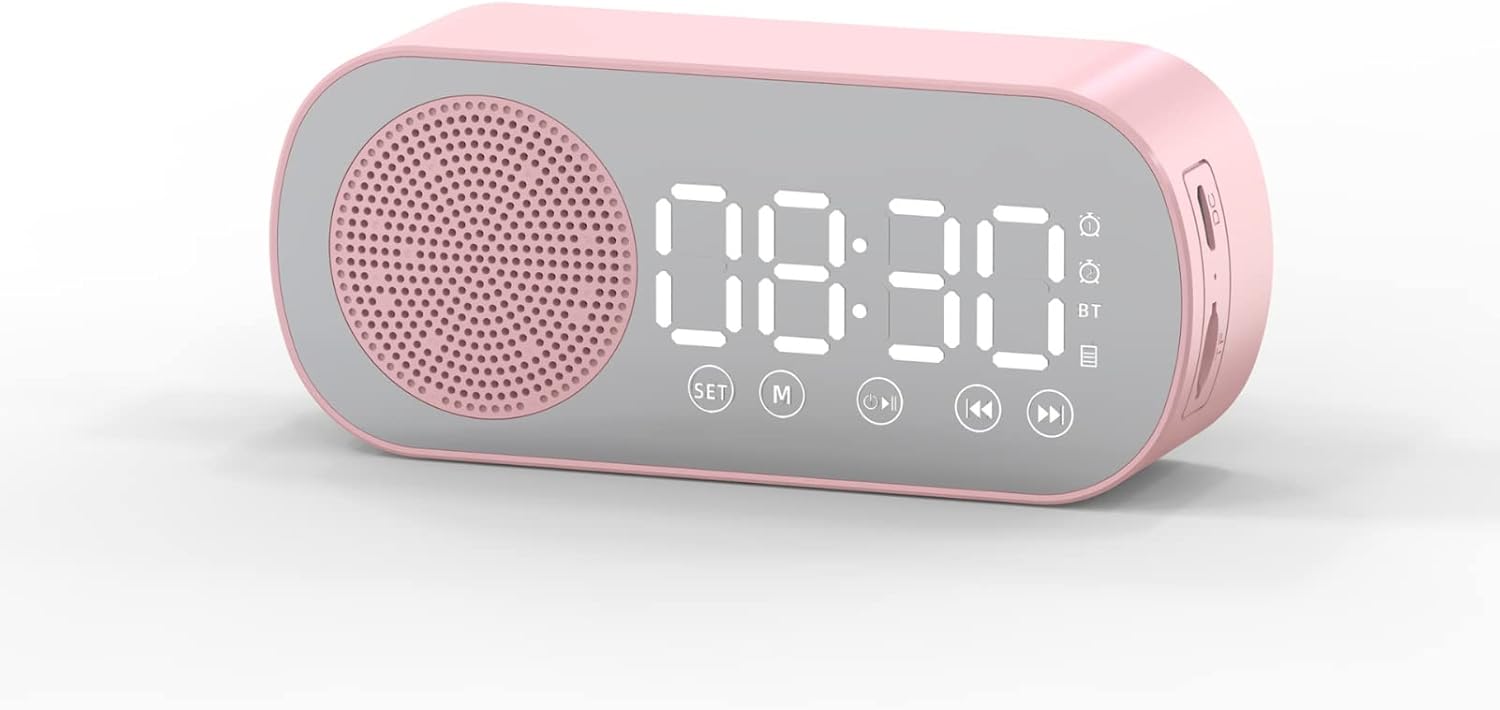
ചിത്രം 1: ഫ്രണ്ട് view of the Jectse Bluetooth Speaker Alarm Clock, showing the speaker grille, LED display, and control buttons (SET, M, Play/Pause, Previous, Next).

ചിത്രം 2: വശം view of the alarm clock with dimensions: 116mm (4.6in) length, 51mm (2in) height, and 33mm (1.3in) depth.
3. സജ്ജീകരണം
3.1. പ്രാരംഭ ചാർജിംഗ്
Before first use, fully charge the device. Connect the provided Micro USB charging cable to the charging port on the side of the alarm clock and the other end to a standard USB power adapter (not included).

ചിത്രം 3: The alarm clock and its Micro USB charging cable.
LED ഡിസ്പ്ലേയിലെ ബാറ്ററി ഇൻഡിക്കേറ്റർ ചാർജിംഗ് സ്റ്റാറ്റസ് കാണിക്കും. പൂർണ്ണമായി ചാർജ് ചെയ്യാൻ സാധാരണയായി കുറച്ച് മണിക്കൂറുകൾ എടുക്കും.
4. പ്രവർത്തന നിർദ്ദേശങ്ങൾ
4.1. പവർ ഓൺ/ഓഫ്
അമർത്തിപ്പിടിക്കുക Power/Mode (M) ഉപകരണം ഓണാക്കാനോ ഓഫാക്കാനോ ഉള്ള ബട്ടൺ.
4.2. സമയം ക്രമീകരിക്കുന്നു
- ക്ലോക്ക് മോഡിൽ, അമർത്തിപ്പിടിക്കുക സെറ്റ് മണിക്കൂർ അക്കങ്ങൾ മിന്നിത്തുടങ്ങുന്നത് വരെ ബട്ടൺ അമർത്തുക.
- ഉപയോഗിക്കുക മുമ്പത്തേത് (◀◀) ഒപ്പം Next (▶▶) മണിക്കൂർ ക്രമീകരിക്കാനുള്ള ബട്ടണുകൾ.
- അമർത്തുക സെറ്റ് button again to switch to minute adjustment. Use the മുമ്പത്തേത് (◀◀) ഒപ്പം Next (▶▶) മിനിറ്റ് ക്രമീകരിക്കാൻ ബട്ടണുകൾ.
- അമർത്തുക സെറ്റ് സമയ ക്രമീകരണ മോഡ് സ്ഥിരീകരിക്കാനും പുറത്തുകടക്കാനും മൂന്നാം തവണ ബട്ടൺ അമർത്തുക.
4.3. Setting Alarms (Dual Alarm Function)
The device supports two independent alarms. Follow these steps for each alarm:

ചിത്രം 4: The alarm clock illustrating the dual alarm feature with two distinct alarm settings.
- In clock mode, short press the സെറ്റ് button once to enter Alarm 1 setting mode. The alarm icon and hour digits will flash.
- ഉപയോഗിക്കുക മുമ്പത്തേത് (◀◀) ഒപ്പം Next (▶▶) മണിക്കൂർ ക്രമീകരിക്കാനുള്ള ബട്ടണുകൾ.
- അമർത്തുക സെറ്റ് again to adjust minutes. Use മുമ്പത്തേത് (◀◀) ഒപ്പം Next (▶▶) ക്രമീകരിക്കാൻ.
- അമർത്തുക സെറ്റ് a third time to select the alarm sound (e.g., buzzer, FM radio). Use മുമ്പത്തേത് (◀◀) ഒപ്പം Next (▶▶) ഓപ്ഷനുകളിലൂടെ സൈക്കിൾ ചെയ്യാൻ.
- അമർത്തുക സെറ്റ് a fourth time to confirm Alarm 1 settings.
- To set Alarm 2, repeat steps 1-5, but short press the സെറ്റ് button twice to enter Alarm 2 setting mode.
- To enable/disable an alarm, short press the സെറ്റ് button until the desired alarm icon flashes, then press the Play/Pause (▶▌▌) അത് ഓണാക്കാനോ ഓഫാക്കാനോ ഉള്ള ബട്ടൺ.
Note: The alarm volume is independent of the main speaker volume and may be fixed or adjustable within the alarm settings. If the alarm sound is too loud, check if there's an option to adjust it during the alarm setup process.
4.4. ബ്ലൂടൂത്ത് മോഡ്
- അമർത്തുക Power/Mode (M) button repeatedly until "BT" appears on the display, indicating Bluetooth mode.
- On your mobile device, enable Bluetooth and search for "Jectse Speaker" or a similar device name.
- Select the device to pair. A confirmation sound will indicate successful pairing.
- You can now play audio from your device through the speaker. Use the Play/Pause (▶▌▌), മുമ്പത്തേത് (◀◀), ഒപ്പം Next (▶▶) പ്ലേബാക്ക് നിയന്ത്രിക്കുന്നതിനുള്ള ബട്ടണുകൾ.
4.5. എഫ്എം റേഡിയോ മോഡ്

ചിത്രം 5: The alarm clock functioning as an FM radio on a bedside table.
- അമർത്തുക Power/Mode (M) ഡിസ്പ്ലേയിൽ "FM" ദൃശ്യമാകുന്നതുവരെ ബട്ടൺ ആവർത്തിച്ച് അമർത്തുക.
- അമർത്തുക Play/Pause (▶▌▌) ലഭ്യമായ എഫ്എം സ്റ്റേഷനുകൾ സ്വയമേവ സ്കാൻ ചെയ്യാനും സംരക്ഷിക്കാനും ബട്ടൺ.
- ഉപയോഗിക്കുക മുമ്പത്തേത് (◀◀) ഒപ്പം Next (▶▶) സംരക്ഷിച്ച സ്റ്റേഷനുകൾക്കിടയിൽ മാറാനുള്ള ബട്ടണുകൾ.
- For better reception, ensure the device is not obstructed and try repositioning it.
4.6. മെമ്മറി കാർഡ് പ്ലേബാക്ക്
Insert a memory card (Micro SD card, up to 32GB, not included) into the designated slot on the device. The device will automatically switch to memory card mode and begin playing audio fileഎസ്. ഉപയോഗിക്കുക Play/Pause (▶▌▌), മുമ്പത്തേത് (◀◀), ഒപ്പം Next (▶▶) പ്ലേബാക്ക് നിയന്ത്രിക്കുന്നതിനുള്ള ബട്ടണുകൾ.
4.7. വോളിയം അഡ്ജസ്റ്റ്മെൻ്റ്
In any audio playback mode (Bluetooth, FM, Memory Card), press and hold the മുമ്പത്തേത് (◀◀) button to decrease volume or the Next (▶▶) വോളിയം വർദ്ധിപ്പിക്കുന്നതിനുള്ള ബട്ടൺ.
4.8. LED Mirror Display

ചിത്രം 6: The alarm clock's LED display also functions as a mirror.
The front panel of the device features an LED display that shows the time and other information. When not actively displaying information, the surface can be used as a mirror.

ചിത്രം 7: The LED display showing multiple functions and indicators, including time, battery level, and Bluetooth status.
5. പരിപാലനം
- വൃത്തിയാക്കൽ: ഉപകരണം വൃത്തിയാക്കാൻ മൃദുവായതും ഉണങ്ങിയതുമായ തുണി ഉപയോഗിക്കുക. അബ്രസീവ് ക്ലീനറുകളോ ലായകങ്ങളോ ഉപയോഗിക്കരുത്.
- സംഭരണം: നേരിട്ടുള്ള സൂര്യപ്രകാശത്തിൽ നിന്നും കടുത്ത താപനിലയിൽ നിന്നും മാറി തണുത്തതും വരണ്ടതുമായ സ്ഥലത്ത് ഉപകരണം സൂക്ഷിക്കുക.
- ബാറ്ററി കെയർ: ബാറ്ററി ലൈഫ് വർദ്ധിപ്പിക്കാൻ, ബാറ്ററി ഇടയ്ക്കിടെ പൂർണ്ണമായും ഡിസ്ചാർജ് ചെയ്യുന്നത് ഒഴിവാക്കുക. ദീർഘനേരം ഉപയോഗത്തിലില്ലെങ്കിൽ പോലും ഉപകരണം പതിവായി ചാർജ് ചെയ്യുക.
- വാട്ടർ എക്സ്പോഷർ: ഈ ഉപകരണം വാട്ടർപ്രൂഫ് അല്ല. വെള്ളത്തിലോ ഉയർന്ന ആർദ്രതയിലോ സമ്പർക്കം ഒഴിവാക്കുക.
6. പ്രശ്നപരിഹാരം
| പ്രശ്നം | സാധ്യമായ കാരണം | പരിഹാരം |
|---|---|---|
| ഉപകരണം പവർ ഓണാക്കുന്നില്ല. | കുറഞ്ഞ ബാറ്ററി. | നൽകിയിരിക്കുന്ന USB കേബിൾ ഉപയോഗിച്ച് ഉപകരണം ചാർജ് ചെയ്യുക. |
| ബ്ലൂടൂത്ത് വഴി ജോടിയാക്കാൻ കഴിയില്ല. | Bluetooth not enabled on device or phone; device not in pairing mode. | Ensure the alarm clock is in Bluetooth mode ("BT" displayed) and your phone's Bluetooth is on and searching. Move devices closer. |
| എഫ്എം റേഡിയോ റിസപ്ഷൻ മോശമാണ്. | ദുർബലമായ സിഗ്നൽ; തടസ്സം. | Reposition the device. Avoid placing near other electronic devices that may cause interference. |
| Alarm is too loud/quiet. | Alarm volume not adjusted during setup. | Re-enter alarm setting mode and check if there is an option to adjust alarm volume. Some models may have a fixed alarm volume. |
| ഡിസ്പ്ലേ വായിക്കാൻ പ്രയാസമാണ്. | Lighting conditions; display brightness setting. | Adjust ambient lighting. Check if there is a display brightness setting (refer to specific model instructions if available, not detailed in general description). |
7 സ്പെസിഫിക്കേഷനുകൾ
| ഫീച്ചർ | വിശദാംശങ്ങൾ |
|---|---|
| മോഡൽ | Jectsesb81t679n01182 |
| മെറ്റീരിയൽ | എബിഎസ് (അക്രിലോണിട്രൈൽ ബ്യൂട്ടാഡീൻ സ്റ്റൈറൈൻ) |
| ഉൽപ്പന്ന വലുപ്പം | ഏകദേശം 116 x 51 x 33 മിമി (4.6 x 2 x 1.3 ഇഞ്ച്) |
| ബാറ്ററി തരം | Lithium Battery (Built-in) |
| ബാറ്ററി ശേഷി | 1600mAh |
| ബ്ലൂടൂത്ത് പതിപ്പ് | 5.0 |
| പ്ലേ മോഡുകൾ | Bluetooth, Memory Card (Max 32G, not included) |
| ക്ലോക്ക് മോഡുകൾ | Digital Clock, Dual Alarm Clock, FM Radio |
| എഫ്എം റേഡിയോ ഫ്രീക്വൻസി | 87.5 മെഗാഹെർട്സ് -108 മെഗാഹെർട്സ് |
| കണക്റ്റിവിറ്റി ടെക്നോളജി | ബ്ലൂടൂത്ത്, യുഎസ്ബി |
| ഇനത്തിൻ്റെ ഭാരം | 5.3 ഔൺസ് |
8. വാറൻ്റിയും പിന്തുണയും
For warranty information and customer support, please refer to the documentation provided at the time of purchase or contact your retailer. Keep your purchase receipt as proof of purchase.