

1. ആമുഖം
Thank you for choosing the CREATE FRYER AIR PRO 3.5L Air Fryer. This appliance uses advanced hot air technology to cook your favorite foods with little to no oil, offering a healthier alternative to traditional frying. It features a 3.5-liter capacity, a digital LCD screen, and 8 pre-installed programs for convenient cooking. Please read this manual thoroughly before first use to ensure safe and optimal performance.
2. പ്രധാന സുരക്ഷാ നിർദ്ദേശങ്ങൾ
തീ, വൈദ്യുതാഘാതം, പരിക്കുകൾ എന്നിവ കുറയ്ക്കുന്നതിന് വൈദ്യുത ഉപകരണങ്ങൾ ഉപയോഗിക്കുമ്പോൾ എല്ലായ്പ്പോഴും അടിസ്ഥാന സുരക്ഷാ മുൻകരുതലുകൾ പാലിക്കുക.
- ഉപയോഗിക്കുന്നതിന് മുമ്പ് എല്ലാ നിർദ്ദേശങ്ങളും വായിക്കുക.
- പ്രധാന യൂണിറ്റ്, ചരട്, പ്ലഗ് എന്നിവ വെള്ളത്തിലോ മറ്റ് ദ്രാവകങ്ങളിലോ മുക്കരുത്.
- വോളിയം ഉറപ്പാക്കുകtagഉപകരണത്തിൽ സൂചിപ്പിച്ചിരിക്കുന്ന ഇ നിങ്ങളുടെ പ്രാദേശിക മെയിൻ വോളിയവുമായി യോജിക്കുന്നുtage.
- കുട്ടികളോ സമീപത്തോ ഏതെങ്കിലും ഉപകരണം ഉപയോഗിക്കുമ്പോൾ സൂക്ഷ്മ മേൽനോട്ടം ആവശ്യമാണ്.
- ഉപയോഗത്തിലില്ലാത്തപ്പോഴും വൃത്തിയാക്കുന്നതിന് മുമ്പും ഔട്ട്ലെറ്റിൽ നിന്ന് അൺപ്ലഗ് ചെയ്യുക. ഭാഗങ്ങൾ ധരിക്കുന്നതിനോ എടുക്കുന്നതിനോ മുമ്പ് തണുപ്പിക്കാൻ അനുവദിക്കുക.
- കേടായ കോർഡോ പ്ലഗോ ഉപയോഗിച്ച് ഒരു ഉപകരണവും പ്രവർത്തിപ്പിക്കരുത്, അല്ലെങ്കിൽ ഉപകരണത്തിൻ്റെ തകരാറുകൾ അല്ലെങ്കിൽ ഏതെങ്കിലും വിധത്തിൽ കേടുപാടുകൾ സംഭവിച്ചതിന് ശേഷം.
- ഉപകരണ നിർമ്മാതാവ് ശുപാർശ ചെയ്തിട്ടില്ലാത്ത അറ്റാച്ചുമെന്റുകൾ ഉപയോഗിക്കരുത്.
- ഉപകരണം ചുമരിനോട് ചേർത്തോ മറ്റ് ഉപകരണങ്ങൾക്ക് നേരെയോ സ്ഥാപിക്കരുത്. പിൻഭാഗത്തും വശങ്ങളിലും കുറഞ്ഞത് 10 സെന്റീമീറ്റർ സ്വതന്ത്ര സ്ഥലവും ഉപകരണത്തിന് മുകളിൽ 10 സെന്റീമീറ്റർ സ്വതന്ത്ര സ്ഥലവും വിടുക.
- ഉപകരണത്തിന് മുകളിൽ ഒന്നും വയ്ക്കരുത്.
- ഈ മാനുവലിൽ വിവരിച്ചിരിക്കുന്നതല്ലാതെ മറ്റൊരു ആവശ്യത്തിനും ഉപകരണം ഉപയോഗിക്കരുത്.
- Hot air is released through the air outlet openings during hot air frying. Keep your hands and face at a safe distance from the steam and from the air outlet openings.
- ഉപയോഗിക്കുമ്പോൾ പുറംഭാഗങ്ങൾ ചൂടായേക്കാം. ചൂടുള്ള പ്രതലങ്ങളിൽ തൊടരുത്. ഹാൻഡിലുകളോ നോബുകളോ ഉപയോഗിക്കുക.
- Always ensure the basket is properly inserted before operating.
3. ഉൽപ്പന്നം കഴിഞ്ഞുview ഘടകങ്ങളും
Familiarize yourself with the main parts of your CREATE FRYER AIR PRO:
- കൺട്രോൾ പാനലുള്ള പ്രധാന യൂണിറ്റ്
- ഡിജിറ്റൽ എൽസിഡി ഡിസ്പ്ലേ
- Temperature/Time Control Dial
- എയർ ഫ്രയർ ബാസ്കറ്റ്
- Crisper Plate (removable)
- കൈകാര്യം ചെയ്യുക
- എയർ ഇൻലെറ്റ്
- എയർ let ട്ട്ലെറ്റ് വെന്റുകൾ

Image: A composite image displaying the CREATE FRYER AIR PRO air fryer unit alongside its separate basket and crisper plate components.
4. സജ്ജീകരണവും ആദ്യ ഉപയോഗവും
4.1 അൺപാക്കിംഗ്
Carefully remove all packaging materials, stickers, and labels from the appliance. Keep packaging for future storage or disposal.
4.2 പ്രാരംഭ ക്ലീനിംഗ്
- പരസ്യം ഉപയോഗിച്ച് ഉപകരണത്തിൻ്റെ പുറംഭാഗം തുടയ്ക്കുകamp തുണി.
- Clean the basket and crisper plate with hot water, dish soap, and a non-abrasive sponge. These parts are dishwasher safe.
- ഉപയോഗിക്കുന്നതിന് മുമ്പ് എല്ലാ ഭാഗങ്ങളും പൂർണ്ണമായും ഉണങ്ങിയതാണെന്ന് ഉറപ്പാക്കുക.
4.3 പ്ലേസ്മെൻ്റ്
Place the appliance on a stable, horizontal, and heat-resistant surface. Ensure there is adequate air circulation around the unit (at least 10 cm clearance on all sides and top).
4.4 First Use (Burn-in Cycle)
It is recommended to run the air fryer empty for about 10-15 minutes at 180°C before cooking food for the first time. This helps to burn off any manufacturing residues and odors. A slight odor may be present during this process; this is normal.
5. പ്രവർത്തന നിർദ്ദേശങ്ങൾ
5.1 അടിസ്ഥാന പ്രവർത്തനം
- Plug the power cord into a grounded wall outlet. The appliance will beep, and the display will illuminate briefly.
- Pull the basket out of the air fryer. Place your ingredients into the basket, ensuring not to overfill (do not exceed the MAX line).
- ബാസ്ക്കറ്റ് സ്ഥലത്ത് ക്ലിക്കുചെയ്യുന്നത് വരെ എയർ ഫ്രയറിലേക്ക് തിരികെ സ്ലൈഡ് ചെയ്യുക.
- The display will show the default temperature and time. Use the control dial to adjust the temperature (80°C to 200°C) and time (1 to 60 minutes). Press the dial to switch between temperature and time settings.
- Press the Start/Pause button (usually a play/pause icon) to begin cooking.
- During cooking, you can pull out the basket to shake or turn ingredients. The air fryer will automatically pause and resume when the basket is reinserted.
- ടൈമർ പൂജ്യത്തിലെത്തിക്കഴിഞ്ഞാൽ, പാചകം പൂർത്തിയായി എന്ന് സൂചിപ്പിക്കുന്ന തരത്തിൽ എയർ ഫ്രയർ ബീപ്പ് ചെയ്യും.
- Carefully pull out the basket and empty the cooked food. Use heat-resistant tongs or gloves.

ചിത്രം: വിശദമായ ഒരു ചിത്രം view of the CREATE FRYER AIR PRO's digital control panel, highlighting the temperature display and various cooking program icons.
5.2 മുൻകൂട്ടി ഇൻസ്റ്റാൾ ചെയ്ത പ്രോഗ്രാമുകൾ
The FRYER AIR PRO comes with 8 pre-installed programs for common dishes. To use them:
- After placing food in the basket, press the Menu button (often represented by multiple icons or a 'P' symbol) to cycle through the programs.
- Each program has a preset temperature and time. You can adjust these settings manually after selecting a program if desired.
- തിരഞ്ഞെടുത്ത പ്രോഗ്രാം ആരംഭിക്കാൻ സ്റ്റാർട്ട്/പോസ് ബട്ടൺ അമർത്തുക.
The 8 programs include:
- Pommes Frites (Fries)
- Revben (Ribs)
- Fisk (Fish)
- Räkor (Shrimp)
- Kyckling (Chicken)
- Pajer (Pies)
- Kycklingben (Chicken Legs)
- Bröd (Bread)
5.3 പാചക നുറുങ്ങുകൾ
- മികച്ച ഫലങ്ങൾക്കായി, ഭക്ഷണം ചേർക്കുന്നതിന് മുമ്പ് എയർ ഫ്രയർ 3-5 മിനിറ്റ് നേരത്തേക്ക് ചൂടാക്കുക.
- ഫ്രൈസ് അല്ലെങ്കിൽ നഗ്ഗെറ്റ് പോലുള്ള ചെറിയ ഇനങ്ങൾക്ക്, പ്രത്യേകിച്ച് തവിട്ടുനിറമാകുന്നതിന്, പാചകം ചെയ്യുമ്പോൾ കൊട്ട പകുതി കുലുക്കുക.
- Lightly brush or spray food with oil for extra crispiness, though many foods require no added oil.
- Do not overcrowd the basket. Cook in batches if necessary to ensure proper air circulation and even cooking.
- For foods that typically require baking, the air fryer can often achieve similar results with a crispy exterior.
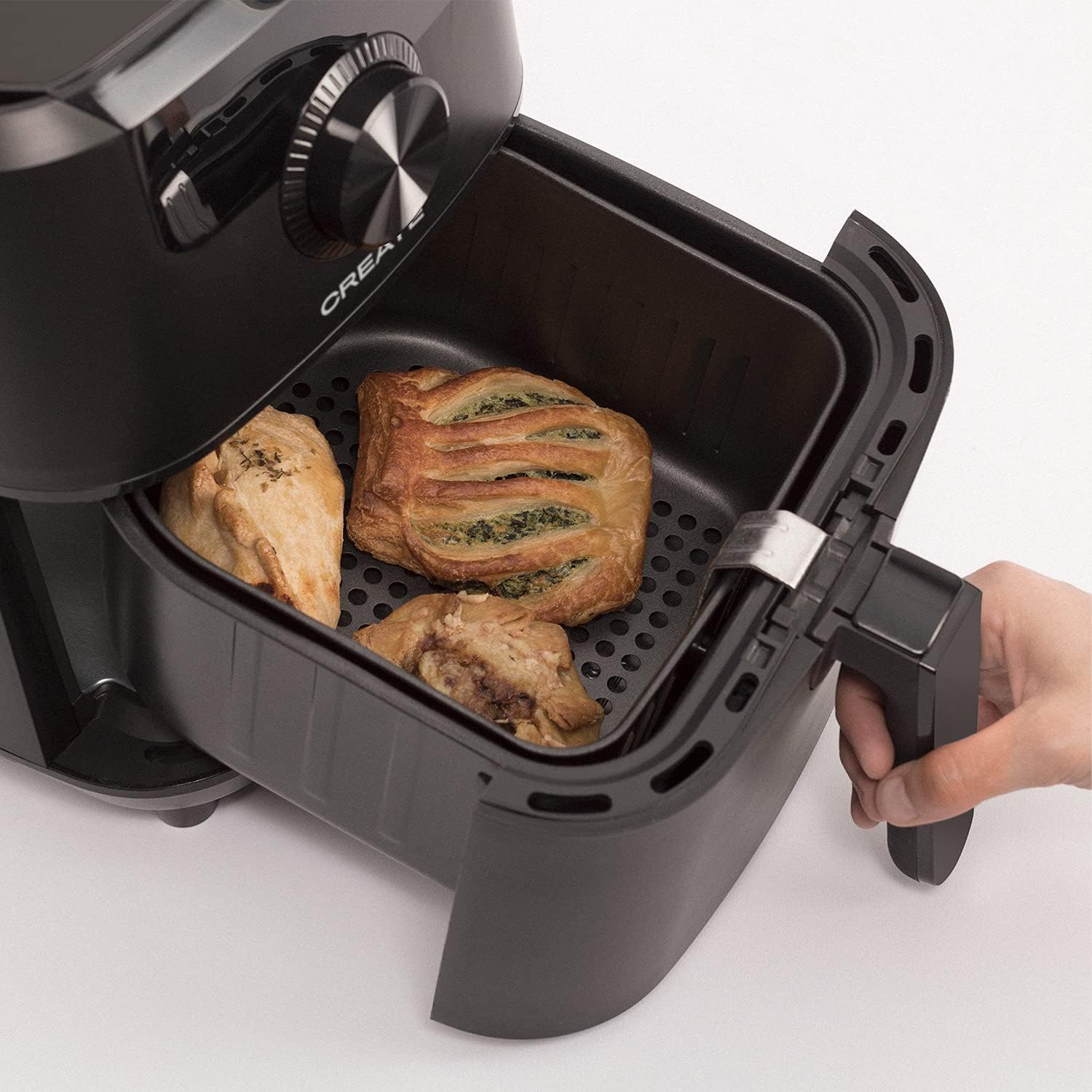
Image: The air fryer basket, pulled out from the main unit, containing cooked pastries and chicken pieces, demonstrating the cooking capacity.
6. പരിപാലനവും ശുചീകരണവും
ഓരോ ഉപയോഗത്തിനും ശേഷം എയർ ഫ്രയർ വൃത്തിയാക്കുക.
- വൃത്തിയാക്കുന്നതിന് മുമ്പ്, ചുമരിലെ ഔട്ട്ലെറ്റിൽ നിന്ന് ഉപകരണം പ്ലഗ് ഊരി പൂർണ്ണമായും തണുക്കാൻ അനുവദിക്കുക.
- പ്രധാന യൂണിറ്റിന്റെ പുറംഭാഗം പരസ്യം ഉപയോഗിച്ച് തുടയ്ക്കുക.amp തുണി. ഉരച്ചിലുകൾ ഉള്ള ക്ലീനറുകൾ ഉപയോഗിക്കരുത്.
- Remove the basket and crisper plate. Wash them with hot water, dish soap, and a non-abrasive sponge. The non-stick coating makes cleaning easy. These parts are also dishwasher safe.
- For stubborn food residues, soak the basket and crisper plate in hot water with dish soap for about 10 minutes before cleaning.
- ഉപകരണം വീണ്ടും കൂട്ടിച്ചേർക്കുന്നതിനോ സൂക്ഷിക്കുന്നതിനോ മുമ്പ് എല്ലാ ഭാഗങ്ങളും നന്നായി ഉണങ്ങിയെന്ന് ഉറപ്പാക്കുക.
- തണുത്തതും വരണ്ടതുമായ സ്ഥലത്ത് എയർ ഫ്രയർ സൂക്ഷിക്കുക.

Image: The air fryer basket, with its crisper plate, fully removed from the main unit, illustrating its readiness for cleaning.
7. പ്രശ്നപരിഹാരം
| പ്രശ്നം | സാധ്യമായ കാരണം | പരിഹാരം |
|---|---|---|
| എയർ ഫ്രയർ ഓണാക്കുന്നില്ല. | ഉപകരണം പ്ലഗിൻ ചെയ്തിട്ടില്ല. | പവർ കോർഡ് ഒരു ഗ്രൗണ്ടഡ് ഔട്ട്ലെറ്റിൽ സുരക്ഷിതമായി പ്ലഗ് ചെയ്തിട്ടുണ്ടെന്ന് ഉറപ്പാക്കുക. |
| ഭക്ഷണം തുല്യമായി പാകം ചെയ്യുന്നില്ല. | Basket is overcrowded. Food not shaken. | ചെറിയ ഭാഗങ്ങളിൽ വേവിക്കുക. പാചകം പകുതിയാകുമ്പോൾ കൊട്ട കുലുക്കുക. |
| ഉപകരണത്തിൽ നിന്ന് വെളുത്ത പുക വരുന്നു. | മുൻ ഉപയോഗത്തിൽ നിന്നുള്ള ഗ്രീസ് അവശിഷ്ടം. | ഓരോ ഉപയോഗത്തിനു ശേഷവും ബാസ്കറ്റും ക്രിസ്പർ പ്ലേറ്റും നന്നായി വൃത്തിയാക്കുക. |
| ഭക്ഷണം ക്രിസ്പി അല്ല. | Too much moisture in food. Not enough oil (if desired). | Pat food dry before cooking. Lightly spray or brush with oil for extra crispiness. |
8 സ്പെസിഫിക്കേഷനുകൾ
- മോഡലിൻ്റെ പേര്: ഫ്രയർ എയർ പ്രോ
- മോഡൽ നമ്പർ: 52025_186434
- ബ്രാൻഡ്: സൃഷ്ടിക്കുക
- ശേഷി: 3.5 ലിറ്റർ
- വാട്ട്tage: 1500 വാട്ട്
- വാല്യംtage: 240V
- താപനില പരിധി: 80°C - 200°C
- നിയന്ത്രണ രീതി: സ്പർശിക്കുക, ഡയൽ ചെയ്യുക
- പ്രത്യേക സവിശേഷതകൾ: Programmable, Temperature Control, Digital Display
- മെറ്റീരിയൽ: പ്ലാസ്റ്റിക്
- നിറം: കറുപ്പ്
- അളവുകൾ (D x W x H): 37.8 സെ.മീ x 26.5 സെ.മീ x 33.7 സെ.മീ
- നോൺ-സ്റ്റിക്ക് കോട്ടിംഗ്: അതെ
9. വാറൻ്റിയും പിന്തുണയും
For warranty information, please refer to the warranty card included with your product or visit the official CREATE website. If you encounter any issues not covered in this manual, please contact CREATE customer support for assistance.
Webസൈറ്റ്: www.create.com (ഉദാample link, please refer to actual manufacturer's webസൈറ്റ്)