
1. ആമുഖം
Thank you for choosing the EMOS Select ES5001 Radio Weather Station. This device provides comprehensive weather information, including indoor and outdoor temperature, humidity, barometric pressure, and a weather forecast. It features a color touch screen for easy interaction and a wireless outdoor sensor with a range of up to 100 meters.
പാക്കേജ് ഉള്ളടക്കം
- EMOS Select ES5001 Weather Station (Main Unit)
- വയർലെസ് Outട്ട്ഡോർ സെൻസർ
- മെയിൻ യൂണിറ്റിനുള്ള പവർ അഡാപ്റ്റർ
- ഉപയോക്തൃ മാനുവൽ (ഈ പ്രമാണം)
കുറിപ്പ്: 2x AAA batteries for the outdoor sensor and 3x AAA batteries for the main unit (backup) are not included and must be purchased separately.
2 സുരക്ഷാ വിവരങ്ങൾ
- ഉപയോഗിക്കുന്നതിന് മുമ്പ് എല്ലാ നിർദ്ദേശങ്ങളും ശ്രദ്ധാപൂർവ്വം വായിക്കുക.
- വെള്ളം, ഉയർന്ന ആർദ്രത എന്നിവയിൽ നിന്ന് ഉപകരണം അകറ്റി നിർത്തുക.
- Do not expose the main unit to direct sunlight or extreme temperatures.
- പ്രധാന യൂണിറ്റിനായി നൽകിയിരിക്കുന്ന പവർ അഡാപ്റ്റർ മാത്രം ഉപയോഗിക്കുക.
- ഉപകരണം സ്വയം വേർപെടുത്താനോ നന്നാക്കാനോ ശ്രമിക്കരുത്. യോഗ്യതയുള്ള സേവന ഉദ്യോഗസ്ഥരെ ബന്ധപ്പെടുക.
- പ്രാദേശിക നിയന്ത്രണങ്ങൾ അനുസരിച്ച് ബാറ്ററികൾ ഉത്തരവാദിത്തത്തോടെ സംസ്കരിക്കുക.
- ബാറ്ററികൾ കുട്ടികൾക്ക് ലഭ്യമാകാതെ സൂക്ഷിക്കുക.
3. സജ്ജീകരണം
3.1 ബാറ്ററി ഇൻസ്റ്റാളേഷൻ
ഔട്ട്ഡോർ സെൻസർ:
- ഔട്ട്ഡോർ സെൻസറിന്റെ പിൻഭാഗത്തുള്ള ബാറ്ററി കമ്പാർട്ട്മെന്റ് കവർ തുറക്കുക.
- ശരിയായ പോളാരിറ്റി (+/-) നിരീക്ഷിച്ചുകൊണ്ട് 2x AAA ബാറ്ററികൾ ഇടുക.
- ബാറ്ററി കമ്പാർട്ട്മെൻ്റ് കവർ സുരക്ഷിതമായി അടയ്ക്കുക.
Main Unit (Backup Power):
- പ്രധാന യൂണിറ്റിന്റെ പിൻഭാഗത്തുള്ള ബാറ്ററി കമ്പാർട്ട്മെന്റ് കവർ തുറക്കുക.
- ശരിയായ പോളാരിറ്റി (+/-) നിരീക്ഷിച്ചുകൊണ്ട് 3x AAA ബാറ്ററികൾ ഇടുക.
- Close the battery compartment cover securely. These batteries provide backup power in case of a power outage.
3.2 പവർ കണക്ഷൻ
Connect the provided power adapter to the main unit's power input port and then plug it into a standard electrical outlet. The display will illuminate.
3.3 പ്രാരംഭ സമന്വയം
Once both the main unit and the outdoor sensor have power, they will automatically attempt to synchronize. Place the outdoor sensor within close proximity to the main unit during the initial setup. The outdoor temperature and humidity readings should appear on the main unit's display within a few minutes. If synchronization fails, refer to the troubleshooting section.
3.4 ഔട്ട്ഡോർ സെൻസർ പ്ലേസ്മെന്റ്
For accurate readings, place the outdoor sensor in a shaded area, protected from direct sunlight and rain. Ensure it is within the 100-meter wireless range of the main unit and away from large metal objects or electrical interference sources. The sensor is water-resistant (IPX4) but should not be submerged.

Image: The outdoor sensor is designed to be water-resistant with an IPX4 rating, suitable for outdoor placement.

Image: The outdoor sensor offers a wireless range of up to 100 meters from the main unit, allowing flexible placement.
4. ഓപ്പറേഷൻ
4.1 പ്രദർശനം പൂർത്തിയായിview
The EMOS Select ES5001 features a clear, color touch screen display that presents various weather metrics and time information. The display is designed for readability from multiple angles.

ചിത്രം: വിശദമായത് view of the weather station's clear interface, highlighting different data sections such as outdoor/indoor temperature and humidity, pressure trend, time, date, and moon phase.
4.2 ടച്ച് സ്ക്രീൻ നിയന്ത്രണങ്ങൾ
The main unit is operated via touch-sensitive buttons located on the display. Specific icons correspond to different functions such as settings, alarm, and unit selection.

Image: A hand demonstrates interaction with the touch-sensitive buttons on the display, which offers a wide 160-degree viewing ആംഗിൾ.
4.3 Basic Settings (Time, Date, Units)
The radio clock automatically sets the time and date via RF signal. Manual adjustments can be made through the settings menu if needed. To access settings, touch the gear icon on the display. You can typically adjust:
- സമയ മേഖല
- 12/24 മണിക്കൂർ ഫോർമാറ്റ്
- Date format (DD/MM or MM/DD)
- താപനില യൂണിറ്റുകൾ (°C/°F)
- Pressure units (hPa/inHg)
4.4 കാലാവസ്ഥാ പ്രവചനം
The weather station features a self-learning weather forecast function. After approximately 14 days of continuous operation, the station will have collected enough data to provide a more accurate 24-hour weather forecast with up to 75% accuracy. The forecast is indicated by graphical icons on the display.

Image: Illustrates the 24-hour weather forecast feature, highlighting the self-learning capability that becomes active after 14 days, along with moon phase and barometer functions.
4.5 അലാറം പ്രവർത്തനം
The weather station includes an alarm clock function. To set the alarm, navigate to the alarm settings via the touch screen interface. You can set a specific alarm time and activate/deactivate it.
4.6 Moon Phase Display
The display shows the current moon phase, providing additional astronomical information.
4.7 Barometric Pressure and Trend
The integrated barometer measures atmospheric pressure. The display shows the current pressure and a trend indicator, allowing you to observe changes in pressure over time, which can help in predicting weather changes.
5. പരിപാലനം
5.1 വൃത്തിയാക്കൽ
മെയിൻ യൂണിറ്റും ഔട്ട്ഡോർ സെൻസറും ഒരു സോഫ്റ്റ്, ഡി ക്ലീനർ ഉപയോഗിച്ച് തുടയ്ക്കുക.amp തുണി. അബ്രാസീവ് ക്ലീനറുകളോ ലായകങ്ങളോ ഉപയോഗിക്കരുത്, കാരണം ഇവ പ്രതലങ്ങളെയോ ഇലക്ട്രോണിക് ഘടകങ്ങളെയോ നശിപ്പിച്ചേക്കാം.
5.2 ബാറ്ററി മാറ്റിസ്ഥാപിക്കൽ
Replace batteries in the outdoor sensor when the low battery indicator appears on the main unit's display. For the main unit, replace backup batteries periodically or when the unit fails to retain settings during a power outage. Always use new batteries of the specified type (AAA) and ensure correct polarity.
6. പ്രശ്നപരിഹാരം
| പ്രശ്നം | സാധ്യമായ കാരണം | പരിഹാരം |
|---|---|---|
| പ്രധാന യൂണിറ്റിൽ ഡിസ്പ്ലേ ഇല്ല. | Power adapter not connected or faulty; backup batteries depleted. | Ensure power adapter is securely connected and plugged in. Check backup batteries and replace if necessary. |
| Outdoor readings not displayed | Outdoor sensor batteries depleted; sensor out of range; interference; synchronization failed. | Replace outdoor sensor batteries. Move sensor closer to the main unit. Avoid placing near large metal objects or electronics. Re-synchronize by removing and reinserting batteries in both units. |
| കൃത്യമല്ലാത്ത കാലാവസ്ഥാ പ്രവചനം | Learning phase not complete; local weather conditions vary significantly. | Allow 14 days for the self-learning function to optimize. Forecasts are general and may not always match hyper-local conditions. |
| Time/Date incorrect | RF signal interference; incorrect time zone setting. | Move unit away from potential interference sources. Manually set the correct time zone in settings. |
| ടച്ച് സ്ക്രീൻ പ്രതികരിക്കുന്നില്ല | താൽക്കാലിക സോഫ്റ്റ്വെയർ തകരാർ. | Disconnect power adapter and remove backup batteries for a few minutes, then reconnect. |
7 സ്പെസിഫിക്കേഷനുകൾ
- മോഡൽ: ES5001
- ഡിസ്പ്ലേ തരം: വർണ്ണ ടച്ച് സ്ക്രീൻ
- പവർ സോഴ്സ് (പ്രധാന യൂണിറ്റ്): AC Adapter (included), 3x AAA batteries (backup, not included)
- പവർ സ്രോതസ്സ് (ഔട്ട്ഡോർ സെൻസർ): 2x AAA ബാറ്ററികൾ (ഉൾപ്പെടുത്തിയിട്ടില്ല)
- വയർലെസ് ശ്രേണി: 100 മീറ്റർ വരെ (തുറന്ന സ്ഥലത്ത്)
- താപനില കൃത്യത: ±1 °C
- ഔട്ട്ഡോർ താപനില പരിധി: -50 °C മുതൽ +70 °C വരെ
- ഈർപ്പം പരിധി: 1% മുതൽ 99% വരെ
- പ്രത്യേക സവിശേഷതകൾ: Alarm, Clock, Wireless Connectivity, Barometer, Moon Phase, Weather Forecast
- മെറ്റീരിയൽ: ഗ്ലാസ്, പ്ലാസ്റ്റിക്
- നിറം: കറുപ്പ്
- അളവുകൾ (പ്രധാന യൂണിറ്റ്): Approximately 192 mm (width) x 127 mm (height) x 65 mm (depth)
- Dimensions (Outdoor Sensor): ഏകദേശം 62 മിമി (വീതി) x 100 മിമി (ഉയരം)
- Water Resistance (Outdoor Sensor): IPX4
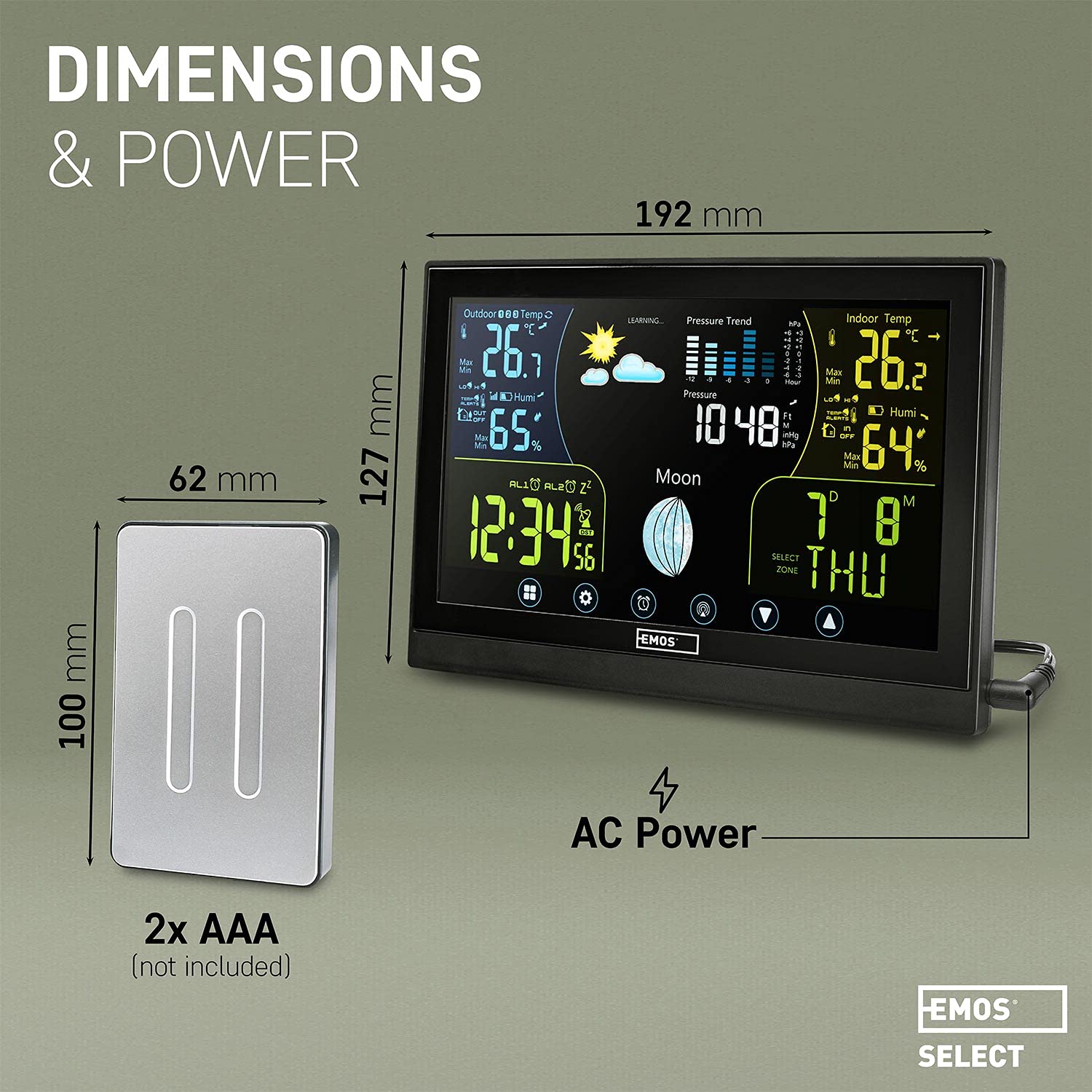
Image: Visual representation of the main unit and outdoor sensor dimensions, indicating power sources for each component.
8. വാറണ്ടിയും പിന്തുണയും
EMOS provides a standard manufacturer's warranty for this product. Please refer to the warranty card included in your package or visit the official EMOS website for detailed warranty terms and conditions. For technical support, troubleshooting assistance, or to inquire about spare parts, please contact EMOS customer service through their official channels.