
1. ആമുഖം
This manual provides detailed instructions for the setup, operation, and maintenance of your BALILA Wireless Lavalier Microphone System, model BA-CM1. This system is designed to capture clear audio for various applications, including video recording, vlogging, interviewകൾ, തത്സമയ സ്ട്രീമിംഗ്.
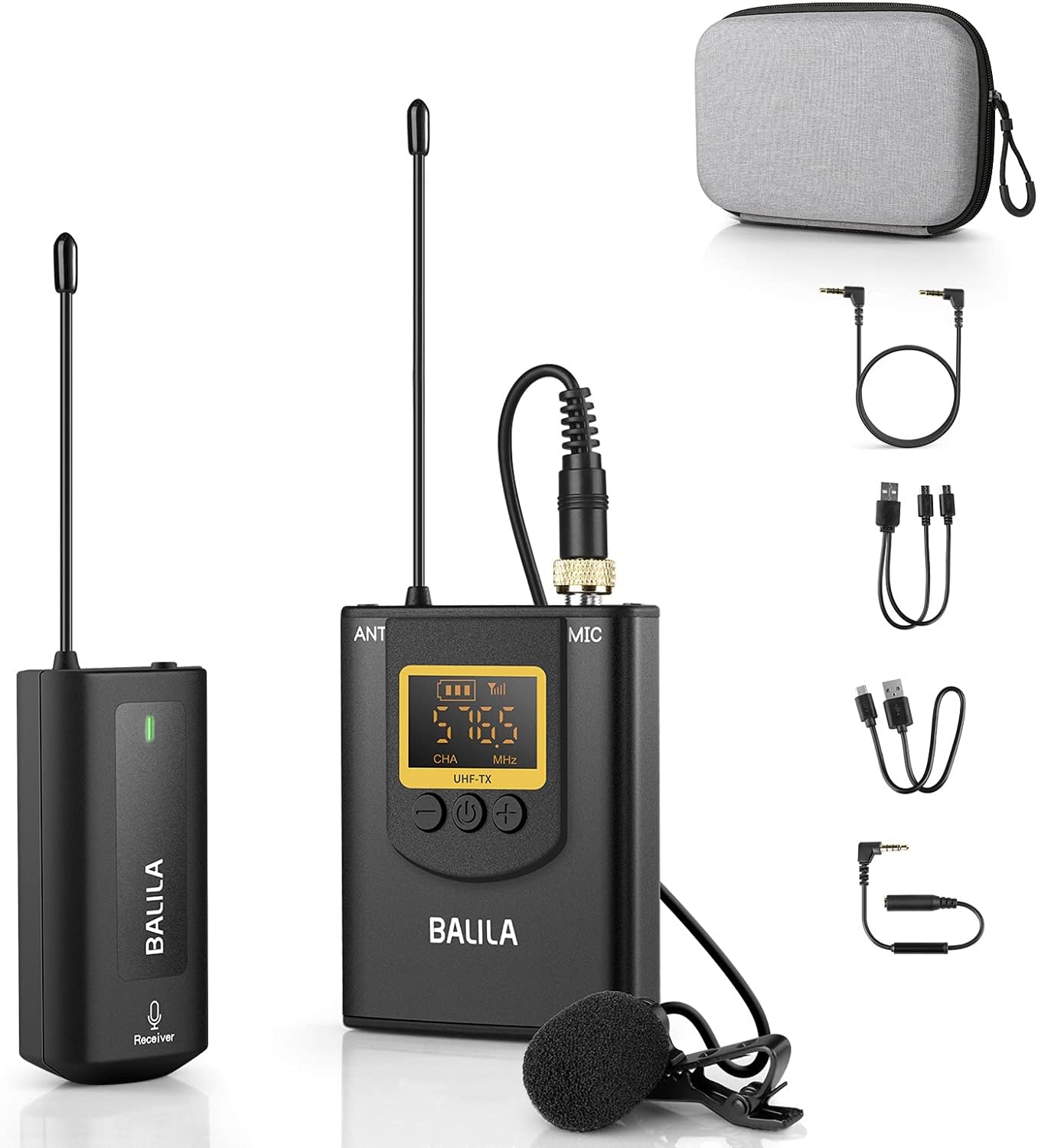
Figure 1: BALILA Wireless Lavalier Microphone System, showing the receiver, transmitter with lavalier mic, charging case, and various cables.
2. പാക്കേജ് ഉള്ളടക്കം
താഴെ ലിസ്റ്റ് ചെയ്തിരിക്കുന്ന എല്ലാ ഇനങ്ങളും നിങ്ങളുടെ പാക്കേജിൽ ഉൾപ്പെടുത്തിയിട്ടുണ്ടെന്ന് ദയവായി പരിശോധിക്കുക:
- 2 x ട്രാൻസ്മിറ്ററുകൾ (TX)
- 1 x റിസീവർ (RX)
- 1 x ചാർജിംഗ് കേസ്
- 2 x വിൻഡ്ഷീൽഡുകൾ
- 1 x യുഎസ്ബി-സി ചാർജിംഗ് കേബിൾ
- 1 x 3.5mm TRS to TRS Camera Cable
- 1 x 3.5mm TRS to TRRS Phone Cable
Figure 2: All components included in the BALILA Wireless Lavalier Microphone System package.
3. ഉൽപ്പന്നം കഴിഞ്ഞുview
3.1 ട്രാൻസ്മിറ്റർ (ടിഎക്സ്)
The transmitter converts audio signals from the lavalier microphone into a wireless signal for transmission to the receiver. It features a display for channel and battery status, and controls for volume adjustment.

Figure 3: Transmitter (TX) components and controls, including microphone input, antenna, display, power button, and volume controls.
- Microphone Input Socket: Connects the lavalier microphone.
- ആൻ്റിന: വയർലെസ് സിഗ്നൽ പ്രക്ഷേപണത്തിനായി.
- ഡിസ്പ്ലേ: Shows channel, battery level, and signal strength.
- പവർ ബട്ടൺ: Turns the unit on/off and initiates pairing.
- വോളിയം ബട്ടണുകൾ (+/-): മൈക്രോഫോൺ ഇൻപുട്ട് വോളിയം ക്രമീകരിക്കുന്നു.
- Micro USB 5V Charging Port: ട്രാൻസ്മിറ്റർ ചാർജ് ചെയ്യുന്നതിനായി.
3.2 റിസീവർ (RX)
The receiver captures the wireless audio signal from the transmitter and outputs it to your recording device. It includes a monitoring port for real-time audio verification.

Figure 4: Receiver (RX) components and indicators, including power button, working indicator, Micro USB charging port, monitor headset socket, antenna, and 3.5mm microphone output.
- പവർ ബട്ടൺ: യൂണിറ്റ് ഓൺ/ഓഫ് ചെയ്യുന്നു.
- പ്രവർത്തന സൂചകം: Shows operational status and pairing status.
- Micro USB 5V Charging Port: റിസീവർ ചാർജുചെയ്യുന്നതിന്.
- Monitor Headset Socket: ഹെഡ്ഫോണുകൾ ഉപയോഗിച്ചുള്ള തത്സമയ ഓഡിയോ നിരീക്ഷണത്തിനായി.
- ആൻ്റിന: വയർലെസ് സിഗ്നൽ സ്വീകരണത്തിനായി.
- 3.5mm Microphone Output: Connects to your recording device (camera, smartphone, PC).
4. സജ്ജീകരണ നിർദ്ദേശങ്ങൾ
4.1 ഉപകരണങ്ങൾ ചാർജ് ചെയ്യുന്നു
Before first use, fully charge both the transmitter(s) and receiver. Use the provided USB-C charging cable to connect the devices to a 5V USB power source. The charging indicator will typically show red while charging and turn off or change color when fully charged.
4.2 Pairing the Microphone Kit
The microphone kit is typically pre-paired at the factory. If re-pairing is necessary, follow these steps:
- റിസീവർ ഓഫാണെന്ന് ഉറപ്പാക്കുക.
- On the transmitter, press and hold the "-" button and the "പവർ ബട്ടൺ" simultaneously for 3 seconds. The display on the transmitter will flash.
- Turn on the receiver. Its indicator light will flash 3-4 times.
- Short press the power button on the transmitter. The receiver's indicator light will turn solid green, indicating successful pairing.

Figure 5: Visual guide for pairing the transmitter and receiver.
4.3 റെക്കോർഡിംഗ് ഉപകരണങ്ങളിലേക്ക് ബന്ധിപ്പിക്കുന്നു
Connect the receiver to your recording device using the appropriate cable:
- For Cameras (DSLR, Camcorder, GoPro): Use the 3.5mm TRS to TRS camera cable. Connect one end to the receiver's 3.5mm output and the other to your camera's microphone input.
- For Smartphones (Android, iPhone): Use the 3.5mm TRS to TRRS phone cable. Connect the TRS end to the receiver's 3.5mm output and the TRRS end to your smartphone's headphone/microphone jack. കുറിപ്പ്: iPhones without a 3.5mm jack will require an official Lightning to 3.5mm adapter (not included). Android phones with USB-C only may require a USB-C to 3.5mm adapter (not included).
- ലാപ്ടോപ്പുകൾ/പിസികൾക്ക്: Use the 3.5mm TRS to TRS camera cable or a suitable adapter if your computer has separate microphone and headphone jacks.

Figure 6: Connection methods for different recording devices.
5. പ്രവർത്തന നിർദ്ദേശങ്ങൾ
5.1 പവർ ഓൺ/ഓഫ്
- To power on, press and hold the power button on both the transmitter and receiver until their displays/indicators light up.
- To power off, press and hold the power button on both units until they shut down.
5.2 വോളിയം ക്രമീകരിക്കൽ
On the transmitter, use the "+"ഒപ്പം"-" buttons to adjust the microphone input volume. Monitor the audio output to ensure optimal levels without distortion.
5.3 നോയ്സ് റദ്ദാക്കൽ
This microphone system features a noise-canceling chip designed to reduce ambient noise. The system automatically applies noise cancellation to enhance voice clarity. No manual activation is typically required for this feature.
5.4 Real-time Audio Monitoring
To monitor your audio in real-time, plug a pair of headphones into the "Monitor headset socket" on the receiver. This allows you to verify audio quality and levels during recording.

Figure 7: Using the real-time audio monitor feature with headphones.
6. പരിപാലനം
6.1 വൃത്തിയാക്കൽ
Wipe the devices with a soft, dry cloth. Do not use liquid cleaners or solvents, as they may damage the product. Keep the microphone head clean and free of debris.
6.2 സംഭരണം
Store the microphone system in a cool, dry place, away from direct sunlight and extreme temperatures. Use the provided charging case for protection during storage and transport.
6.3 ബാറ്ററി കെയർ
To prolong battery life, avoid fully discharging the devices frequently. Recharge them regularly, even if not in use for extended periods (e.g., once every 3 months).
7. പ്രശ്നപരിഹാരം
If you encounter issues with your BALILA Wireless Lavalier Microphone System, please refer to the common problems and solutions below. For more detailed assistance, consult the official Troubleshooting Guide PDF.
Official Troubleshooting Guide: PDF ഡൗൺലോഡ് ചെയ്യുക
പൊതുവായ പ്രശ്നങ്ങളും പരിഹാരങ്ങളും:
- ശബ്ദമില്ല/കുറഞ്ഞ ശബ്ദം:
- ട്രാൻസ്മിറ്ററും റിസീവറും ഓണാക്കിയിട്ടുണ്ടെന്നും പൂർണ്ണമായി ചാർജ് ചെയ്തിട്ടുണ്ടെന്നും ഉറപ്പാക്കുക.
- Verify that the transmitter and receiver are successfully paired (solid green indicator on receiver).
- Check all cable connections between the receiver and your recording device. Ensure the correct cable (TRS for cameras, TRRS for smartphones) is used and fully inserted.
- Adjust the volume on the transmitter using the +/- buttons.
- Check the microphone input settings and volume levels on your recording device.
- സ്റ്റാറ്റിക്/ഇടപെടൽ:
- Ensure the transmitter and receiver are within the specified operating range (up to 262 ft / 80m).
- ട്രാൻസ്മിറ്ററിനും റിസീവറിനും ഇടയിലുള്ള സിഗ്നലിനെ തടഞ്ഞേക്കാവുന്ന തടസ്സങ്ങൾ ഒഴിവാക്കുക.
- Minimize proximity to other wireless devices or strong electromagnetic fields that could cause interference.
- If using multiple wireless systems, ensure they are operating on different channels to prevent crosstalk.
- Difficulty Pairing:
- Follow the pairing instructions in Section 4.2 carefully.
- Ensure both devices are sufficiently charged before attempting to pair.
- If the transmitter was accidentally switched to a different channel (e.g., CHB), reset it to CHA by pressing "-" and "+" simultaneously for about 10 seconds while powered on, then re-attempt pairing.
- ഹ്രസ്വ ബാറ്ററി ലൈഫ്:
- ഉപയോഗിക്കുന്നതിന് മുമ്പ് ഉപകരണങ്ങൾ പൂർണ്ണമായും ചാർജ്ജ് ചെയ്തിട്ടുണ്ടെന്ന് ഉറപ്പാക്കുക.
- ആവർത്തിച്ചുള്ള ചാർജിംഗ് സൈക്കിളുകൾ കാലക്രമേണ ബാറ്ററി പ്രകടനം മോശമാകാൻ കാരണമാകും.
- Operating in very cold environments can temporarily reduce battery life.
8 സ്പെസിഫിക്കേഷനുകൾ
| ഫീച്ചർ | സ്പെസിഫിക്കേഷൻ |
|---|---|
| മോഡൽ നമ്പർ | BA-CM1 |
| മൈക്രോഫോൺ ഫോം ഫാക്ടർ | ലാവലിയർ |
| കണക്റ്റിവിറ്റി ടെക്നോളജി | 2.4G വയർലെസ് |
| പോളാർ പാറ്റേൺ | ഓമ്നിഡയറക്ഷണൽ |
| ഫ്രീക്വൻസി പ്രതികരണം | 20 Hz മുതൽ 20 KHz വരെ |
| സിഗ്നൽ-ടു-നോയിസ് അനുപാതം | 70 ഡി.ബി |
| ചാനലുകളുടെ എണ്ണം | 20 |
| പ്രവർത്തന ശ്രേണി | 262 അടി (80 മീ) വരെ |
| ലേറ്റൻസി | Approximately 0ms |
| പവർ ഉറവിടം | Battery Powered (1 Lithium Polymer battery included per unit) |
| ബാറ്ററി ശേഷി | 650mAh (ബിൽറ്റ്-ഇൻ) |
| ഹാർഡ്വെയർ പ്ലാറ്റ്ഫോം | ലാപ്ടോപ്പ്, പിസി, സ്മാർട്ട്ഫോൺ |
| മെറ്റീരിയൽ | പ്ലാസ്റ്റിക് |
| Item Weight (Transmitter/Receiver) | Approx. 9.5g (each) |
| യു.പി.സി | 659514772202 |
9. വാറൻ്റിയും പിന്തുണയും
BALILA products are designed for reliability and performance. For information regarding warranty coverage, please refer to the documentation included with your purchase or contact BALILA customer support.
If you require further assistance or have questions not covered in this manual, please visit the official BALILA store or contact their customer service department.
BALILA Store: Visit BALILA on Amazon