
1. ആമുഖം
This manual provides detailed instructions for the safe and efficient operation, setup, and maintenance of your LRT 8586 2-in-1 Soldering Iron Hot Air Station. This unit is designed for SMD rework and desoldering applications, offering both a soldering iron and a hot air gun in a single compact device. Please read this manual thoroughly before using the product to ensure proper function and safety.
2 സുരക്ഷാ വിവരങ്ങൾ
Always observe the following safety precautions to prevent injury or damage to the equipment.
- വൈദ്യുതി വിതരണം വോളിയം ഉറപ്പാക്കുകtage യൂണിറ്റിന്റെ ആവശ്യകതകളുമായി പൊരുത്തപ്പെടുന്നു (110V).
- Do not operate the station in damp അല്ലെങ്കിൽ ആർദ്ര സാഹചര്യങ്ങൾ.
- Keep the work area well-ventilated to avoid inhaling fumes from soldering.
- The soldering iron tip and hot air nozzle reach very high temperatures. Avoid direct contact with skin.
- Always place the hot air gun in its holder and the soldering iron in its stand when not in use. The unit features an automatic cool-down and stoppage function when the hot air gun is placed back in its holder.
- സുരക്ഷാ ഗ്ലാസുകൾ ഉൾപ്പെടെയുള്ള ഉചിതമായ വ്യക്തിഗത സംരക്ഷണ ഉപകരണങ്ങൾ ധരിക്കുക.
- Disconnect power before performing any maintenance or when the unit is not in use.
3. ഉൽപ്പന്ന ഘടകങ്ങൾ
The LRT 8586 station includes the following main components:
- Main Control Unit (with digital LED display)
- ഹോട്ട് എയർ ഗൺ
- സോൾഡറിംഗ് ഇരുമ്പ്
- Soldering Iron Stand with Cleaning Sponge
- Hot Air Nozzles (various sizes)
- ട്വീസറുകൾ

ചിത്രം 3.1: ഓവർview of the LRT 8586 2-in-1 Soldering Iron Hot Air Station.

Figure 3.2: Complete LRT 8586 kit with included accessories.
4. സജ്ജീകരണം
- അൺപാക്ക് ചെയ്യുന്നു: പാക്കേജിംഗിൽ നിന്ന് എല്ലാ ഘടകങ്ങളും ശ്രദ്ധാപൂർവ്വം നീക്കം ചെയ്യുക. എന്തെങ്കിലും കേടുപാടുകൾ ഉണ്ടോ എന്ന് പരിശോധിക്കുക.
- പ്ലേസ്മെൻ്റ്: Place the main control unit on a stable, heat-resistant surface in a well-ventilated area. Ensure sufficient space around the unit for air circulation.
- ഹോട്ട് എയർ ഗൺ ബന്ധിപ്പിക്കുക: Connect the hot air gun cable to the designated port on the front panel of the main unit. Secure it by tightening the connector. Place the hot air gun in its side holder.
- സോൾഡറിംഗ് ഇരുമ്പ് ബന്ധിപ്പിക്കുക: Connect the soldering iron cable to the designated port on the front panel. Secure it by tightening the connector. Place the soldering iron in its stand.
- Prepare Soldering Iron Stand: Insert the cleaning sponge into the soldering iron stand. Dampen the sponge slightly with water before use.
- പവർ കണക്ഷൻ: Ensure the power switch on the back of the unit is in the OFF position. Connect the power cord to the unit's power inlet and then to a grounded 110V AC outlet.

ചിത്രം 4.1: പിൻഭാഗം view of the main unit with power input and switch.
5. പ്രവർത്തന നിർദ്ദേശങ്ങൾ
The LRT 8586 features independent controls for the hot air gun and soldering iron.
5.1. നിയന്ത്രണ പാനൽ ഓവർview

Figure 5.1: Front control panel of the LRT 8586 station.
- ഡിജിറ്റൽ LED ഡിസ്പ്ലേ: Shows the current temperature for the selected tool.
- താപനില ക്രമീകരണ ബട്ടണുകൾ (മുകളിലേക്ക്/താഴേക്ക്): ആവശ്യമുള്ള താപനില സജ്ജമാക്കാൻ ഉപയോഗിക്കുന്നു.
- Air Flow Control Knob: Adjusts the hot air gun's airflow intensity.
- Soldering Iron Temperature Control Knob: Adjusts the soldering iron's temperature.
- പവർ സ്വിച്ചുകൾ: Separate switches for the hot air station and soldering station.
5.2. Hot Air Gun Operation
- പവർ ഓൺ: Flip the "SMOREWORK STATION" power switch to ON. The LED display will show the current hot air temperature.
- താപനില സജ്ജമാക്കുക: Use the Up/Down buttons to set the desired temperature. The unit heats rapidly, reaching the set temperature within 3-5 seconds.
- എയർ ഫ്ലോ ക്രമീകരിക്കുക: Rotate the "AIR" knob to adjust the airflow. Start with a lower setting and increase as needed. The brushless fan ensures low noise and gentle blowing, preventing deformation of plastic components.
- പ്രവർത്തനം: Remove the hot air gun from its holder. The unit will automatically begin heating to the set temperature.
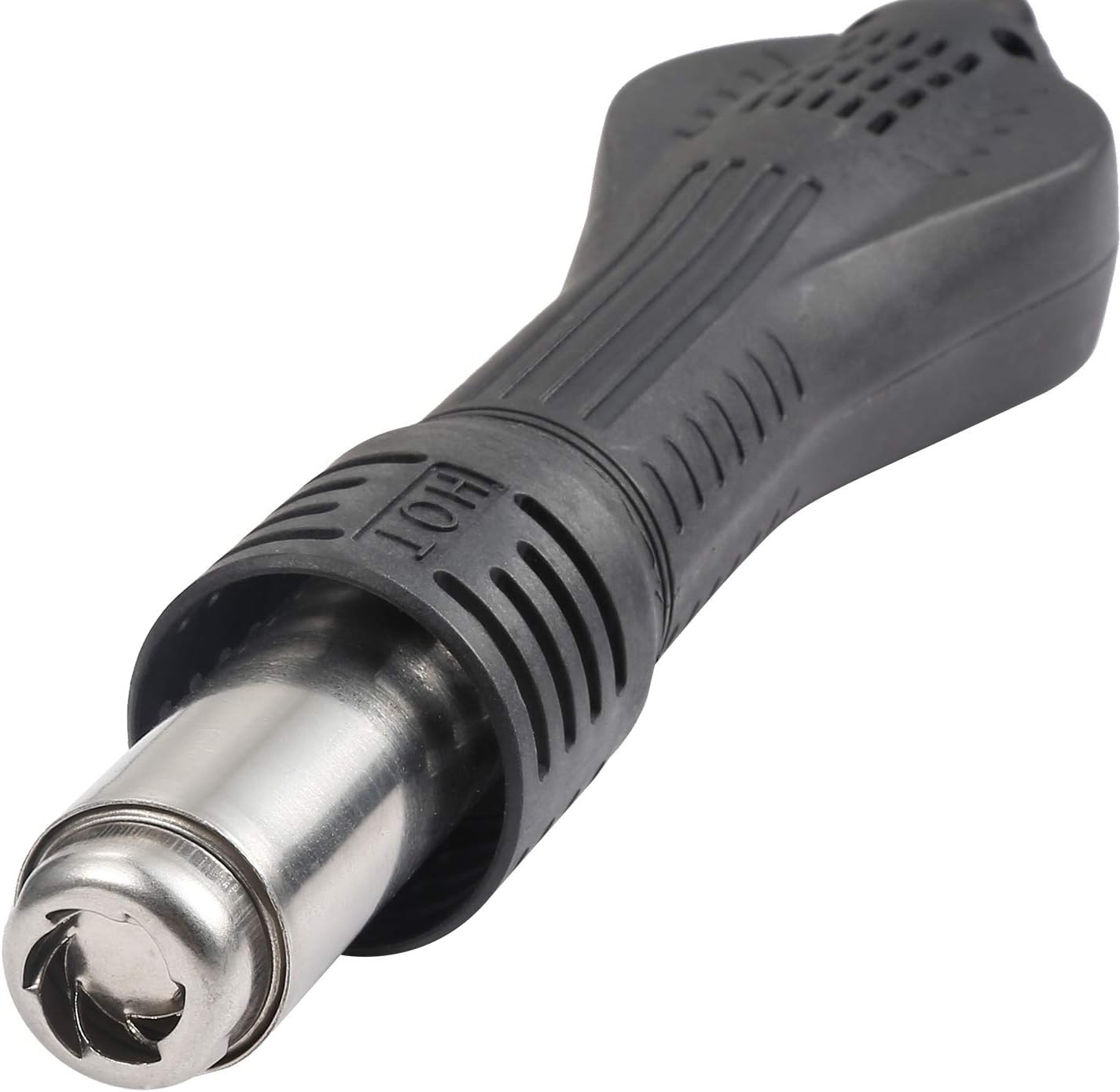
Figure 5.2: Hot air gun handle.
- Automatic Stoppage: When the hot air gun is returned to its holder, the unit will automatically blow cool air to protect the heating element and then enter standby mode.
- നോസൽ തിരഞ്ഞെടുക്കൽ: Choose an appropriate nozzle size for your application.

Figure 5.3: Assortment of hot air nozzles.
5.3. Soldering Iron Operation
- പവർ ഓൺ: Flip the "SOLDERING STATION" power switch to ON.
- താപനില സജ്ജമാക്കുക: Rotate the "SOLDERING STATION" knob to set the desired temperature (e.g., 200°C to 480°C). The LED display will show the hot air temperature, but the soldering iron will heat to its set point.
- Pre-tinning: Before first use or after cleaning, pre-tin the soldering iron tip with a small amount of solder.
- പ്രവർത്തനം: Use the soldering iron for your soldering tasks. Always return the iron to its stand when not actively soldering.

Figure 5.4: Soldering iron in its stand.
6. പരിപാലനം
- സോൾഡറിംഗ് ഇരുമ്പ് നുറുങ്ങ്: Regularly clean the soldering iron tip using the damp sponge. Re-tin the tip after cleaning to prevent oxidation. Replace tips when they become excessively worn or corroded.
- Hot Air Nozzles: Ensure hot air nozzles are free from debris. Clean them gently if necessary.
- യൂണിറ്റ് വൃത്തിയാക്കൽ: Wipe the main unit with a soft, dry cloth. Do not use abrasive cleaners or solvents. Ensure the unit is unplugged before cleaning.
- എയർ ഫിൽട്ടർ: Periodically check the air intake vents for dust accumulation and clean as needed to maintain proper airflow.
7. പ്രശ്നപരിഹാരം
| പ്രശ്നം | സാധ്യമായ കാരണം | പരിഹാരം |
|---|---|---|
| യൂണിറ്റ് പവർ ഓണാക്കുന്നില്ല. | Power cord not connected, power switch off, or blown fuse. | Check power cord connection. Ensure power switch is ON. Check and replace fuse if necessary (refer to specifications for fuse type). |
| Hot air gun not heating. | Hot air gun not properly connected, hot air switch off, or heating element failure. | Ensure hot air gun cable is securely connected. Verify "SMOREWORK STATION" switch is ON. If problem persists, contact support. |
| Soldering iron not heating. | Soldering iron not properly connected, soldering iron switch off, or heating element failure. | Ensure soldering iron cable is securely connected. Verify "SOLDERING STATION" switch is ON. If problem persists, contact support. |
| പൊരുത്തമില്ലാത്ത താപനില. | Sensor issue or environmental factors. | Ensure proper ventilation. If problem persists, contact support. |
| Low airflow from hot air gun. | Airflow knob set too low, or blocked air intake. | Increase airflow using the "AIR" knob. Check and clean air intake vents. |
8 സ്പെസിഫിക്കേഷനുകൾ
| ഫീച്ചർ | വിശദാംശങ്ങൾ |
|---|---|
| മോഡൽ നമ്പർ | എൽ-8586 |
| ബ്രാൻഡ് | LRT |
| ഇൻപുട്ട് വോളിയംtage | 110 വോൾട്ട് |
| ആകെ വാട്ട്tage | 700 വാട്ട്സ് |
| ഡിസ്പ്ലേ തരം | എൽഇഡി |
| Hot Air Temperature Range | 480 ഡിഗ്രി സെൽഷ്യസ് വരെ |
| Soldering Iron Temperature Range | 480 ഡിഗ്രി സെൽഷ്യസ് വരെ |
| താപനില സ്ഥിരത | ±1 Degrees Celsius |
| ഇനത്തിൻ്റെ ഭാരം | 5.3 പൗണ്ട് |
| ഉൾപ്പെടുത്തിയ ഘടകങ്ങൾ | Soldering Iron, Sponge, Tweezer, Hot Air Nozzles |
| യു.പി.സി | 786411211647 |
9. വാറൻ്റിയും പിന്തുണയും
For warranty information or technical support, please refer to the documentation provided with your purchase or contact the retailer.