
1. ആമുഖം
This manual provides detailed instructions for the installation, operation, and maintenance of your Sanpyl Bluetooth MP3 Decoder Board. Please read this manual thoroughly before using the product to ensure proper function and to prevent damage.
2 സുരക്ഷാ വിവരങ്ങൾ
- വൈദ്യുതി വിതരണം വോളിയം ഉറപ്പാക്കുകtage matches the product's specifications (DC 7V-12V or Micro USB 5V). Incorrect voltage കേടുപാടുകൾ വരുത്തിവയ്ക്കാം.
- ഉപകരണത്തെ ഈർപ്പം, മഴ, അല്ലെങ്കിൽ തീവ്രമായ താപനില എന്നിവയ്ക്ക് വിധേയമാക്കരുത്.
- ഉപകരണം വേർപെടുത്തുന്നതോ പരിഷ്കരിക്കുന്നതോ ഒഴിവാക്കുക, കാരണം ഇത് വാറന്റി അസാധുവാക്കുകയും സുരക്ഷാ അപകടങ്ങൾ ഉണ്ടാക്കുകയും ചെയ്തേക്കാം.
- കുട്ടികൾക്ക് ലഭ്യമാകാതെ സൂക്ഷിക്കുക.
- ഏതെങ്കിലും കണക്ഷനുകൾ നടത്തുന്നതിനോ വിച്ഛേദിക്കുന്നതിനോ മുമ്പ് വൈദ്യുതി വിച്ഛേദിക്കുക.
3. പാക്കേജ് ഉള്ളടക്കം
പാക്കേജിൽ എല്ലാ ഇനങ്ങളും ഉണ്ടെന്ന് ഉറപ്പാക്കുക:
- 1 x Sanpyl Bluetooth MP3 Decoder Board
- 1 x റിമോട്ട് കൺട്രോൾ
- 1 x 2-pin Power Cable
- 2 x 3-pin Audio Cables
4. ഉൽപ്പന്നം കഴിഞ്ഞുview
The Sanpyl Bluetooth MP3 Decoder Board is a versatile audio module designed for integrating music playback and FM radio capabilities into various projects. It supports multiple audio sources including USB drives, SD/MMC cards, Bluetooth, and external line-in. It also features hands-free calling and comes with a remote control for convenient operation.
4.1 ഫ്രണ്ട് പാനൽ ലേഔട്ട്

ചിത്രം 4.1: Front panel of the decoder board. This view shows the digital display, USB port, SD/MMC card slot, and control buttons for playback, volume, and mode selection.
- ഡിജിറ്റൽ ഡിസ്പ്ലേ: നിലവിലെ മോഡ്, ട്രാക്ക് നമ്പർ, ഫ്രീക്വൻസി മുതലായവ കാണിക്കുന്നു.
- USB പോർട്ട്: യുഎസ്ബി ഫ്ലാഷ് ഡ്രൈവുകൾ ബന്ധിപ്പിക്കുന്നതിന്.
- SD/MMC കാർഡ് സ്ലോട്ട്: For inserting Secure Digital or MultiMediaCards.
- നിയന്ത്രണ ബട്ടണുകൾ: Play/Pause, Volume Up/Next Track, Volume Down/Previous Track, Mode.
4.2 പിൻ കണക്ഷനുകൾ

ചിത്രം 4.2: Rear connections of the decoder board. This image highlights the various input and output terminals for power, audio, and the FM antenna.
- DC 12V+ / GND: Main power input (7V-12V DC).
- Micro USB 5V Input: Alternative 5V power input.
- L IN / R IN / GND: Stereo audio line input.
- L Output / R Output / GND: Stereo audio line output.
- എഫ്എം ആന്റിന: Connection point for an external FM antenna.
4.3 അളവുകൾ
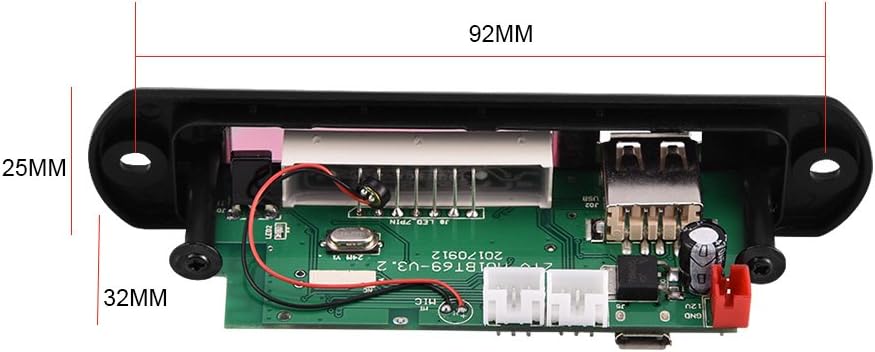
ചിത്രം 4.3: Physical dimensions of the decoder board. The panel length is 107mm, height is 25mm, and depth is 32mm. The mounting hole spacing is 92mm.
5 സ്പെസിഫിക്കേഷനുകൾ
| മോഡൽ നമ്പർ | Sanpylcw78yrodhs |
| ഓപ്പറേറ്റിംഗ് വോളിയംtage | DC 7V to 12V (main), Micro USB 5V (alternative) |
| ഓപ്പറേറ്റിംഗ് കറൻ്റ് | 800mA മുതൽ 1A വരെ |
| Panel Dimensions (L x H x D) | 107mm x 25mm x 32mm |
| മൗണ്ടിംഗ് ഹോൾ സ്പേസിംഗ് | 92 മി.മീ |
| സ്ക്രീൻ വലിപ്പം | 45 മിമി x 8 മിമി |
| പിന്തുണയ്ക്കുന്ന മീഡിയ | USB Disk, SD Card, MMC Card |
| കണക്റ്റിവിറ്റി | Bluetooth, FM Radio, Line-in (AUX) |
| ഫീച്ചറുകൾ | Hands-free calls, Multiple EQ modes, Mute function, Digital display |
| ഇനത്തിൻ്റെ ഭാരം | 2.08 ഔൺസ് (ഏകദേശം 59 ഗ്രാം) |
6. സജ്ജീകരണം
6.1 പവർ കണക്ഷൻ
The decoder board can be powered in two ways:
- DC 7V-12V: Connect the provided 2-pin power cable to the "DC 12V+" and "GND" terminals on the rear of the board (refer to Figure 4.2). Ensure correct polarity.
- Micro USB 5V: Alternatively, connect a standard Micro USB cable to the "Micro USB 5V Input" port. This is suitable for 5V power sources.
ജാഗ്രത: Do not connect both 12V DC and Micro USB 5V power simultaneously. Choose one power source.
6.2 ഓഡിയോ കണക്ഷനുകൾ
- ഓഡിയോ ഔട്ട്പുട്ട്: Use the provided 3-pin audio cables to connect the "L Output", "R Output", and "GND" terminals to your ampലൈഫയർ അല്ലെങ്കിൽ സജീവ സ്പീക്കറുകൾ.
- ഓഡിയോ ഇൻപുട്ട് (AUX): If you wish to use an external audio source (e.g., phone, computer), connect it to the "L IN", "R IN", and "GND" terminals. You will need to switch the mode to "LIN" for this input.
6.3 എഫ്എം ആന്റിന കണക്ഷൻ
Connect a suitable FM antenna to the "FM Antenna" terminal for optimal radio reception (refer to Figure 4.2).
7. പ്രവർത്തന നിർദ്ദേശങ്ങൾ
7.1 Power On / Automatic Playback
Once powered on, the decoder board will automatically start playing music if a USB disk, SD card, or MMC card is inserted. If no media is present, it will default to the last used mode.
7.2 മോഡ് തിരഞ്ഞെടുക്കൽ
അമർത്തുക മോഡ് button on the front panel or remote control to cycle through available modes: USB, SD, Bluetooth, FM, and LIN (Line Input).
7.3 ബ്ലൂടൂത്ത് ജോടിയാക്കൽ
- Switch the decoder board to ബ്ലൂടൂത്ത് mode. The display will show "BT".
- On your mobile device, search for Bluetooth devices.
- Select the device named M01BT.
- പാസ്വേഡ് ആവശ്യപ്പെടുകയാണെങ്കിൽ, നൽകുക 0000.
- Once paired, you can play audio from your device through the decoder board.
7.4 USB / SD / MMC Card Playback
- USB പോർട്ടിലേക്ക് ഒരു USB ഫ്ലാഷ് ഡ്രൈവ് അല്ലെങ്കിൽ കാർഡ് സ്ലോട്ടിലേക്ക് ഒരു SD/MMC കാർഡ് ഇടുക.
- The board will automatically switch to the corresponding mode (USB or SD) and begin playback.
- ഉപയോഗിക്കുക പ്ലേ/താൽക്കാലികമായി നിർത്തുക, VOL- / Previous, ഒപ്പം VOL+ / അടുത്തത് പ്ലേബാക്ക് നിയന്ത്രിക്കുന്നതിനുള്ള ബട്ടണുകൾ.
7.5 എഫ്എം റേഡിയോ പ്രവർത്തനം
- Switch the decoder board to FM മോഡ്.
- അമർത്തിപ്പിടിക്കുക പ്ലേ/താൽക്കാലികമായി നിർത്തുക button to initiate an automatic scan for FM stations. The board will save found stations.
- ഉപയോഗിക്കുക VOL- / Previous ഒപ്പം VOL+ / അടുത്തത് സംരക്ഷിച്ച സ്റ്റേഷനുകൾക്കിടയിൽ നാവിഗേറ്റ് ചെയ്യാനുള്ള ബട്ടണുകൾ.
7.6 ഹാൻഡ്സ് ഫ്രീ കോളിംഗ്
When in Bluetooth mode and paired with a phone, the decoder board supports hands-free calling. Incoming calls can be answered or ended using the remote control or specific buttons on the board (refer to remote control diagram if available, or typically the Play/Pause button).
7.7 വിദൂര നിയന്ത്രണ പ്രവർത്തനങ്ങൾ
ഉൾപ്പെടുത്തിയിരിക്കുന്ന റിമോട്ട് കൺട്രോൾ വിവിധ ഫംഗ്ഷനുകളിലേക്ക് സൗകര്യപ്രദമായ ആക്സസ് നൽകുന്നു:
- ശക്തി: ഉപകരണം ഓൺ/ഓഫ് ചെയ്യുക.
- മോഡ്: Switch between USB, SD, Bluetooth, FM, LIN.
- പ്ലേ/താൽക്കാലികമായി നിർത്തുക: Start or pause playback. Answer/End calls.
- മുമ്പത്തെ അടുത്തത്: Skip tracks or navigate FM stations.
- വോളിയം കൂട്ടുക/താഴ്ത്തുക: ഓഡിയോ വോളിയം ക്രമീകരിക്കുക.
- EQ: Cycle through various equalizer sound modes.
- നിശബ്ദമാക്കുക: ഓഡിയോ നിശബ്ദമാക്കുക അല്ലെങ്കിൽ അൺമ്യൂട്ട് ചെയ്യുക.
- നമ്പർ ബട്ടണുകൾ: Direct track selection (in USB/SD mode) or FM frequency input.
8. പരിപാലനം
- മൃദുവായതും ഉണങ്ങിയതുമായ തുണി ഉപയോഗിച്ച് ഉപകരണം വൃത്തിയാക്കുക. ലിക്വിഡ് ക്ലീനറുകളോ ലായകങ്ങളോ ഉപയോഗിക്കരുത്.
- Keep the USB port and SD card slot free from dust and debris.
- ദീർഘനേരം ഉപയോഗിക്കാത്തപ്പോൾ ഉപകരണം തണുത്തതും വരണ്ടതുമായ സ്ഥലത്ത് സൂക്ഷിക്കുക.
9. പ്രശ്നപരിഹാരം
| പ്രശ്നം | സാധ്യമായ കാരണം | പരിഹാരം |
|---|---|---|
| പവർ ഇല്ല / ഉപകരണം ഓണാകുന്നില്ല. | Incorrect power connection; Insufficient voltage; Faulty power supply. | Check power cable connections and polarity. Ensure power supply is within 7V-12V DC or 5V Micro USB. Test with a different power source. |
| ശബ്ദ ഔട്ട്പുട്ട് ഇല്ല. | Volume too low; Mute function active; Incorrect audio output connection; Ampലൈഫയർ പ്രശ്നം. | Increase volume. Press Mute button on remote. Verify audio output cables are correctly connected to amplifier/speakers. Test amplifier with another source. |
| ബ്ലൂടൂത്ത് ജോടിയാക്കുന്നില്ല. | Device not in Bluetooth mode; Incorrect pairing password; Distance too far; Interference. | Ensure decoder is in Bluetooth mode ("BT" on display). Re-enter password "0000". Move device closer. Reduce interference from other wireless devices. |
| USB/SD കാർഡ് പ്ലേ ചെയ്യുന്നില്ല. | Card/drive not inserted correctly; Unsupported file format; Corrupted media. | Re-insert media. Ensure media contains supported audio files (e.g., MP3). Try a different USB drive or SD card. |
| മോശം എഫ്എം റേഡിയോ സ്വീകരണം. | No antenna connected; Weak signal; Interference. | Connect an external FM antenna. Reposition the antenna for better signal. Perform an auto-scan again. |
10. വാറൻ്റിയും പിന്തുണയും
Sanpyl products are designed for reliability and performance. For any issues or questions regarding your Bluetooth MP3 Decoder Board, please contact your retailer or Sanpyl customer support. Please retain your proof of purchase for warranty claims.
കൂടുതൽ സഹായത്തിന്, സന്ദർശിക്കുക Sanpyl Store on Amazon.