
1. ആമുഖം
The JBL Boost TV is an ultra-compact TV speaker designed to significantly enhance your television's audio experience with JBL signature sound. Measuring only 15 inches (380mm) in length, it delivers high-quality sound suitable for various room sizes. This soundbar features deep bass, virtual surround sound, and Dolby Digital support for HD movies. It also supports Bluetooth audio streaming from wireless mobile devices and includes JBL SoundShift™ technology, allowing seamless switching between TV audio and a connected mobile device.
2. ബോക്സിൽ എന്താണുള്ളത്?
- JBL Boost TV Soundbar
- റിമോട്ട് കൺട്രോൾ
- 3.5 എംഎം അനലോഗ് ഓഡിയോ കേബിൾ
- ഒപ്റ്റിക്കൽ ഓഡിയോ കേബിൾ
- പവർ കേബിൾ
- ദ്രുത ആരംഭ ഗൈഡ്
- വാറൻ്റി കാർഡ്
- സുരക്ഷാ ഷീറ്റ്
3. ഉൽപ്പന്നം കഴിഞ്ഞുview
3.1 ഫ്രണ്ട് View
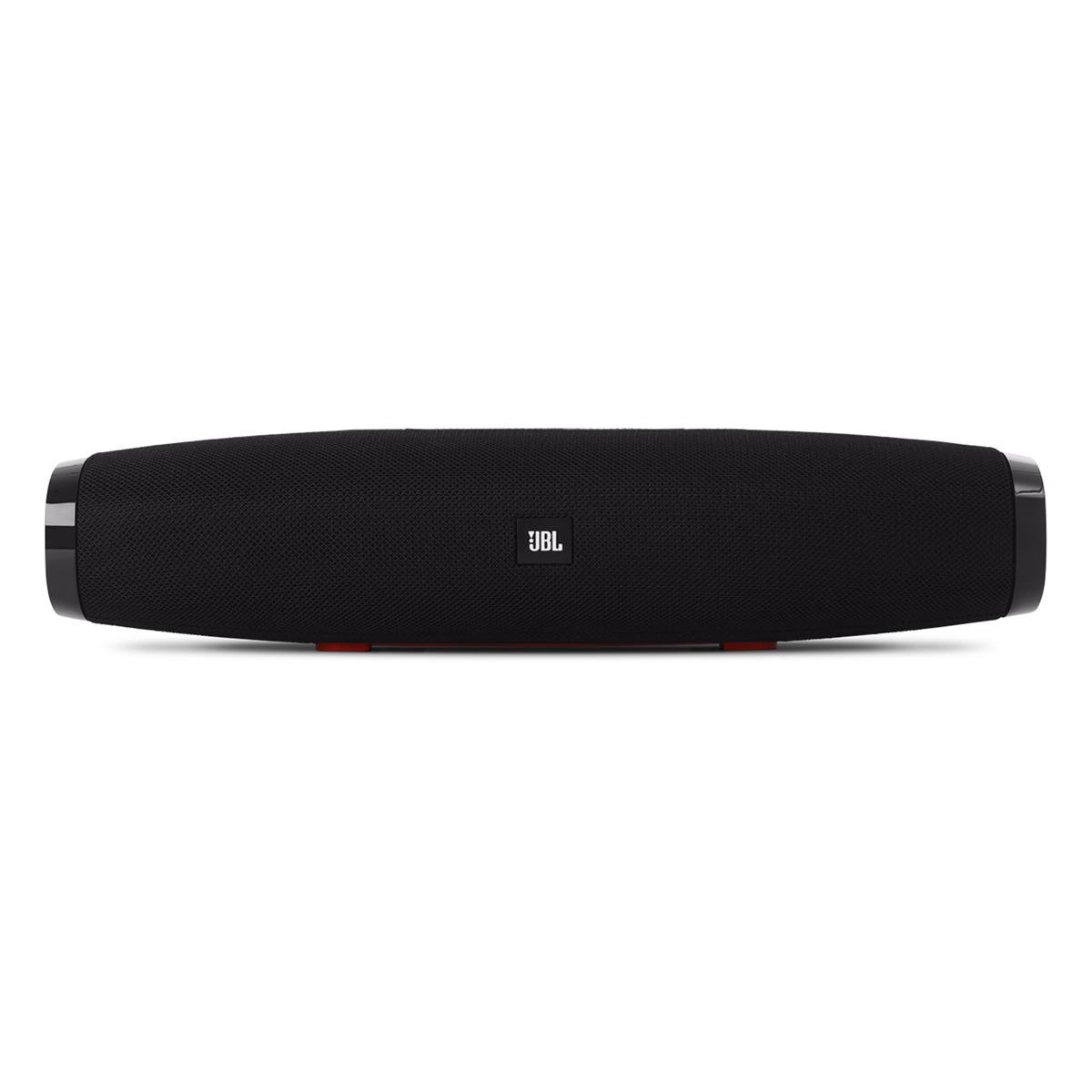
ചിത്രം 1: ഫ്രണ്ട് view of the JBL Boost TV soundbar, showcasing its compact design and JBL logo.
The JBL Boost TV features a sleek, compact design, approximately 15 inches (380mm) long and 4 inches wide, making it ideal for placement beneath most televisions without obstructing the screen. The front grille covers the main speaker drivers, and the JBL logo is prominently displayed.
3.2 പിൻ പാനൽ കണക്ഷനുകൾ

ചിത്രം 2: Rear panel of the JBL Boost TV, showing the various input ports.
The rear panel, highlighted in orange, provides the following connectivity options:
- ഒപ്റ്റിക്കൽ ഇൻപുട്ട്: For connecting to your TV using the included optical cable, providing high-quality digital audio.
- AUX ഇൻ (3.5 മിമി): For connecting external audio devices via a 3.5mm analog cable.
- പവർ ഇൻപുട്ട്: For connecting the power cable to supply electricity to the soundbar.
- Software Update Port: A micro-USB port for potential future software updates (typically for manufacturer use).
3.3 മുകളിലെ പാനൽ നിയന്ത്രണങ്ങൾ

ചിത്രം 3: Top panel controls of the JBL Boost TV soundbar.
The top panel features intuitive controls for easy operation:
- ബ്ലൂടൂത്ത് ബട്ടൺ: Initiates Bluetooth pairing mode for connecting wireless devices.
- SoundShift Button: Allows switching between connected devices (e.g., TV and Bluetooth).
- വോളിയം ഡൗൺ (-): ഓഡിയോ വോളിയം കുറയ്ക്കുന്നു.
- പവർ ബട്ടൺ: സൗണ്ട്ബാർ ഓണാക്കുകയോ ഓഫാക്കുകയോ ചെയ്യുന്നു.
- വോളിയം കൂട്ടുക (+): ഓഡിയോ വോളിയം വർദ്ധിപ്പിക്കുന്നു.
- Harman Display Surround Button: Activates or deactivates the virtual surround sound mode for an expanded audio experience.
- TV Sound Mode Button: Optimizes audio for TV viewing, enhancing dialogue clarity and overall TV viewഅനുഭവം.
4. സജ്ജീകരണം
4.1 പ്ലേസ്മെൻ്റ്
Place the JBL Boost TV soundbar on a stable, flat surface directly in front of your television. Ensure there are no obstructions blocking the sound from the front or the side-firing ports.
4.2 നിങ്ങളുടെ ടിവിയിലേക്ക് കണക്റ്റുചെയ്യുന്നു
- ഒപ്റ്റിക്കൽ കണക്ഷൻ (ശുപാർശ ചെയ്യുന്നത്):
- Connect one end of the optical cable to the OPTICAL OUT port on your TV.
- Connect the other end to the OPTICAL IN port on the rear of the JBL Boost TV.
- Ensure your TV's audio output settings are configured to "Optical" or "External Speaker."
- അനലോഗ് കണക്ഷൻ:
- Connect one end of the 3.5mm analog cable to the AUDIO OUT (headphone jack) or RCA L/R audio output on your TV (using an adapter if necessary).
- Connect the other end to the AUX IN port on the rear of the JBL Boost TV.
4.3 പവർ കണക്ഷൻ
Connect the power cable to the Power Input port on the soundbar, then plug the other end into a wall outlet.
4.4 ബ്ലൂടൂത്ത് ജോടിയാക്കൽ
- Press the Bluetooth button on the top panel of the soundbar or on the remote control. The Bluetooth indicator light will begin to flash.
- നിങ്ങളുടെ മൊബൈൽ ഉപകരണത്തിൽ (സ്മാർട്ട്ഫോൺ, ടാബ്ലെറ്റ് മുതലായവ), ബ്ലൂടൂത്ത് പ്രവർത്തനക്ഷമമാക്കി ലഭ്യമായ ഉപകരണങ്ങൾക്കായി തിരയുക.
- Select "JBL Boost TV" from the list of devices. Once connected, the Bluetooth indicator light will turn solid.
4.5 Programming Your TV Remote (SoundShift™)
The JBL Boost TV can learn volume and power commands from your existing TV remote control. This allows you to control the soundbar's basic functions with a single remote.
- പഠന മോഡ് നൽകുക: Press and hold the SoundShift button (the one with the headphone icon) on the soundbar for 5 seconds until the indicator light flashes orange.
- പ്രോഗ്രാമിന്റെ ശക്തി: Press the Power button on the soundbar once. Then, point your TV remote at the soundbar and press its Power button. The indicator light will flash white once to confirm.
- Program Volume Up: Press the Volume Up (+) button on the soundbar once. Then, point your TV remote at the soundbar and press its Volume Up button. The indicator light will flash white once to confirm.
- Program Volume Down: Press the Volume Down (-) button on the soundbar once. Then, point your TV remote at the soundbar and press its Volume Down button. The indicator light will flash white once to confirm.
- പഠന മോഡിൽ നിന്ന് പുറത്തുകടക്കുക: The soundbar will automatically exit learning mode after a short period of inactivity, or you can press the SoundShift button again.
5. പ്രവർത്തന നിർദ്ദേശങ്ങൾ
5.1 പവർ ഓൺ/ഓഫ്
പവർ ബട്ടൺ അമർത്തുക (① (ഓഡിയോ)) on the top panel or the remote control to turn the soundbar on or off.
5.2 വോളിയം നിയന്ത്രണം
വോളിയം അപ്പ് ഉപയോഗിക്കുക (+) യും വോളിയം കുറയ്ക്കലും (-) buttons on the top panel or the remote control to adjust the audio level.
5.3 Source Selection (SoundShift™)
The SoundShift™ feature allows you to seamlessly switch between your TV audio and a connected Bluetooth device. When a Bluetooth device starts playing, the soundbar will automatically switch to that source. When the Bluetooth audio stops, it will switch back to the TV audio. You can also manually switch sources using the SoundShift button (⑁) on the top panel or remote.
5.4 Harman Display Surround
Press the Harman Display Surround button (⏴) on the top panel or remote to activate or deactivate the virtual surround sound mode. This feature expands the soundstage, providing a more immersive audio experience without additional speakers.
5.5 TV Sound Mode
Press the TV Sound Mode button (📺) on the top panel or remote to optimize the soundbar's audio for television content, enhancing dialogue clarity and overall TV viewഅനുഭവം.
6. പരിപാലനം
- വൃത്തിയാക്കൽ: സൗണ്ട്ബാറിന്റെ ഉപരിതലം വൃത്തിയാക്കാൻ മൃദുവായതും ഉണങ്ങിയതുമായ തുണി ഉപയോഗിക്കുക. ലിക്വിഡ് ക്ലീനറുകളോ അബ്രസീവ് വസ്തുക്കളോ ഉപയോഗിക്കരുത്.
- സംഭരണം: സൗണ്ട്ബാർ ദീർഘനേരം സൂക്ഷിക്കുകയാണെങ്കിൽ, അത് പവറിൽ നിന്ന് വിച്ഛേദിച്ച് തണുത്തതും വരണ്ടതുമായ സ്ഥലത്ത് സൂക്ഷിക്കുക.
- തടസ്സങ്ങൾ ഒഴിവാക്കുക: Ensure the speaker grilles and ports are free from dust and debris to maintain optimal sound performance.
7. പ്രശ്നപരിഹാരം
| പ്രശ്നം | സാധ്യമായ കാരണം | പരിഹാരം |
|---|---|---|
| ശക്തിയില്ല | പവർ കേബിൾ ബന്ധിപ്പിച്ചിട്ടില്ല അല്ലെങ്കിൽ ഔട്ട്ലെറ്റ് സജീവമല്ല. | പവർ കേബിൾ സൗണ്ട്ബാറിലേക്കും പ്രവർത്തിക്കുന്ന ഒരു പവർ ഔട്ട്ലെറ്റിലേക്കും സുരക്ഷിതമായി ബന്ധിപ്പിച്ചിട്ടുണ്ടെന്ന് ഉറപ്പാക്കുക. |
| ശബ്ദമില്ല | Incorrect input source selected, TV audio settings incorrect, or volume too low. | Verify the correct input source is selected (Optical, AUX, or Bluetooth). Check your TV's audio output settings. Increase the volume on both the soundbar and your TV. |
| ബ്ലൂടൂത്ത് ജോടിയാക്കൽ പരാജയപ്പെടുന്നു | സൗണ്ട്ബാർ ജോടിയാക്കൽ മോഡിലല്ല, ഉപകരണം വളരെ അകലെയാണ്, അല്ലെങ്കിൽ തടസ്സമുണ്ട്. | Ensure the soundbar's Bluetooth indicator is flashing. Move your device closer to the soundbar. Try restarting both the soundbar and your Bluetooth device. |
| റിമോട്ട് കൺട്രോൾ പ്രവർത്തിക്കുന്നില്ല | Batteries depleted or line of sight blocked. | Replace the remote control batteries. Ensure there are no obstructions between the remote and the soundbar. |
8 സ്പെസിഫിക്കേഷനുകൾ
| ഫീച്ചർ | വിശദാംശങ്ങൾ |
|---|---|
| ബ്രാൻഡ് | ജെ.ബി.എൽ |
| മോഡൽ നമ്പർ | ടിവി ബൂസ്റ്റ് ചെയ്യുക |
| സ്പീക്കർ പരമാവധി ഔട്ട്പുട്ട് പവർ | 60 വാട്ട്സ് |
| ഫ്രീക്വൻസി പ്രതികരണം | 20 KHz (Upper limit, lower limit not specified) |
| കണക്റ്റിവിറ്റി ടെക്നോളജി | 1 Analog, 1 Optical, Bluetooth |
| ഓഡിയോ put ട്ട്പുട്ട് മോഡ് | സ്റ്റീരിയോ |
| മൗണ്ടിംഗ് തരം | ടേബിൾടോപ്പ് മൗണ്ട് |
| സ്പീക്കർ തരം | സൗണ്ട്ബാർ |
| അധിക സവിശേഷതകൾ | Display, Dolby Enabled |
| കൺട്രോളർ തരം | കോർഡഡ് ഇലക്ട്രിക് |
| നിറം | കറുപ്പ് |
| നിയന്ത്രണ രീതി | റിമോട്ട് |
| ഇനത്തിൻ്റെ ഭാരം | 4.25 പൗണ്ട് |
| വയർലെസ് ടെക്നോളജി | ബ്ലൂടൂത്ത് |
| ഓഡിയോ ചാനലുകളുടെ എണ്ണം | 2.0 |
| സിഗ്നൽ-ടു-നോയിസ് അനുപാതം | 60 ഡി.ബി |
| അനുയോജ്യമായ ഉപകരണങ്ങൾ | Laptop, Smartphone, Television |
| പവർ ഉറവിടം | കോർഡഡ് ഇലക്ട്രിക് |
9. വാറണ്ടിയും പിന്തുണയും
The JBL Boost TV comes with a limited warranty. Please refer to the included Warranty Card in your product packaging for detailed terms and conditions, including warranty period and coverage. For technical support, product registration, or further assistance, please visit the official JBL webസൈറ്റ് അല്ലെങ്കിൽ അവരുടെ ഉപഭോക്തൃ സേവന വിഭാഗവുമായി ബന്ധപ്പെടുക.
ഓൺലൈൻ പിന്തുണ: www.jbl.com/support (സപ്പോർട്ട്)