
ആമുഖം
This manual provides essential information for the safe and efficient operation of your Technical Pro AW1 Torque Audio 2U Professional 2-Channel Power Amplifier. The AW1 is designed to deliver robust audio amplification for various professional sound applications. Please read this manual thoroughly before operating the unit to ensure proper setup and performance.
സുരക്ഷാ വിവരങ്ങൾ
മുന്നറിയിപ്പ്: To reduce the risk of electric shock, do not open the ampലിഫയർ സിasing. എല്ലാ സേവനങ്ങളും യോഗ്യതയുള്ള ഉദ്യോഗസ്ഥർക്ക് റഫർ ചെയ്യുക.
- ഊർജ്ജ സ്രോതസ്സ്: Connect the unit only to a 110 Volt AC power outlet. Ensure the power cord is securely connected.
- വെൻ്റിലേഷൻ: വെന്റിലേഷൻ തുറസ്സുകൾ തടയരുത്. അമിതമായി ചൂടാകുന്നത് തടയാൻ യൂണിറ്റിന് ചുറ്റും മതിയായ വായുസഞ്ചാരം ഉറപ്പാക്കുക.
- ഈർപ്പം: യൂണിറ്റ് മഴയിലോ ഈർപ്പത്തിലോ തുറന്നുകാട്ടരുത്. പാത്രങ്ങൾ പോലുള്ള ദ്രാവകങ്ങൾ നിറച്ച വസ്തുക്കൾ യൂണിറ്റിൽ വയ്ക്കരുത്.
- വൃത്തിയാക്കൽ: Disconnect the power cord before cleaning. Use a dry cloth only.
- പ്ലേസ്മെൻ്റ്: യൂണിറ്റ് ഒരു സ്ഥിരതയുള്ള, നിരപ്പായ പ്രതലത്തിൽ വയ്ക്കുക. താപ സ്രോതസ്സുകൾക്ക് സമീപമോ നേരിട്ടുള്ള സൂര്യപ്രകാശത്തിലോ വയ്ക്കുന്നത് ഒഴിവാക്കുക.
- സേവനം: Do not attempt to service this unit yourself. Contact qualified service personnel for any repairs.
പാക്കേജ് ഉള്ളടക്കം
പാക്കേജിൽ എല്ലാ ഇനങ്ങളും ഉണ്ടെന്ന് ഉറപ്പാക്കുക:
- Technical Pro AW1 Torque Audio 2U Professional 2-Channel Power Ampലൈഫയർ യൂണിറ്റ്
- എസി പവർ കോർഡ്

ഉൽപ്പന്നം കഴിഞ്ഞുview
ഫ്രണ്ട് പാനൽ
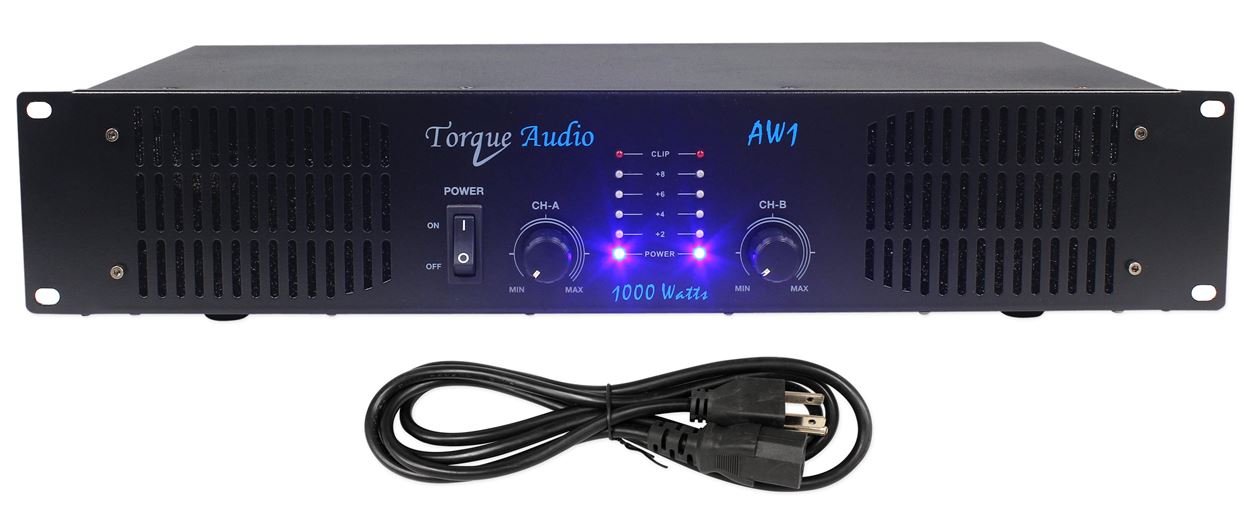
- വൈദ്യുതി സ്വിച്ച്: ടോഗിൾ ചെയ്യുന്നു ampലൈഫയറിന്റെ പവർ ഓൺ അല്ലെങ്കിൽ ഓഫ്.
- Channel A/B Level Controls: Rotary knobs to adjust the output level for each channel independently.
- പവർ സൂചകങ്ങൾ: LEDs that illuminate when the unit is powered on.
- Level Indicators: LEDs that show the output signal level for each channel.
- ക്ലിപ്പിംഗ് സൂചകങ്ങൾ: LEDs that illuminate when the audio signal is clipping, indicating potential distortion.
പിൻ പാനൽ

- Audio Inputs (CH A, CH B): RCA jacks for connecting audio sources (e.g., mixer, preampജീവപര്യന്തം).
- Channel A/B Outputs: Banana binding posts for connecting passive speakers.
- എസി പവർ ഇൻലെറ്റ്: Connector for the supplied AC power cord.
സജ്ജമാക്കുക
- പ്ലേസ്മെൻ്റ്: സ്ഥാനം amplifier in a location with adequate ventilation, away from direct sunlight, heat sources, and moisture. Ensure it is on a stable surface.
- ഓഡിയോ ഉറവിടങ്ങൾ ബന്ധിപ്പിക്കുക: Using RCA cables, connect your audio source (e.g., mixer, DJ controller, preamplifier) to the "AUDIO INPUTS" (CH A and CH B) on the rear panel. Match the left channel of your source to CH A input and the right channel to CH B input.
- സ്പീക്കറുകൾ ബന്ധിപ്പിക്കുക: Connect your passive speakers to the "CH A OUTPUTS" and "CH B OUTPUTS" using speaker wire terminated with banana plugs or bare wire. Ensure correct polarity (+ to + and - to -) for each speaker. The amplifier supports speakers with appropriate impedance (typically 2 ohms or higher).
- പവർ ബന്ധിപ്പിക്കുക: ഉറപ്പാക്കുക amplifier's POWER switch is in the OFF position. Connect the supplied AC power cord to the "AC POWER INLET" on the rear panel and then plug the other end into a standard 110 Volt AC wall outlet.
പ്രധാനപ്പെട്ടത്: Before powering on, double-check all connections to prevent damage to the amplifier or connected equipment.
പ്രവർത്തന നിർദ്ദേശങ്ങൾ
- പവർ ഓൺ: Turn the Channel A and Channel B Level Controls to their minimum (MIN) position. Then, press the POWER switch to the ON position. The Power Indicators on the front panel should illuminate.
- വോളിയം ക്രമീകരിക്കുക: Start playing audio from your source. Slowly increase the Channel A and Channel B Level Controls to achieve the desired listening volume.
- നിരീക്ഷണ സൂചകങ്ങൾ: Observe the Level Indicators to ensure the signal is not consistently peaking. If the Clipping Indicators illuminate frequently or stay lit, reduce the input level from your source or the amplifier's channel level controls to prevent distortion and potential damage to speakers.
- പവർ ഓഫ്: Before powering off, turn both Channel A and Channel B Level Controls to their minimum (MIN) position. Then, press the POWER switch to the OFF position.
മെയിൻ്റനൻസ്
- വൃത്തിയാക്കൽ: പതിവായി തുടയ്ക്കുക amplifier's exterior with a soft, dry cloth. Do not use liquid cleaners or solvents.
- വെൻ്റിലേഷൻ: Ensure that the ventilation grilles on the sides and top of the unit remain clear of dust and obstructions. Proper airflow is crucial for preventing overheating.
- കണക്ഷനുകൾ: Periodically check all audio and power connections to ensure they are secure.
- സംഭരണം: സംഭരിച്ചാൽ ampലൈഫയർ ദീർഘനേരം വച്ചിരിക്കുക, വൈദ്യുതിയിൽ നിന്ന് വിച്ഛേദിക്കുക, വൃത്തിയാക്കുക, തണുത്തതും വരണ്ടതുമായ സ്ഥലത്ത് സൂക്ഷിക്കുക, വെയിലത്ത് അതിന്റെ യഥാർത്ഥ പാക്കേജിംഗിൽ.
ട്രബിൾഷൂട്ടിംഗ്
| പ്രശ്നം | സാധ്യമായ കാരണം | പരിഹാരം |
|---|---|---|
| ശക്തിയില്ല | പവർ കോർഡ് ബന്ധിപ്പിച്ചിട്ടില്ല; പവർ ഔട്ട്ലെറ്റ് സജീവമല്ല; Amplifier power switch off. | Ensure power cord is firmly connected. Check the power outlet with another device. Turn the POWER switch to ON. |
| ശബ്ദ ഔട്ട്പുട്ട് ഇല്ല | Audio input cables not connected; Speaker cables not connected; Channel level controls at minimum; Audio source not playing or volume too low. | Verify all audio input and speaker connections. Increase channel level controls. Check audio source playback and volume. |
| വികലമായ ശബ്ദം | Input signal too high (clipping); Speaker impedance mismatch; Damaged speaker or cable. | Reduce input level from source or amplifier channel controls until clipping indicators stop illuminating. Ensure speakers meet impedance requirements. Check speakers and cables for damage. |
| യൂണിറ്റിന് ചൂട് അനുഭവപ്പെടുന്നു | Inadequate ventilation; Prolonged high-volume operation. | Ensure ventilation openings are clear. Reduce volume or allow the unit to cool down. |
If the problem persists after attempting these solutions, contact Technical Pro customer support.
സ്പെസിഫിക്കേഷനുകൾ
- മോഡൽ: AW1
- പീക്ക് പവർ: 1000 വാട്ട്സ്
- RMS പവർ: 450 വാട്ട്സ് @ 2 ഓംസ്
- ചാനലുകൾ: 2
- ഓഡിയോ ഇൻപുട്ടുകൾ: RCA (CH A, CH B)
- ഓഡിയോ pട്ട്പുട്ടുകൾ: Banana Binding Post
- സൂചകങ്ങൾ: Power, Level, Clipping (per channel)
- വാല്യംtage: 110 വോൾട്ട് (എസി)
- അളവുകൾ (L x W x H): 20 x 12 x 6 ഇഞ്ച് (ഉൽപ്പന്ന അളവുകൾ)
- ഇനത്തിൻ്റെ ഭാരം: Approximately 6 pounds (based on product description)
- മെറ്റീരിയൽ: ലോഹം
വാറൻ്റിയും പിന്തുണയും
For warranty information and technical support, please refer to the documentation provided with your purchase or visit the official Technical Pro webസൈറ്റ്. ഏതെങ്കിലും വാറന്റി ക്ലെയിമുകൾക്ക് വാങ്ങിയതിന്റെ തെളിവായി നിങ്ങളുടെ വാങ്ങൽ രസീത് സൂക്ഷിക്കുക.
Technical Pro Store: Visit the Technical Pro Store on Amazon