1. Вовед
Thank you for choosing the TELLUR FCC10 Car Charger. This manual provides essential information for the safe and efficient operation of your device. Please read it thoroughly before use and retain it for future reference.
The TELLUR FCC10 is a high-performance car charger designed to provide rapid charging for your cellular phones and other compatible devices. Featuring both Power Delivery (PD20W) and Quick Charge 3.0 (QC3.0) ports, it allows for simultaneous fast charging of two devices. Its intelligent design includes multiple protection mechanisms to ensure the safety of your devices.
2. Производот завршиview
The TELLUR FCC10 Car Charger is compact and designed for convenience. It features two distinct charging ports for versatile compatibility.

Слика 2.1: Предна страна view of the TELLUR FCC10 Car Charger, showing the USB-C (PD) and USB-A (QC3.0) ports.

Слика 2.2: Аголна view of the TELLUR FCC10 Car Charger, highlighting its compact design and textured finish.
Клучни карактеристики:
- Двојни порти за полнење: Equipped with one USB-C Power Delivery (PD20W) port and one USB-A Quick Charge 3.0 (QC3.0) port.
- Брзо полнење: Delivers up to 38W total output, enabling 4x faster charging than standard chargers.
- Intelligent Adaptation: Automatically adjusts input current to optimize charging for connected devices.
- Систем за повеќекратна заштита: Built-in safeguards against overcurrent, short circuit, overvoltagд, и прегревање.
- Универзална компатибилност: Compatible with a wide range of cellular phones and other USB-powered devices.

Слика 2.3: Diagram illustrating the internal protection features of the TELLUR FCC10 Car Charger, including over-current, over-voltage, over-temp, and over-charge protection, along with a Smart-IC chip.
3. Поставување
Setting up your TELLUR FCC10 Car Charger is straightforward. Follow these steps to begin charging your devices.
- Locate Your Vehicle's Cigarette Lighter Socket: This is typically found in the dashboard or center console of your car.
- Вметнете го полначот: Firmly insert the TELLUR FCC10 Car Charger into the cigarette lighter socket. Ensure it is fully seated for a stable connection.
- Потврдете ја моќноста: Once inserted, the charger may have a small LED indicator that illuminates, signifying it is powered on and ready for use.
Забелешка: Ensure your vehicle's engine is running or the ignition is in the accessory position for the cigarette lighter socket to provide power.
4. Упатства за работа
Using the TELLUR FCC10 Car Charger to charge your devices is simple.
- Поврзете го вашиот уред:
- For devices supporting Power Delivery (PD), use a USB-C to USB-C cable or USB-C to Lightning cable and connect it to the USB-C port on the charger.
- For devices supporting Quick Charge (QC3.0) or standard USB charging, use a USB-A cable and connect it to the USB-A port on the charger.
- Започнете со полнење: Once connected, your device should automatically begin charging. The charger's intelligent technology will adapt the output to suit your device's charging requirements.
- Истовремено полнење: Можете да полните два уреди истовремено користејќи ги и USB-C и USB-A портите.
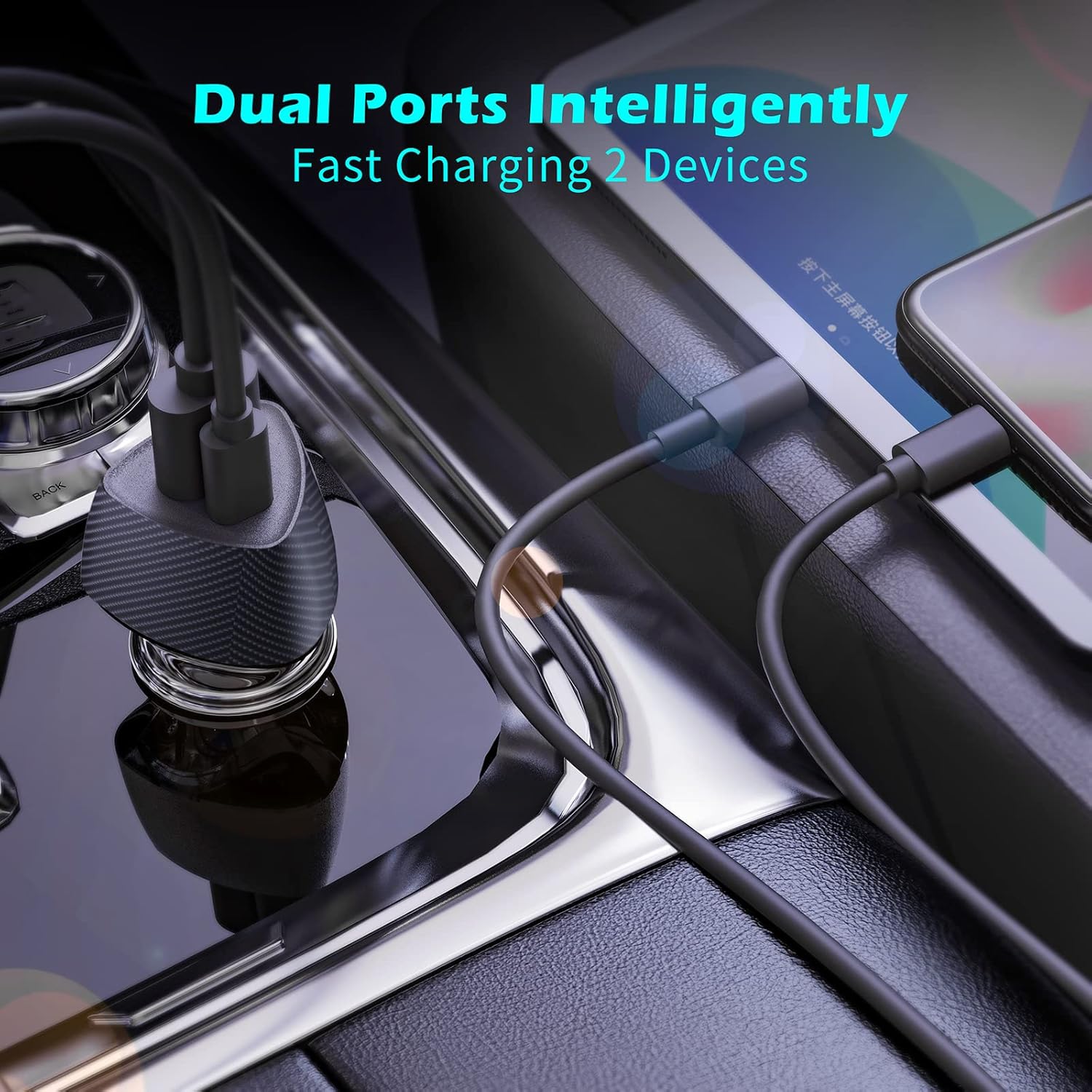
Слика 4.1: The TELLUR FCC10 Car Charger simultaneously charging two devices, demonstrating its dual-port capability.

Слика 4.2: Одблиску view of the TELLUR FCC10 Car Charger ports, labeling the PD 20W Output (USB-C) and QC 3.0 Output (USB-A).
Важни размислувања:
- Use high-quality charging cables compatible with your devices and the charger's fast charging standards (PD/QC3.0) for optimal performance.
- The charging speed may vary depending on your device's battery level, cable quality, and environmental factors.
- Unplug the charger from the car's socket when not in use for extended periods.
5. Одржување
Proper maintenance will ensure the longevity and optimal performance of your TELLUR FCC10 Car Charger.
- Чистење: Користете мека, сува крпа за да ја избришете надворешноста на полначот. Не користете течни средства за чистење или абразивни материјали.
- Складирање: Чувајте го полначот на ладно и суво место, подалеку од директна сончева светлина и екстремни температури кога не е во употреба.
- Избегнувајте физичко оштетување: Do not drop, disassemble, or expose the charger to excessive force or moisture.
- Проверете ги врските: Periodically check the charger's contacts and your car's cigarette lighter socket for any debris or corrosion that might affect connectivity.
6 Смена на проблеми
If you encounter issues with your TELLUR FCC10 Car Charger, refer to the following common problems and solutions:
| Проблем | Можна причина | Решение |
|---|---|---|
| Charger not powering on/no indicator light. |
|
|
| Уредот не се полни или се полни бавно. |
|
|
| Charger gets excessively hot. |
|
|
If the problem persists after trying these solutions, please contact TELLUR customer support.
7. Спецификации
| Карактеристика | Детал |
|---|---|
| Бренд | ТЕЛУР |
| Име на моделот | FCC10 |
| Број на модел | TLL151291 |
| Влез волуменtage | 12 волти |
| Вкупен излез ватtage | 38 W (максимум) |
| USB-C (PD) Output | Испорака на енергија од 20W |
| USB-A (QC) Output | Брзо полнење 3.0 |
| Ampбес | 6 Amps |
| Број на пристаништа | 2 (1x USB-C, 1x USB-A) |
| Компатибилни уреди | Cellular Phones (supports major manufacturers' fast charging standards: Samsung, Apple, Huawei) |
| Посебни карактеристики | Fast Charging, Integrated Smart Technology, Multi-Protection (Overcurrent, Short Circuit, Overvoltage, Overheating) |
| Тежина на ставката | 23 гр |
| Димензии на пакетот | 17.7 x 8.5 x 3.4 cm |
8. Гаранција и поддршка
TELLUR products are manufactured to the highest quality standards. For information regarding warranty coverage, technical support, or service inquiries, please refer to the warranty card included with your product or visit the official TELLUR webсајт.
Вклучени компоненти: 1 x Fast car charger FCC10, 1 x Manual
For further assistance, please contact TELLUR customer service through their official channels.