

ProPlex CodeBridge TimeCode Or Midi Over Ethernet
- Ka whakamanahia e TMB ana kaihoko ki te tango me te ta i tenei pukapuka pukapuka rorohiko kua whakaputaina hei whakamahi ngaio anake.
- Ka whakakorehia e TMB te whakaputa uri, te whakarereke, te tohatoha ranei o tenei tuhinga mo etahi atu kaupapa, me te kore e whakaae i tuhia.
- Specifications are subject to change without notice. The information in this document supersedes all previously supplied information before the effective date listed below. TMB has confidence in the accuracy of the document information herein but assumes no responsibility or liability for any loss occurring as a direct or indirect result of errors or exclusions whether by accident or any other cause.
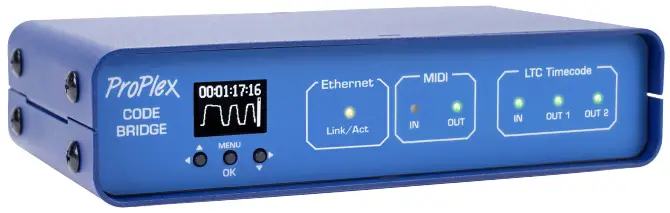
The ProPlex CodeBridge is a member of our LTC Device system which is designed to generate, distribute and monitor timecode. Our rugged, compact mini-enclosure design is perfect for desktop programmers to throw in bag while also being flexible enough to install in a rack with an optional RackMount Kit. Drop a CodeBridge anywhere you need to share a fully synchronized timecode stream between multiple departments and other TMB LTC devices on the network.
NGĀ WHAKAMAHI TUATAHI
- Theoretically unlimited number of CodeBridges possible on the same network
- OLED control panel with intuitive user interface and LTC clock, oscilloscope, and level display
- Remote access and configuration via ProPlex Software GUI* or built-in web wharangi
- Interface options include the ability to name and select between multiple CodeBridge sources*
- Two transformer-isolated XLR3 LTC outputs. Adjustable output level (-18dBu to +6dBu)
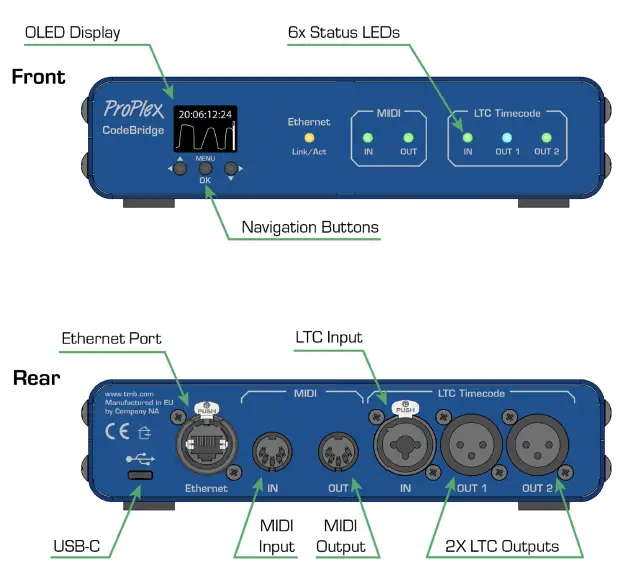
- Front panel status LEDs for Ethernet, MIDI and LTC
- Kiato, mama, pakari, pono. He pai te peeke
- Ko nga whiringa kete rackmount e waatea ana
- Redundant power – USB-C and PoE
*RTP MIDI, ProPlex Software functionality and naming and selecting of sources will be added in future firmware updates
ORDERING CODES
| WAHANGA NGA TAU | INGOA PROUDCT |
| PPCODEBLME | PROPLEX CODEBRIDGE |
| PP1RMKITSS | 1U RACKMOUNT KIT, SMALL, SINGLE |
| PP1RMKITSD | 1U RACKMOUNT KIT, SMALL, DUAL |
| PP1RMKITS+MD | PROPLEX 1U TUITANGA TUITANGA + WAENGANUI |
TE TAUIRAVIEW
KATOA NGA TANGI WAERANGI KATOA


WHAKATAHI
Whakatupato Haumaru
Tena koa panuihia enei tohutohu.
Kei roto i tenei aratohu kaiwhakamahi nga korero nui mo te whakaurunga, te whakamahi me te tiaki i tenei hua
- Me mohio kei te hono te taputapu ki te vol tikatage, me taua rarangi voltage kore e teitei ake i tera e kiia ana i roto i nga whakaritenga taputapu
- Kia mahara kia kaua he rauemi ngiha e tata ana ki te waahanga i a koe e mahi ana
- Whakamahia he taura haumaru i nga wa katoa ka whakairihia te taputapu ki runga
- Momotuhia i nga wa katoa mai i te puna hiko i mua i te mahi, te whakakapi ranei i te hiko (mena e tika ana)
- Ko te 40°C (104°F) te teitei o te pāmahana ambient (Ta). Kaua e whakahaere i te waeine i nga mahana i runga ake i tenei whakatauranga
- Mena he raru nui te whakahaere, mutu tonu te whakamahi i te taputapu. Ko nga whakatikatika me mahi e nga kaimahi kua whakangungua, whai mana. Whakapa atu ki te pokapū awhina hangarau whai mana tata. Ko nga waahanga mokowhiti OEM anake me whakamahi
- Kaua e honoa te taputapu ki te kete riaka
- Me whakarite kia kaua rawa e mirimiri, e pakaru ranei te taura hiko
- Kaua rawa e momotu te taura hiko ma te toia, te kume ranei i te taura
WHAKATAHI! There are no user serviceable parts inside the unit. Do not open the housing or attempt any repairs yourself. In the unlikely event your unit may require service, please see the limited warranty information at the end of this document
TE WHAKAMAHI
I te wa i riro mai ai te waahanga, me ata wetewetehia te kaata me te tirotiro i nga mea kei roto kia mohio kei te noho pai nga waahanga katoa. Me whakamohio atu ki te kaikawe me te pupuri i nga taonga kikii mo te tirotiro mena kua pakaru etahi waahanga mai i nga kaipuke, mena kei te kaata tonu nga tohu o te mahi he. Whakaorangia te kaata me nga taonga whakakakahu katoa. Mena me whakahoki mai tetahi waahanga ki te wheketere, he mea nui kia whakahokia mai ki roto i te pouaka wheketere taketake me te kikii.
HE AHA KEI KAUPAPA
- ProPlex CodeBridge
- USB-C taura
- Tauera taura clamp
- Kaari tikiake Waehere QR
NGA WHAKAMAHI KAUPAPA
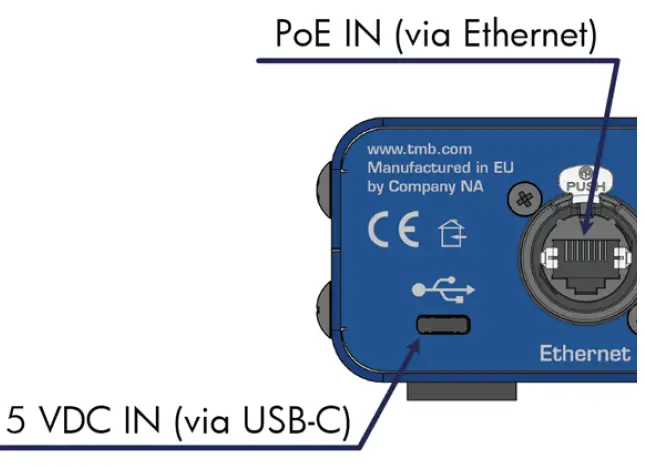
The ProPlex CodeBridge has redundant power connections.
- Power the device via a USB-C cable connected to any standard 5 VDC wall charger or computer USB port
- Supply Power over Ethernet (PoE) by connecting the CodeBridge Ethernet port to any PoE enabled switch or injector.
In some cases, you may want to utilize both connections. Units powered via PoE allow access to the web browser via any computer connected to the same network. Additionally, all connected CodeBridge devices will share stream data via Ethernet. USB-C connections allow for MTC data communication as well as power-IN.
WHAKATANGA
The ProPlex CodeClock enclosure was designed with the touring programmer in mind. We wanted these devices to be lightweight, packable and stackable – so we fitted them with oversized rubber feet to keep them stationary on most surfaces These units are also compatible with Small RackMount Kits should they need to be semi-permanently mounted for touring applications
NGA TOHUTOHU WHAKATANGA RACKMOUNT
ProPlex RackMount Kits are available for both Single-Unit and Dual-Unit mounting configurations To fasten the rack ears or joiners to the ProPlex PortableMount chassis, you must remove the two chassis screws on each side at the front of the chassis. These same screws are used to securely fasten the RackMount ears and joiners to the chassis For dual-unit configurations, both sets of front and rear chassis screws will be used
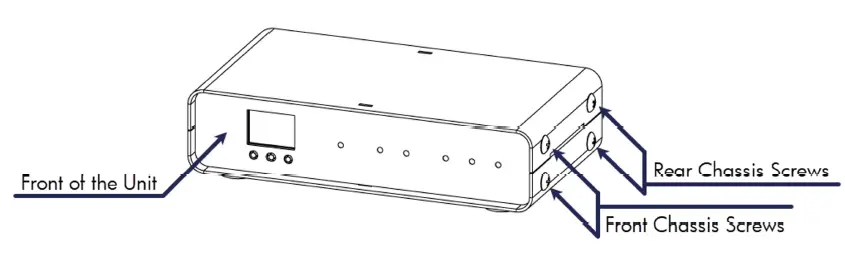
NUI : Be sure to reinsert the screws into the unit after ears have been removed. Store RackMount Kit in a safe location until needed again. Spare screws are available from TMB if needed
NGA TOHUTOHU WHAKATANGA RACKMOUNT
Ko te Kete RackMount Iti Wae-kotahi e rua nga taringa whatanga, KOTAHI te roa me te KOTAHI poto. Ko te hoahoa i raro nei e whakaatu ana i te whakaurunga o te RackMount Kit. Ko enei taringa whatanga he mea hanga kia hangarite, kia taea ai te whakawhiti nga taringa poto me te roa
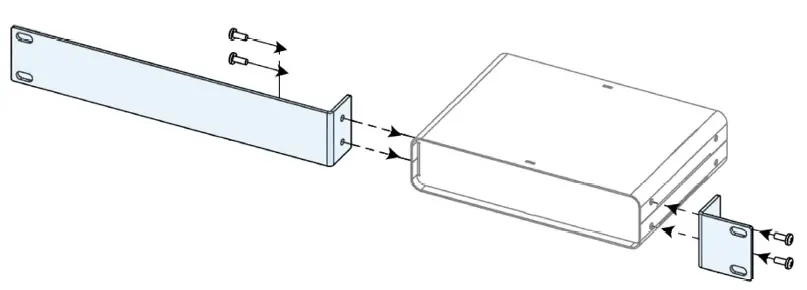
Ko te Kete RackMount Iti Wae-Taarua e RUA nga taringa whatanga poto me te RUA o nga kaihonohono. Ko te hoahoa i raro nei e whakaatu ana i te whakaurunga o te RackMount Kit. Ko tenei whirihoranga e hiahia ana kia RUA nga hononga o te pokapu hono ki mua me muri
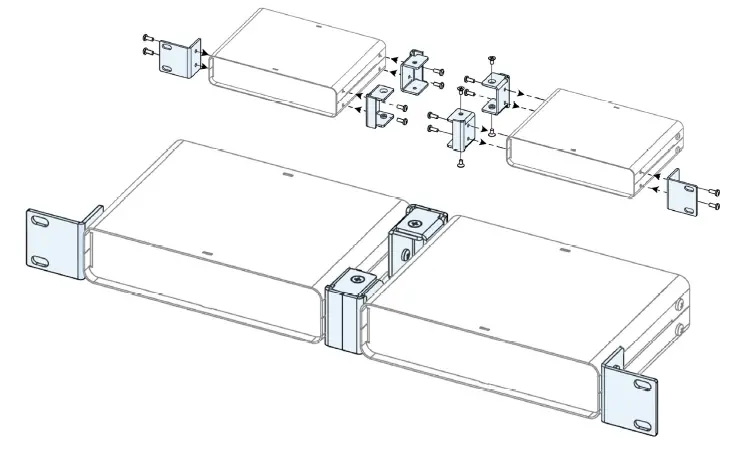
TE WHAKATAUTANGA I NGA KAUPAPA TUARUA
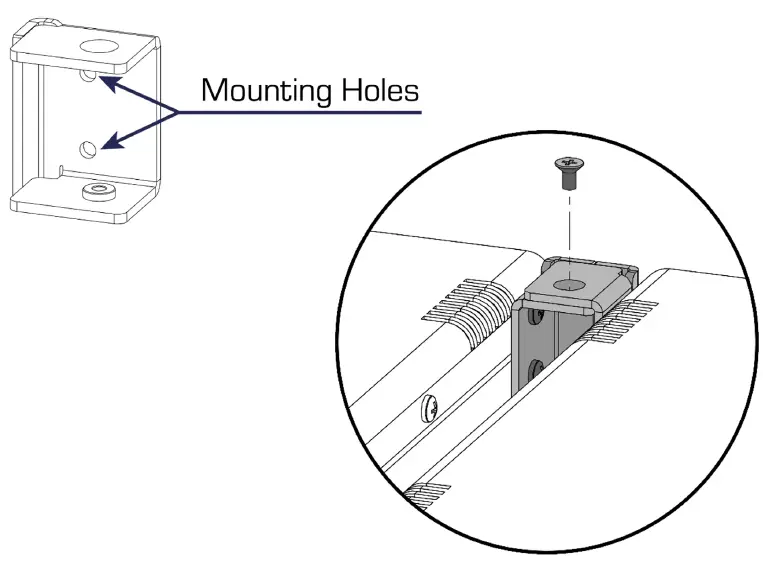
The Dual-Unit Small RackMount Kit includes FOUR joining links and FOUR countersunk flat head screws. These links are designed to nest into each other and are secured with the included screws and threaded holes. Each link piece is identical. Simply rotate the joining link and line up the installation holes to install on either the left or right side of the corresponding unit.
WHAKAMAHI
Ka ngawari te whirihora i te ProPlex CodeBride me te OLED Whakaatu me nga paatene whakatere kei mua o te waahanga.
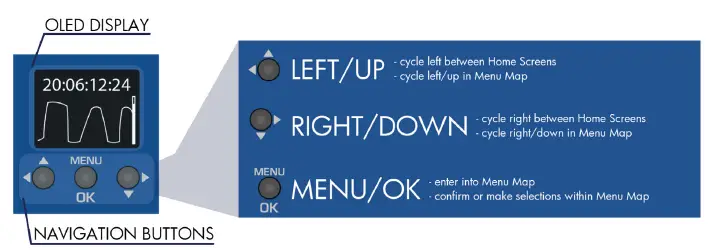
MATA KAINGA
The CodeBridge has 3 separate HOME SCREENS that display different parameters of incoming timecode streams. Cycle between these screens by pressing either the  pātene
- Mata Kainga 1
The incoming LTC IN stream is displayed at the top of the screen while the bottom area shows oscillogram and voltage level bar to indicate signal level from the LTC source only
Note: Ideally the LTC IN steam should resemble a square wave with high output level. If level is too low, try increasing the volume at the source to improve the signal - Mata Kainga 2
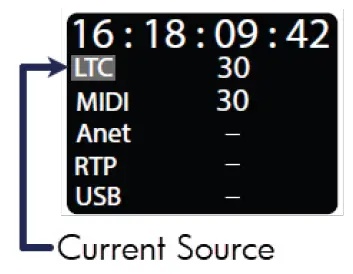
This screen displays all sources of timecode that the CodeBridge can detect
The topmost source is the current active source which is retransmitted further from output connections. Whichever source is active will be highlighted with a blinking background

Mata Kainga 3
The third screen displays format information on all detected streams Like Home Screen 2, the top-most source is the current active source which is retransmitted further from output connections. Whichever source is active will be highlighted with a blinking background
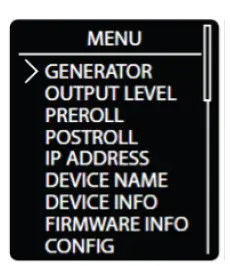
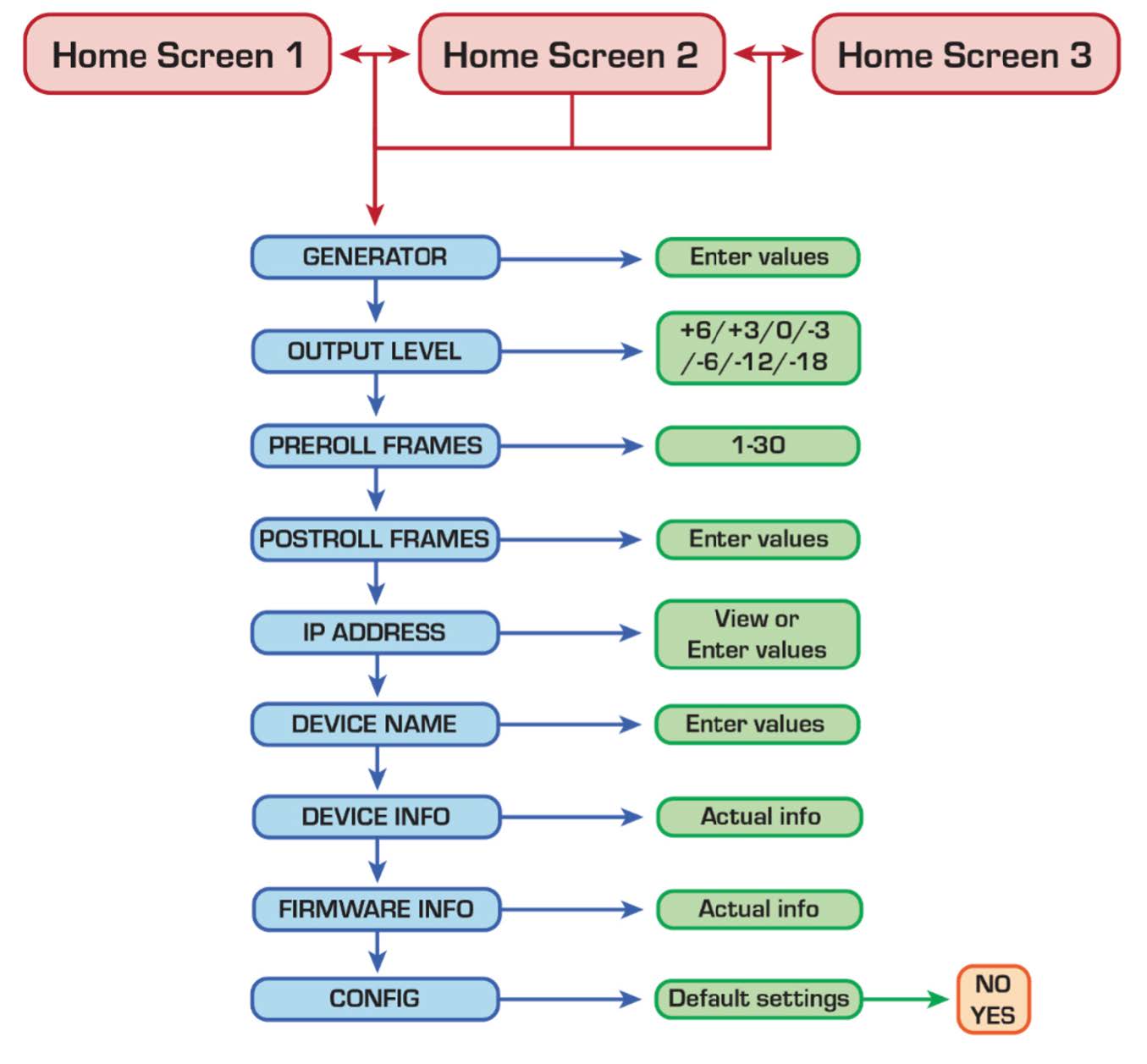
Tahua Matua
Ka taea te uru atu ki te Tahua Matua ma te pehi i te  button and majority of options can be exited via the button Scroll with the te paatene me te whakaū i te kowhiringa me te pātene.
Tuhipoka: Kaore nga tahua katoa e uru ki te mata o te taputapu na reira me panuku koe ki te uru ki etahi tahua. Ko te taha matau o te nuinga o nga mata tahua ka whakaatu i te pae panuku hei tohu i te hohonutanga o te whakatere panuku
Waehere Waehere Kaihanga
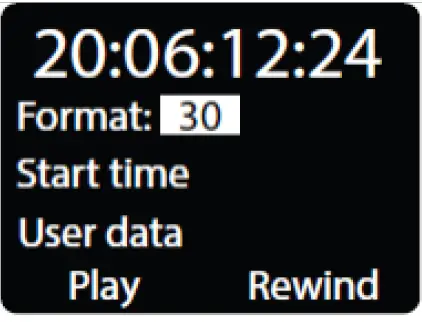
The CodeBridge can generate clean, high output LTC out of the two isolated XLR3 ports (located on the rear of each unit)
Whakamahia te pātene, ka whakaū i te tīpakonga ki te te paatene ki te huri i waenga i nga momo whiringa whakaputa
- Format: Select between different industry standard FPS rates 23.976, 24, 25, 29.97ND, 29.97DF, and 30 FPS. If the selected format is compatible with MTC or Art-Net timecode, it will also be transmitted through that respective interface port (MIDI OUT or Ethernet ports)
- Start Time: Specify a start time of HH:MM:SS:FF using navigation buttons
- User Data: Specify user data in 0x00000000 hex format
- Play, Pause, Rewind: User playback controls for generated timecode.
Tuhipoka: me noho tonu koe ki runga i tenei mata ki te whakamahi tonu i te kaihanga LTC. Mena ka puta atu koe i tenei mata, ka mutu aunoa te kaiwhakaputa, ka huri te puna o naianei ki te puna hohe e whai ake nei
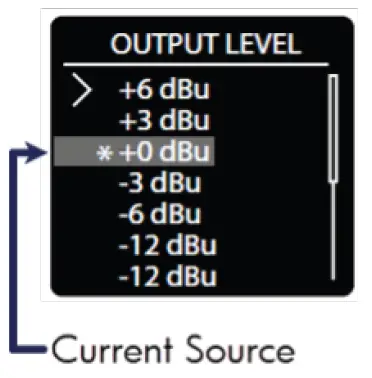
Taumata Putanga
Boost or cut the output level from +6 dBu to -12 dBu. Everything outputting via the two isolated XLR3 ports is affected by this level change.
Kei roto i tenei ko:
- Putanga kaihanga
- I tukuna ano nga whakatakotoranga waowaewae mai i etahi atu whakaurunga
Whakamahia tepātene, ka whakaū i te tīpakonga ki te button to cycle between the various output levels. The asterisk indicator will denote the currently selected output level
Nga Tapare i mua i te pukapuka
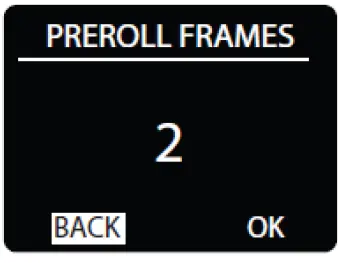
- Ko te pukapuka i mua i te pukapuka ko te maha o nga papa whaimana e tika ana kia whai mana te puna wawaewae ka timata te tuku whakamua ki nga putanga
- Whakamahi
 the button to highlight the Pre-roll value, then press button to edit
 - Whakamahia te button to set the Pre-roll frames (1-30) and to save the value
Tuhipoka: The active stream display will always show incoming LTC stream starting from the 1st received frame regardless of Pre-roll settings
Post-roll Frames
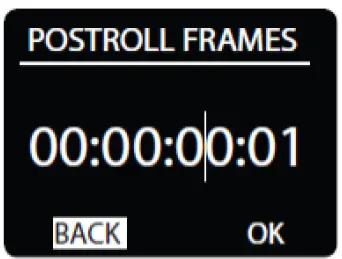
- Post-roll frames help correct erroneous or dropped frames in a timecode source
- When a stream is stopped for any reason, the transmission will continue until a count equivalent to the Post-roll frames setting is reached
- If an erratic source issue resolved within the Post-roll window, the device will continue streaming timecode without interruption
- Use the button to highlight the Post-roll value, then press button to edit. Use to select a value place in HH:MM:SS:FF format
- Press button to edit each value as needed, using or to change the count. Press after editing to save each value and repeat to edit the next.
Wāhitau IP
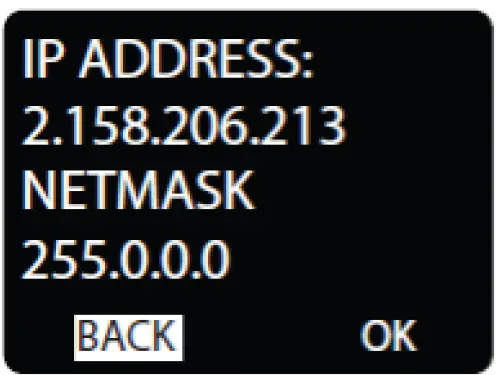
- View set the IP Address and Netmask of the unit
Note: This is the address used to access the CodeBridge Web Browser. This is mainly used to monitor and update each unit with future firmware releases - Use the button to highlight, then press button to edit either IP Address or Netmask
- Whakamahi to select a value in x.x.x.x format. Press to edit, using to change each value and again to save. Repeat to edit each octet
Ingoa Pūrere
Create a custom name for the device
 Mokowāmuri
 Change to UPPERCASE
 Nukuhia te pehu
- 123 Number editor
- – Add a space
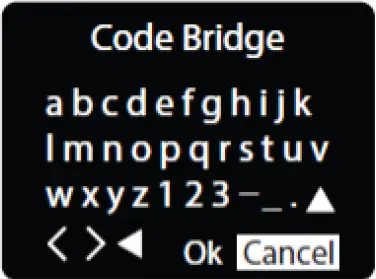
- Whakamahi to select and highlight an editing tool or a letter, then press hei whakaū i te kowhiringa
- Highlight the 123 menu and press to input a numerical character.
- Whakamahi to select 0-9 and press again to confirm selection and type the character in the name field
- When name editing is complete, highlight OK and press ki te penapena ka puta
Mōhiohio Pūrere
Device Info displays status information of the unit. The information displayed is:
- Ingoa Pūrere
- Wāhitau IP
- NetMask
- MAC Wāhitau
Perehi ki te puta 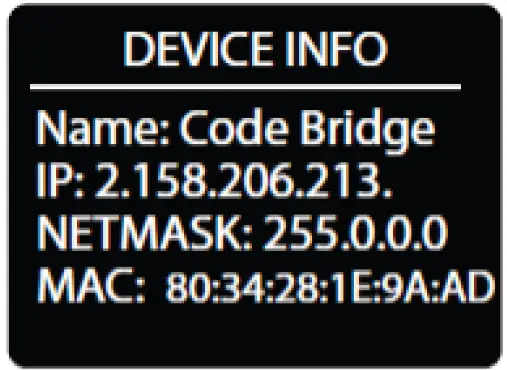
Mōhiohio Firmware
Firmware Info displays status information of the unit. The information displayed is
- Tau Putanga
- Te ra hanga
- Te wa hanga
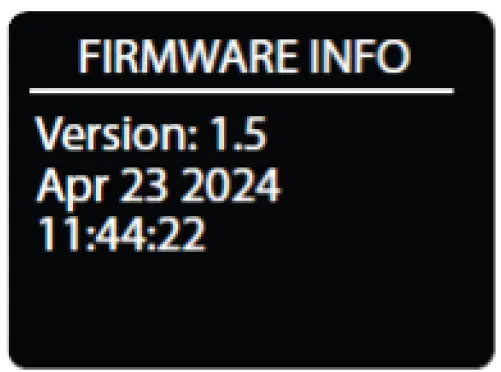 Perehi ki te puta
MAPI TAHUA
WHAKAMAHI KAUPAPA KAUPAPA
MIDl IN:
 Receives timecode
 Receives data which is not timecode
WAENGANUI:
- Transmits timecode from source
 Transmits timecode, postroll is running
- Transmits data which is not timecode
LTC IN:
- Receives timecode, but 1 second has not passed without errors or jumps in timecode
- Receives timecode without jumps or errors for more than 1 second
 Timecode was received, but is not received at the moment
LTC ki waho:
- Transmits timecode, postroll is running
 Transmits timecode, internal generator is running
- Transmits timecode for more than 1 second
- Transmits timecode, but 1 second has not passed from start of transmission
WEB HE TINO
Any networked computer can access the CodeBridge Web Pūtirotiro
Locate the IP address of the unit (instructions above) then type the IP address into the address bar of your favorite browser. You should be presented with the following landing page:
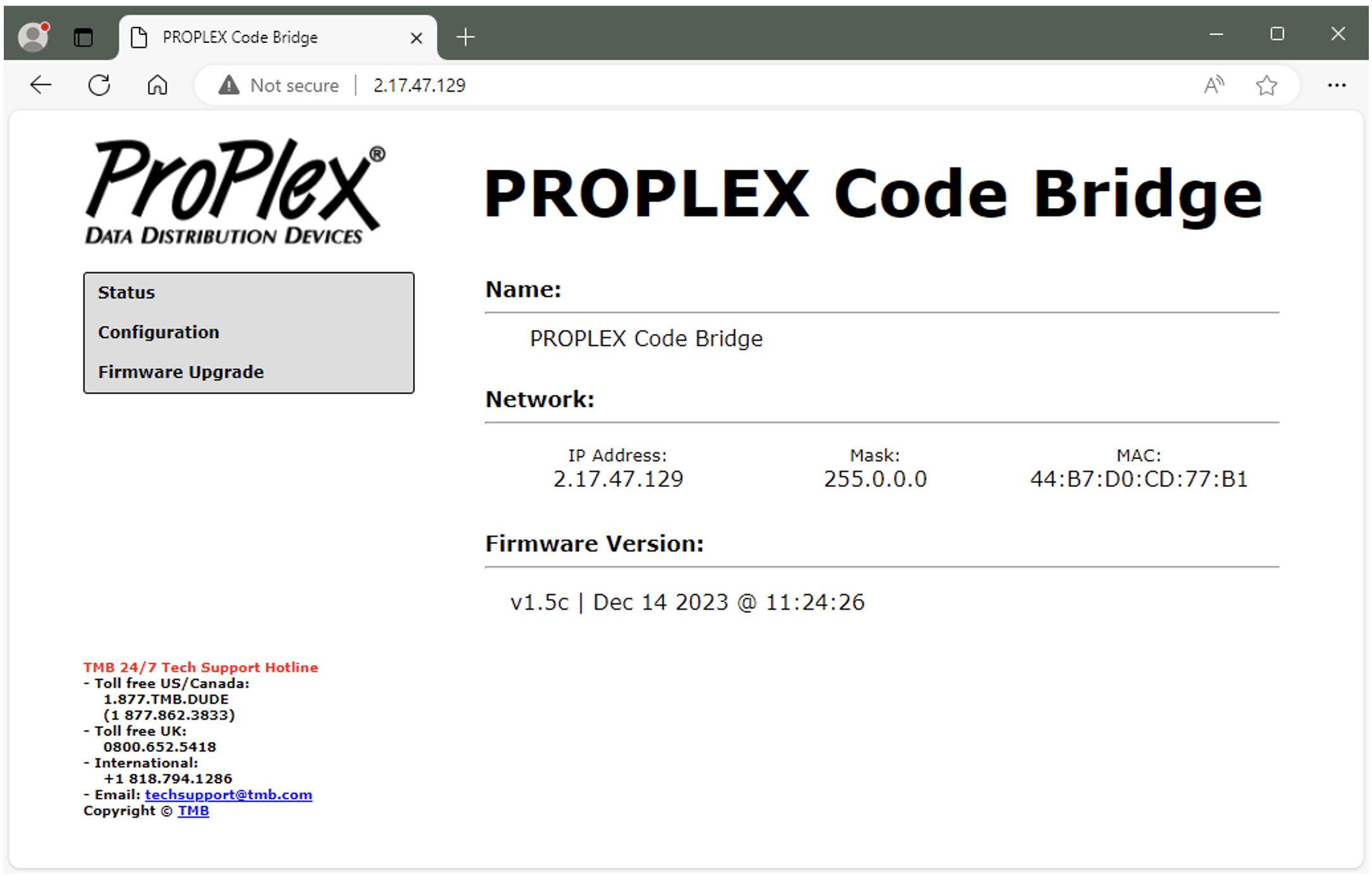
Note: computer or laptop should be in the same network range – 2.X.X.X
NGA MAHI WHAKAMAHI
Occasionally we will release firmware updates that contain new features or bug fixes. Firmware for all ProPlex units is available via the TMB Cloud
A link to TMB Cloud is under the Resources menu on our main webpae https://tmb.com/
To update, download the new firmware.bin file to your desktop. Then upload through the “Firmware Upgrade” menu via the Web Pūtirotiro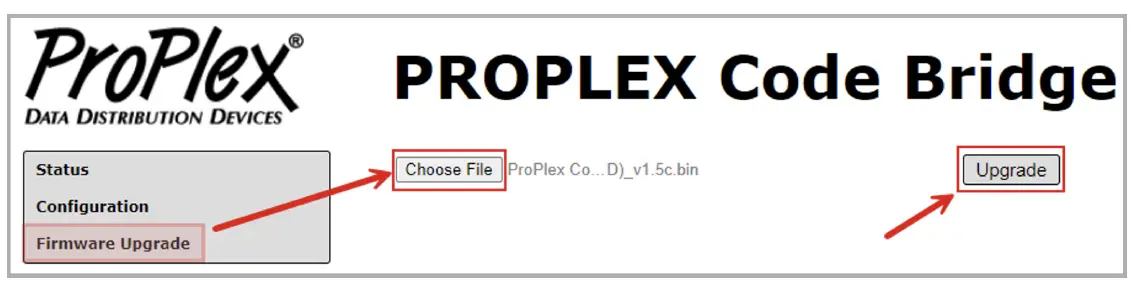
TE WHAKAMAHI ME TE WHAKATAKI
Dust build-up in connector ports can cause performance issues and can potentially lead to further damage during normal wear and tear CodeClock devices need occasional cleaning to maintain best performance, especially units used in harsher environmental conditions
KO NGA ARATOHU WHAI WHAI AWHIRI E whai ake nei:
- Momotu i nga wa katoa i te hiko i mua i te ngana ki te horoi
- Tatari kia whakamatao te waeine ka marere katoa i mua i te horoi
- Whakamahia te korehau, te hau maroke maroke ranei hei tango i te puehu/para i roto i nga hononga hono
- Whakamahia he tauera ngohengohe, he paraihe ranei hei muru me te parai i te tinana tahuhu
- Hei horoi i te mata whakatere, tonohia te waipiro isopropyl me te kiko horoi mo te arotahi ngawari, te miro kore ranei
- Ka taea e nga papa waipiro me nga tohu-q te awhina i te tango i nga paru me nga toenga mai i nga paatene whakatere
NUI:
Me mohio kua maroke nga papa katoa i mua i te ngana ki te whakakaha ano
WHAKAMAHI WHAKAMAHI
| Nama Wahi | PPCODEBLME |
| Tūhono Hiko | USB-C |
| Ethernet (& PoE in) Connector | Neutrik EtherCON™ RJ45 |
| Hononga Whakauru MIDI | DIN 5-Pin Wahine |
| Hononga Huaputa MIDI | DIN 5-Pin Wahine |
| Tūhono Whakauru LTC | Neutrik™ Combination 3-Pin XLR me te 1/4” TRS wahine |
| LTC Huaputa Hononga | Neutrik™ 3-Pin XLR Tane |
| Mahinga Mahi Voltage | 5 VDC USB-C or 48 VDC PoE |
| Whakamahi Hiko | TBA |
| Temp Mahi. | TBA |
| Ahu (HxWxD) | 1.72 x 7.22 x 4.42 in [43.7 x 183.5 x 112.3 mm] |
| Taumaha | 1.2 lbs. [0.54 kg] |
| Taumaha Tuku | 1.4 lbs. [0.64 kg] |
HE KORERO PUTANGA HEI
Ko nga Pūrere Tohatoha Raraunga ProPlex e whakamanahia ana e te TMB mo nga rawa hee, he mahi ranei mo te rua (2) tau mai i te ra o te hokonga tuatahi a TMB. Ko te whakamana a TMB ka herea ki te whakatikatika, ki te whakakapi ranei i tetahi waahanga ka kitea he hapa, ka tukuna he kereme ki a TMB i mua i te paunga o nga wa whakamana e tika ana.
Ko tenei Raarangi Whakaiti ka mutu mena ko nga hapa o te Hua na te:
- Te whakatuwhera casing, te whakatikatika, te whakarerekētanga rānei e tetahi atu i a TMB, e ngā tāngata rānei kua whakamanahia e TMB
- Ko te aitua, te tukino tinana, te whakahaere hee, te whakamahi pohehe ranei i te hua.
- Te kino na te uira, te ru, te waipuke, te whakatumatuma, te whawhai, te mahi a te Atua.
TMB will not assume responsibility for any labor expended, or materials used, to replace and/or repair the Product without TMB’s prior written authorization. Any repair of the Product in the field, and any associated labor charges, must be authorized in advance by TMB. Freight costs on warranty repairs are split 50/50: Customer pays to ship defective product to TMB; TMB pays to ship repaired product, ground freight, back to Customer. This warranty does not cover consequential damages or costs of any kind.
Me tiki mai he nama Whakaaetanga Taonga Whakahoki (RMA) mai i a TMB i mua i te hokinga mai o nga taonga kohakore mo te whakamana, te whakatika-kore ranei. Mo nga patai whakatika, me waea atu ki a TMB ma te imeera i TechSupport@tmb.com waea ranei ki tetahi o o maatau waahi i raro nei:
TMB US
- 527 Park Ave.
- San Fernando, CA 91340
- United States
- Waea: +1 818.899.8818
- TMB UK
- 21 Armstrong Way
- Southall, UB2 4SD
Ingarangi
- Waea: +44 (0)20.8574.9700
- You may also contact TMB directly via
- īmēra i TechSupport@tmb.com
TE WHAKAMAHI WHAKAHOKI
Tena koa whakapā atu ki a TMB me tono he tikiti whakatika me te Tau Whakaaetanga Taonga Whakahoki i mua i te tuku i nga taonga hei whakatika. Kia rite ki te whakarato i te tau tauira, tau rangatū, me te whakamaarama poto mo te take o te hokinga mai me te wahitau kaipuke whakahoki mai me nga korero whakapā. Ina oti te tukatuka i tetahi tikiti whakatika, ka tukuna te RMA # me nga tohutohu whakahoki mai ma te imeera ki te hoapaki i runga file.
Clearly label any shipping package(s) with ATTN: RMA#. Please return equipment prepaid and in the original packaging whenever possible. DO NOT include cables or accessories (unless advised otherwise). If original packaging is not available, be sure to properly pack and protect any equipment. TMB is not liable for any shipping damage resulting from inadequate packaging by the sender. Freight call tags will not be issued for shipping repairs to TMB, but TMB will pay the freight for return to the customer if the repair qualifies for warranty service. Non-warranty repairs will undergo a quotation process by the technician assigned to the repair. All associated costs for parts, labor and return shipping must be authorized in writing before any work can be completed. TMB reserves the right to use its own discretion to repair or replace product(s) and determine the warranty status of any equipment.
HE KORERO WHAKAPAKI
LOS ANGELES HEADQUARTERS
527 Park Avenue | San Fernando, CA 91340, USA
- Waea: +1 818.899.8818
- Waeaatu: + 1 818.899.8813 sales@tmb.com
- TMB 24/7 TECH TAUTOKO
- US/Kanata: +1.818.794.1286
- Toll Free: 1.877.862.3833 (1.877.TMB.DUDE)
- UK: +44 (0)20.8574.9739
- Koreutu Koreutu: 0800.652.5418 techsupport@tmb.com
- TMB 24/7 TECH TAUTOKO
US/Kanata: +1.818.794.1286
Toll Free: 1.877.862.3833 (1.877.TMB.DUDE) - UK: +44 (0)20.8574.9739
- Koreutu Koreutu: 0800.652.5418
- techsupport@tmb.com
He kamupene ratonga katoa e whakarato ana i te tautoko hangarau, ratonga kiritaki, me te whai ake.
Providing products and services for the industrial, entertainment, architectural, installation, defense, broadcast, research, telecommunications, and signage industries. Los Angeles, London, New York, Toronto, Riga and Beijing.
Effective 11 July 2025. © Copyright 2025, TMB. All rights reserved
FAQ
Q: Are spare screws available for the RackMount Kit?
A: Yes, spare screws are available from TMB if needed. Contact customer support for assistance with spare parts.
Tuhinga / Rauemi
 | CodeBridge TimeCode Ranei Midi Over Ethernet |
Tohutoro
- ProPlex — High-Performance Data Distribution—Rock Solid Bluewww.proplex.com
- Pukapuka Kaiwhakamahimanual.tools