Kupu Whakataki
This manual provides comprehensive instructions for the installation and use of your BRAINWAVZ Corner Wall Mount, designed specifically for the NETVUE NI-3421 Pet & Baby Indoor Camera. Please read these instructions carefully before installation to ensure proper setup and optimal performance.
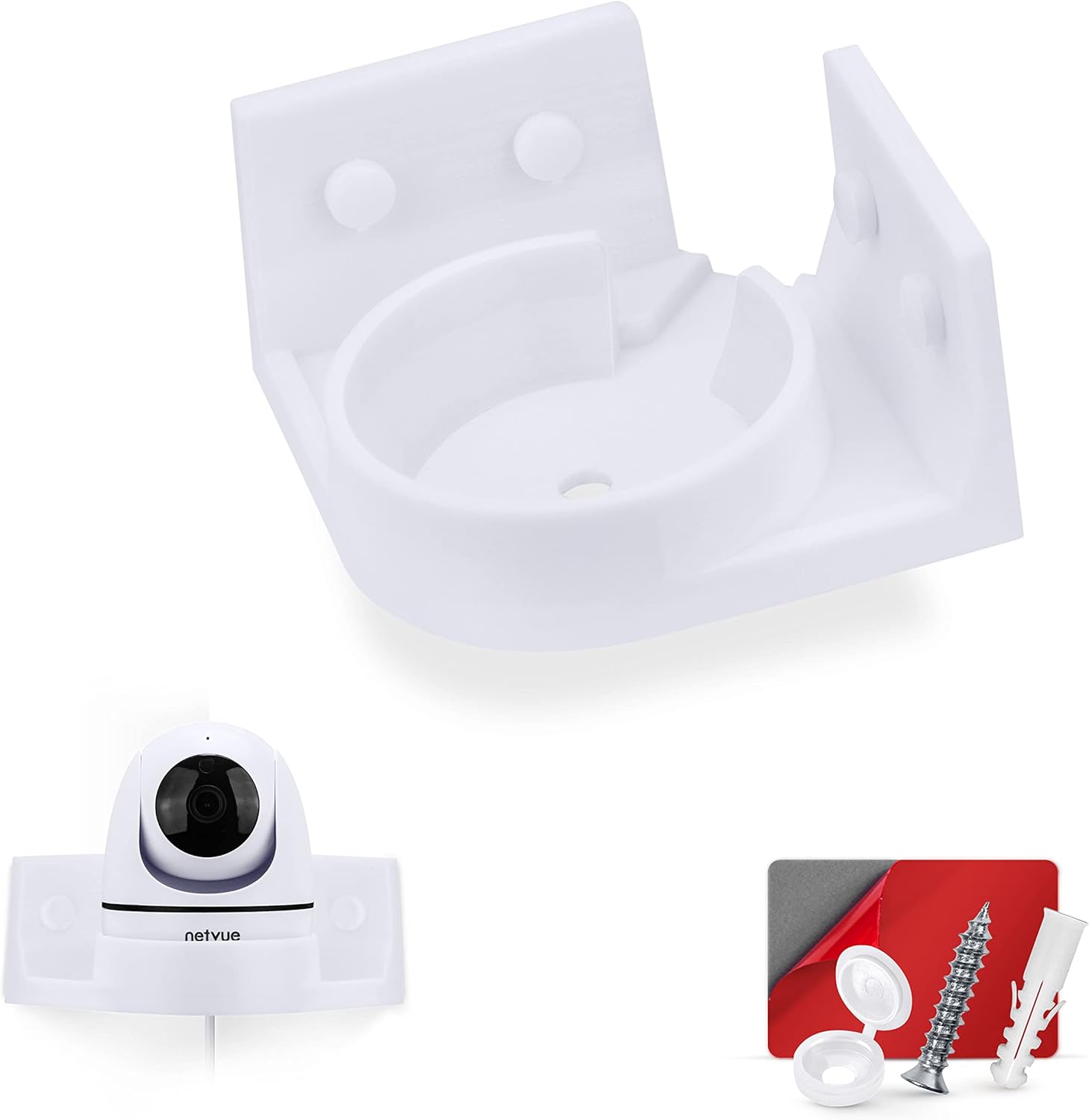
This image displays the BRAINWAVZ Corner Wall Mount, a NETVUE NI-3421 camera, and the included installation hardware, which consists of screws, wall plugs, and screw caps.
Ka mutu te huaview
The BRAINWAVZ Corner Wall Mount is engineered to provide a secure and optimal viewing angle for your NETVUE NI-3421 camera. Its design allows for placement on vertical surfaces, reducing blind spots and keeping the camera safely out of the way. Key features include:
- Corner Mounting: Designed for corner installation to maximize viewing angles and minimize obstruction.
- Pai Haumaru: The camera fits snugly into the mount, ensuring stability.
- Whakaha Uepu: Features a flat power cord exit to the rear of the mount for a tidy setup.
- Hanga Roa: Made from tough and durable plastic.
- Kōwhiringa Whakapuru Takirua: Supports both screw-in and self-adhesive installation.
Hototahi
This BRAINWAVZ Corner Wall Mount is exclusively compatible with the NETVUE NI-3421 Pet & Baby Indoor Camera. It is not designed for use with other camera models or brands. Please verify your camera model before installation. The camera's identification number is 4047503111704338.

This image highlights the compatibility of the mount specifically with the NETVUE NI-3421 camera, showing the camera's model number and a QR code for identification. A warning indicates that the mount is not compatible with other models or brands.
Tatūnga me te Tāuta
The BRAINWAVZ Corner Wall Mount offers two installation methods: screw-in or self-adhesive. Choose the method best suited for your wall surface.
Method 1: Screw Mount Installation
This method provides the most secure attachment and is recommended for long-term installation.
- Tīpako Tauwāhi: Choose a corner on a wall or wood surface where you want to mount your camera. Ensure the surface is clean and dry.
- Tohua Kohao: Hold the mount in the desired position and mark the locations for the screw holes with a pencil.
- Drill Pilot rua: For drywall or masonry, drill appropriate pilot holes. Insert the provided wall plugs into the holes. For wood surfaces, pilot holes may not be necessary but can prevent splitting.
- Maunga Haumaru: Align the mount with the drilled holes and secure it using the provided screws. Place the screw caps over the screw heads for a finished look.
Method 2: Self-Adhesive Mount Installation
This quick-mount option requires no tools, but it is crucial to adhere to the surface requirements.

This image illustrates both mounting options: the strong 3M VHB adhesive tape for screw-free application and the screw mount method, showing a screwdriver in use. It also warns against using adhesive on painted, damp, or plastered walls.
- Maa Mata: Thoroughly clean the desired corner surface. Ensure it is completely dry and free of dust, grease, or debris.
- Tihore te tuara: Carefully peel off the red protective backing from the 3M VHB tape located on the back of the mount.
- Tāpirihia te Maunga: Press the mount firmly onto the desired corner surface. Apply consistent pressure for at least 30 seconds to ensure good adhesion.
- Wā Whakawera: Allow the adhesive to set for a few hours (ideally 24 hours) before placing the camera into the mount. This ensures maximum bond strength.
NUI: DO NOT PLACE ON PAINTED, DAMP, OR PLASTERED WALLS. These surfaces are not suitable for adhesive mounting and may result in the mount detaching and potential damage to your camera or property.

This multi-panel image provides a visual guide to the installation process, showing the camera dropping into the mount, a side view of the mounted camera, and the application of the 3M VHB adhesive tape.
Te whakahaere
Once the mount is securely installed using either the screw-in or adhesive method, you can place your NETVUE NI-3421 camera.
- Hono Hono: Ensure your camera's power cable is connected.
- Taura Ara: Guide the power cable through the designated cable access channel at the rear of the mount. This ensures the cable lies flat and is neatly managed.
- Whakauruhia te Kāmera: Gently lower your NETVUE NI-3421 camera into the mount. The mount features a drop-in design that securely cradles the camera.
- Manatoko Pūmautanga: Ensure the camera is seated firmly and stably within the mount.

This diagram demonstrates the easy drop-in design for securely placing the camera into the mount. It also shows the rear cable access, allowing the power cable to pass through neatly.

This image provides examples of suitable locations for mounting the camera, such as a nursery, living room, entrance hall, garage, or home office, illustrating the versatility of the corner mount.
Te tiaki
The BRAINWAVZ Corner Wall Mount requires minimal maintenance. To keep it clean, simply wipe it with a soft, dry, or slightly damp cloth. Avoid using harsh chemicals or abrasive cleaners, as these may damage the plastic finish.
Raparongoā
If you encounter any issues with your BRAINWAVZ Corner Wall Mount, consider the following:
- Mount Not Holding: If using the adhesive method, ensure the surface was clean and dry, and that the mount was pressed firmly for the recommended curing time. Avoid using on painted, damp, or plastered walls. For screw mounts, ensure screws are tightened securely into appropriate wall plugs or wood.
- Camera Not Fitting: Double-check that your camera is indeed the NETVUE NI-3421 model. This mount is designed for specific compatibility.
- Nga take whakahaere taura: Ensure the power cable is correctly routed through the designated channel to prevent strain or obstruction.
For further assistance, please contact BRAINWAVZ customer support.
Whakatakotoranga
- Ingoa Hua: BRAINWAVZ Corner Wall Mount
- Hototahi: NETVUE NI-3421 Pet & Baby Indoor Camera
- Kōwhiringa Whakapuru: Screw-in (hardware included), Self-Adhesive (3M VHB tape)
- Rauemi: Kirihou mauroa
- Tae: Mā
- Ahu mōkihi: 6.77 x 5.24 x 2.44 inihi
- Taumaha Tūemi: 8 hekere
- Tau tauira: a1e13b79-e5e8-4185-b1ad-4e43798a5fde
- ASIN: B0C4Z77WKB
Pūtāhui me te Tautoko
For information regarding warranty coverage or to obtain technical support, please refer to the official BRAINWAVZ webpaetukutuku, whakapā atu ranei ki ta raatau tari ratonga kaihoko. Puritia to riiki hoko hei tohu mo te hoko.


