Kupu Whakataki
The Logitech MK270 Wireless Keyboard and Mouse Combo provides a reliable and convenient wireless solution for your computing needs. This combo features a 2.4 GHz wireless connection, offering a range of up to 10 meters with minimal delays or dropouts. Designed for ease of use, it includes a full-size keyboard with media hotkeys and a compact, ambidextrous mouse. This manual provides instructions for setup, operation, maintenance, and troubleshooting to ensure optimal performance of your device.
He aha kei roto i te Pouaka
I te whakatuwheratanga o te kete, tirohia kei te noho nga waahanga katoa:
- Logitech MK270 Papapātuhi Ahokore
- Kiore Ahokore Ahorangi Logitech
- USB Nano Kaihoko
- 2 pākahiko AAA (mo te papapātuhi)
- 1 pākahiko AA (mo te kiore)


Tohutohu Tatūnga
- Whakauruhia nga Pataha: Open the battery compartments on the underside of both the keyboard and the mouse. Insert the included AAA batteries into the keyboard and the AA battery into the mouse, ensuring correct polarity (+/-).
- Honoa te Kaiwhiwhi USB: Locate an available USB port on your computer. Plug the tiny Logitech Nano Receiver into the USB port. The system should automatically detect the receiver and install necessary drivers.
- Hiko i nga taputapu: Locate the ON/OFF switch on the top right of the keyboard and on the underside of the mouse. Slide both switches to the 'ON' position.
- Hononga Whakamatau: Once powered on, the keyboard and mouse should be ready for use. Test by typing on the keyboard and moving the mouse cursor. If they do not respond, ensure the receiver is securely plugged in and the devices are powered on.
The Logitech MK270 is designed for plug-and-play simplicity and is compatible with Windows 10 or later, Windows 8, 7, Windows Vista, Windows XP, and Chrome OS. It is not Bluetooth compatible.
Nga Tohutohu Whakahaere
Nga waahanga papapātuhi
- Tahora Rahi-Katoa: The keyboard features a standard full-size layout with deep-profile, quiet keys for comfortable typing.
- Eight Hot Keys: Access frequently used functions instantly with the dedicated hotkeys located above the function row. These include controls for movies, music, internet, email, volume adjustment, and play/pause.
- Whakawhiti Whakaka/Weto: Conserve battery life by using the ON/OFF switch located on the top right of the keyboard when not in use.


Ahua Kiore
- Compact and Ambidextrous Design: The mouse is designed for comfortable control, suitable for both left and right-handed users.
- Aroturuki Maeneene: Provides responsive and accurate cursor control.
- 10m Wireless Range: Maintain a reliable connection up to 10 meters from your computer.
- Rokiroki Kaiwhiwhi: The USB Nano Receiver can be conveniently stored inside the mouse when not in use, making it ideal for portability.
- Whakawhiti Whakaka/Weto: An ON/OFF switch on the underside of the mouse helps conserve battery power.


Te tiaki
Whakahaere Pūhiko
The Logitech MK270 combo is designed for extended battery life:
- Te ora o te pākahiko papapātuhi: Up to 36 months (3 years) with typical use.
- Ora Pūhiko Kiore: Up to 12 months with typical use.
Battery life may vary based on user and computing conditions. To maximize battery life, always use the ON/OFF switches on both the keyboard and mouse when not in use. The devices also feature an auto-sleep function to conserve power during periods of inactivity.

Te horoi
To clean your devices, use a soft, damp cloth. Avoid using harsh chemicals or abrasive cleaners, as these can damage the surfaces. Ensure devices are powered off before cleaning.
Raparongoā
- Kāore he whakautu mai i te Papapātuhi/Kiore:
- Me whakarite kua tahuri te papapātuhi me te kiore ki te 'ON'.
- Check that the USB Nano Receiver is securely plugged into a working USB port on your computer.
- Replace the batteries in both the keyboard and mouse. Low batteries are a common cause of connectivity issues.
- Whakamātauria te mono i te kaiwhiwhi USB ki tetahi tauranga USB rereke.
- Hononga Taarua, Tamuri ranei:
- Move the keyboard and mouse closer to the USB receiver. The optimal range is up to 10 meters, but environmental factors (e.g., metal objects, other wireless devices) can reduce this.
- Avoid placing the receiver near other electrical devices that may cause interference (e.g., speakers, monitors, Wi-Fi routers).
- If using a USB hub, try connecting the receiver directly to a USB port on your computer.
- Hotkeys Not Working:
- Me mohio kei te hou to punaha whakahaere.
- While plug-and-play, some advanced functions or specific hotkey behaviors might benefit from Logitech's optional software, available on their official support webpae.
Whakatakotoranga
| Waitohu | Logitech |
| Tau tauira | 920-004536 |
| Hangarau Hononga | Wireless (2.4 GHz Radio Frequency) |
| Mokowoko Korekore | Tae atu ki te 10 mita (33 putu) |
| Te ora o te pākahiko papapātuhi | Tae atu ki te 36 marama (3 tau) |
| Ora Pūhiko Kiore | Tae atu ki te 12 marama |
| Hototahitanga Pūnaha Whakahaere | Windows 10, Windows 7, Windows 8, Windows Vista, Windows XP, Chrome OS |
| Ahu Papapātuhi (LxWxH) | 441 mm x 149 mm x 18 mm (tata ki te 17.36 x 5.87 x 0.71 inihi) |
| Taumaha Papapātuhi | 481 g (tata ki te 1.06 lbs) |
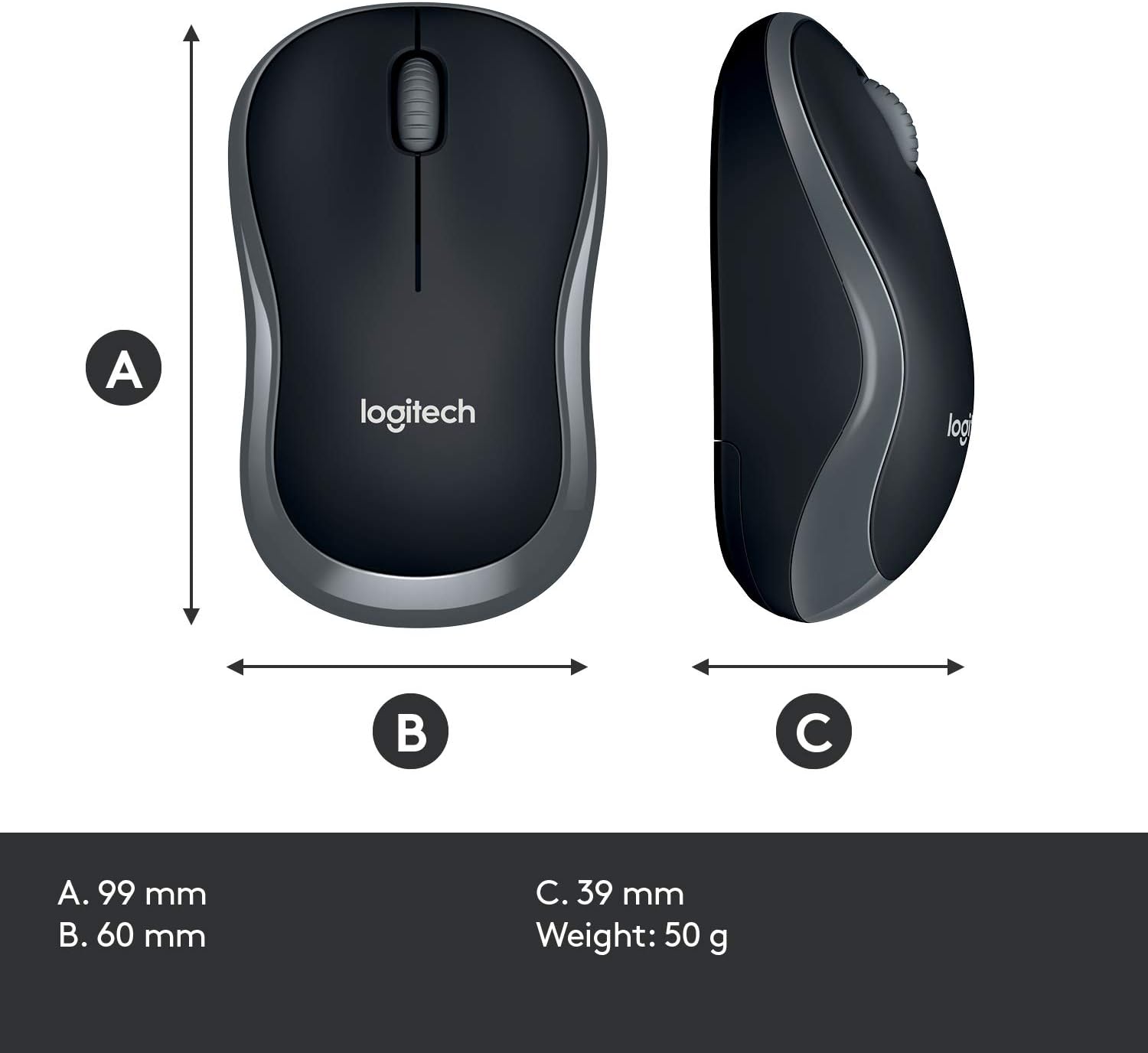
| Rahi Kiore (LxWxH) | 99 mm x 60 mm x 39 mm (tata ki te 3.90 x 2.36 x 1.54 inihi) |
| Taumaha kiore | 50 g (tata ki te 0.11 lbs) |
| Tae | Pango |

Pūtāhui me te Tautoko
Warranty information for the Logitech MK270 Wireless Keyboard and Mouse Combo is typically provided with your product packaging or can be found on the official Logitech webpae. Tirohia ēnei rauemi mō ngā tikanga me ngā herenga pūtāhui motuhake.
Mo etahi atu awhina, tautoko hangarau, ki te tango ranei i nga taraiwa me nga rorohiko hou, tirohia koa te tautoko Logitech mana webpae:


