Sava lalana
This manual provides essential information for setting up, operating, and maintaining your INNOCN 27D2U 27-inch 4K Monitor. Please read through these instructions carefully to ensure optimal performance and longevity of your device.
The INNOCN 27D2U features a 27-inch 4K UHD (3840 x 2160) IPS panel with a 60Hz refresh rate, sRGB 99% color gamut, and a 1500:1 contrast ratio. It supports HDR10 and offers versatile connectivity options including DisplayPort, HDMI, and USB-C.
Hametraka
Unboxing sy fisavana voalohany
Carefully remove all components from the packaging. Ensure all parts listed in the packing list are present and undamaged. Keep the original packaging for future transport or service needs.
Video: KOORUI 4K Monitor Unboxing and Setup! (Note: This video is for a similar product and demonstrates general unboxing and setup procedures.)
Fivoriambe mijoro
Assemble the monitor stand by attaching the base to the stand column. Ensure all screws are tightened securely. Then, attach the assembled stand to the back of the monitor panel. The stand is designed for easy, tool-free assembly.

Sary: Front view of the INNOCN 27D2U monitor with its standard stand, highlighting the IPS panel and key display features.
Video: Gawfolk GF005 28'' 4K Monitor Mount Installation. This video demonstrates the assembly of a monitor base stand, which is similar to the INNOCN 27D2U's stand assembly process.
VESA Mounting (Optional)
The monitor is VESA wall mountable (100x100mm). If using a VESA mount, ensure the long screws are installed into the VESA low screw holes on the monitor first, followed by short screws into the VESA high screw holes. Secure the VESA base plate with black screw caps. The VESA mount is not included with the monitor.

Sary: aoriana view of the INNOCN 27D2U monitor, showing the VESA mounting pattern and port locations.
Video: VESA Installation Video. This video provides a general guide for installing a VESA mount on a monitor.
Cable mampifandray
Connect your devices using the available ports: 2 x DisplayPort (DP), 2 x HDMI, and 1 x 3.5mm Audio Jack. The monitor also supports USB-C connectivity for compatible devices.

Image: The INNOCN 27D2U monitor displaying content from multiple connected devices, showcasing its versatile connectivity.
Torolàlana miasa
Asehoy ny endri-javatra
- Fanapahan-kevitra 4K UHD: Enjoy crisp visuals with 3840x2160 pixels.
- IPS Panel: Experience wide 178° viewamin'ny zoro sy loko marevaka.
- Fanohanana HDR10: Enhanced contrast and color performance for a dynamic viewamin'ny traikefa.
- 60Hz Refresh tahan'ny: Smooth image display suitable for office work and general use.
- Karazana loko: sRGB 99% and ΔE < 2 for precise color reproduction.

Image: The INNOCN 27D2U monitor showcasing its IPS panel technology with vivid colors and wide viewamin'ny angles.
Fanitsiana ny Monitor
Ny fijoroana monitor dia manolotra fanitsiana ergonomika mba hahazoana aina viewing:
- Jery mitongilana: Amboary ny zoro fijerena ny efijery manomboka amin'ny -5° ka hatramin'ny 20°.
- Haavo: Adjust the screen height up/down by ±5 inches (100mm).
- Pivot: Ahodino ±90° ny efijery raha hijery ny endrika "portrait" na "landscape".

Image: Visual representation of the monitor's adjustable stand, demonstrating tilt, swivel, and height adjustments.
Picture-in-Picture (PIP) / Picture-by-Picture (PBP)
The monitor supports PIP and PBP modes, allowing you to view content from multiple sources simultaneously. Access these settings through the On-Screen Display (OSD) menu to configure input sources, audio, position, and size of the sub-windows.
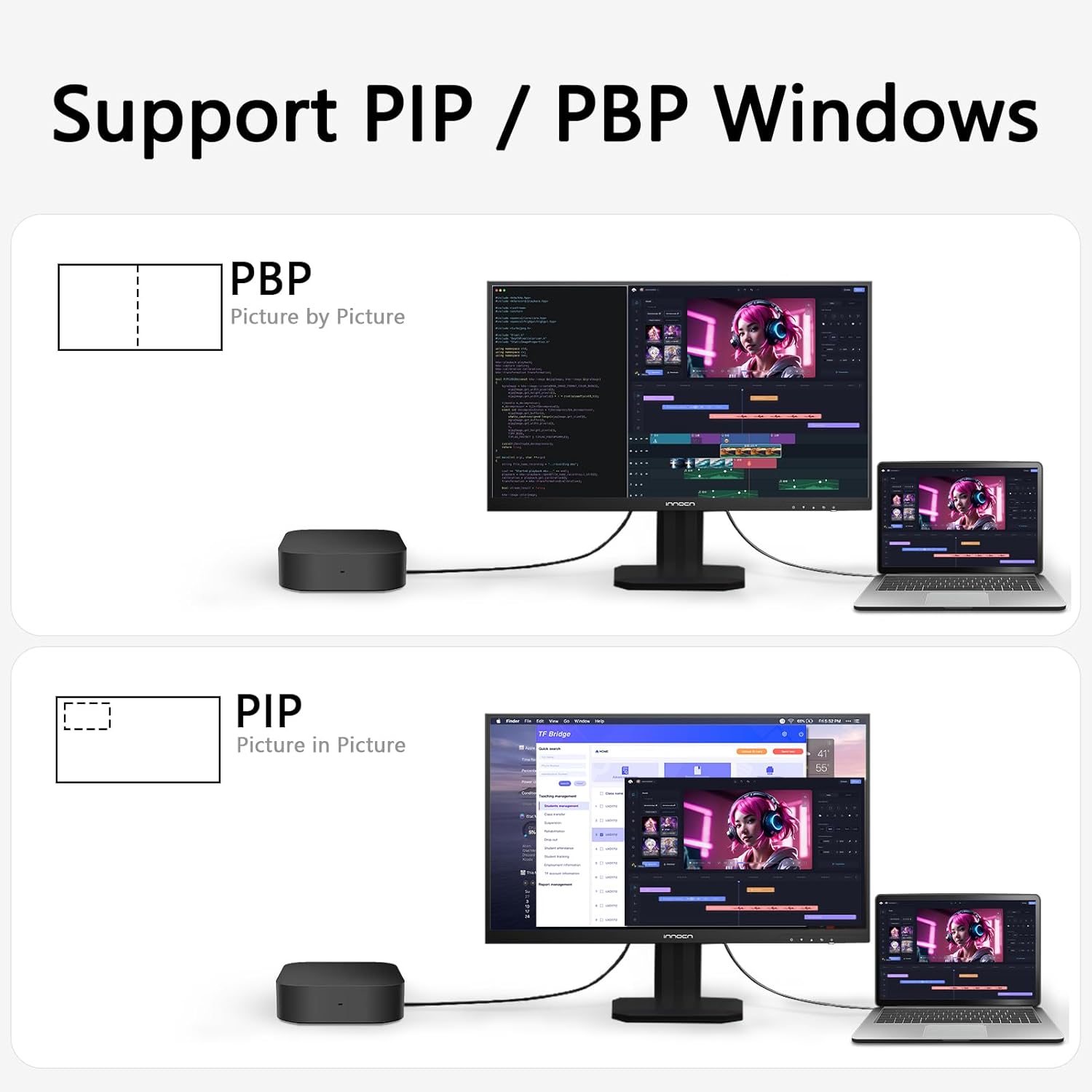
Image: The INNOCN 27D2U monitor displaying content in Picture-by-Picture (PBP) and Picture-in-Picture (PIP) modes, allowing multiple inputs to be viewed miaraka.
On-Screen Display (OSD) Menu Navigation
Use the buttons located on the bottom right side of the monitor to access and navigate the OSD menu. The menu provides options for Professional settings, Picture settings, Game settings, PIP/PBP, OSD settings, and Other settings.
- Fikirana matihanina: Adjust color modes (Standard, sRGB, Adobe, DCI-P3), Gamma, Color Temperature (Natural, Design, Warm, Cool, User), Sharpness, Shadow Balance, Low Blue Light, Hue, Saturation, and Dynamic Brightness.
- Fikirana sary: Control Brightness, Contrast, Dynamic Contrast Ratio (DCR), Contextual Model (Movie, Reading, Night, Care Eyes), HDR (Standard, Movie, Design), and Aspect Ratio.
- Fikirana lalao: Optimize display for different game genres with RTS/RPG, FPS Arena, and MOBA Arena modes. Adjust Response Time (Off, Normal, Fast, Ultra Fast) and Backlight Contrast.
- Fikirana OSD: Configure Language, OSD Time Out, OSD H/V Position, OSD Transparency, and Hotkey settings.
- Fikirana hafa: Manage Input Signal, Volume, Auto Power, Eye-care Reminder, and Light Sensor.
fikarakarana
- Fanadiovana: Mampiasà lamba malefaka sady tsy misy loko mba hamafa moramora ny efijery. Ho an'ny marika mafy loha, moramora dampSasao amin'ny rano na mpanadio efijery malefaka sy tsy manimba ny lamba. Fadio ny mampiasa akora simika mahery vaika na fitaovana manimba.
- rivotra: Ataovy azo antoka fa tsy voasakana ny fidiran'ny rivotra ao amin'ny monitor mba hisorohana ny hafanana be loatra.
- fitahirizana: Rehefa tsy ampiasaina mandritra ny fotoana maharitra dia tehirizo ao amin'ny toerana mangatsiaka sy maina ny efijery, tsara kokoa raha ao anaty fonosany tany am-boalohany.
Fanamboarana
| Olana | Vahaolana mety |
|---|---|
| Tsy misy sary eo amin'ny efijery | Check power connection and ensure the monitor is turned on. Verify video cable (DP/HDMI/USB-C) is securely connected to both the monitor and the source device. Select the correct input source via the OSD menu. |
| Manjavozavo na mivadika ny sary | Ensure the display resolution on your device matches the monitor's native resolution (3840x2160). Check video cable for damage or loose connections. Adjust sharpness settings in the OSD menu. |
| Toa tsy mety ny loko | Adjust color settings (Hue, Saturation, Color Temperature) in the OSD menu. Try different color modes (sRGB, Adobe, DCI-P3) under Professional settings. |
| Monitor not responding to controls | Power cycle the monitor (turn off, unplug, wait 30 seconds, plug back in, turn on). |
fepetra arahana
- Modely: 27D2U
- Haben'ny efijery: 27 santimetatra
- Karazana tontonana: IPS Panel with LED Backlit Technology
- fanapahan-kevitra: 4K UHD (3840 x 2160)
- Aspect ratio: 16:9
- Havaozina: 60Hz
- Famirapiratana: 400 nits (Max)
- tahan'ny fifanoherana: 1500:1
- Color Gamut: sRGB 99%
- Halalin'ny loko: 1.07 Billion colors (8bits+FRC)
- Fanohanana HDR: Asehoy ny HDR 10
- Viewangle: 178° (H/V)
- Seranana: 2 x DisplayPort, 2 x HDMI, 1 x 3.5mm Audio Jack
- Fanitsiana mijoro: Tilt (-5° to 20°), Height (±5 inches), Pivot (±90°)
- Fifandraisana VESA: 100x100mm
- Haben'ny vokatra: 7.67 x 24.17 x 22.5 santimetatra
- Lanja entana: 13.86 kg
Warranty sy fanohanana
For warranty information and technical support, please refer to the documentation included with your product or visit the official INNOCN website. Tehirizo ny tapakila fividiananao ho porofon'ny fividianana ho an'ny fitakiana fiantohana.
Optional protection plans are available for purchase separately. These plans may offer extended coverage beyond the manufacturer's warranty.


