1. Fampidirana
This manual provides essential information for the safe and efficient operation of your Philips Evnia 24M2N3200L 24-inch Gaming Monitor. Please read this manual thoroughly before using the product and retain it for future reference.
2. Information momba ny fiarovana
Araho ireto fepetra fiarovana manaraka ireto mba hisorohana ny fahasimban'ny efijery ary hahazoana antoka ny fiarovana ny mpampiasa:
- Aza avela hisy orana na hamandoana ny monitor.
- Aza sokafy ny monitor casing; miantsoa ny serivisy rehetra amin'ny mpiasa mahafeno fepetra.
- Hamarino tsara ny rivotra manodidina ny monitor.
- Ampiasao ihany ny adaptatera herinaratra omena miaraka amin'ny monitor.
- Fadio ny mametraka zavatra mavesatra eo amin'ny tadin-jiro.
- Diovy amin'ny lamba malefaka tsy misy loto ny efijery. Aza mampiasa ranoka fanadiovana mivantana eo amin'ny efijery.
3. Ny votoatin'ny fonosana
Hamarino fa misy ny entana rehetra ao anaty fonosana:
- Philips Evnia 24M2N3200L Monitor
- Monitor Stand (fototra sy vozony)
- Cable herinaratra
- Cable HDMI
- Tariby DisplayPort
- User Manual (ity antontan-taratasy ity)

Image: The retail packaging box for the Philips Evnia 24M2N3200L monitor, showing the product name and design awards.
4. Fametrahana
4.1. Fivoriambe mijoro
- Apetraho midina eo amin'ny toerana malefaka sy madio ny fanaraha-maso mba hisorohana ny fingotra.
- Attach the stand neck to the monitor's VESA mounting area. Secure with screws if provided.
- Attach the stand base to the bottom of the stand neck. Tighten the thumb screw or screws until secure.

Sary: aoriana view of the monitor showing the attached stand and the VESA mounting area.
4.2. Mampifandray amin'ny solosaina
The monitor supports HDMI and DisplayPort connections.
- Fampifandraisana herinaratra: Ampifandraiso amin'ny fidirana herinaratra amin'ny efijery ny tariby herinaratra ary avy eo amin'ny faladiany.
- Fifandraisana video:
- For HDMI: Connect one end of the HDMI cable to the monitor's HDMI port and the other end to your computer's HDMI output.
- For DisplayPort: Connect one end of the DisplayPort cable to the monitor's DisplayPort and the other end to your computer's DisplayPort output.
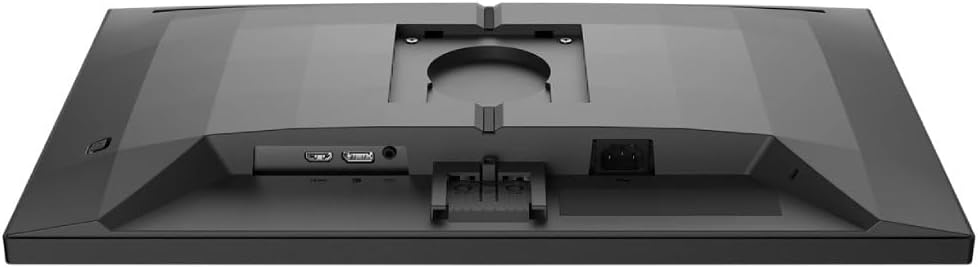
Sary: Detailed view of the monitor's rear panel, showing the HDMI, DisplayPort, and power input ports.
5. Fampandehanana ny Monitor
5.1. Power On/off
Press the power button, usually located on the bottom right or rear of the monitor, to turn it on or off. The power LED will indicate the monitor's status.
5.2. Menu eo amin'ny efijery (OSD).
The OSD menu allows you to adjust various monitor settings. Use the joystick or buttons (refer to your monitor's specific layout) to navigate and select options.
- Sary: Ahitsio ny famirapiratana, ny fifanoherana, ny hakingan-tsaina ary ny gamma.
- loko: Safidio ny mari-pana amin'ny loko, ny maody sRGB, na ny firafitry ny loko voafaritry ny mpampiasa.
- Audio: Control volume if the monitor has built-in speakers or an audio output.
- Fampidirana: Manually select the input source (HDMI, DisplayPort).
- Lalao: Access specific gaming features like SmartImage Game, Low Input Lag, and Adaptive Sync settings.
- Fikirana OSD: Ahitsio ny fiteny OSD, ny mangarahara ary ny fe-potoana.

Image: The Philips Evnia 24M2N3200L monitor showcasing a high-quality image from a video game, highlighting its display capabilities.
6. Fikojakojana
6.1. Manadio ny Monitor
- Esory foana ny monitor alohan'ny hanadiovana.
- Use a soft, clean, lint-free cloth to gently wipe the screen.
- Ho an'ny marika mafy loha, moramora dampen the cloth with water or a mild, non-abrasive screen cleaner. Do not spray liquids directly onto the screen.
- Diovy ny monitor casing misy lamba malefaka sy maina.
6.2. fitahirizana
Raha mitahiry ny monitor mandritra ny fotoana maharitra dia tapaho ny tariby rehetra ary apetraho ao anaty fonosana voalohany mba hiarovana azy amin'ny vovoka sy ny fahasimbana ara-batana. Tehirizo ao amin'ny toerana mangatsiatsiaka sy maina.
7. Famahana olana
Raha sendra olana amin'ny monitor-nao ianao dia jereo ireto olana sy vahaolana mahazatra ireto:
| OLANA | Antony mety hitranga | vahaolana |
|---|---|---|
| Tsy misy sary eo amin'ny efijery | Power cable disconnected, video cable loose, incorrect input source. | Check power and video cable connections. Select correct input source via OSD. |
| Image flickering | Loose video cable, graphics card issue, refresh rate mismatch. | Ensure video cable is secure. Update graphics drivers. Adjust refresh rate in OS settings. |
| Diso ny loko | Incorrect color settings, faulty cable. | Reset color settings in OSD. Try a different video cable. |
| Tsy mandeha ny monitor | Tsy misy herinaratra, adaptatera herinaratra simba. | Check power outlet and cable. Ensure power adapter is functioning. |
8. Famaritana
| endri-javatra | antsipirihany |
|---|---|
| Laharana modely | 24M2N3200L |
| Haben'ny efijery | 24 santimetatra |
| Karazana tontonana | IPS |
| vahaolana | 1920 x 1080 (HD feno) |
| Aspect ratio | 16:9 |
| Ny tahan'ny fanavaozana | 180Hz |
| Fotoam-pamaliana | 0.5ms (MPRT) |
| fifandraisana | 1x HDMI, 1x DisplayPort |
| Loharanon-kery | Hery elektrônika |
| Ny haben'ny vokatra (miaraka amin'ny fijoroana) | 19.5 x 54 x 43.3 sm (Halalina x Sakany x Haavo) |
| Lanja vokatra (miaraka amin'ny fijoroana) | 4.96 kg |
| mpanamboatra | Philips |
9. Warranty sy fanohanana
For warranty information and technical support, please refer to the warranty card included in your package or visit the official Philips support website. Tehirizo ny tapakila fividiananao ho porofon'ny fividianana ho an'ny fitakiana fiantohana.
Fanohanana an-tserasera: www.jaspa.com/support


