1. Fampidirana
This manual provides comprehensive instructions for the setup, operation, and maintenance of your Cherry MW 9100 Wireless Rechargeable Mouse. The MW 9100 is a compact, versatile mouse offering dual connectivity options (Bluetooth or 2.4 GHz USB receiver) and a convenient rechargeable battery.
Ny endri-javatra fototra dia ahitana:
- Compact design with charging functionality.
- Flexible operation: use while charging via USB-C cable.
- Dual connectivity: Bluetooth or 2.4 GHz USB receiver.
- Magnetic storage for the USB receiver, ideal for travel.
- Adjustable DPI settings for varied usage.
2. Ny votoatin'ny fonosana
Hamarino fa misy ny entana rehetra ao anaty fonosana:
- Cherry MW 9100 Wireless Rechargeable Mouse
- USB-C Charging Cable
- 2.4 GHz USB Receiver
- Pouch miaro
- Boky torolàlana (torolàlana ity)
3. Fametrahana
3.1 Fametrahana ny totozy
The Cherry MW 9100 mouse features a built-in rechargeable battery. Before initial use, or when the battery is low, connect the included USB-C cable to the mouse and to a USB power source (e.g., computer USB port, USB wall adapter). The mouse can be used normally while charging.

Sary 3.1: Top view of the Cherry MW 9100 mouse, showing the charging indicator light.
3.2 Fampifandraisana ny totozy
The MW 9100 offers two connection methods: 2.4 GHz wireless via USB receiver or Bluetooth.
3.2.1 Fifandraisana tsy misy tariby 2.4 GHz
- Locate the USB receiver. It is magnetically stored in a compartment on the underside of the mouse.
- Ampidiro ao amin'ny seranan-tsambo USB misy eo amin'ny solosainao ny mpandray USB.
- On the underside of the mouse, slide the switch to the "RF" position.
- Tokony hifandray ho azy amin'ny solosainao ny totozy.
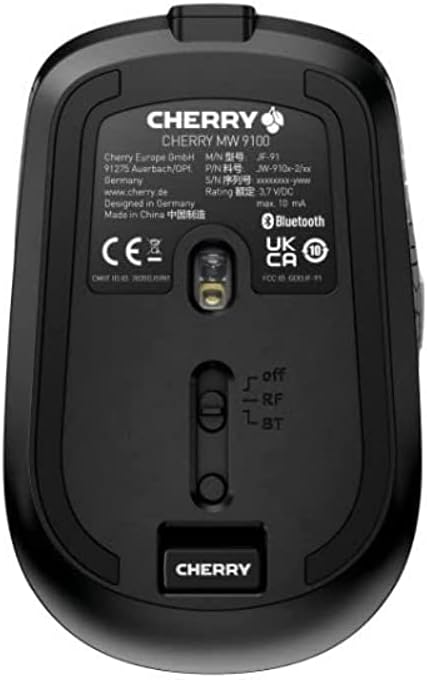
Sary 3.2: Underside of the Cherry MW 9100 mouse, highlighting the USB receiver storage and the connection mode switch.
3.2.2 Fifandraisana Bluetooth
- On the underside of the mouse, slide the switch to the "BT" (Bluetooth) position.
- Press and hold the small pairing button located near the connection switch on the underside of the mouse until the LED indicator on the mouse starts blinking, indicating pairing mode.
- Sokafy ny fikirana Bluetooth ao amin'ny solosainao na ny fitaovanao ary tadiavo ireo fitaovana vaovao.
- Select "Cherry MW 9100" from the list of available devices to complete the pairing process.
4. Torolàlana miasa
4.1 Asa fototra
The Cherry MW 9100 mouse features standard left and right click buttons, a scroll wheel (which also functions as a middle click button), and two side buttons for navigation (typically forward/back).
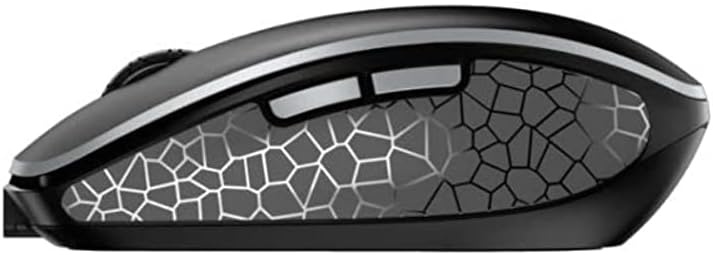
Sary 4.1: sisiny view of the Cherry MW 9100 mouse, illustrating the ergonomic design and side buttons.
4.2 DPI fanitsiana
The mouse includes a DPI (Dots Per Inch) button, usually located near the scroll wheel, allowing you to adjust the cursor sensitivity. Press this button to cycle through different DPI settings to match your preference or task requirements.

Sary 4.2: A hand demonstrating the comfortable grip on the Cherry MW 9100 mouse during use.
5. Fikojakojana
To ensure optimal performance and longevity of your Cherry MW 9100 mouse:
- Fanadiovana: Mampiasà lamba malefaka sy maina hanadiovana ny totozy. Ho an'ny loto mafy loha, dia asio kelyamp cloth can be used, but ensure no moisture enters the device. Avoid harsh chemicals or abrasive materials.
- fitahirizana: When not in use, especially during travel, store the mouse in the provided protective pouch to prevent scratches and damage.
- Fikarakarana bateria: Avoid fully discharging the battery frequently. Recharge the mouse when the low battery indicator appears.
6. Famahana olana
| OLANA | Antony mety hitranga | vahaolana |
|---|---|---|
| Tsy mamaly ny totozy | Low battery, incorrect connection mode, USB receiver not connected, Bluetooth not paired. |
|
| Intermittent connection (Bluetooth) | Interference, device driver issues, distance from device. |
|
| Mikorontana na miadana ny fihetsehan'ny cursor | Dirty optical sensor, low battery, incorrect DPI setting. |
|
7. Famaritana
| endri-javatra | antsipirihany |
|---|---|
| Marika | serizy |
| Laharana modely | JW-9100US-2 |
| Teknolojia fifandraisana | Bluetooth, 2.4 GHz USB Wireless |
| Movement Detection | Optical |
| Endri-javatra manokana | Maivana, azo entina, azo averina ampiasaina |
| Ny refin'ny vokatra | 4 x 3 x 2 santimetatra |
| Lanja entana | 6.4 oz |
| loko | Mainty |
8. Warranty sy fanohanana
For warranty information and technical support, please refer to the official Cherry website or contact Cherry customer service directly. Keep your proof of purchase for warranty claims.
Mpanamboatra: SERIZY
Webtranokala: www.cherry.de


