Sava lalana
This manual provides essential instructions for the setup, operation, maintenance, and troubleshooting of your NEC NP-M403H projector. Please read this manual thoroughly before using the projector to ensure proper and safe operation.
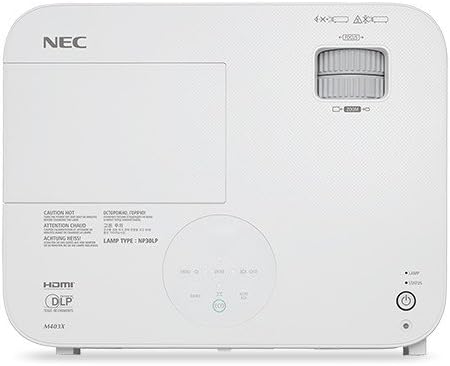
Sary: Top view of the NEC NP-M403H projector, showing the lens, control panel, and ventilation. This image illustrates the overall design and key external features from a top-down perspective.
Hametraka
Follow these steps for initial setup of your NEC NP-M403H projector.
- Famoahana: Esory tsara ao anaty fonosana ny projecteur sy ny kojakoja rehetra. Hamarino tsara fa eo daholo ny singa rehetra.
- Fametrahana: Position the projector on a stable, flat surface or mount it to the ceiling. Ensure adequate ventilation around the unit. The compact and lightweight design allows for flexible placement.
- Fampifandraisana herinaratra: Connect the power cord to the projector and then to a suitable electrical outlet.
- Loharano fampidirana mampifandray:
The projector supports various connectivity options. Use appropriate cables to connect your source devices (e.g., computer, media player) to the projector's input ports.
- HDMI: Ho an'ny horonan-tsary sy feo nomerika avo lenta.
- VGA (Computer In): Ho an'ny famantarana analog an'ny solosaina.
- USB: For certain data or control functions.
- Audio ao: Ho an'ny fidirana feo analog.

Sary: aoriana view of the NEC NP-M403H projector, displaying the array of input and output ports including HDMI, VGA, USB, and audio connections. This image helps users identify where to connect their source devices.
- Herin'ny voalohany: Press the power button on the projector or remote control. The projector will initiate its startup sequence.
Torolàlana miasa
This section details the basic operation of your projector.
Power On/off
- Herim-batana: Press the power button. The projector features a quick startup function.
- Mamono hery: Press the power button again. The projector supports direct power off, allowing for quick shutdown.
Fanitsiana sary
- mifantoka: Rotate the focus ring on the lens to achieve a clear image.
- Zoom: Amboary ny peratra zoom eo amin'ny family mba hanovana ny haben'ny sary.
- Fanitsiana Keystone: Ampiasao ny menio na ny bokotra natokana ho an'ny projecteur mba hanitsiana ny fiovaovan'ny endrika trapezoidal raha toa ka tsy mifanitsy tsara amin'ny efijery ny projecteur.

Sary: lafiny anoloana view of the NEC NP-M403H projector, highlighting the lens assembly and front ventilation. This image assists users in locating the lens for focus and zoom adjustments.
Fampidirana Loharano Fantenana
The projector can automatically detect input signals (Autosense™). You can also manually select the input source using the "Input" button on the projector or remote control.
Mode ECO
To extend lamp life and reduce power consumption, activate ECO Mode. This feature contributes to energy savings and environmental protection. The projector offers a lamp life of up to 8,000 hours in ECO Mode.
fikarakarana
Ny fikojakojana tsy tapaka dia miantoka ny fahombiazana tsara indrindra ary manalava ny androm-piainan'ny projecteur-nao.
- Lamp Fanoloana: Ny projector lamp has a life of up to 8,000 hours in ECO Mode. When the lamp reaches the end of its life, a warning indicator will appear. Refer to the full service manual for detailed lamp toromarika fanoloana.
- Fanadiovana/fanoloana sivana: The projector is equipped with an air filter to prevent dust accumulation. Regularly clean the filter to maintain proper airflow and cooling. Replace the filter as needed; the projector features an extended filter life.
- Fanadiovana Lens: Diovy moramora amin'ny lamba malefaka sy tsy misy loto natao manokana ho an'ny velaran-javatra optika ny family projecteur. Aza mampiasa mpanadio mikikitra.
- Fanadiovana ivelany: Wipe the projector's exterior with a soft, dry cloth. Avoid using harsh chemicals.
Fanamboarana
This section addresses common issues you might encounter with your NEC NP-M403H projector.
| OLANA | Antony mety hitranga | vahaolana |
|---|---|---|
| Tsy misy sary naseho |
|
|
| Manjavozavo ny sary |
|
|
| Trapezoidal ny sary |
|
|
| Mihafana loatra na maty ny projecteur |
|
|
fepetra arahana
Key technical specifications for the NEC NP-M403H projector:
- Modely: NP-M403H
- marika: NEC
- Teknolojia fampisehoana: DLP
- Famirapiratana: 4000 lumens
- Fanapahan-kevitra teratany: 1920 x 1080 (1080p)
- Fanapahan-kevitra ambony indrindra: 1920x1080
- tahan'ny fifanoherana: Hatramin'ny 10,000:1
- Lamp fiainana: Up to 8,000 hours (ECO Mode)
- Fifandraisana: HDMI, USB, VGA
- refy (W x H x D): 14.5 x 4.3 x 11.5 santimetatra
- Lanja: 9.8 kg
- Endri-javatra manokana: Lightweight, Portable, ECO Mode, Autosense™
Warranty sy fanohanana
For detailed warranty information, please refer to the warranty card included with your product or visit the official NEC website. Technical support contact details are typically provided in the product packaging or on the manufacturer's support pages.